


How to Create a Google Ads Account Step by
Google Ad Account Setup for Contractors: How to Create a Google Ads Account in Expert Mode, Set Billing, Verify, Track Calls and Keep Ownership
A Google Ads Setup Guide From Local Legends Marketing
Updated November 2026 · Reviewed by Levi Ostlund, Founder
Breadcrumb: Home > Learning Center [LINK: /learning-center/] > Google Ad Account Setup
Google ad account setup for a contractor takes about 30 minutes: sign in with a business Google account, switch to Expert Mode, create the account without a campaign, confirm billing country, time zone and currency, add payment and then set up call and form conversion tracking before any ad runs. Those first choices decide how much of your budget reaches real homeowners.
- Pick Expert Mode: it unlocks negative keywords, search terms and location controls that Smart campaigns hide.
- Check time zone and currency twice: Google's help page says they cannot be changed after setup.
- Track calls before launch: contractors get most leads by phone, so call conversions come first.
- Keep ownership: create the account under your company's Google login and give agencies access, not the account.
Free Growth Audit
Your Reviews, Radius and Response Rate vs the competitors beating you.
About Local Legends Marketing
A home service marketing agency headquartered in Conroe, Texas, with 8+ years of marketing experience, running Google Ads, Local Services Ads, local SEO, AI SEO, connected TV and review systems for contractors nationwide.
How to Create a Google Ads Account Step by Step in 2026 Eight Screens From Sign-In to a Working Account
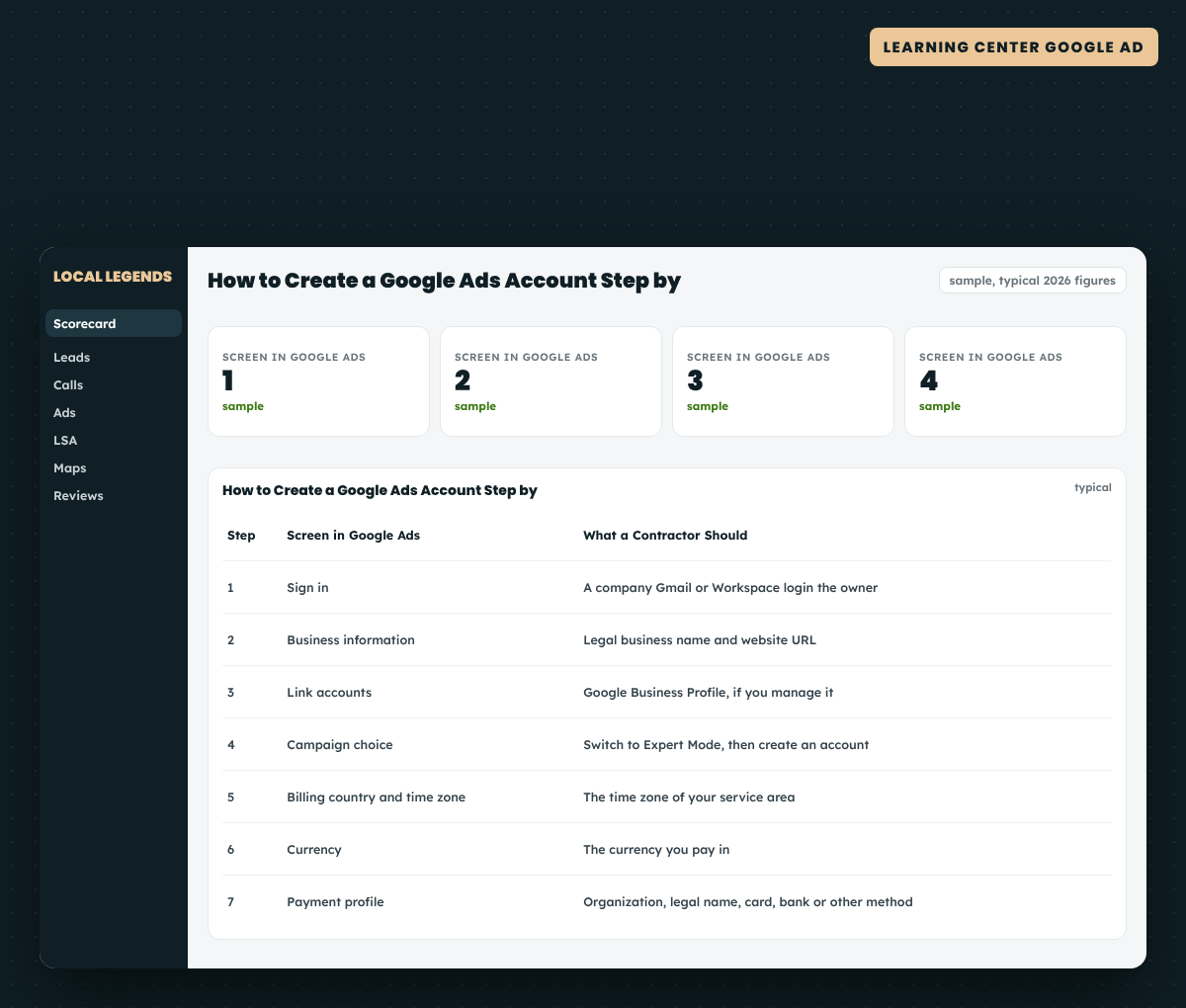
To create a Google Ads account, sign in at Google Ads with your business Google account, enter your business name and website, choose to set up the account without a campaign, confirm billing country, time zone and currency, add a payment method and submit. Google's own help page lists the same order.
Google's sign-up flow nudges new advertisers into a first campaign right away. For a contractor, the cleaner path is to open the account first, then build campaigns once tracking is in place. The table lists each screen and what a home service company should enter.
| Step | Screen in Google Ads | What a Contractor Should Enter | Why It Matters |
|---|---|---|---|
| 1 | Sign in | A company Gmail or Workspace login the owner controls | The account stays with the business, not an employee |
| 2 | Business information | Legal business name and website URL | Google pulls site details for ad suggestions |
| 3 | Link accounts | Google Business Profile, if you manage it | Enables location assets later |
| 4 | Campaign choice | Switch to Expert Mode, then create an account without a campaign | Avoids a Smart campaign with limited controls |
| 5 | Billing country and time zone | The time zone of your service area | Reports and schedules follow it, and it is permanent |
| 6 | Currency | The currency you pay in | Cannot be changed after setup |
| 7 | Payment profile | Organization, legal name, card, bank or other method Google offers | Matches the name used for verification |
| 8 | Submit and verify | Answer the business questions and start advertiser verification | Ads can pause if verification is not completed |
Steps follow Google's "Create a Google Ads account" help page and Google's November 2026 AI Overview for "google ad account setup." Screen names change often, so match the wording you see. [SOURCE: Google Ads Help 6366720 and Google AI Overview capture, Nov 27 2026]
How Do I Set Up a Google Ads Account for My Contracting Business Without Starting a Campaign?
A contractor sets up a Google Ads account without a campaign by choosing Switch to Expert Mode during sign-up and then selecting Create an account without a campaign, Google's November 2026 AI Overview explained. The full dashboard opens after business, time zone and currency details are confirmed.
- Look for the small Expert Mode link: it often sits low on the first goal screen.
- Choose the account-only option: skip the suggested first campaign and its auto-built ads.
- Confirm business details: use the same legal name you will use for verification.
- Build campaigns later: after call tracking, conversions and negative keywords are ready.
Google Ads Expert Mode vs Smart Mode for Contractors Control Beats Convenience for Local Service Ads
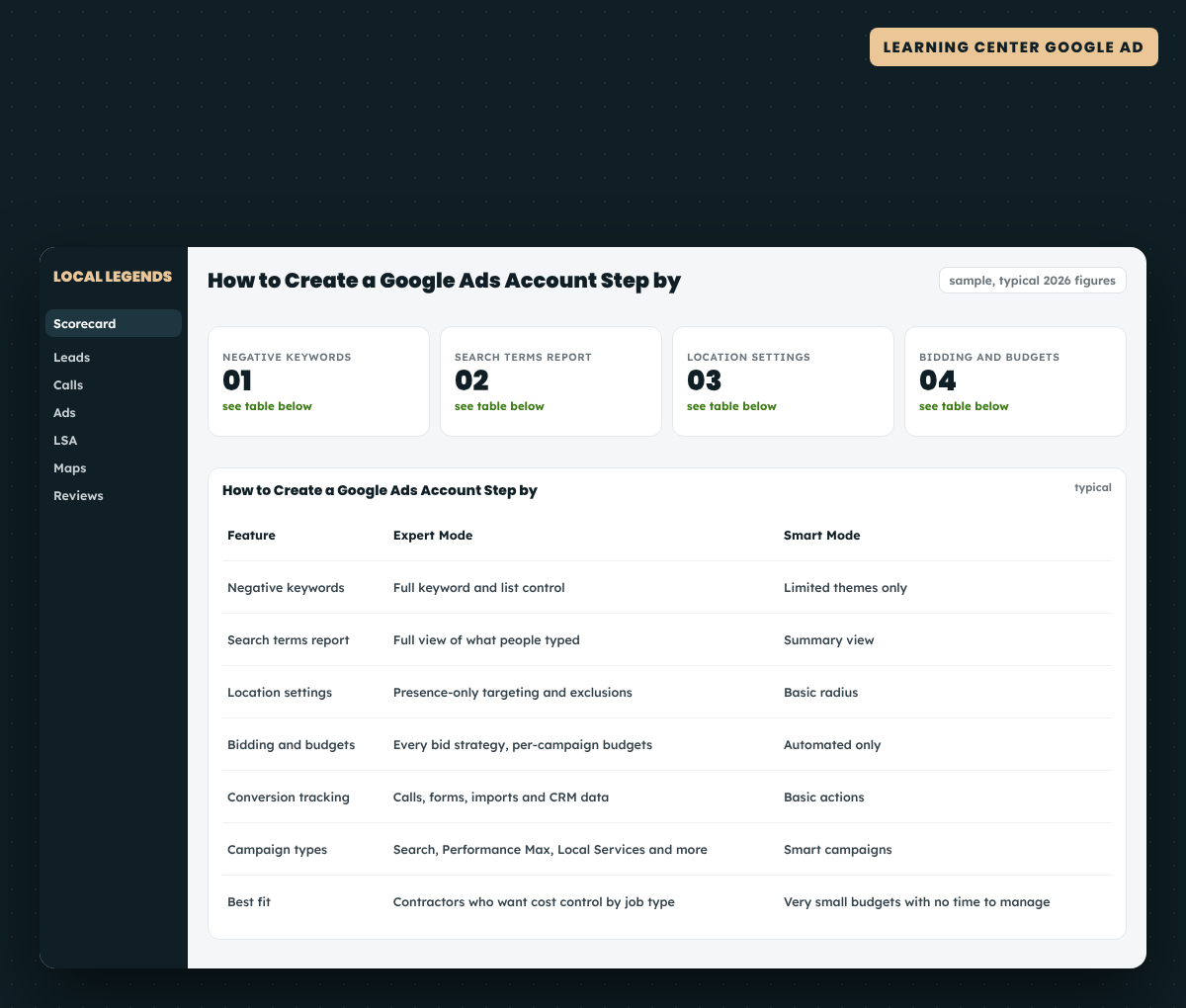
Google Ads Expert Mode is the standard Google Ads interface with full control over keywords, search terms, locations and bidding, while Smart Mode runs simplified Smart campaigns with most of those controls hidden. Google's November 2026 AI Overview recommended Expert Mode for contractors.
Smart Mode can fit an owner with a very small budget and no time to learn the platform. Most home service companies outgrow it quickly, because the costly problems in contractor accounts (job seekers, DIY searches and out-of-area clicks) are exactly the settings Smart Mode hides.
| Feature | Expert Mode | Smart Mode |
|---|---|---|
| Negative keywords | Full keyword and list control | Limited themes only |
| Search terms report | Full view of what people typed | Summary view |
| Location settings | Presence-only targeting and exclusions | Basic radius |
| Bidding and budgets | Every bid strategy, per-campaign budgets | Automated only |
| Conversion tracking | Calls, forms, imports and CRM data | Basic actions |
| Campaign types | Search, Performance Max, Local Services and more | Smart campaigns |
| Best fit | Contractors who want cost control by job type | Very small budgets with no time to manage |
Comparison reflects Google's AI Overview answer and published Google Ads setup guides in November 2026. Features inside each mode change, so check the current interface.
How Do I Switch an Existing Google Ads Account From Smart Mode to Expert Mode?
An existing Smart Mode account switches to Expert Mode from the settings menu, under the gear or tools icon, by choosing Switch to Expert Mode, according to Google's November 2026 AI Overview. Existing Smart campaigns keep running after the switch, so review them before building new ones.
- Open settings: the gear or tools icon in the top menu.
- Choose Switch to Expert Mode: confirm the switch when prompted.
- Review the Smart campaign: pause it or keep it while a Search campaign is built.
- Add tracking next: call and form conversions before any new spend.
Google Ads Setup Settings Every Contractor Should Check Before Launch The Defaults Are Built for Reach, Not Local Calls
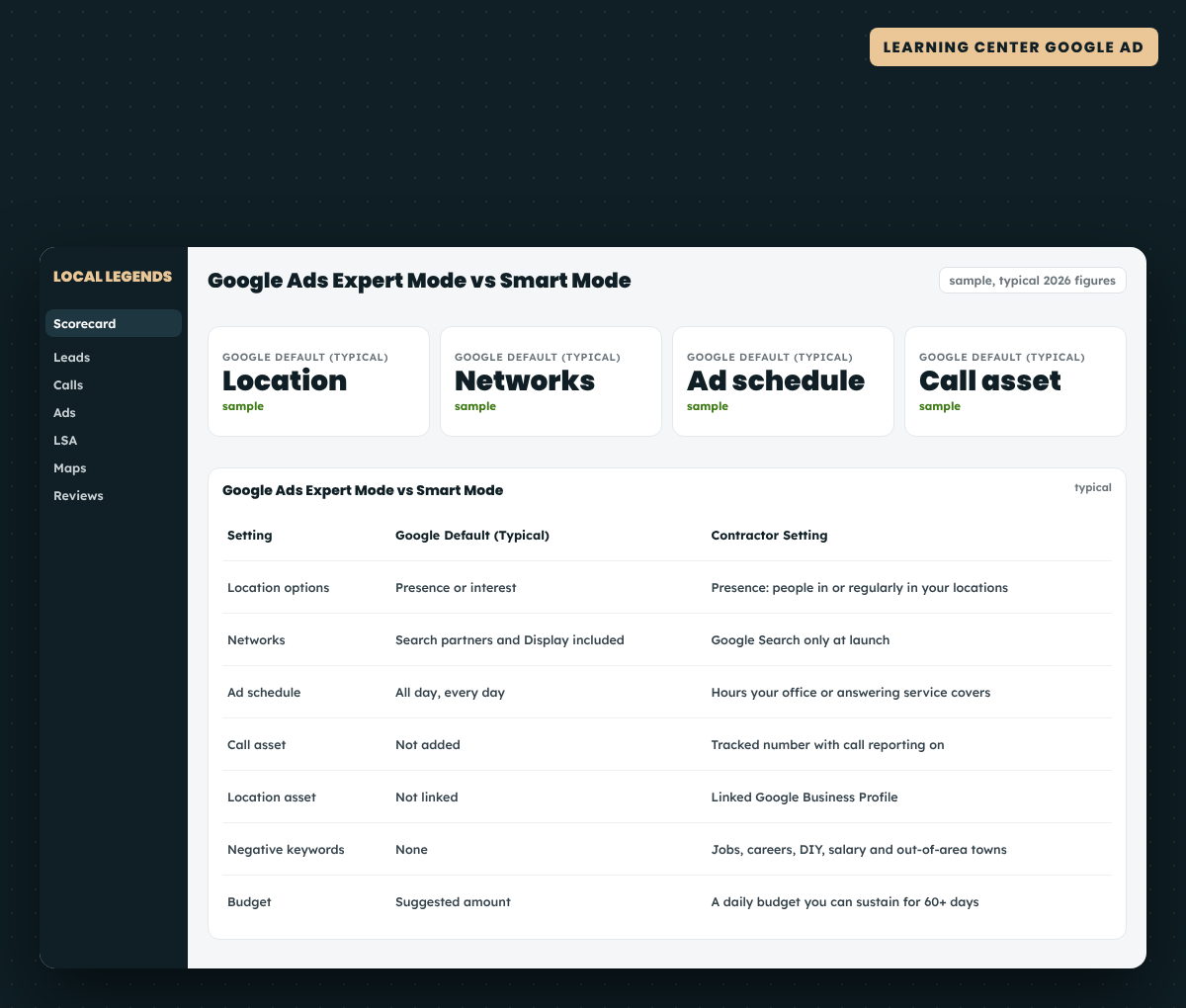
Google Ads setup for a contractor is not finished until location, network, schedule and asset settings are changed from their defaults, because those defaults favor reach over local phone calls. Google's November 2026 AI Overviews gave the same advice for location and network settings.
| Setting | Google Default (Typical) | Contractor Setting | Reason |
|---|---|---|---|
| Location options | Presence or interest | Presence: people in or regularly in your locations | Stops clicks from people outside your service area |
| Networks | Search partners and Display included | Google Search only at launch | Keeps a new budget on homeowners actively searching |
| Ad schedule | All day, every day | Hours your office or answering service covers | Calls that reach voicemail rarely book |
| Call asset | Not added | Tracked number with call reporting on | Counts calls from the ad itself |
| Location asset | Not linked | Linked Google Business Profile | Shows your address and reviews with the ad |
| Negative keywords | None | Jobs, careers, DIY, salary and out-of-area towns | Blocks searches that never hire |
| Budget | Suggested amount | A daily budget you can sustain for 60+ days | Gives Google's bidding enough data to learn |
Recommendations reflect Google AI Overview answers and published setup guides in November 2026. Every account is different, and Local Legends reviews these settings in the growth audit. [SOURCE: Google AI Overview captures, location and network prompts, Nov 27 2026]
Which Google Ads Location Setting Should a Local Contractor Use, Presence or Interest?
A local contractor should choose Presence, meaning people in or regularly in your targeted locations, instead of the default Presence or interest, Google's November 2026 AI Overview said. Contractors drive to the property, so a click from someone researching your town from another state rarely becomes a job.
- Where to find it: campaign settings, Locations, then Location options.
- Pick Presence: people in or regularly in your targeted locations.
- Add exclusions: towns or ZIP codes your crews do not serve.
- Check monthly: the locations report shows where clicks actually came from.
Should a Roofing Company Turn Off Search Partners and the Display Network in a New Campaign?
Yes, a roofing company should turn off Search Partners and the Display Network when it launches a new Search campaign, Google's November 2026 AI Overview advised, so a limited budget reaches homeowners searching on Google itself. Partner traffic can be tested later with its own tracking.
- Display Network off: banner placements bring browsing traffic, not roof replacement searches.
- Search Partners off at launch: test it later only if calls are tracked by network.
- Separate campaigns for other goals: retargeting or video belongs in its own campaign.
- Watch spend share: any network that takes budget without calls gets switched off.
Conversion Tracking for a New Google Ads Account Calls First, Then Forms, Then Booked Jobs
Conversion tracking tells Google Ads which clicks turned into calls, forms and booked jobs, and a contractor account should have it working before the first campaign spends a dollar. Without it, Google's bidding optimizes for clicks, and the owner cannot tell which keywords bring work.
Local Legends sets up these conversion actions in every contractor account, then connects them to call tracking and CRM integration[LINK: /services/call-tracking-crm/] so booked and sold jobs can feed back into Google Ads.
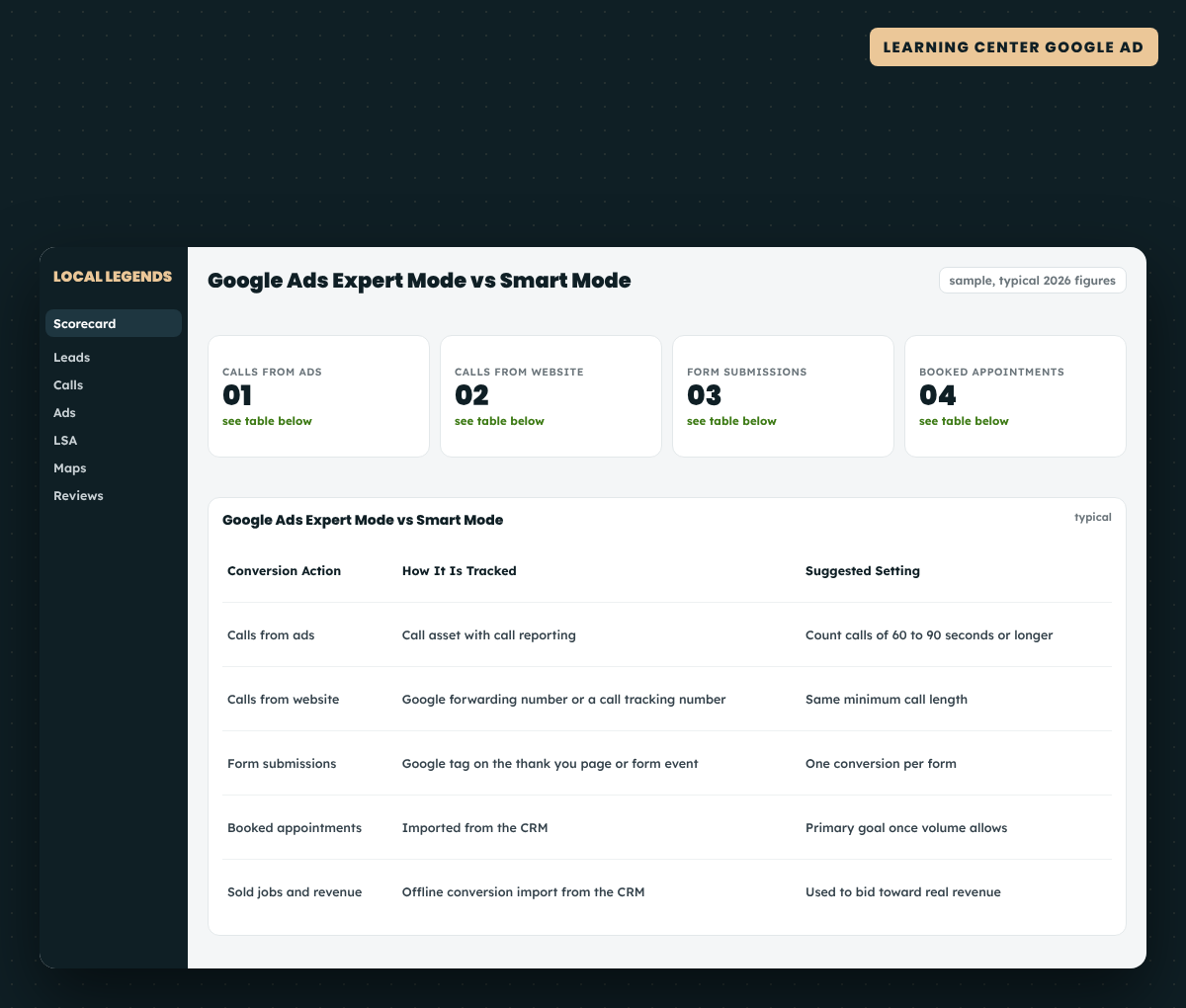
| Conversion Action | How It Is Tracked | Suggested Setting for Contractors |
|---|---|---|
| Calls from ads | Call asset with call reporting | Count calls of 60 to 90 seconds or longer |
| Calls from website | Google forwarding number or a call tracking number on the site | Same minimum call length |
| Form submissions | Google tag on the thank you page or form event | One conversion per form |
| Booked appointments | Imported from the CRM | Primary goal once volume allows |
| Sold jobs and revenue | Offline conversion import from the CRM | Used to bid toward real revenue |
The 60 to 90 second call length is the filter Google's November 2026 AI Overview suggested for plumbing accounts, used to keep wrong numbers and hang-ups out of reporting. [SOURCE: Google AI Overview capture, call conversion tracking prompt, Nov 27 2026]
How Do I Set Up Phone Call Conversion Tracking in a New Google Ads Account for a Plumber?
A plumber sets up phone call conversion tracking by creating a conversion action under Goals for phone calls, choosing calls from ads and calls from the website, setting a minimum call length of 60 to 90 seconds and adding a call asset with call reporting on, as Google's November 2026 AI Overview described.
- Calls from ads: counts taps on the number in the ad or call asset.
- Calls from website: needs a forwarding or tracking number that swaps onto your site.
- Minimum call length: filters out wrong numbers and quick hang-ups.
- Name each action clearly:"Ad call 60s" reads better in reports than "Calls."
Google AdWords Account Management: Access, Ownership and Linking Your Account, Their Access
Google AdWords account management, now called Google Ads, works best when the business owns the account under its own login and grants an agency access through a manager account link, Google's November 2026 AI Overview explained. Linking a manager account does not transfer ownership.
Give an Agency Access Without Giving Up the Account
Copy the 10-digit customer ID from the top of your Google Ads account and send it to the agency. When the link request arrives, approve it in the access and security area. You keep admin access and can remove the agency at any time.
Link Google Business Profile for Location Assets
In Google Ads, open Assets, then Location, add your locations and pick your Google Business Profile. The login on Google Ads needs owner or manager access to the profile, or the profile owner approves a link request.
Link Google Analytics and Search Console
Linking Google Analytics and Search Console lets the account see on-site behavior and organic search terms. Setup guides recommend doing it before launch.
Local Services Ads Now Sit Inside Google Ads
Google has been moving Local Services Ads into Google Ads, so one account can hold both. See our Google Local Services Ads[LINK: /services/google-local-services-ads/] page for how LSA fits next to Search.
How Do I Give an Agency Access to My Google Ads Account Without Losing Ownership?
Give an agency access to your Google Ads account by keeping the account under a company-controlled login with admin access and approving a link from the agency's manager account using your 10-digit customer ID, the method Google's November 2026 AI Overview gave. Ownership stays with you.
- Never let an agency create the account under its own email: ask for it under yours.
- Keep at least two admins from your company: owner plus an office manager.
- Keep the payment profile in your company's name: billing records stay with you.
- Review users every quarter: remove anyone who has left the company.
Advertiser Verification and New Account Suspensions Verify Before Ads Pause
Advertiser verification is Google's identity check for advertisers, and a new contractor account usually has 30 days to start and finish it before ads can pause, according to Google's November 2026 AI Overview. Google reviews most submissions in up to 5 business days.
New accounts also trip Google's automated safety checks more often than older ones. The AI Overview named mismatched billing details, failed charges and extra accounts made to dodge a past suspension as common causes, so the legal name, payment profile and website should match.
- Use the same legal business name everywhere: account, payments profile and verification documents.
- Have documents ready: business registration and the payer's ID.
- Avoid making a second account: it can look like an attempt to bypass a review.
- Watch the notifications bar: verification tasks and deadlines appear there first.
Why Do New Google Ads Accounts Get Suspended?
New Google Ads accounts get suspended most often for suspicious payment activity, mismatched business details or behavior that looks like getting around Google's systems, Google's November 2026 AI Overview said. Most are fixable by correcting the details and appealing from inside the account.
- Payment problems: declined cards, mismatched names or unusual first charges.
- Policy flags: a website missing contact information or clear business details.
- Duplicate accounts: a new account created after an earlier one was suspended.
- The fix path: read the alert, correct the cause, then submit the appeal form in the account.
How Much Does It Cost to Set Up a Google Ads Account? Free to Open, Then Spend
Setting up a Google Ads account is free, and a contractor pays only for ad clicks or Local Services Ads leads once campaigns run, plus any management fee. Google may place a small temporary card hold when billing is added.
Google also offers introductory ad credits to some new advertisers that are applied after a set amount of spend, so read the offer terms on the billing screen. Local Legends charges a flat management fee and no setup fee.
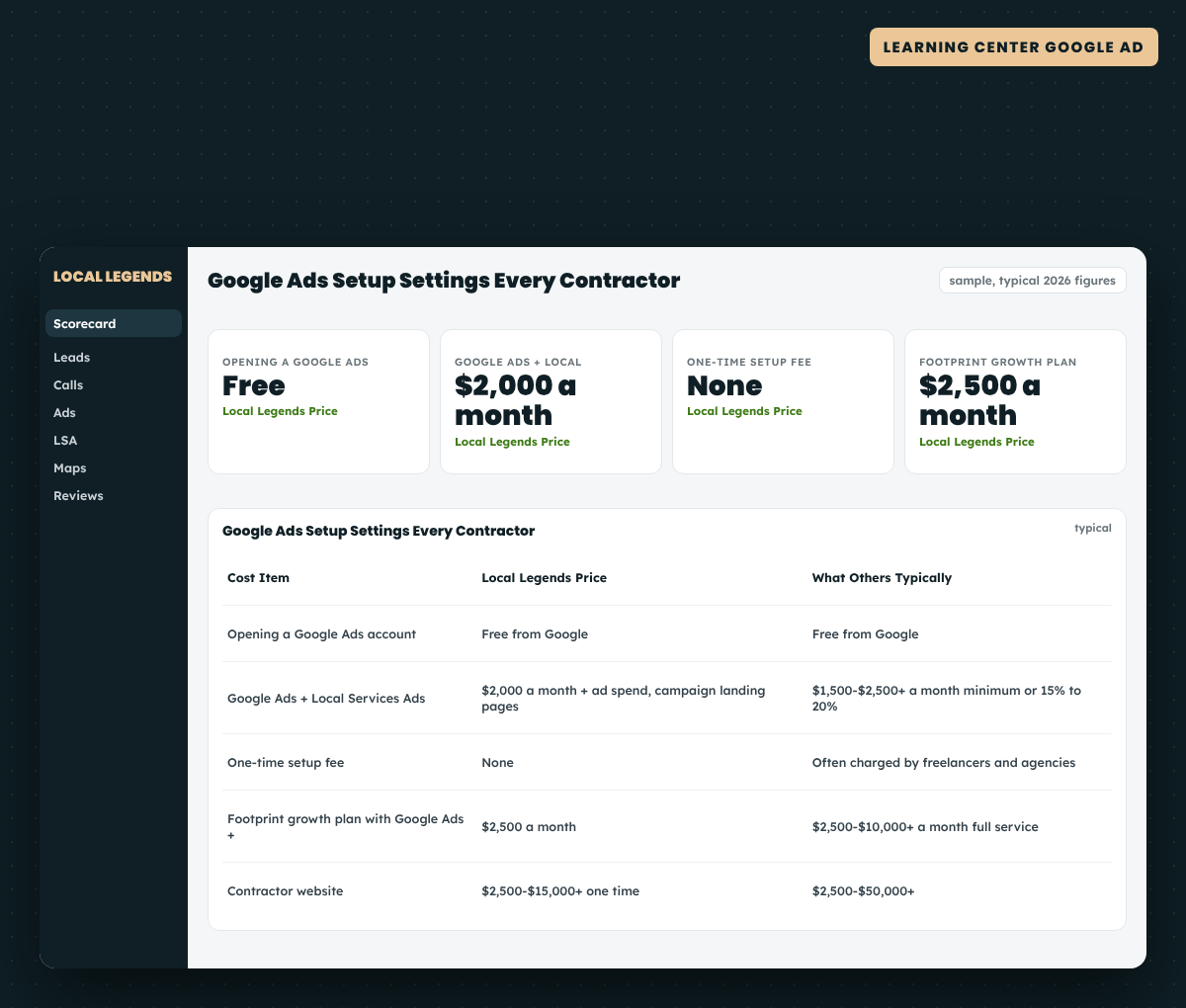
| Cost Item | Local Legends Price | What Others Typically Charge |
|---|---|---|
| Opening a Google Ads account | Free from Google | Free from Google |
| Google Ads + Local Services Ads management | $2,000 a month + ad spend, campaign landing pages included | $1,500-$2,500+ a month minimum or 15% to 20% of spend |
| One-time setup fee | None | Often charged by freelancers and agencies |
| Footprint growth plan with Google Ads + LSA | $2,500 a month | $2,500-$10,000+ a month full service |
| Contractor website | $2,500-$15,000+ one time | $2,500-$50,000+ |
The comparison column reflects published 2026 agency pricing and is labeled typical. See every plan on the Local Legends pricing[LINK: /pricing/] page.
How Much Should a New Contractor Set as a Daily Budget in Google Ads?
A new contractor should set a daily Google Ads budget that buys at least 10 clicks a day at local click prices, the rule Google's November 2026 AI Overview gave, which often lands near $50-$100+ a day for competitive trades. Too little budget slows Google's learning.
- Use the 10 clicks rule: multiply your local cost per click by 10.
- Work backward from jobs: estimate the booked jobs you want and the calls needed to book them.
- Expect daily swings: Google can spend more on some days and balances it across the month.
- Hold the budget steady: give a new campaign several weeks before big changes.
Should a Contractor Set Up Google Ads Alone or Hire Help? Time, Budget and Tracking Decide It
A contractor can set up Google Ads alone when the budget is small and the owner has time to learn, and hiring help makes sense as monthly ad spend reaches about $2,000-$3,000+ or tracking gets complex, Google's November 2026 AI Overview said. Either way, the account should stay in the owner's name.
- Do it yourself when: you serve one area, sell one or two core services and can check the account weekly.
- Hire help when: you run several job types, multiple towns or Local Services Ads beside Search.
- Ask any helper: whose login owns the account, what conversions they track and how they report booked jobs.
- Expect a flat or percentage fee: typical agencies charge a monthly retainer or 10% to 20% of spend.
What Should a Contractor Look For in a Google Ads Account Setup and Management Company?
A contractor should look for a Google Ads company that builds the account in the owner's name, tracks calls and booked jobs from day one and reports cost per booked job rather than clicks. Those are the setup choices that protect the budget later.
Local Legends Marketing[LINK: /] answers those questions the same way for every client: you own the Google Ads account, the Google Business Profile and the call data.
Google Ads management[LINK: /services/google-ads-management/] is a flat $2,000 a month with no setup fee, and the weekly CEO scorecard shows leads, booked, sold and cost per booked job. Local Legends is not a Google Partner and never claims to be.
Google Ads Setup Help From a Founder Who Bought Marketing as a Contractor Why Local Legends Sets Accounts Up This Way
Levi Ostlund sold driveway jobs door to door at age 10, poured concrete with his father, ran a landscaping company and lost $30,000+ to marketers who disappeared before he founded Local Legends Marketing[LINK: /].[SOURCE: BRIEF.md founder story, confirmed by Levi Ostlund]
That is why every Local Legends account is created in the client's name, every engagement includes the marketing course and every audit covers tracking, local SEO, Local Services Ads and the funnel, with Google Maps rank grids. [SOURCE: Levi Ostlund confirmation, Nov 10 2026]
Local Legends Marketing Reviews From Home Service Contractor CEOs Owners on Working With Levi
Home service and restoration CEOs have recorded what working with Local Legends Marketing is like, and their testimonials appear on the Local Legends home page.
Levi has been absolutely outstanding to work with over the years... His creativity, responsiveness, and deep understanding of our marketing strategy have made a huge impact." Brad Beldon, CEO, Roofing Company. See it on locallegends.marketing
Several years of working together, in the owner's words: Brad Beldon wrote this testimonial after a long relationship with Levi, and it sits beside recorded video testimonials from other contracting owners. [SOURCE: written testimonial, locallegends.marketing home page, Nov 2026]
- Kyle Scott, CEO, Roofing Company (video testimonial)
- Jim Dodson, CEO, Roofing Company (video testimonial)
- Race Allen, CEO, Precision Restoration of Texas (video testimonial)
Frequently Asked Questions About Google Ad Account Setup Google Ads Account Questions From Contractors
Is It Free to Set Up a Google Ads Account?
Yes, creating a Google Ads account is free. You pay Google only when campaigns run, for clicks on Search ads or for leads in Local Services Ads, and Google may place a temporary authorization on your card when billing is added.
Can I Get a Free Google Ads Account With Ad Credit?
Google offers introductory ad credits to some new advertisers, applied after a set amount of spend within a set time. The offer and terms appear during billing setup, and they vary by country and date.
Is $500 a Month Enough for Google Ads?
Five hundred dollars a month can test one service in one small area, but it buys few clicks in competitive trades like roofing or HVAC. Google's November 2026 AI Overview suggested enough budget for at least 10 clicks a day.
Is $20 a Day Good for Google Ads?
Twenty dollars a day works only where local clicks are inexpensive, because it may buy just a few clicks a day for many home service keywords. Start from your local click prices and the number of calls you need each week.
Can I Change My Google Ads Time Zone or Currency Later?
No, Google's help page says the time zone and currency are set when the account is created and cannot be changed later. Fixing either one means opening a new account, so confirm both before you submit.
Can One Google Ads Account Run Several Campaigns?
Yes, one Google Ads account can run many campaigns, so a contractor does not need a new account for each service or town. Separate campaigns by job type and area inside the same account.
What Is a Google Ads Manager Account?
A Google Ads manager account lets an agency or a company with several locations view and manage many Google Ads accounts from one login. Linking to a manager account gives access, while the business keeps ownership through its own admin users.
Does Local Legends Charge a Setup Fee for Google Ads?
No, Local Legends Marketing charges no setup fee on any plan. Google Ads and Local Services Ads management is a flat $2,000 a month plus ad spend, with the campaign landing pages included.
Reviewed by Levi Ostlund, Founder, Local Legends Marketing

Get Your Google Ads Account Set Up to Bring Booked Jobs Book Your Free Growth Audit
Book a free growth audit and Local Legends Marketing will review your Google Ads account setup, tracking and location settings, then show you the first fixes worth making. You keep every account, and you can leave any month.
Call (936) 900-1248 or book online to start with a Google Ads account built for your contracting business.