


A Local Legends Marketing Guide for Home
Google Ads Conversion Tag for Contractors: How to Set It Up, Test It and Count Real Calls, Forms and Booked Jobs Instead of Clicks
A Local Legends Marketing Guide for Home Service Companies
Updated November 2026 · Reviewed by Levi Ostlund, Founder
Breadcrumb: Home > Learning Center [LINK: /learning-center/] > Google Ads Conversion Tag
A Google Ads conversion tag is the code that tells Google Ads when someone who clicked an ad took an action you care about, such as calling, submitting an estimate form or booking online. For a contractor, a correct tag is the difference between paying for clicks and paying for booked jobs.
- Two parts: the Google tag on every page and an event snippet that marks the conversion.
- Count real leads: calls over a minimum length, real form submissions and online bookings.
- Skip vanity actions: page views and button clicks that are not leads.
- Send jobs back: booked and sold jobs imported from the CRM teach Google which clicks pay.
- Test before spending: Tag Assistant checks the tag before the budget goes live.
Free Growth Audit
Your Reviews, Radius and Response Rate vs the competitors beating you.
About Local Legends Marketing
A home service marketing agency headquartered in Conroe, Texas, with 8+ years of marketing experience, running Google Ads, Local Services Ads, local SEO, AI SEO, connected TV and review systems for contractors nationwide.
What Is a Google Ads Conversion Tag and Do I Need It for My Roofing Company? The Google Tag Plus an Event Snippet
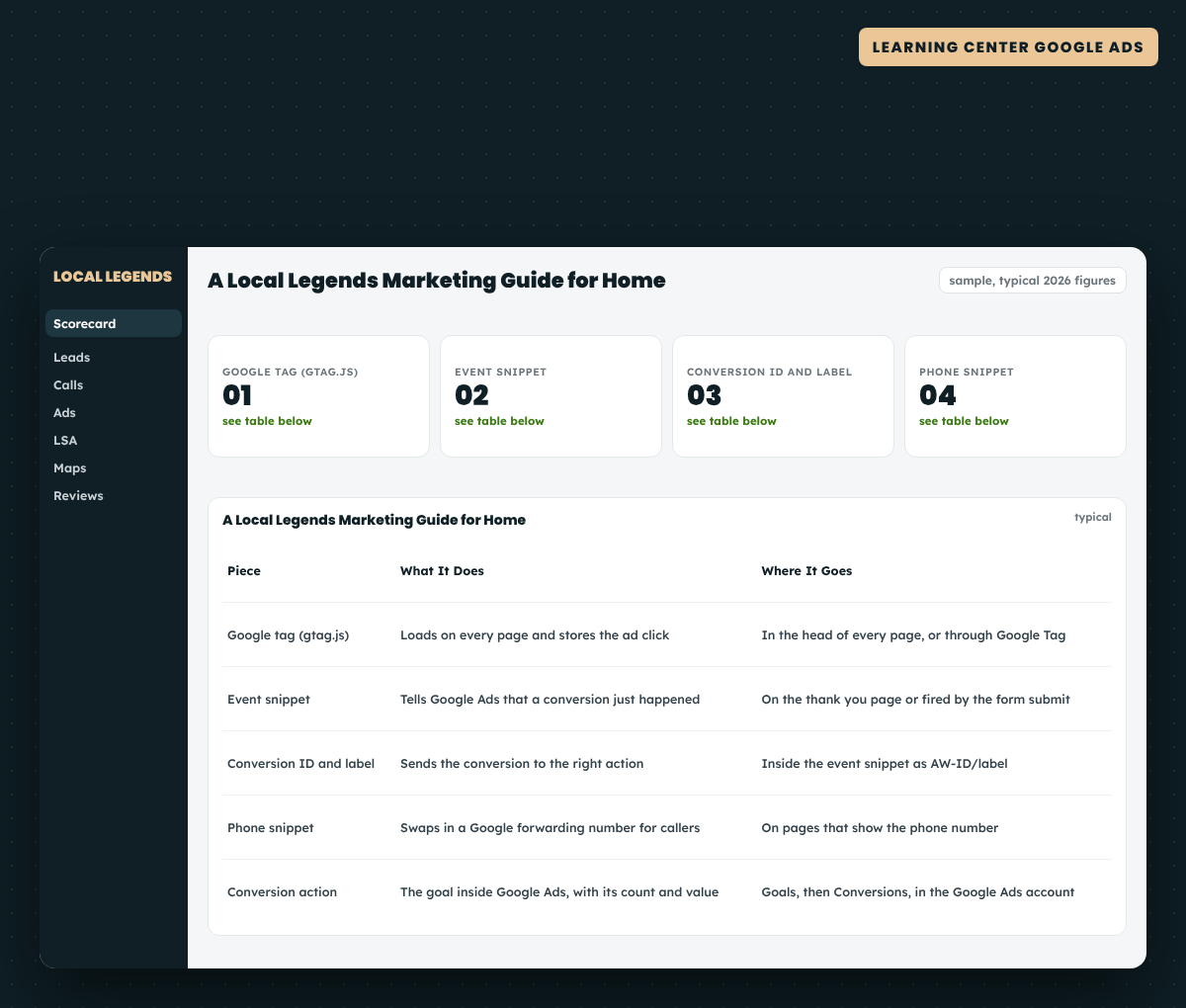
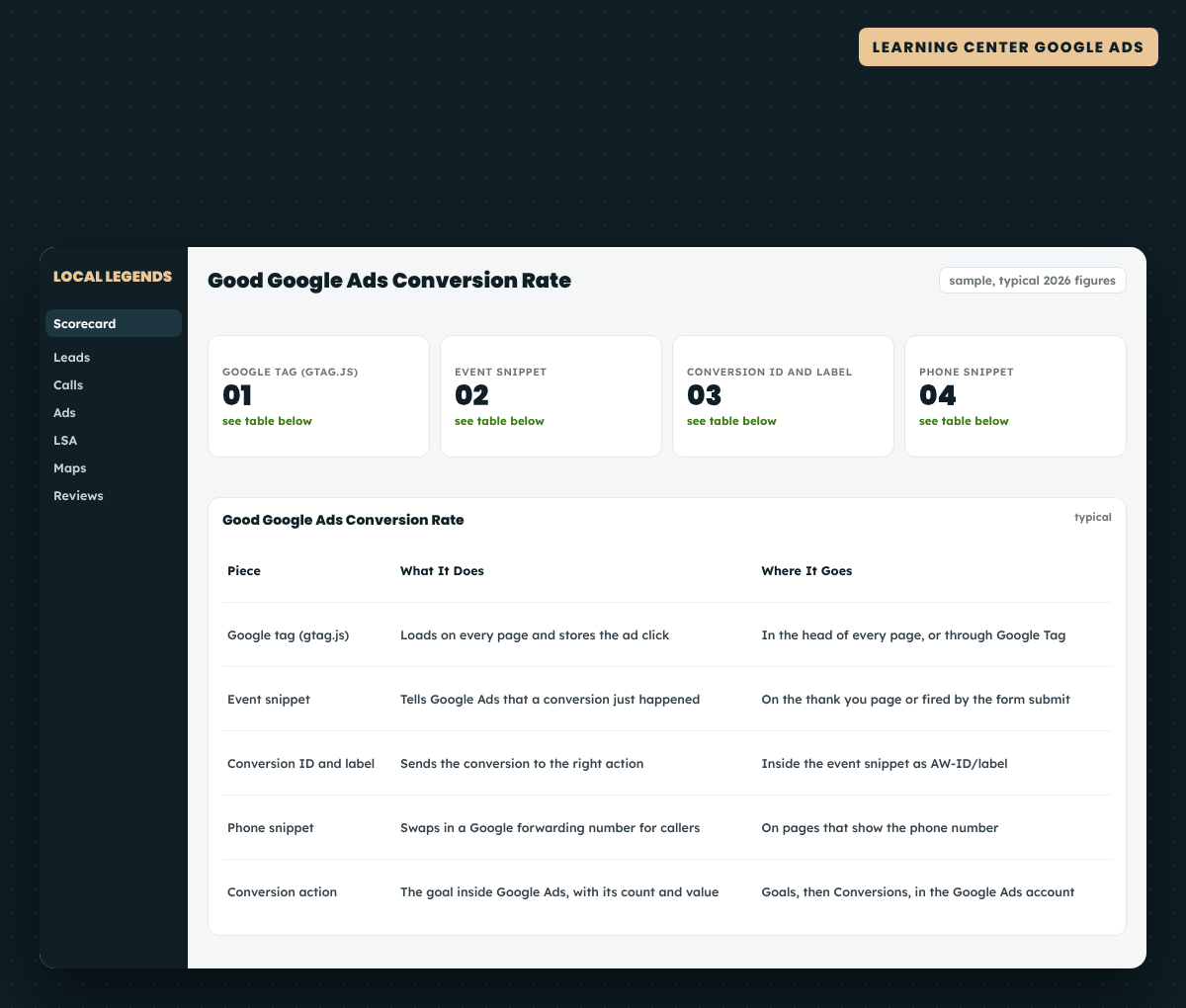
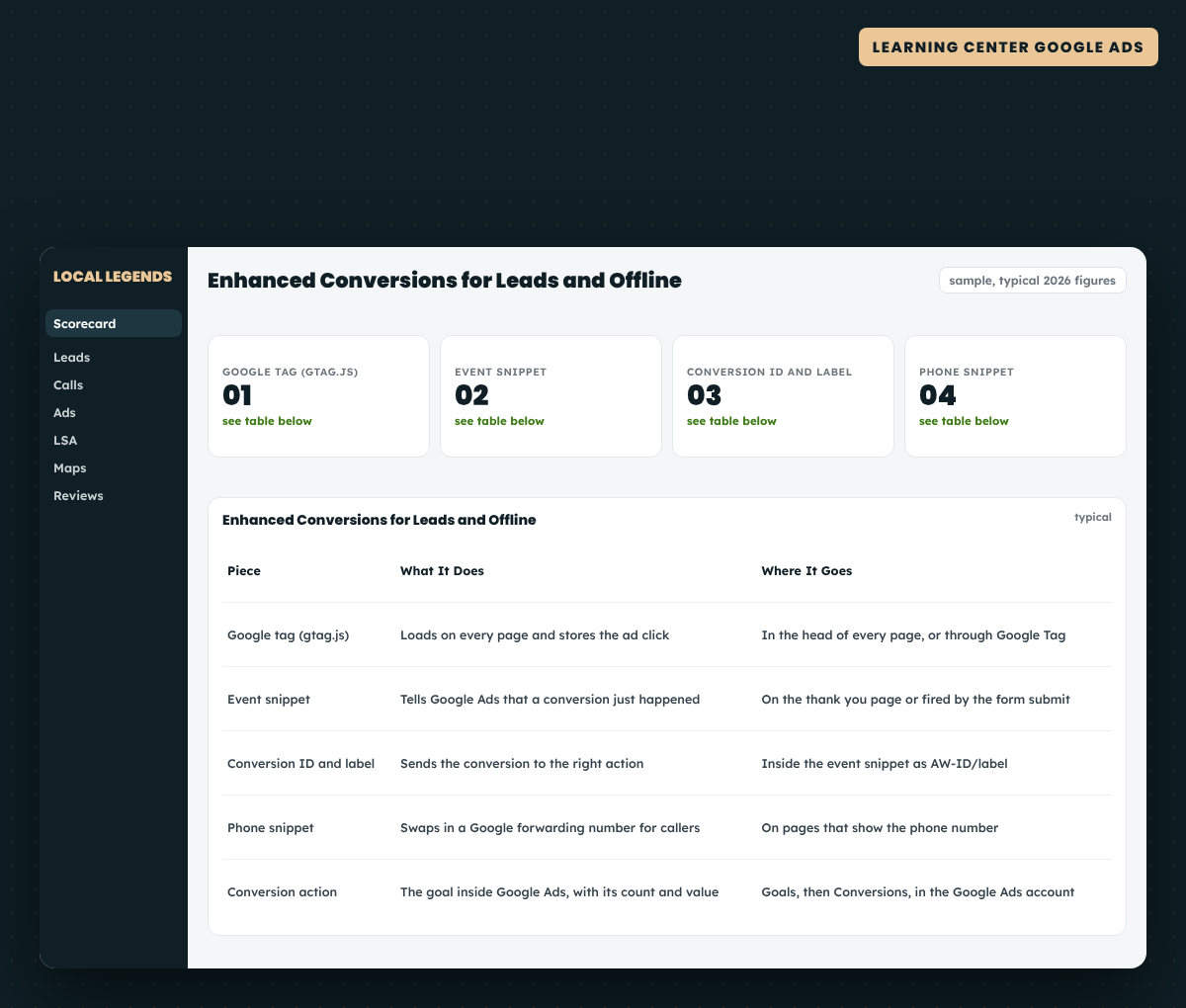
A roofing company needs a Google Ads conversion tag, because without it Google Ads cannot tell which keywords and ads produce calls and estimate requests, and automated bidding has nothing real to aim for. Google's help center describes the setup as the Google tag on every page plus an event snippet where the conversion happens.
| Piece | What It Does | Where It Goes |
|---|---|---|
| Google tag (gtag.js) | Loads on every page and stores the ad click in first-party cookies on your domain | In the head of every page, or through Google Tag Manager |
| Event snippet | Tells Google Ads that a conversion just happened | On the thank you page or fired by the form submit event |
| Conversion ID and label | Sends the conversion to the right action in your account | Inside the event snippet as AW-ID/label |
| Phone snippet | Swaps in a Google forwarding number for callers from ads | On pages that show the phone number |
| Conversion action | The goal inside Google Ads, with its count and value settings | Goals, then Conversions, in the Google Ads account |
[SOURCE: Google Ads Help, "Use the Google tag for Google Ads conversion tracking", captured Nov 27 2026]
Should a Home Service Business Track Phone Calls or Form Fills as Conversions?
A home service business should track both phone calls and form fills, because most homeowners call while others prefer to send a form at night. Google's AI Overview in November 2026 gave the same advice and warned against counting phone number taps or very short calls on their own.
- Calls from ads: calls placed straight from the ad or a call asset.
- Calls from the website: calls to the tracking number shown after an ad click.
- Estimate and contact forms: counted once per real submission.
- Online booking: when the scheduler confirms an appointment.
- Booked and sold jobs: imported later from the CRM as the most valuable actions.
Which Conversion Actions a Contractor Should Count in Google Ads Primary Goals Drive Bidding, Secondary Goals Only Report
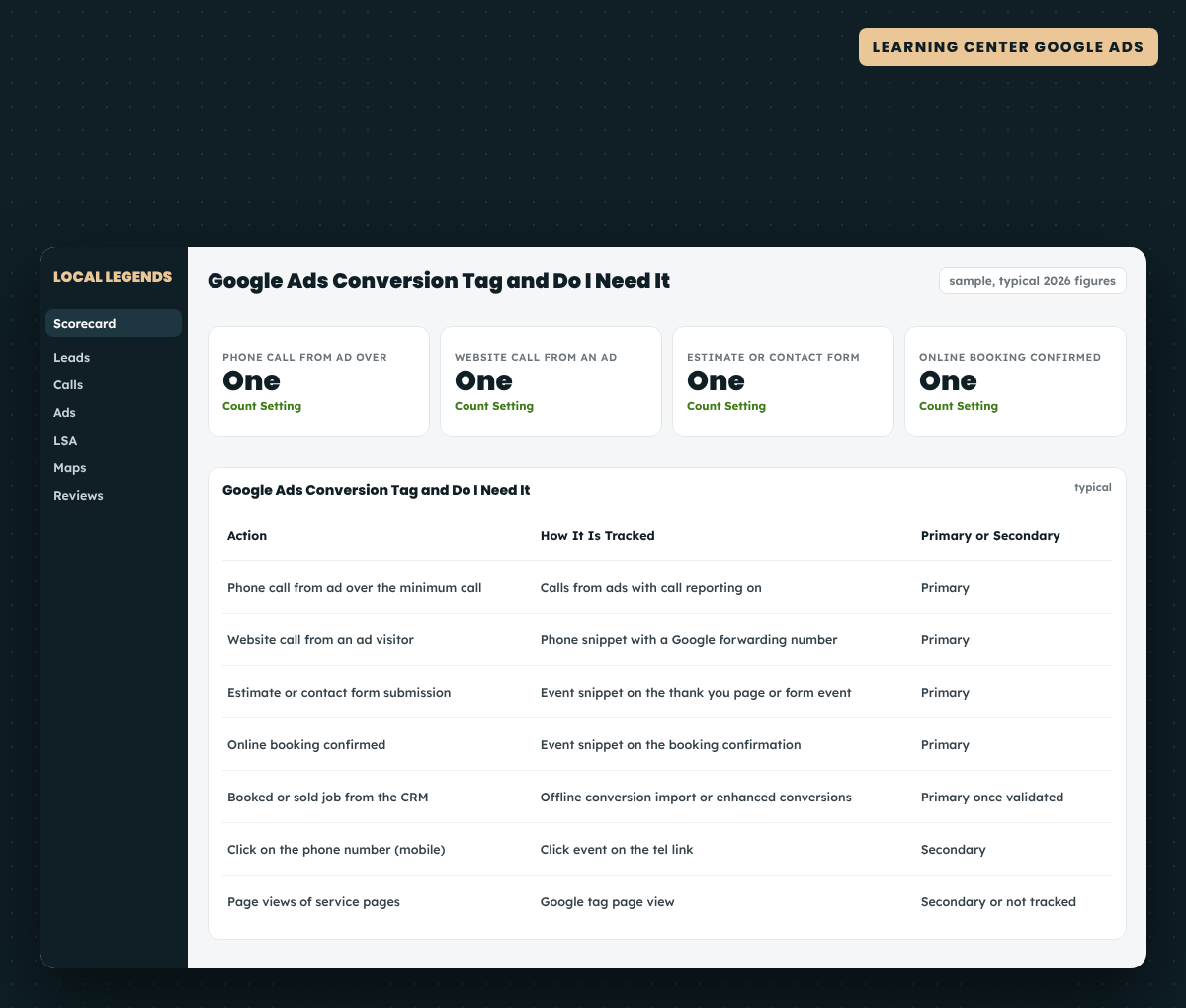
A contractor's Google Ads account should set real leads as primary conversion actions and keep lighter signals as secondary, because primary actions are what automated bidding optimizes toward. Mixing page views or button clicks into primary goals pushes the budget toward cheap, useless clicks.
| Action | How It Is Tracked | Primary or Secondary | Count Setting |
|---|---|---|---|
| Phone call from ad over the minimum call length | Calls from ads with call reporting on | Primary | One |
| Website call from an ad visitor | Phone snippet with a Google forwarding number or a call tracking integration | Primary | One |
| Estimate or contact form submission | Event snippet on the thank you page or form event | Primary | One |
| Online booking confirmed | Event snippet on the booking confirmation | Primary | One |
| Booked or sold job from the CRM | Offline conversion import or enhanced conversions for leads | Primary once validated | One, with job value |
| Click on the phone number (mobile) | Click event on the tel link | Secondary | One |
| Page views of service pages | Google tag page view | Secondary or not tracked | Every |
Should I Count Calls Under 60 Seconds as Conversions for My Plumbing Company?
A plumbing company usually should not count very short calls as conversions, because hang-ups, wrong numbers and robocalls make the account look better than it is. Google Ads lets each account set its own minimum call length for ad and website calls.
- Common starting point: 60 seconds, then adjust after listening to recorded calls.
- Emergency trades: some urgent calls are short, so review recordings before raising the bar.
- Better filter: import only calls the CRM marks as booked.
- Watch spam: repeated short calls from the same numbers are a sign of junk traffic.
How to Set Up the Google Ads Conversion Tag on a Contractor Website Five Steps From Account to Live Tag
Setting up the Google Ads conversion tag on a contractor website takes five steps: create the conversion action, install the Google tag, add the event snippet, set up call tracking and test. Each step happens before ad spend goes live.
Step 1: Create the Conversion Action
In Google Ads, open Goals, then Conversions, and create a website conversion such as "Estimate form submitted," with the count set to one per click.
Step 2: Install the Google Tag on Every Page
Paste the Google tag into the site-wide header, or add it through Google Tag Manager. If the site already has an Analytics Google tag, add the Google Ads ID to it instead of a second copy.
Step 3: Fire the Event Snippet on the Real Conversion
Place the event snippet on the thank you page that appears only after a form is sent, or trigger it on the form submit event in Tag Manager.
Step 4: Turn On Call Tracking
Turn on call reporting, add call assets and set up website call conversions or connect a call tracking platform.
Step 5: Test, Then Launch
Submit a test form, place a test call and confirm each fires in Tag Assistant before raising the budget.
Can I Install the Google Ads Conversion Tag on My Contractor Website Without a Developer?
Most contractors can install the Google Ads conversion tag without a developer when the website builder has a header code box or a Google Tag Manager setting, though forms built with third-party tools often need extra setup to fire the snippet correctly.
- Website builders: many have a site-wide header field for the Google tag.
- Tag Manager: one container, then tags and triggers managed without editing pages.
- Forms that redirect: easiest, because the thank you page holds the snippet.
- Forms that do not redirect: need a form submit trigger or a custom event.
- Ask for help when: forms live in an iframe or a booking widget from another company.
Google Tag Manager or the Google Ads Tag Directly: Which Should a Contractor Use?
Google Tag Manager is usually the better choice for a contractor who runs Google Ads, Analytics and Facebook tracking together, because every tag lives in one place. Google's help center recommends consolidating into one method rather than running gtag.js and Tag Manager side by side.
- Direct install: simple for one tag on a small site.
- Tag Manager: easier to add call tracking, form events and enhanced conversions later.
- Avoid both at once: duplicate tags cause double counting.
- Keep access: the Tag Manager container should be in the company's own account.
Google Ads Phone Call Conversions for HVAC, Roofing and Plumbing Companies Most Contractor Leads Start With a Call
Phone call conversions matter most for HVAC, roofing and plumbing companies because most homeowners call when the AC stops, the roof leaks or a pipe breaks. Google Ads offers four ways to count calls, and each counts something different.
How Do I Set Up Google Ads Conversion Tracking for Phone Calls for My HVAC Company?
An HVAC company sets up call conversion tracking by turning on call reporting, adding call assets to campaigns, installing the phone snippet for website calls and setting a minimum call length. Calls can also be imported from a CRM so only booked calls count.
- Calls from ads: from call assets and call-only ads, counted when they pass the minimum length.
- Calls to a website number: a Google forwarding number shown to visitors who came from an ad.
- Clicks on a mobile number: counts the tap, not whether the call connected.
- Imported call conversions: calls from another system, so only booked or sold calls count.
[SOURCE: Google Ads Help, "About phone call conversion tracking", captured Nov 27 2026]
Does CallRail Work With Google Ads Conversion Tracking?
Call tracking platforms such as CallRail can send qualified calls into Google Ads as conversions, which lets a contractor count calls by length, by keyword or by whether the lead was marked qualified. Google's AI Overview in November 2026 noted the integration needs visitor-level tracking, not just source-level. One source of call conversions should be primary to avoid counting the same call twice.
- Pick one primary source: Google forwarding numbers or the call tracking platform, not both.
- Use dynamic number insertion: each visitor source sees its own tracking number.
- Record and score calls: listen for booked versus price shoppers.
- Push booked calls only: when the CRM confirms the appointment.
Local Legends sets up CallRail call tracking and CRM integration for ServiceTitan, Housecall Pro, JobNimbus, AccuLynx, Jobber, Buildertrend and GoHighLevel. Details are on our call tracking and CRM page. [SOURCE: Local Legends services, Local Legends brief, Nov 2026]
How to Test a Google Ads Conversion Tag and Fix It When It Does Not Fire Tag Assistant First, Then the Account
A contractor tests a Google Ads conversion tag by running Tag Assistant, submitting a real test form and placing a test call, then checking the conversion action status in Google Ads. Google notes status can take up to 48 hours to update after changes.
Why Is Google Ads Not Recording Conversions From My Contact Form?
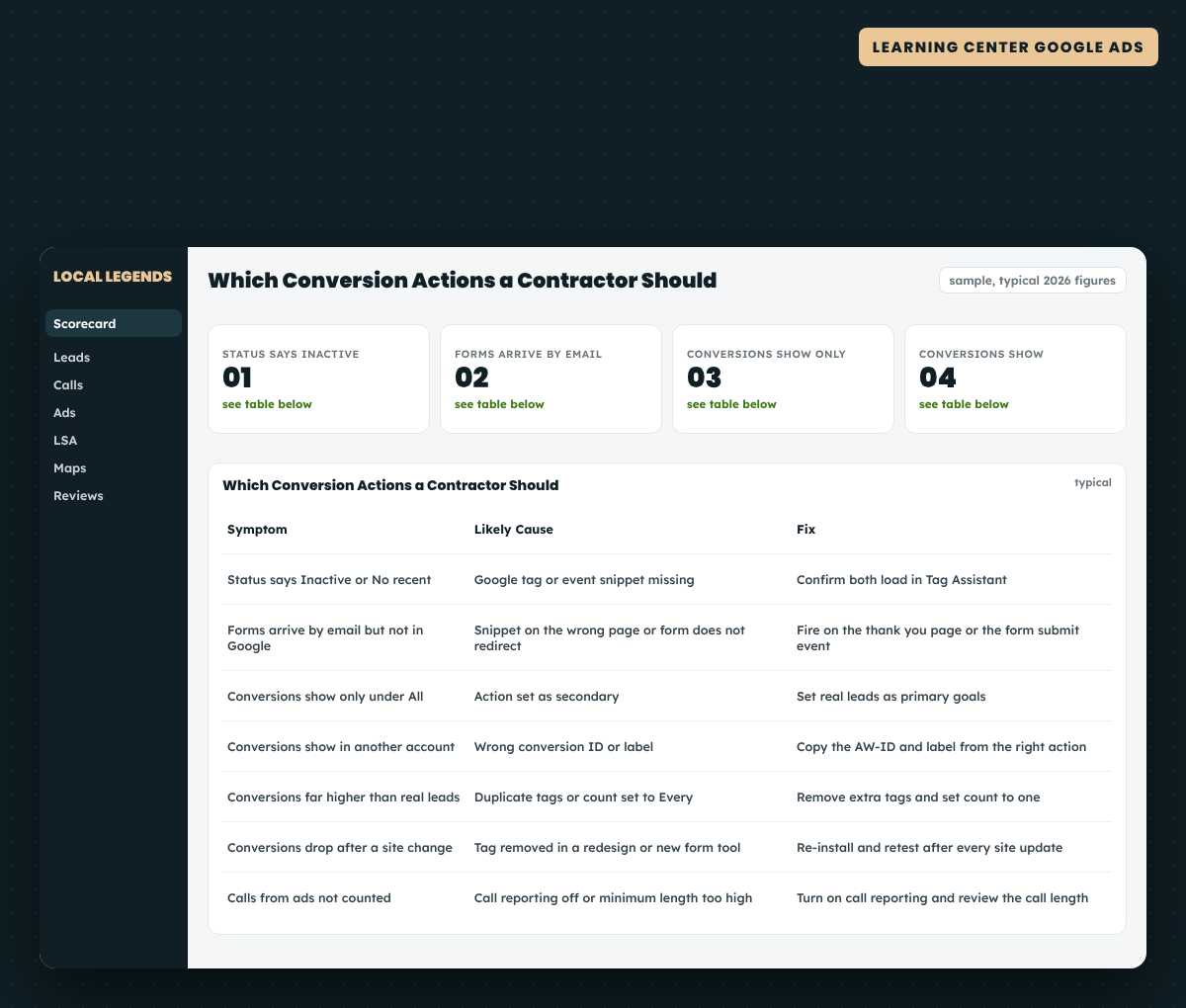
Google Ads usually misses form conversions because the tag does not fire on the real submission, the form submits in the background with no thank you page, the action is set as secondary, or consent settings block the tag. Each cause has a simple check.
| Symptom | Likely Cause | Fix |
|---|---|---|
| Status says "Inactive" or "No recent conversions" | Google tag or event snippet missing | Confirm both load in Tag Assistant |
| Forms arrive by email but not in Google Ads | Snippet on the wrong page or form does not redirect | Fire on the thank you page or the form submit event |
| Conversions show only under All conversions | Action set as secondary | Set real leads as primary goals |
| Conversions show in another account | Wrong conversion ID or label | Copy the AW-ID and label from the right action |
| Conversions far higher than real leads | Duplicate tags or count set to "Every" | Remove extra tags and set count to one |
| Conversions drop after a site change | Tag removed in a redesign or new form tool | Re-install and retest after every site update |
| Calls from ads not counted | Call reporting off or minimum length too high | Turn on call reporting and review the call length |
Why Does Google Ads Show More Conversions Than the Leads My Office Actually Got?
Google Ads shows more conversions than real leads when the same lead is counted more than once, when light actions like phone clicks are set as primary, or when spam forms and short calls slip through. Google's AI Overview in November 2026 called a gap of up to about 20% normal; a bigger gap means a setup problem.
- Count one per click for leads, not every repeat.
- Remove duplicate tags from old installs and plugins.
- Move phone clicks to secondary so they stop driving bidding.
- Filter spam forms with validation and honeypot fields.
- Compare weekly: Google Ads conversions against the CRM lead list.
What Is a Good Google Ads Conversion Rate for a Contractor? Conversion Rates Vary Widely by Trade
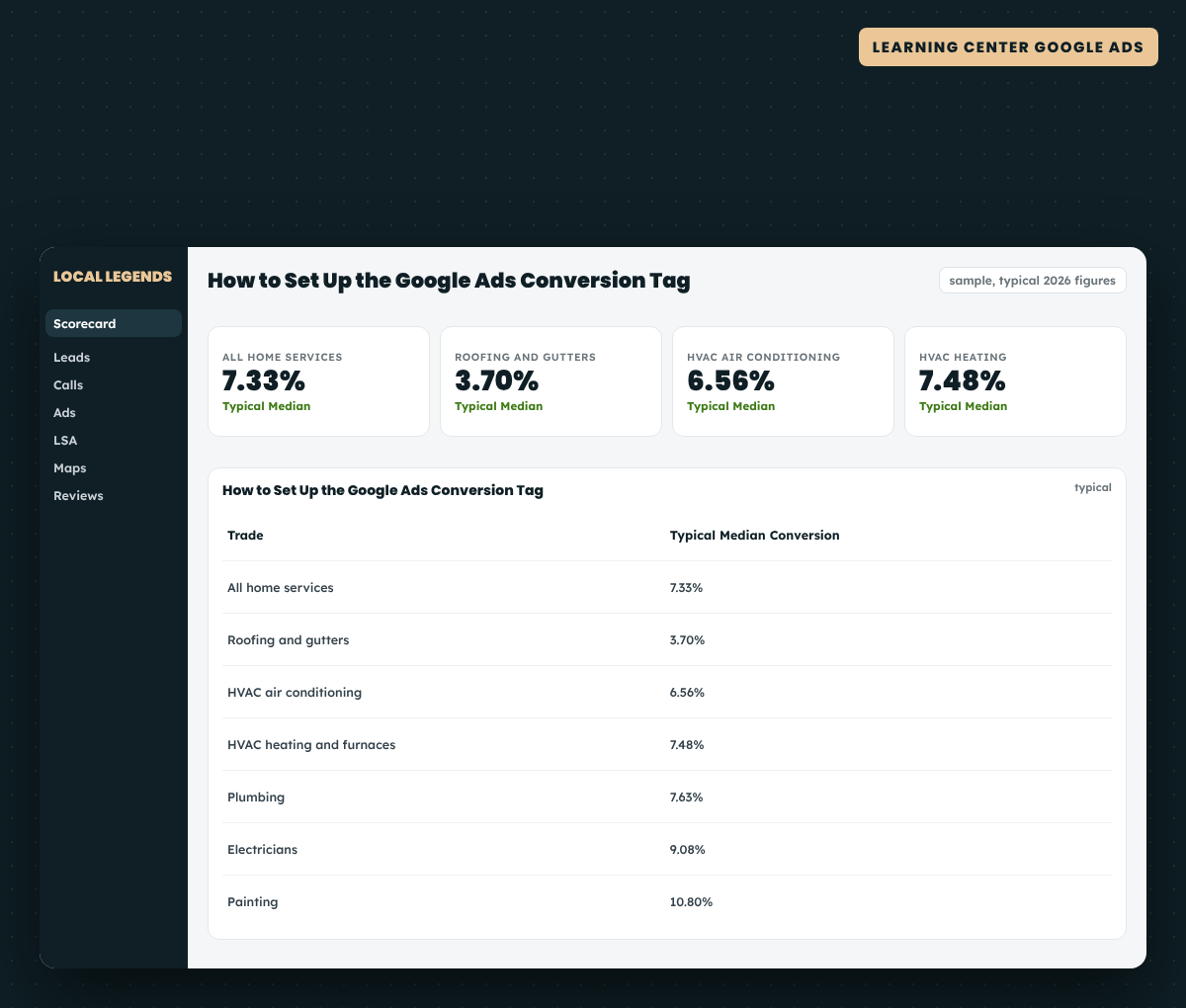
A good Google Ads conversion rate for a contractor depends heavily on the trade: published 2025 benchmarks of 3,211 home service search campaigns showed a typical median of about 7.33%, with house cleaning far higher and roofing far lower. Google's AI Overview in November 2026 called 7% to 15% a good range for plumbing, with rates under 5% usually pointing to the landing page or targeting.
| Trade | Typical Median Conversion Rate (2025 Published Benchmark) |
|---|---|
| All home services | 7.33% |
| Roofing and gutters | 3.70% |
| HVAC air conditioning | 6.56% |
| HVAC heating and furnaces | 7.48% |
| Plumbing | 7.63% |
| Electricians | 9.08% |
| Painting | 10.80% |
| Landscaping | 6.42% |
| Cleaning and maid services | 17.65% |
[SOURCE: Published 2025 home services search advertising benchmark study, 3,211 US campaigns, April 2024 to March 2025, captured Nov 27 2026]
Why Are My Google PPC Conversion Rates So Low Compared to Other Contractors?
Low Google PPC conversion rates for a contractor usually come from broad keywords, a slow or generic landing page, missing call tracking or a tag that misses real leads. Fixing the tag first shows whether the problem is the ads or the measurement.
- Measurement gaps: calls not counted, so the rate looks lower than it is.
- Search terms: job seekers, DIY searches and out-of-area clicks.
- Landing page: no phone number above the fold, no reviews, no clear service.
- Offer: no reason to call now, such as financing or a free inspection the company really offers.
- Hours: ads running while nobody answers the phone.
Our Google Ads management page covers how Local Legends builds landing pages for each campaign.
Enhanced Conversions for Leads and Offline Conversion Import From Your CRM Teach Google Which Leads Became Jobs
Enhanced conversions for leads let a contractor tell Google Ads which form leads later became booked or sold jobs, by matching hashed lead details from the website with the same details uploaded from the CRM. Google calls it an upgraded form of offline conversion import.
How Do I Track Booked Jobs From Google Ads in ServiceTitan or Housecall Pro?
A contractor tracks booked jobs from Google Ads by keeping the ad click ID or the hashed email and phone with each lead in the CRM, then importing the booked and sold status back into Google Ads as conversions. Google then bids toward clicks that become jobs.
- Capture at the form: the Google tag collects hashed lead details on submit.
- Store in the CRM: the lead record keeps its source and click ID.
- Upload the outcome: booked and sold jobs, with job value where possible.
- Validate first: Google advises running the new action alongside the old one for 1 to 2 conversion cycles or 4 weeks before switching.
- Watch the change: Google moved offline conversion and enhanced conversions for leads uploads to its Data Manager API starting June 15, 2026.
[SOURCE: Google Ads Help, "About enhanced conversions for leads" and "Upgrade offline conversion import to enhanced conversion for leads", captured Nov 27 2026]
How Does the Conversion Tag Affect Smart Bidding for a Roofing Company?
Smart bidding strategies such as Maximize Conversions spend a roofing company's budget on the searches most likely to produce whatever the primary conversion actions count, so a bad tag teaches Google the wrong lesson. Google's AI Overview in November 2026 warned that counting basic forms and very short calls can steer roofing budgets toward renters, price shoppers and job seekers.
- Too few conversions: bidding has little to learn from, so start with calls and forms together.
- Wrong conversions: bidding finds cheap clicks that never book.
- Job values: importing sold job values lets bidding favor replacements over repairs.
How Much Does Google Ads Conversion Tracking Cost a Contractor? The Tag Is Free, the Setup Is Not Always
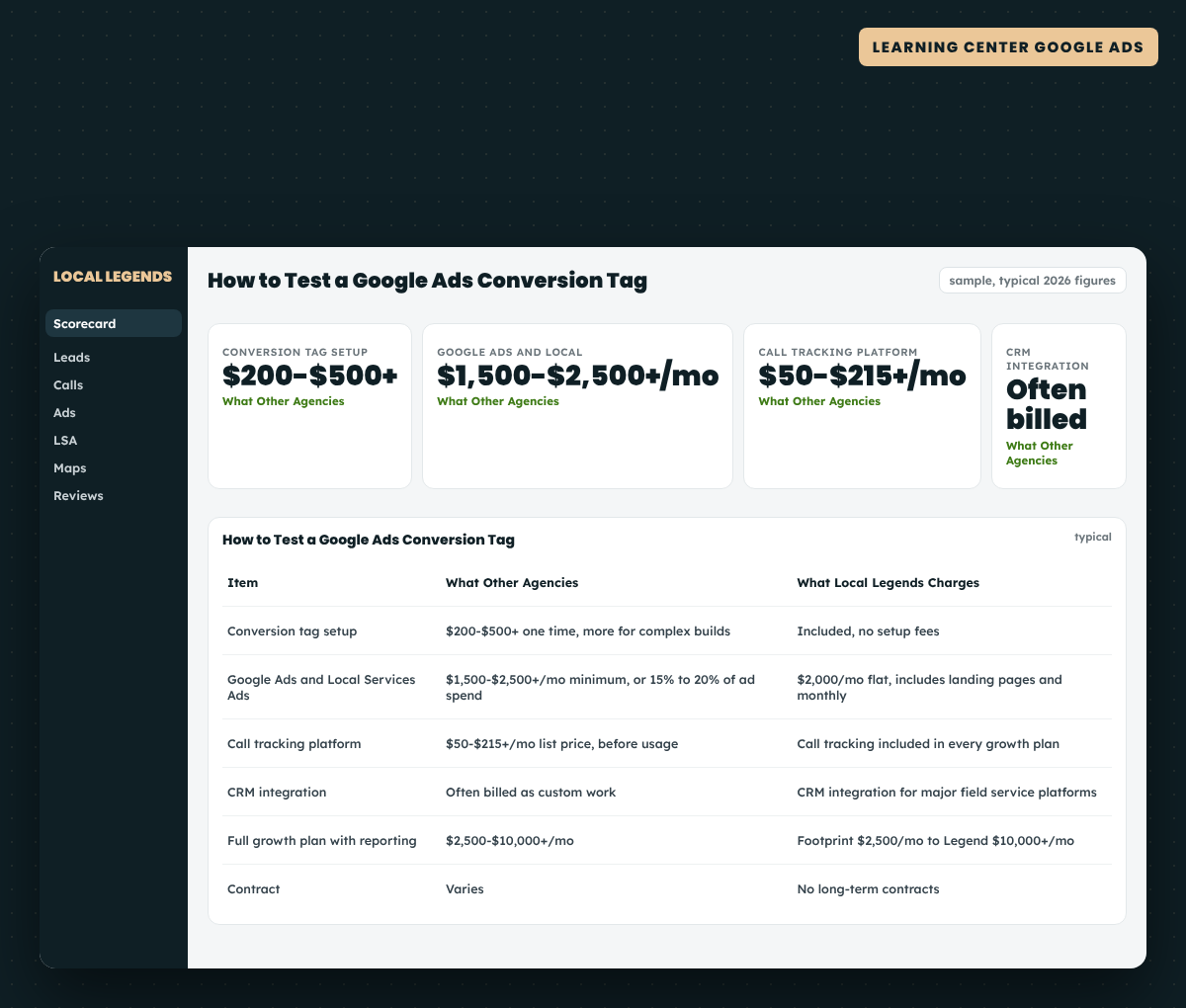
The Google Ads conversion tag is free, but contractors typically pay a freelancer or agency $200-$500+ for a basic setup, plus $50-$215+ a month for a call tracking platform. Google's AI Overview in November 2026 noted complex setups cost more and are often bundled into a campaign build.
| Item | What Other Agencies Typically Charge | What Local Legends Charges |
|---|---|---|
| Conversion tag setup | $200-$500+ one time, more for complex builds | Included, no setup fees |
| Google Ads and Local Services Ads management | $1,500-$2,500+/mo minimum, or 15% to 20% of ad spend | $2,000/mo flat, includes landing pages and monthly Google Business Profile optimization |
| Call tracking platform | $50-$215+/mo list price, before usage | Call tracking included in every growth plan |
| CRM integration | Often billed as custom work | CRM integration for major field service platforms |
| Full growth plan with reporting | $2,500-$10,000+/mo | Footprint $2,500/mo to Legend $10,000+/mo |
| Contract | Varies | No long-term contracts |
Ad spend is paid by the contractor straight to Google. Compare every plan on the Local Legends pricing page.
How Local Legends Sets Up Conversion Tracking for Contractors From the Tag to the Booked Job
Local Legends sets up conversion tracking so every Google Ads lead can be followed from the click to the call or form, then to the booked job, the sold job and the cost per booked job. Conversions in Google Ads are chapter one; the CEO scorecard is where the story ends.
- Audit first: tracking, local SEO, Local Services Ads and the sales funnel, with Google Maps rank grids. [SOURCE: Local Legends audit scope, confirmed by Levi Ostlund Nov 10 2026]
- Calls and forms as primary goals: with call tracking and form events tested before launch.
- CRM connection: booked and sold jobs carried back to the ad source.
- Weekly or monthly scorecard: leads, booked, sold and cost per booked job.
- You own it all: the ad account, tag container, website and call data stay in your name.
Founder Levi Ostlund lost $30,000+ to marketers before starting Local Legends Marketing, including one who built a website that never ranked. That is why every campaign is judged on booked jobs, not clicks. [SOURCE: Levi Ostlund founder story, Local Legends brief, Nov 2026]
Local Legends Marketing Client Reviews and Testimonials Contractor CEOs on the Record
Roofing and restoration company owners have recorded testimonials about working with Local Legends and Levi Ostlund on the ads, tracking and reporting behind their growth.
Levi has been absolutely outstanding to work with over the years... His creativity, responsiveness, and deep understanding of our marketing strategy have made a huge impact." Brad Beldon, CEO, Roofing Company. Read more reviews
Video testimonials also come from Kyle Scott, CEO, Roofing Company; Jim Dodson, CEO, Roofing Company; and Race Allen, CEO, Precision Restoration of Texas. More on paid search is on our PPC page.
Frequently Asked Questions About the Google Ads Conversion Tag Quick Answers for Contractors
Where Do I Find the Conversion Label in Google Ads?
The conversion label is in the tag setup for each conversion action, under Goals, then Conversions, then the action, then Tag setup. It appears after the conversion ID in the send_to value.
How Long Does It Take for Conversions to Show in Google Ads?
A new tag can take up to 48 hours to show an updated status, and individual conversions can appear later than the click because Google credits the conversion to the click date.
Does Google Tag Manager Track Conversions?
Yes. Google Tag Manager can fire the Google Ads conversion tag on page views, form submits or custom events, as long as the Google tag and the conversion linker are set up in the container.
Do I Need a Separate Tag for Local Services Ads?
No. Local Services Ads leads are tracked inside the Local Services Ads dashboard, while the conversion tag measures Google Ads search campaigns that send visitors to your website.
Will a Website Redesign Break My Conversion Tracking?
It can. A redesign or a new form tool often removes the Google tag or changes the thank you page, so retest every conversion action the day a new site goes live.
Can I Track Conversions if My Website Has No Thank You Page?
Yes. Fire the event snippet on the form submit event or a confirmation message using Google Tag Manager, and test that it fires only when the form is really sent.
What Is the Difference Between a Conversion and a Lead?
A conversion is whatever action the tag counts; a lead is a real homeowner asking for work. The goal of good setup is to make those two numbers match.
Who Should Own the Google Ads Account and Tag Manager Container?
The contractor should own both. Local Legends clients own every account, including the ad account, website, domain and call data.
Reviewed by Levi Ostlund, Founder, Local Legends Marketing

Make Your Google Ads Count Booked Jobs, Not Just Clicks Book Your Free Growth Audit
The first step is a free growth audit that checks your Google Ads conversion tag, call tracking and CRM connection, and shows how many reported conversions turned into real booked jobs. Local Legends then manages Google Ads and LSA for a flat $2,000 a month with landing pages included and no setup fees.
- Bring your Google Ads access: the audit compares conversions with your CRM leads.
- See every plan on the pricing page before the call.
- Keep every account in your name.
Call (936) 900-1248 or book a free growth audit online.