


You Delete Facebook Reviews From Your Business

How to Delete Facebook Reviews on a Contractor Business Page: What You Can Remove, What You Can Hide and How to Respond
Facebook Review Removal Help From Local Legends Marketing
Updated November 2026 · Reviewed by Levi Ostlund, Founder
Breadcrumb: Home > Learning Center [LINK: /learning-center/] > How to Delete Facebook Reviews
To delete Facebook reviews from a business page, a contractor has three real options: report a review that breaks Facebook's Community Standards, turn off recommendations to hide all of them, or reply and earn newer reviews. Page admins cannot delete another person's recommendation directly.
- Report it: only reviews that break a Facebook rule, such as spam, hate or a fake account, can come down.
- Hide them all: one Page setting hides every recommendation, good and bad, and blocks new ones.
- Reply in public: a calm answer shows the next homeowner how you handle problems.
- Outnumber it: real recommendations from recent jobs push one bad post down the list.
- Delete your own: a review you wrote on another page can be deleted from its menu in seconds.
Free Growth Audit
Your Reviews, Radius and Response Rate vs the competitors beating you.
About Local Legends Marketing
A home service marketing agency headquartered in Conroe, Texas, with 8+ years of marketing experience, running Google Ads, Local Services Ads, local SEO, AI SEO, connected TV and review systems for contractors nationwide.
Can You Delete Facebook Reviews From Your Business Page? Report, Hide or Reply
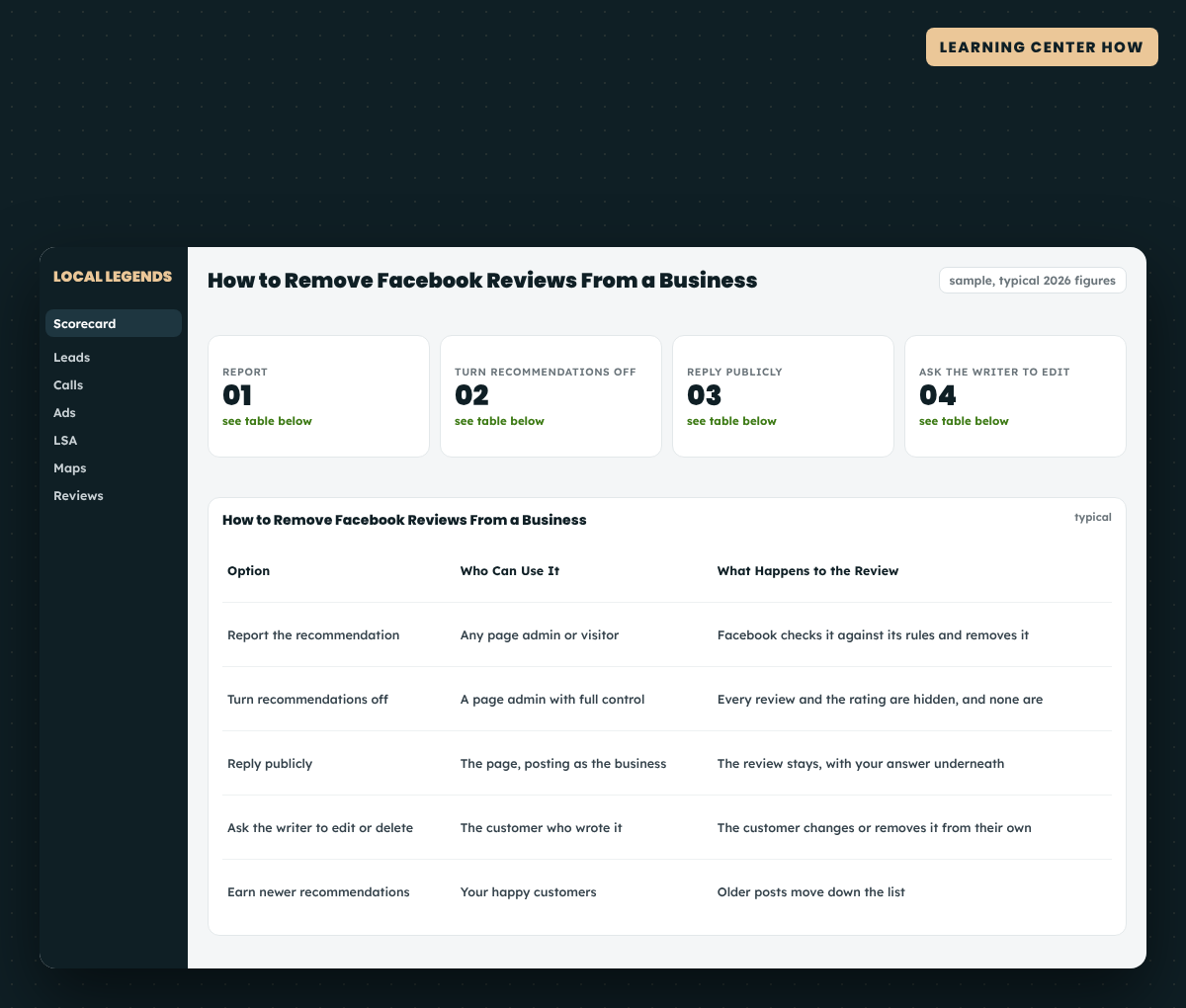
No, a contractor cannot delete a Facebook review that a customer or stranger left on the business page. Facebook replaced star reviews with recommendations in 2018, and only the writer or Facebook itself can remove one.
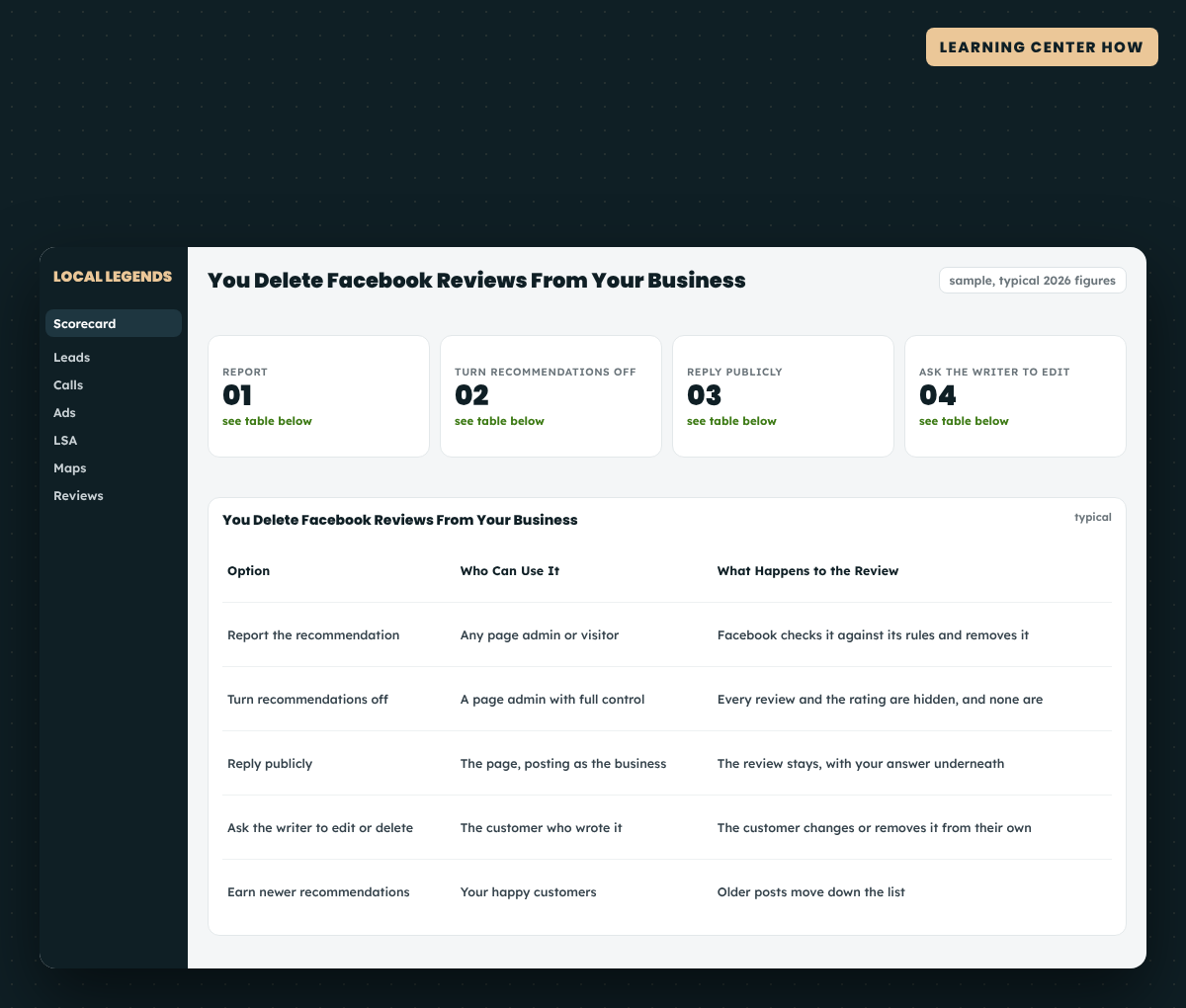
What an owner can control is what happens next. The table below shows each option, who can use it and what it actually does to the review.
| Option | Who Can Use It | What Happens to the Review | Best Use for a Contractor |
|---|---|---|---|
| Report the recommendation | Any page admin or visitor | Facebook checks it against its rules and removes it only if one is broken | Spam, fake accounts, hate speech, off-topic posts |
| Turn recommendations off | A page admin with full control | Every review and the rating are hidden, and none are erased | A short pause during a harassment wave |
| Reply publicly | The page, posting as the business | The review stays, with your answer underneath | Real complaints and misunderstandings |
| Ask the writer to edit or delete | The customer who wrote it | The customer changes or removes it from their own menu | After the problem is truly fixed |
| Earn newer recommendations | Your happy customers | Older posts move down the list | Every week, on every finished job |
How to Remove a Facebook Review You Wrote Yourself
Anyone who wrote a review on another business page can delete or edit it from that review's own menu, and the business is not notified. Contractors sometimes need this after reviewing a supplier or a sub in the heat of the moment.
- Open the business page you reviewed and choose Reviews, or find the post in your activity log.
- Click the three dots in the top corner of your recommendation.
- Choose Delete to remove it, or Edit to change the wording or the yes or no answer.
- Confirm, and the post disappears from the page right away.
Facebook's help center notes that editing and deleting your own review is not available on mobile browsers, so use the app or a computer.
Why Can't I Report a Facebook Recommendation on My Contractor Page?
A contractor usually cannot report a Facebook recommendation because it contains only a rating with no written text, and Facebook's help center says rating-only posts cannot be reported. A missing post may also already be under review.
- No text, no report: a bare yes or no recommendation gives Facebook nothing to judge.
- Wrong profile: switch into the page profile with admin access before opening the menu.
- Already gone: a recommendation you saw earlier may have been removed or hidden by Facebook.
- Reviews tab missing: recommendations may be switched off, or the page category may not support them.
- Write it down: screenshot the post and date in case the reviewer adds text later.
How to Get Facebook Reviews Removed That Break Community Standards Reporting Works Only When a Rule Is Broken
Facebook removes a reported review only when it breaks a Community Standard, such as spam, harassment, hate speech, a fake account or content that has nothing to do with the business. A harsh but honest opinion about your work stays up, however unfair it feels.
Step 1: Capture the Evidence
Screenshot the full recommendation, the reviewer's name and profile, and the date. Pull your job records so you can show whether the person was ever a customer.
Step 2: Open the Review Menu as the Page
Switch into the page profile, open Reviews, then click the three dots on the post and choose the report option, sometimes shown as Find support or report.
Step 3: Choose the Reason That Fits Best
Pick the closest match, such as spam, false information, harassment or a conflict of interest. A vague reason is the most common cause of a quick denial.
Step 4: Ask for Another Look if It Stays Up
Facebook's help center says a second look usually happens within a day of the request. If it is still denied, report again with a better-fitting reason, then keep replying and collecting real reviews.
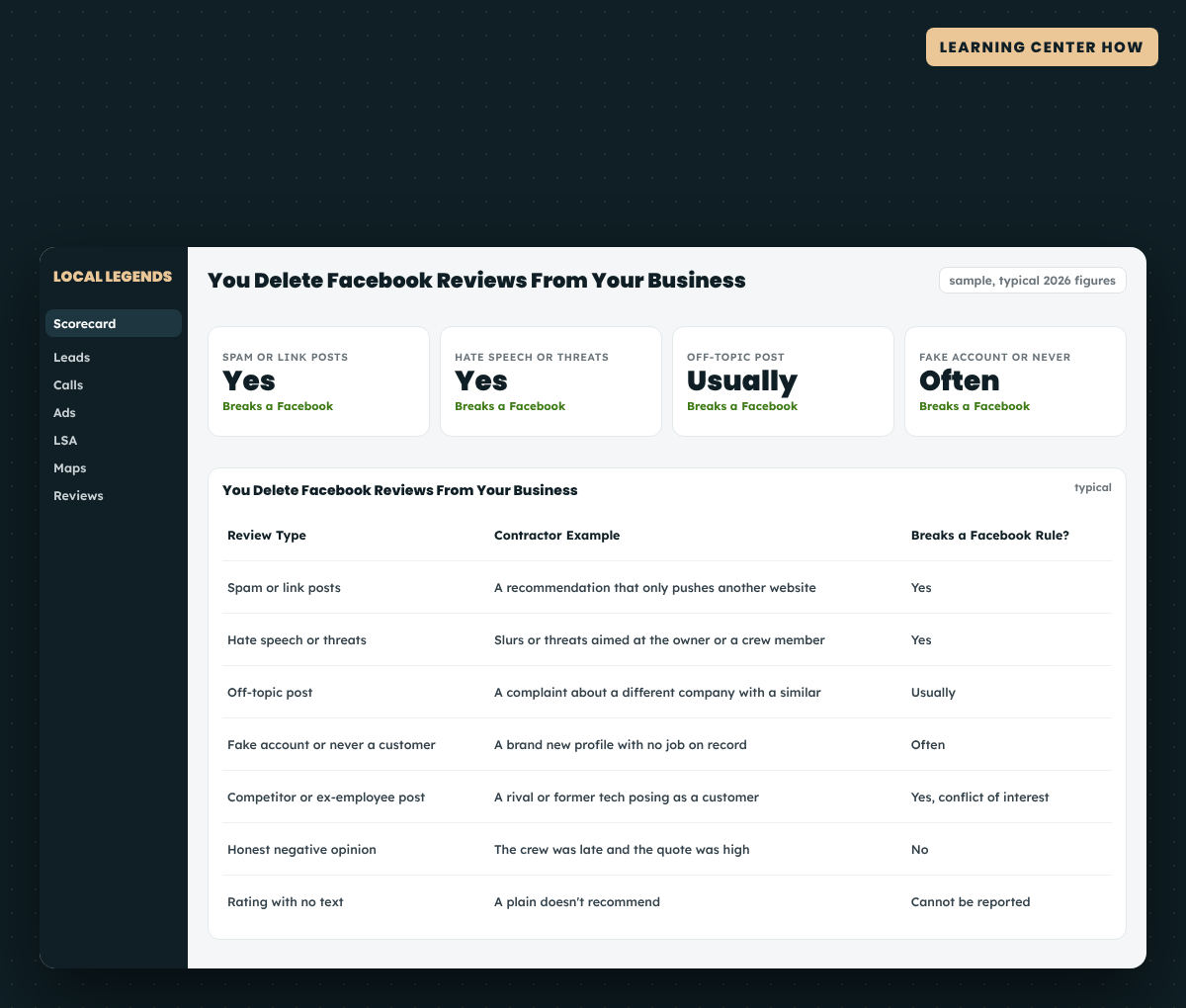
| Review Type | Contractor Example | Breaks a Facebook Rule? | Likely Outcome When Reported |
|---|---|---|---|
| Spam or link posts | A recommendation that only pushes another website | Yes | Often removed |
| Hate speech or threats | Slurs or threats aimed at the owner or a crew member | Yes | Often removed |
| Off-topic post | A complaint about a different company with a similar name | Usually | Sometimes removed |
| Fake account or never a customer | A brand new profile with no job on record | Often | Removal takes patience and is not certain |
| Competitor or ex-employee post | A rival or former tech posing as a customer | Yes, conflict of interest | Removal takes evidence and time |
| Honest negative opinion | "The crew was late and the quote was high" | No | Stays up, so reply instead |
| Rating with no text | A plain "doesn't recommend" | Cannot be reported | Stays up |
A Competitor or Former Employee Left a Fake Review on My Roofing Page. What Do I Do?
A roofing company hit with a fake review from a competitor or former employee should document it, report it as a conflict of interest, reply once with facts and talk to an attorney only if the false claims cause real harm. The Google AI Overview gave that order in November 2026.
- Save proof: screenshots, the posting date, the profile and your employment or customer records.
- Report it: choose the reason that matches, such as false information or conflict of interest.
- Reply calmly: say you have no record of the person as a customer and give a way to reach the office.
- Skip the accusations: never call the reviewer a liar or name the suspected competitor in public.
- Know the federal rule: the FTC's August 2024 final rule bans fake reviews and testimonials.
How Long Does Facebook Take to Remove a Reported Review?
Facebook does not publish a set timeline for removing a reported review, and owners in contractor Facebook groups report anywhere from a few days to weeks, with many reports denied. A request for another look is usually handled within about a day, per Facebook's help center.
- Automated first pass: most reports are screened by Facebook's systems before any person sees them.
- Check the status: your Support Inbox shows whether a decision was made.
- Report once, precisely: a well-matched reason helps more than many vague reports.
- Keep working meanwhile: reply in public and ask recent customers for recommendations.
Are Facebook Review Removal Services Legit?
Some firms charge to remove Facebook reviews, but they can only use the same reporting channels and legal routes every page owner has. Facebook does not give paid removal firms a private door.
- Legitimate work: organizing evidence, filing precise reports and coordinating with an attorney.
- Walk away if: a service offers to delete honest negative reviews or to flood the page with fake ones.
- Ask how they do it: a clear answer should name Facebook's reporting tools or a court process.
- Know the risk: buying fake recommendations breaks Facebook's rules and the FTC's 2024 rule.
Can a Contractor Sue Over a False Facebook Review?
A contractor can sue over a false Facebook review only when it crosses into defamation, meaning a provably false statement of fact that was published and caused real harm. The Google AI Overview stressed in November 2026 that this is general information, not legal advice.
- Facebook itself is shielded: Section 230 generally protects platforms from liability for user posts.
- The reviewer is the target: some businesses file a "John Doe" suit to learn who an anonymous poster is.
- Costs add up: lawsuits are expensive and slow compared with a reply and steady new reviews.
- Talk to a local attorney first: before any cease-and-desist letter or filing.
What Makes a Facebook Review Defamatory
Courts generally look for four things: a false statement of fact, publication to others, fault on the reviewer's part and measurable damage such as lost jobs or canceled contracts.
Opinion Versus Fact
"Worst roofer in town" is an opinion and is protected. "They took my $5,000 deposit and never showed up," when the job was finished, is a factual claim that can be tested.
Anti-SLAPP Laws Can Turn a Weak Case Around
Many states have anti-SLAPP laws that let a reviewer recover legal fees when a business sues over protected speech, which is another reason to get advice before filing.
How to Remove Facebook Reviews From a Business Page by Turning Recommendations Off One Setting Hides Every Review at Once
A contractor removes Facebook reviews from a business page view by turning off the setting "Allow others to view and leave reviews on your Page," which hides the Reviews tab, every recommendation and the rating. Nothing is erased; it all returns when the setting is switched back on.
- Switch into the Facebook page profile with full admin access.
- Open Settings and privacy, then Settings.
- Choose Page and tagging, which some versions list under Audience and visibility.
- Turn off "Allow others to view and leave reviews on your Page?"
- Check the page as a visitor to confirm the Reviews tab is gone.
Should I Turn Off Facebook Reviews Because of One Bad Review?
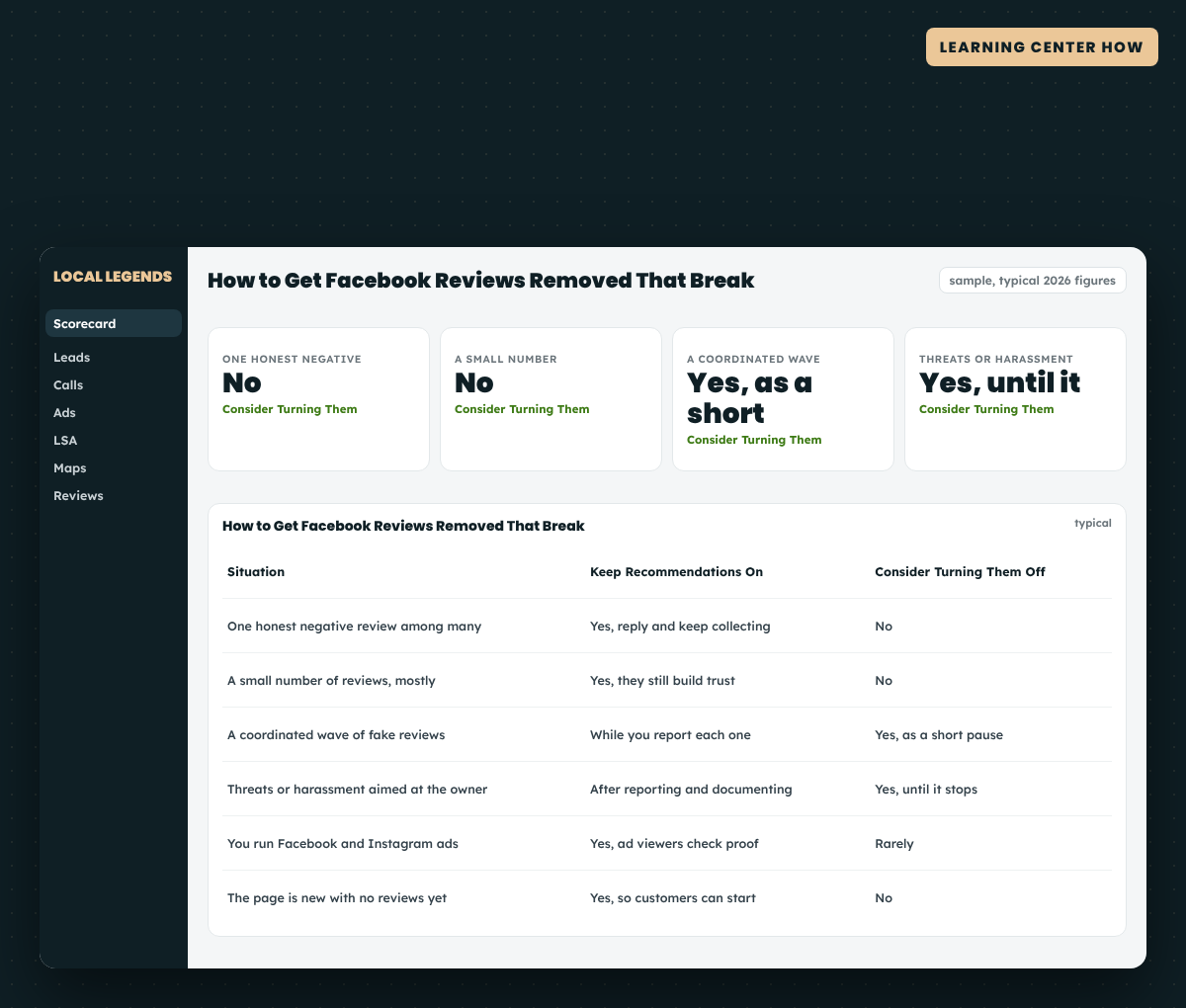
In most cases, no: a contractor should not turn off Facebook reviews over one bad review, because the switch also hides every positive recommendation and the overall rating. The Google AI Overview advised replying, reporting and earning new reviews first in November 2026.
| Situation | Keep Recommendations On | Consider Turning Them Off |
|---|---|---|
| One honest negative review among many good ones | Yes, reply and keep collecting | No |
| A small number of reviews, mostly positive | Yes, they still build trust | No |
| A coordinated wave of fake reviews in one week | While you report each one | Yes, as a short pause |
| Threats or harassment aimed at the owner or crew | After reporting and documenting | Yes, until it stops |
| You run Facebook and Instagram ads to the page | Yes, ad viewers check proof | Rarely |
| The page is new with no reviews yet | Yes, so customers can start | No |
How to Respond to a Negative Facebook Review as a Contractor Write the Reply for the Next Homeowner Who Reads It
A contractor should respond to a negative Facebook review within a day or two, briefly and calmly, by thanking the reviewer, owning any real mistake and moving the details to a phone call. The reply is written as much for future customers as for the person who posted.
How Should a Plumber Respond to a Negative Facebook Review?
A plumber should answer a negative Facebook review calmly, quickly and in a few sentences, acknowledging the issue and inviting the customer to call the office. The Google AI Overview described that structure in November 2026.
- Cool off first: wait until the reply can be written without heat.
- Thank and acknowledge: name the concern, such as scheduling or the price of a water heater swap.
- Own your part: apologize for real misses without accepting blame for things outside your control.
- Move it offline: give a named contact and the office number for a private conversation.
- Keep it short: about four or five sentences reads as confident, not defensive.
- Protect privacy: never post the customer's address, invoice or job details.
A Sample Reply a Contractor Can Adapt
"Hi Dana, thank you for taking the time to share this. We are sorry the return visit took longer than you expected. Our service manager, Chris, would like to go over the job with you; please call our office at your convenience so we can make this right."
What to Leave Out of a Public Reply
Leave out arguments about who said what, the customer's personal details, sarcasm and any guess about the reviewer's motives. Each one reads worse to a stranger than the original complaint.
Can I Ask a Customer to Change Their Facebook Review After I Fix the Problem?
Yes, a contractor can politely ask a customer to update a Facebook review, but only after the problem is genuinely resolved and with no pressure or reward attached. The customer is the only person who can edit or delete the post.
- Fix it first: the request only works once the leak, the repair or the refund is handled.
- Ask privately: a short text or call, not a public comment under the review.
- Make it easy: explain that the three dot menu on their post has Edit and Delete.
- Offer nothing in return: discounts or gifts for changed reviews break platform rules.
- Accept the answer: a follow-up reply showing the fix helps even if the review stays.
How to Get Facebook Reviews for a Home Service Business Steady Real Reviews Outweigh One Bad Post
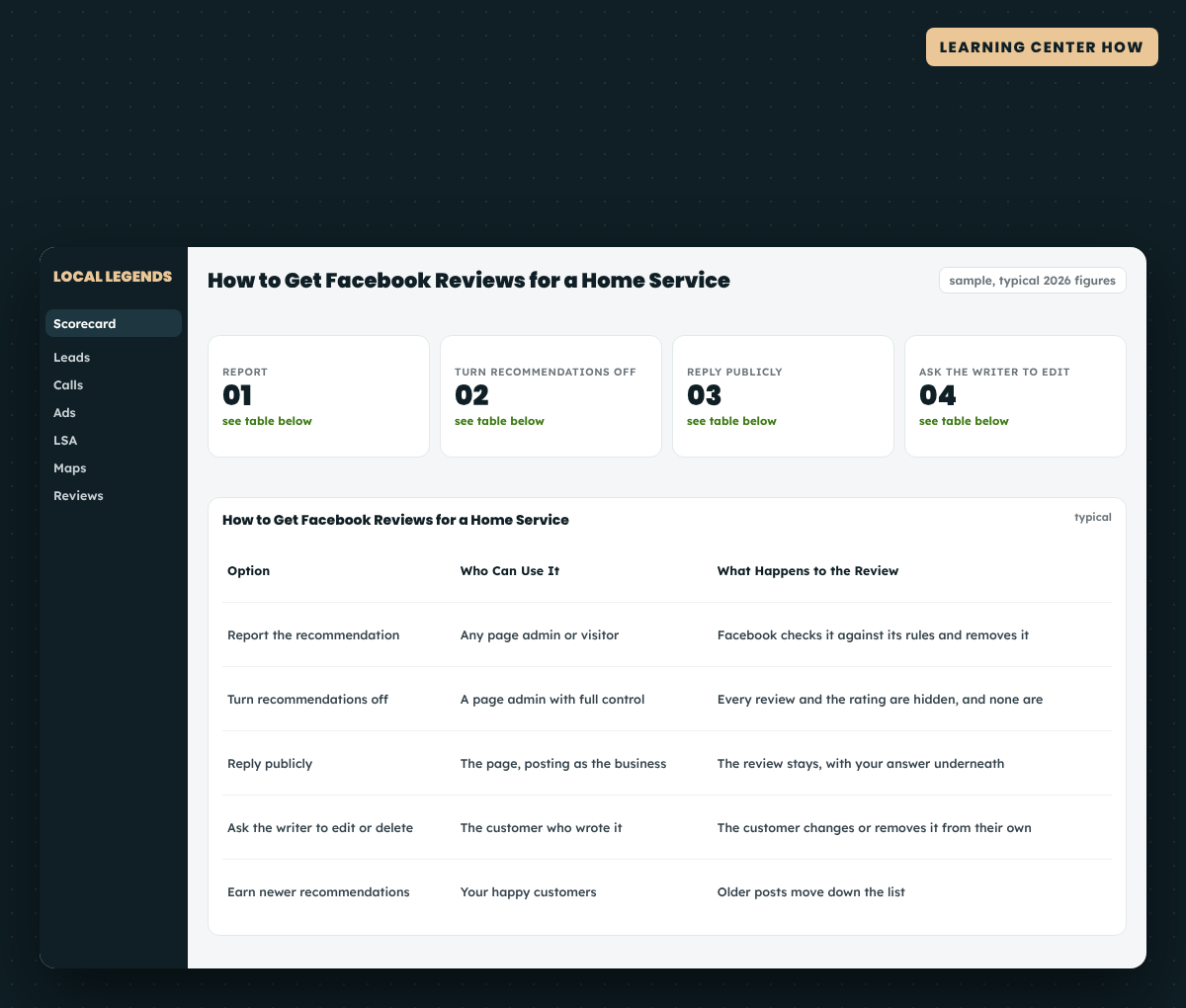
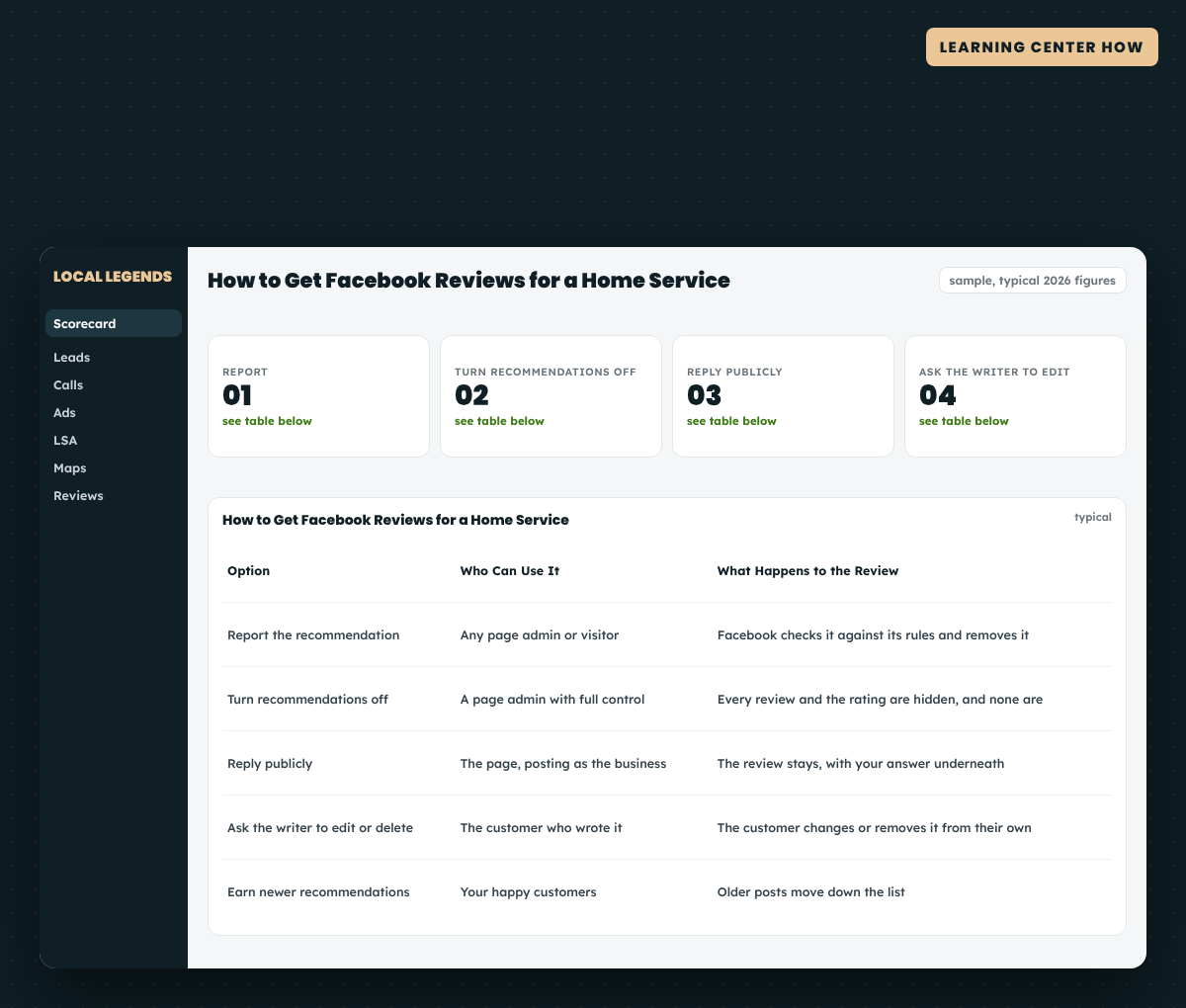
A home service business gets Facebook reviews by keeping recommendations turned on, sending customers the direct review link and asking right after a job goes well. New, specific reviews from real jobs are the most reliable answer to a bad one.
How Local Legends handles review requests: every growth plan includes the LSA Ranker review texter, which texts each customer a review request after the job, and Trailblazer and above add review request automation. [SOURCE: Local Legends plan inclusions, BRIEF.md Nov 2026] See how it works on our review management page.
How Do I Get More Facebook Reviews for My Roofing Company?
A roofing company gets more Facebook reviews by asking at the final walkthrough, texting the direct link the same day and sharing the finished roof on the page. Roofers in contractor Facebook groups said in 2026 that asking before the crew leaves works best.
- Ask at the walkthrough: the homeowner is happiest while looking at the new roof.
- Text the link the same day: open the Reviews tab, copy the URL and send it with their first name.
- Show the job: post before and after photos and tag the review request to that post.
- Remind once: one friendly follow-up a few days later, then stop.
- Ask everyone: never filter out customers you think might be unhappy.
- Reply to every review: thank the good ones and answer the hard ones.
Do Facebook Reviews Matter as Much as Google Reviews for a Home Service Business?
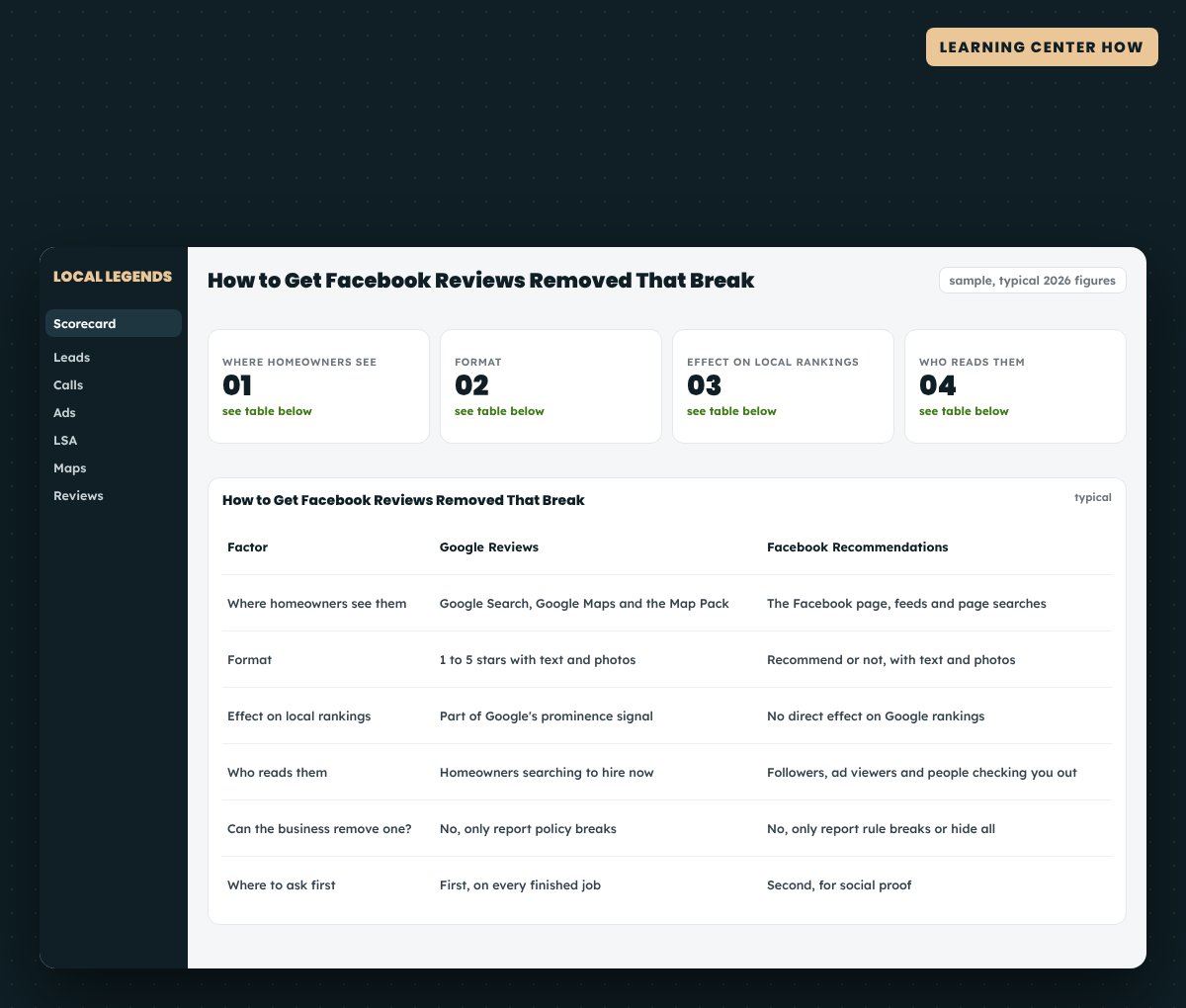
For most home service businesses, Google reviews matter more than Facebook reviews, because Google reviews appear in Google Search and the Map Pack where homeowners are ready to hire. Facebook reviews still build trust when people check a contractor on social media or after seeing an ad.
| Factor | Google Reviews | Facebook Recommendations |
|---|---|---|
| Where homeowners see them | Google Search, Google Maps and the Map Pack | The Facebook page, feeds and page searches |
| Format | 1 to 5 stars with text and photos | Recommend or not, with text and photos |
| Effect on local rankings | Part of Google's prominence signal | No direct effect on Google rankings |
| Who reads them | Homeowners searching to hire now | Followers, ad viewers and people checking you out |
| Can the business remove one? | No, only report policy breaks | No, only report rule breaks or hide all |
| Where to ask first | First, on every finished job | Second, for social proof |
How Much Does Review Management Cost for a Contractor? Typical Fees Next to Local Legends Prices
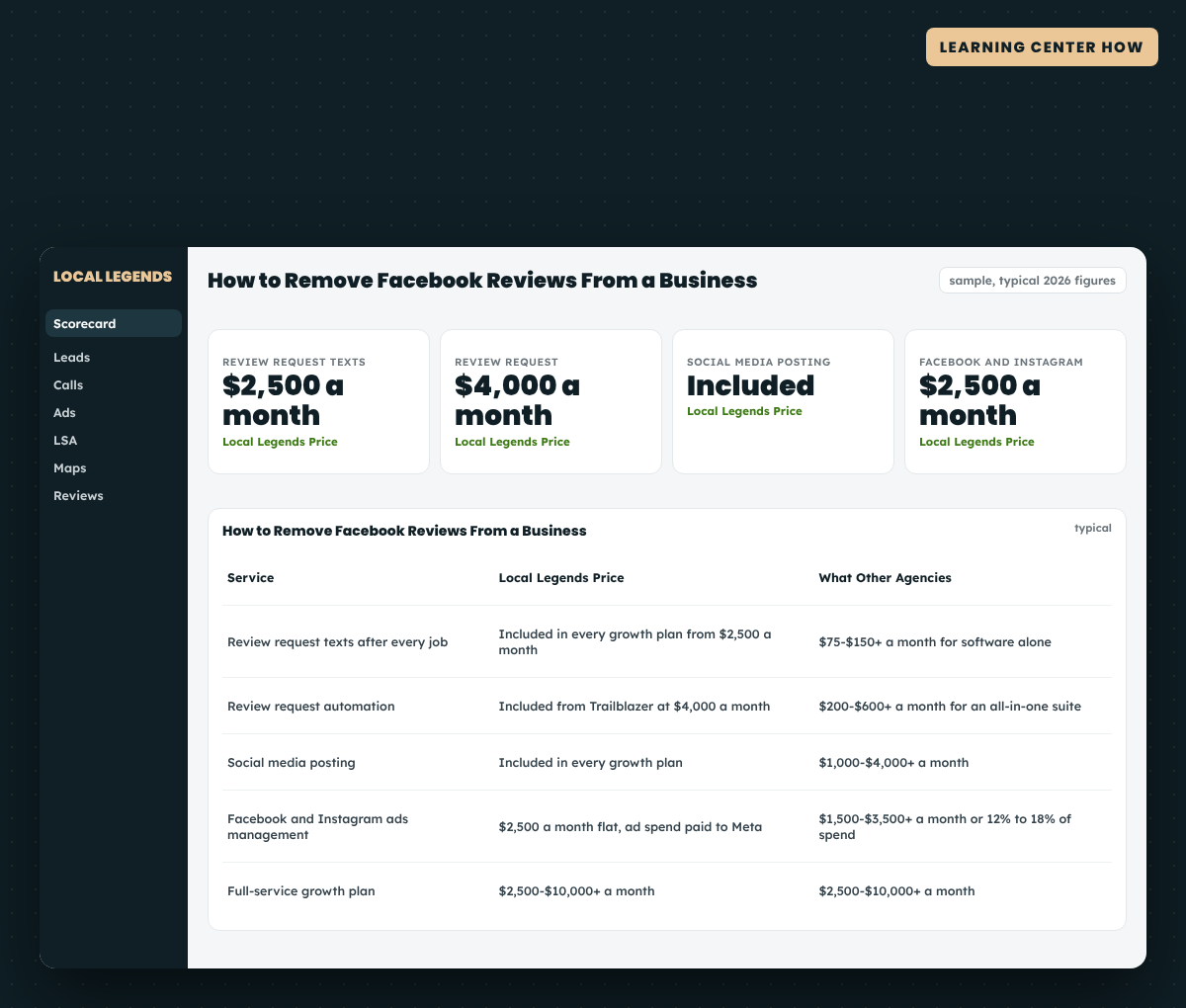
Review management for a contractor typically costs $75-$150+ a month for review software and $500-$2,500+ a month for a managed reputation agency, based on 2026 published pricing. Those are typical market ranges, not Local Legends prices. Handling Facebook reviews yourself costs only time.
| Service | Local Legends Price | What Other Agencies Typically Charge |
|---|---|---|
| Review request texts after every job | Included in every growth plan from $2,500 a month | $75-$150+ a month for software alone |
| Review request automation | Included from Trailblazer at $4,000 a month | $200-$600+ a month for an all-in-one suite |
| Social media posting | Included in every growth plan | $1,000-$4,000+ a month |
| Facebook and Instagram ads management | $2,500 a month flat, ad spend paid to Meta | $1,500-$3,500+ a month or 12% to 18% of spend |
| Full-service growth plan | $2,500-$10,000+ a month | $2,500-$10,000+ a month |
There are no setup fees and no long-term contracts, and the contractor owns the Facebook page, the Google Business Profile and every ad account. See every plan on the Local Legends pricing page.
Why ownership matters to Local Legends: founder Levi Ostlund lost $30,000+ to marketers before starting the agency, including one who disappeared, so every client keeps ownership of the website, domain, profiles, ad accounts and call data. [SOURCE: Levi Ostlund founder story and ownership policy, BRIEF.md Nov 2026]
Local Legends Marketing Reviews From Contractor CEOs Owners Who Hired Levi
Roofing and restoration owners have gone on record about working with Local Legends Marketing and founder Levi Ostlund on reviews, ads and tracking. The video testimonials are on the Local Legends reviews page [LINK: /about-us/reviews/].
Levi has been absolutely outstanding to work with over the years... His creativity, responsiveness, and deep understanding of our marketing strategy have made a huge impact." Brad Beldon, CEO, Roofing Company. Read on Local Legends
What the weekly scorecard tracks: Local Legends follows each review request through to calls, booked jobs, sold jobs and cost per booked job on a CEO scorecard, so reviews are measured as chapter one of the sale, not the finish line. [SOURCE: Local Legends weekly CEO scorecard, BRIEF.md Nov 2026]
- Kyle Scott, CEO, Roofing Company (video testimonial)
- Jim Dodson, CEO, Roofing Company (video testimonial)
- Race Allen, CEO, Precision Restoration of Texas (video testimonial)
- Brad Beldon, CEO, Roofing Company (written testimonial)
Frequently Asked Questions About Deleting Facebook Reviews Facebook Review Questions From Contractors
Can You Delete Reviews on Your Own Business Page?
No. A page admin cannot delete someone else's recommendation. You can report it, reply to it or turn off recommendations for the whole page.
If I Turn Reviews Back On, Do the Old Ones Come Back?
Yes. Turning recommendations off only hides them, so past reviews and the rating return when the setting is switched back on.
Can I Reply to a Recommendation as the Business?
Yes. Switch into the page profile and comment under the recommendation, so the reply shows the business name and logo.
Can I Turn Off Only the Negative Recommendations?
No. The reviews setting is all or nothing, so hiding one review hides every positive one too.
Why Can't Customers Leave a Review on My Facebook Page?
Recommendations may be turned off, or the page category may not support them. Turn the reviews setting on and confirm the Reviews tab shows to visitors.
Is It Illegal to Leave a Fake Review for a Business?
The FTC's final rule from August 2024 bans businesses from writing, buying or selling fake reviews, and fake posts also break Facebook's Community Standards.
Can the Reviewer See That I Reported Their Review?
No. Facebook does not tell the writer who reported a recommendation.
How Many Characters Does a Facebook Recommendation Need?
A written recommendation needs at least 25 characters, so a customer may need a short sentence about the job before Facebook accepts it.
Reviewed by Levi Ostlund, Founder, Local Legends Marketing

Turn Facebook Reviews Into Booked Jobs Book a Free Growth Audit
One bad Facebook review rarely sinks a contractor; a quiet page with no recent reviews and no replies does more damage. Local Legends Marketing reviews your Facebook page, Google Business Profile, tracking and funnel, then recommends the next step for your trade. Learn about our social media management service.
- Flat monthly fees, with no setup fees and no long-term contracts.
- A review request on every finished job through the LSA Ranker review texter.
- A CEO scorecard that follows each review and lead to the booked and sold job.
Call (936) 900-1248 or book a free growth audit online.