


Picking the Right Campaign for the Job

Google Ads Campaign Types for Contractors: Which Ones Roofers, HVAC Companies and Plumbers Should Run, How to Set Them Up and How to Optimize Them in 2026
Picking the Right Campaign for the Job
Updated November 2026 · Reviewed by Levi Ostlund, Founder
Breadcrumb: Home > Learning Center [LINK: /learning-center/] > Google Ads Campaign Types
Google Ads campaign types decide where a contractor's ads appear and how Google spends the budget: Search for people looking for a service now, Performance Max across all of Google, Demand Gen and Video for people not yet searching, Display for retargeting, and Local Services Ads, now moving into Google Ads, for pay-per-lead calls.
- Search first: it captures people asking for your service right now.
- Local Services Ads alongside: pay per valid lead at the top of Search and Maps.
- Performance Max later: once call and booking tracking can teach it what a good lead is.
- Demand Gen, Video and Display: for remodelers, roofers and HVAC companies selling bigger planned jobs.
- Shopping and App: rarely a fit for service businesses.
Free Growth Audit
Your Reviews, Radius and Response Rate vs the competitors beating you.
About Local Legends Marketing
A home service marketing agency headquartered in Conroe, Texas, with 8+ years of marketing experience, running Google Ads, Local Services Ads, local SEO, AI SEO, connected TV and review systems for contractors nationwide.
What Google Ads Campaign Types Should a Roofing Company Use? A Fit Rating for Every Type
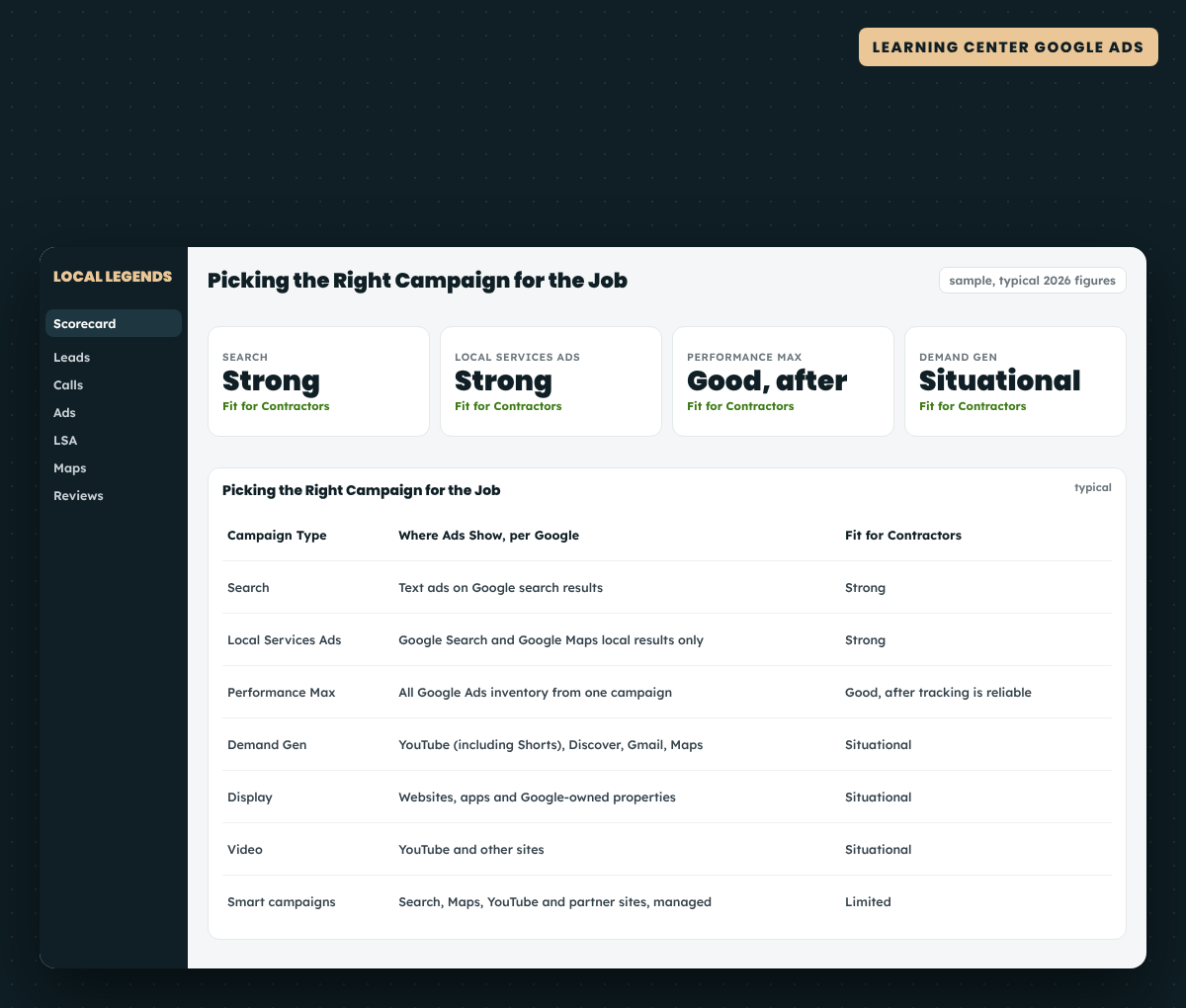
A roofing company should build around Search campaigns and Local Services Ads, then test Performance Max and remarketing once tracking is solid. Search answers "roof leak repair near me" in the moment, while the visual types support replacement jobs that take weeks to decide.
| Campaign Type | Where Ads Show, per Google | Fit for Contractors | Typical Contractor Use |
|---|---|---|---|
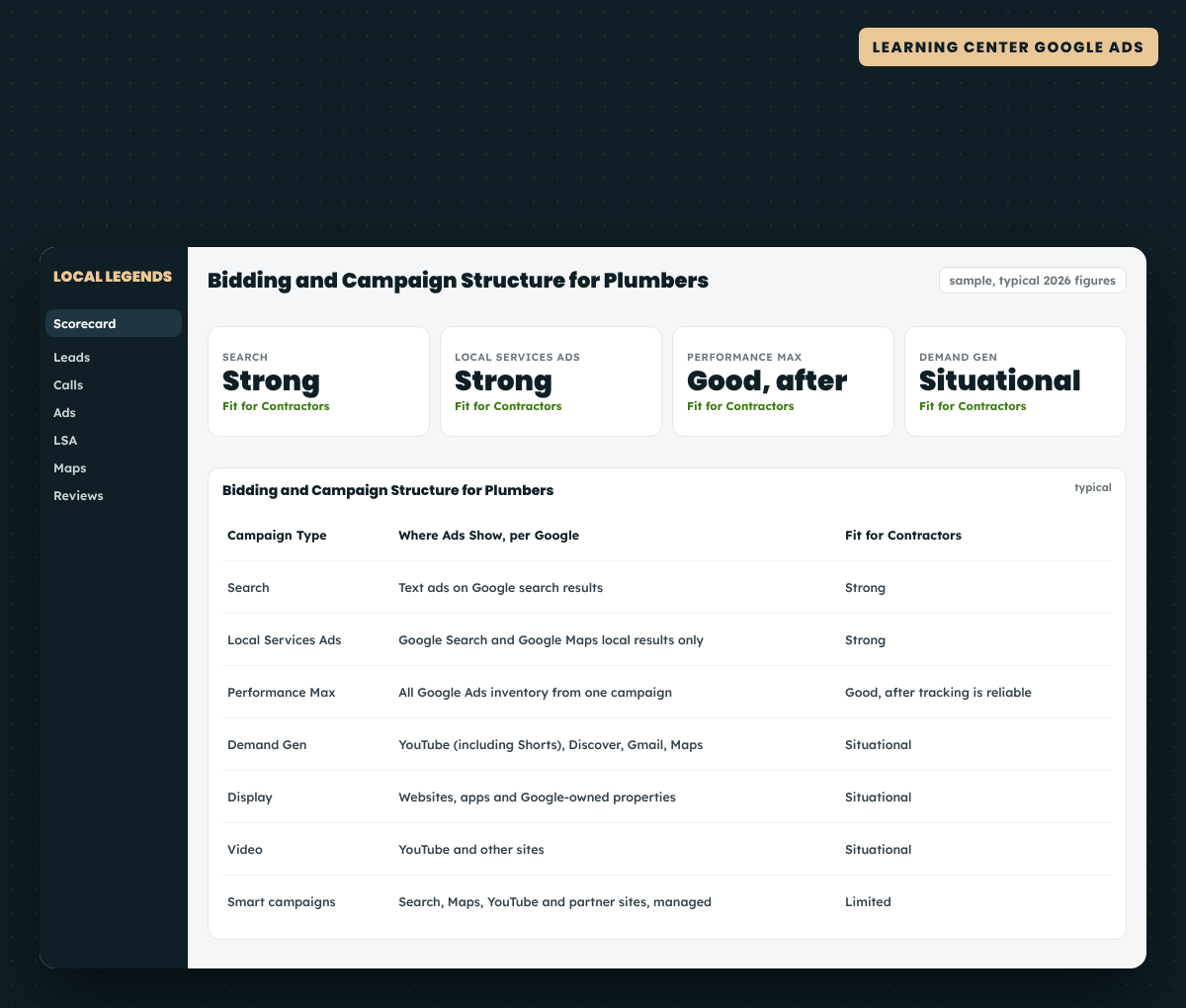
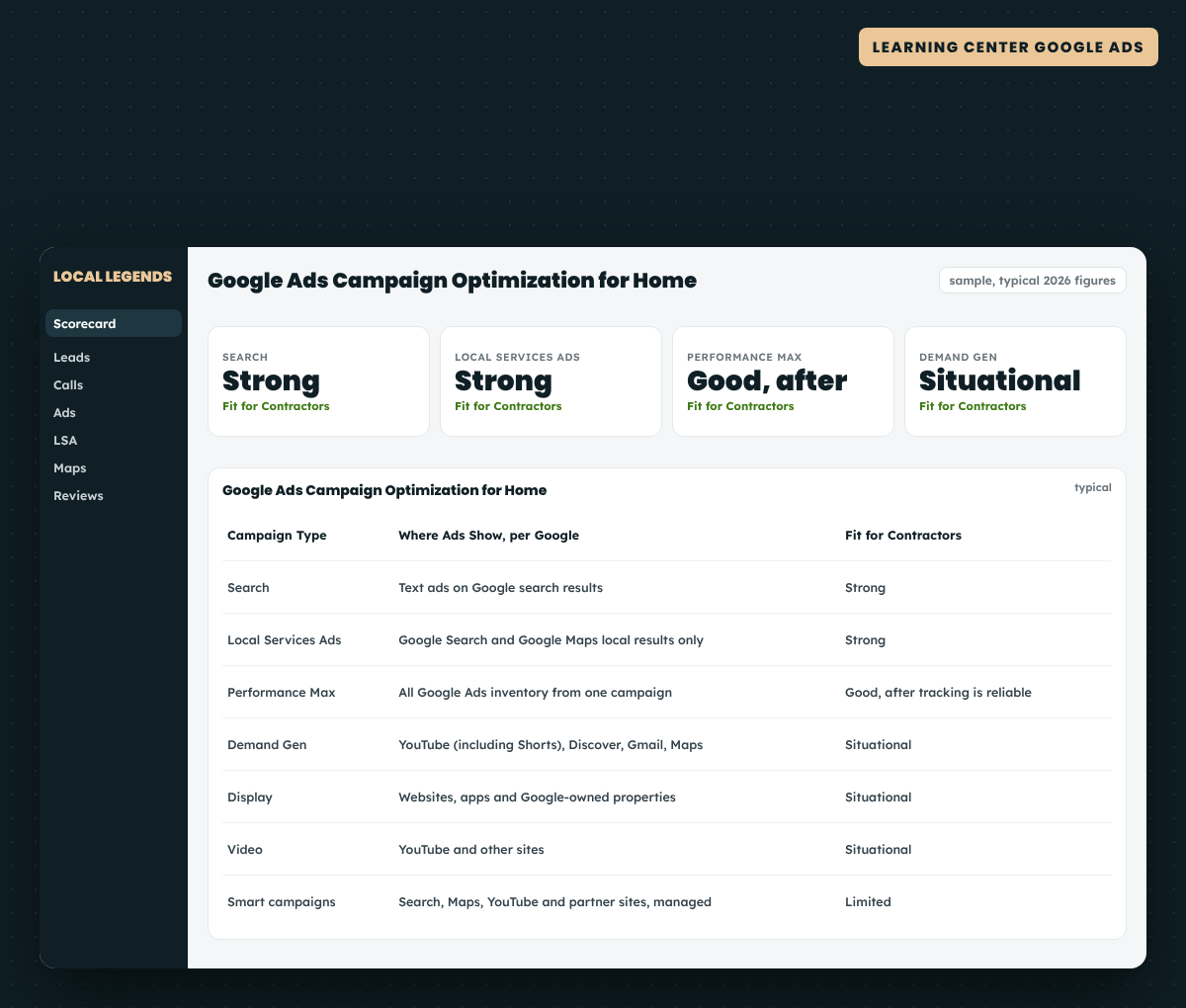
| Search | Text ads on Google search results | Strong | Repairs, emergencies, replacements and service-plus-town searches |
| Local Services Ads (Performance Max with pay-per-lead goals) | Google Search and Google Maps local results only | Strong | Phone leads charged per valid lead, not per click |
| Performance Max | All Google Ads inventory from one campaign | Good, after tracking is reliable | Extra lead volume across Search, YouTube, Display, Gmail, Discover and Maps |
| Demand Gen | YouTube (including Shorts), Discover, Gmail, Maps and the Display Network | Situational | Remodeling, roofing and HVAC replacement offers with strong visuals |
| Display | Websites, apps and Google-owned properties | Situational | Reminding past website visitors to call back |
| Video | YouTube and other sites | Situational | Brand awareness and how-it-works videos for big-ticket jobs |
| Smart campaigns | Search, Maps, YouTube and partner sites, managed by Google | Limited | Very small budgets with no time to manage |
| Shopping and App | Product listings and app promotion | Rarely | Only if the business sells products online or has an app |
Why Search Comes First for Roofers
Search shows the exact words a homeowner typed, so a roofer can see which searches lead to inspections and which waste money. That search term data later guides every other campaign type.
Search vs Performance Max vs Demand Gen for an HVAC Company Intent, Reach and Control
For an HVAC company, Search campaigns catch homeowners already asking for help, Performance Max reaches across every Google channel with less manual control, and Demand Gen builds interest with people who are not searching yet. Each one learns differently, so each needs its own budget and goal.
What Is the Difference Between Search, Performance Max and Demand Gen for an HVAC Company?
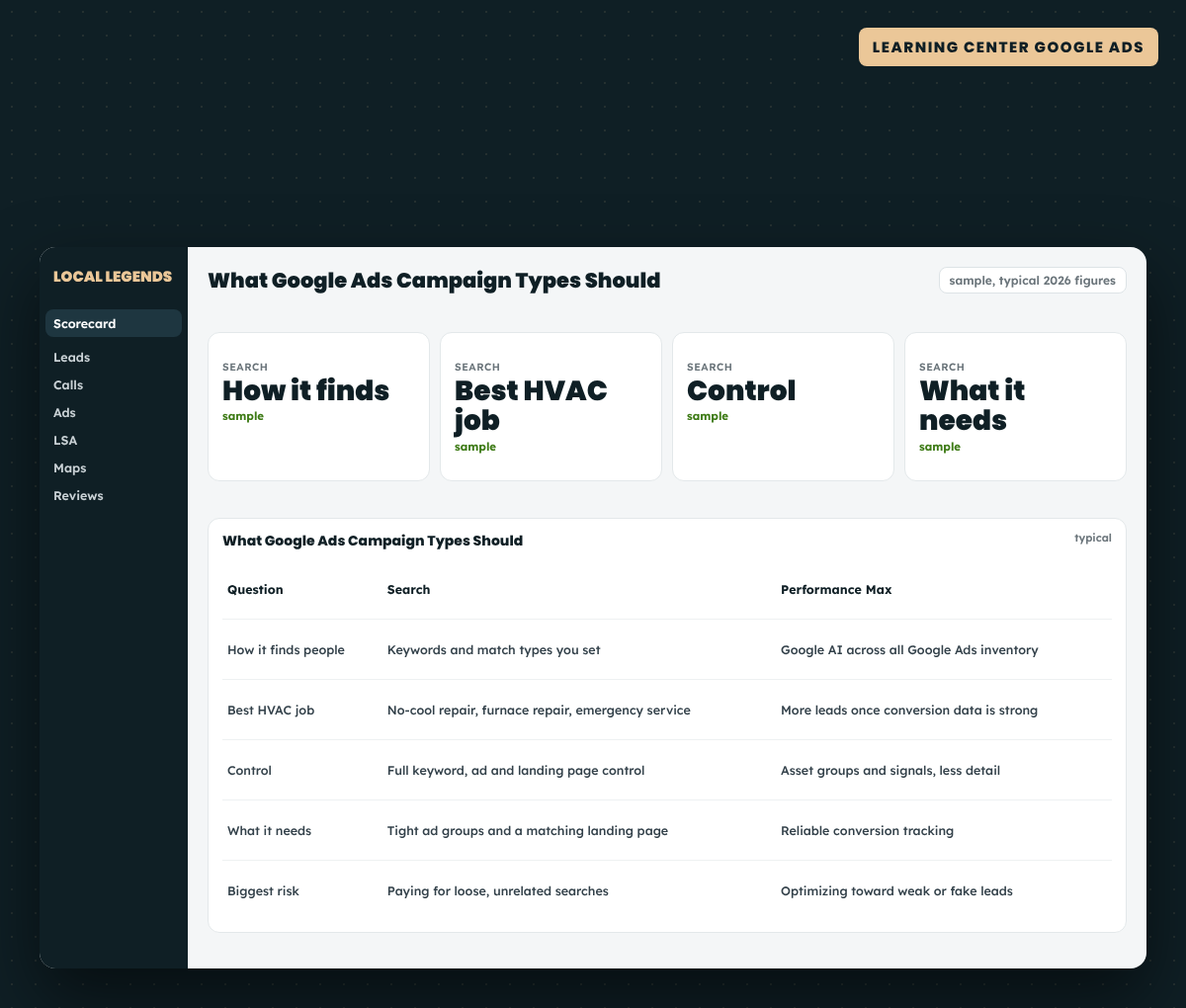
The difference is how each campaign finds people: Search uses keywords you choose, Performance Max uses Google's AI across all inventory from one campaign, and Demand Gen serves visual ads on YouTube, Discover, Gmail, Maps and the Display Network to audiences likely to care. Google describes all three on its help center.
| Question | Search | Performance Max | Demand Gen |
|---|---|---|---|
| How it finds people | Keywords and match types you set | Google AI across all Google Ads inventory | Audiences on visual feeds |
| Best HVAC job | No-cool repair, furnace repair, emergency service | More leads once conversion data is strong | Heat pump and system replacement offers |
| Control | Full keyword, ad and landing page control | Asset groups and signals, less detail | Creative, audience and budget |
| What it needs | Tight ad groups and a matching landing page | Reliable conversion tracking | Strong photos or short videos |
| Biggest risk | Paying for loose, unrelated searches | Optimizing toward weak or fake leads | Views that never turn into calls |
How to Run Them Together
Start with Search and keep it running. Add Performance Max only when calls and booked appointments are tracked, and use Demand Gen before peak seasons to warm up homeowners who will need a replacement soon.
Should My Roofing Company Turn On AI Max for Search Campaigns?
A roofing company can test AI Max for Search once its Search campaign has steady conversion tracking, because AI Max widens keyword matching, rewrites headlines and descriptions, and can send clicks to other pages on the site. Google describes it as something advertisers activate inside a Search campaign.
- Test it as an experiment, not across the whole account at once.
- Watch the search terms report for storm, insurance or DIY searches you do not want.
- Protect landing pages: final URL expansion can choose a different page, so keep every service page strong.
- Keep negative keywords current before switching it on.
- Judge by booked inspections, not by conversion counts alone.
What Is Happening to Google Local Services Ads in 2026? LSA Moves Into Google Ads
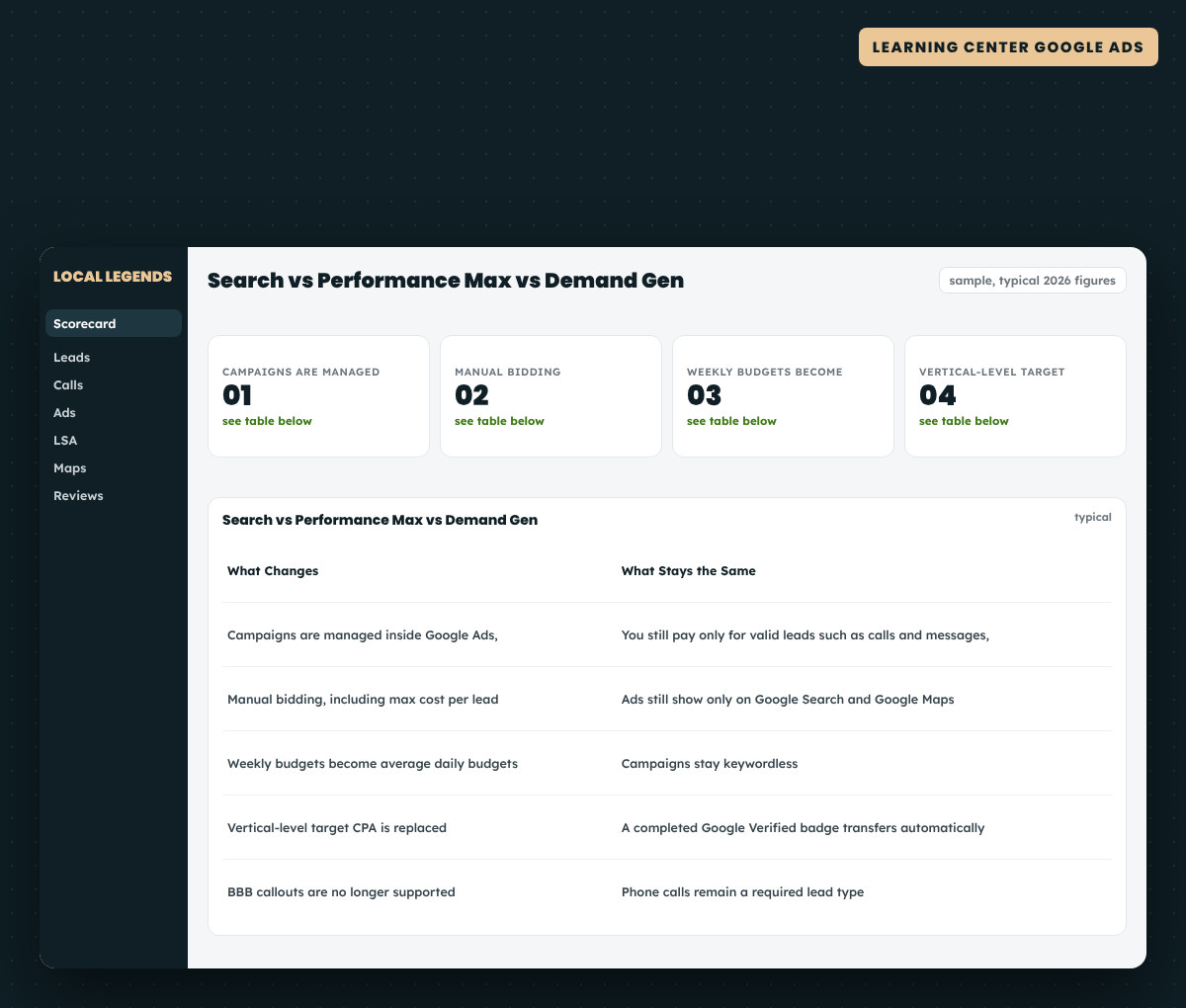
Google Local Services Ads began moving into Google Ads in August 2026 as Performance Max campaigns with pay-per-lead goals, starting with select United States home and storefront service advertisers in categories such as plumbing, HVAC and roofing. Google says the rollout continues through late 2026 and into 2027. [SOURCE: Google Ads Help, "Local Services Ads transition to Performance Max campaigns with pay-per-lead goals"]
| What Changes | What Stays the Same |
|---|---|
| Campaigns are managed inside Google Ads, and past LSA reports do not carry over | You still pay only for valid leads such as calls and messages, not clicks |
| Manual bidding, including max cost per lead, is no longer supported | Ads still show only on Google Search and Google Maps |
| Weekly budgets become average daily budgets, capped at the daily average times 30.4 in a month | Campaigns stay keywordless |
| Vertical-level target CPA is replaced by a campaign-level target | A completed Google Verified badge transfers automatically |
| BBB callouts are no longer supported | Phone calls remain a required lead type |
What a Contractor Should Do Before Migration
- Download historical lead data from the old dashboard before the switch.
- Split services into separate campaigns if you need different cost targets by job type.
- Check the daily budget that replaces your weekly budget.
- Keep answering every call, since valid leads include some missed calls.
- Allow time to settle: Google says campaigns can take up to two weeks to stabilize.
Are Local Services Ads Still Charged per Lead After the Move to Performance Max?
Yes, Local Services Ads still charge per valid lead after the move, and Google says advertisers pay only when a potential customer contacts the business directly through the ad. Phone calls are required as a lead type, messages are optional, and bookings become optional starting October 2026.
- Eligibility: a business located and operating in the United States with at least one verified Google Business Profile.
- Categories: eligible storefront and home service categories, with some advanced verification trades, such as locksmiths and garage door services, staying on the legacy portal for now.
- Charges: only valid, qualified phone leads that meet minimum call duration rules.
- Google's advice: run these campaigns alongside Search, Performance Max and Demand Gen.
Google Ads Campaign Setup: How to Set Up a Campaign for an HVAC Company Step by Step Eight Steps From Google, Built for the Trades
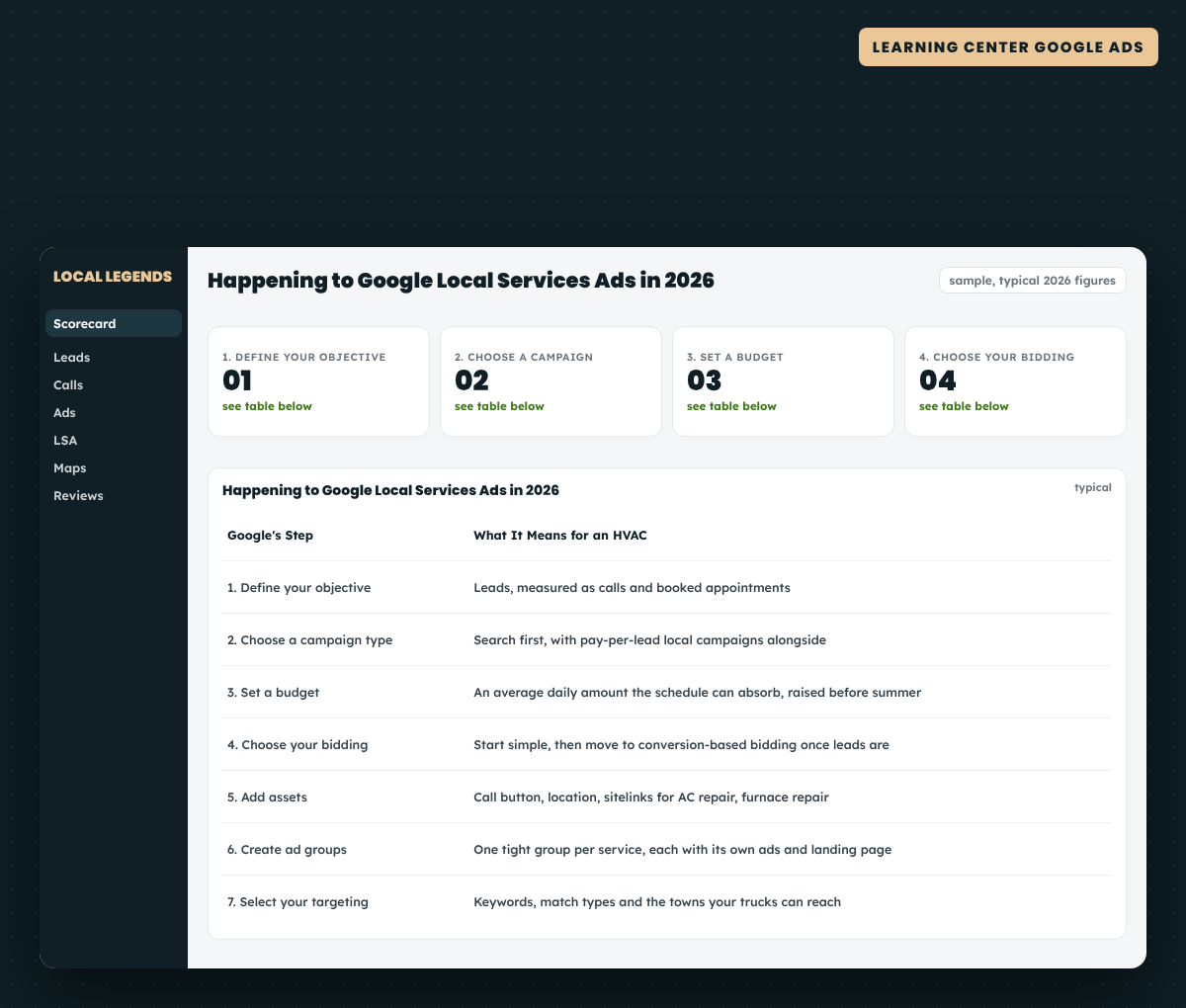
Google Ads campaign setup follows eight steps in Google's own checklist: define the objective, choose the campaign type, set a budget, choose bidding, add assets, create ad groups, select targeting and set up conversions. Each step has a contractor version that decides whether the campaign books jobs. [SOURCE: Google Ads Help, "8 steps to prepare your campaign for success"]
| Google's Step | What It Means for an HVAC Company |
|---|---|
| 1. Define your objective | Leads, measured as calls and booked appointments |
| 2. Choose a campaign type | Search first, with pay-per-lead local campaigns alongside |
| 3. Set a budget | An average daily amount the schedule can absorb, raised before summer and winter peaks |
| 4. Choose your bidding | Start simple, then move to conversion-based bidding once leads are tracked |
| 5. Add assets | Call button, location, sitelinks for AC repair, furnace repair and maintenance plans |
| 6. Create ad groups | One tight group per service, each with its own ads and landing page |
| 7. Select your targeting | Keywords, match types and the towns your trucks can reach |
| 8. Set up conversions | Calls over a set length, form fills and booked jobs from the CRM |
How Do I Set Up a Google Ads Campaign for My HVAC Company Step by Step?
An HVAC company sets up a Google Ads campaign by building conversion tracking first, then a Search campaign with one ad group per service, a matching landing page for each and a budget that fits the crew's capacity. Launching before tracking is ready leaves the account guessing which clicks matter.
- Install call tracking and conversion tags before any ad goes live.
- List services by value: system replacement, repair, maintenance and indoor air quality.
- Write two or three ads per ad group with the service and town in the headline.
- Point each ad group at its own page, not the home page.
- Set the location to the service area and review the location option.
- Add negative keywords for jobs, training, parts and DIY.
- Launch, then read the search terms report within the first week.
Location Settings Contractors Miss
Google's default location option, Presence or Interest, includes people who show interest in your area as well as people in it. A contractor who only serves local homes should review the Presence option, which limits ads to people likely to be in the targeted locations.
When the Default Makes Sense
Interest targeting can help when out-of-town owners book work for a property they own locally, such as a rental or a parent's home. Most emergency trades still choose Presence.
Bidding and Campaign Structure for Plumbers and Other Trades Structure Decides What Google Can Learn
Campaign structure tells Google what each dollar is for, so a plumbing company that splits emergency and planned work, and separates high-value services, gives its bidding clean signals instead of one blended average.
What Bid Strategy Should a New Contractor Google Ads Campaign Use?
A new contractor campaign usually starts with a simpler bid strategy until it has conversion data, then moves to conversion-based bidding such as target CPA. Google describes target CPA as an automated strategy that sets bids to get as many conversions as possible near the target cost.
- Weeks 1 to 4: a simple strategy that buys clicks within budget while tracking fills in.
- Once leads are steady: conversion-based bidding toward calls and booked appointments.
- Feed it real outcomes: booked and sold jobs imported from the CRM, not just form fills.
- Change one thing at a time, so you know what moved results.
How Should a Plumber Structure Campaigns: by Service, by City or Emergency vs Planned Work?
A plumber should structure campaigns by the value and urgency of the job first, then by area only where results differ. Emergency drain and leak calls behave nothing like repiping or tankless water heater installs, so they need different budgets, ads and schedules.
- Emergency campaign: burst pipe, clogged drain and leak searches, with call assets and full-hour schedules.
- Planned work campaign: water heater replacement, repiping and sewer line work, with landing pages that explain options.
- High-value service campaign: tankless or sewer replacement with its own budget so it never runs out.
- Area splits: only for towns with clearly different costs or results.
- Brand campaign: a small budget for your company name, if competitors bid on it.
Google Ads Campaign Optimization for Home Service Contractors Booked Jobs Over Scores
Google Ads campaign optimization for a contractor means steady changes that lower the cost per booked job: pruning wasted searches, sharpening ads and landing pages, shifting budget to winners and feeding real outcomes back to Google. Clicks and impressions are the start of the story, not the scoreboard.
How Do I Optimize a Google Ads Campaign That Is Spending but Not Booking Jobs?
A campaign that spends without booking jobs needs a review of search terms, landing pages, call handling and conversion tracking, in that order. Most problems show up in one of those four places.
- Search terms: add negatives for searches that never fit.
- Landing pages: match the page to the ad and make calling one tap.
- Call handling: listen to recordings and check missed calls by hour.
- Conversion tracking: confirm only real leads are counted, not page views or short calls.
- Budget: move money from campaigns with high cost per booked job to the ones that win.
- Ads: test new headlines with the service, the town and a reason to call now.
What Does Google Ads Optimization Score Mean, and Should I Apply Every Recommendation?
Optimization score is Google's 0% to 100% estimate of how well an account is set up to perform, and applying recommendations raises it, but Google presents it as an estimate rather than a promise. A contractor should apply only the recommendations that fit the business.
- Usually worth a look: adding assets, fixing disapproved ads and adding missing conversion tracking.
- Review carefully: broad match expansion, budget increases and automatic changes.
- Turn off auto-apply for anything that changes keywords or budgets without review.
- Judge every change by cost per booked job a few weeks later.
How Many Campaigns Should a Small Contractor Run With $3,000 a Month?
A small contractor with $3,000 a month in ad spend usually runs two to three campaigns, because spreading a small budget across many campaigns starves each one of data. One strong Search campaign plus pay-per-lead local campaigns covers most of the demand.
- Search campaign: the top two or three services, each in its own ad group.
- Pay-per-lead local campaign: calls from the top of Search and Maps.
- Optional third: a small remarketing campaign once the site has steady traffic.
- Skip for now: Performance Max and Demand Gen until tracking and budget can support them.
Tracking, Ownership and the Cost of Running Google Ads Campaigns What Campaigns Need Before They Launch
Every Google Ads campaign type depends on two things the contractor should control: conversion tracking that counts real leads and an account owned by the business. Without them, automated campaigns optimize toward the wrong goal and the history leaves with the agency.
What Conversions Should a Contractor Track Before Launching Performance Max?
A contractor should track calls over a set length, qualified form fills and booked jobs before launching Performance Max, because Performance Max optimizes toward whatever the account counts as a conversion. Counting page views or very short calls teaches it to find more of the wrong thing.
- Calls from ads and the website, with a minimum length.
- Form fills that reach the CRM, not just the thank-you page.
- Booked appointments and sold jobs imported from the CRM through offline conversion imports.
- Values on each conversion, so a replacement job counts for more than a tune-up.
Learn how calls are connected to the CRM on the call tracking and CRM integration page.
Should I Let My Agency Set Up Campaigns in Their Google Ads Account or Mine?
Campaigns should always be built in the contractor's own Google Ads account, with the agency linked through its manager account, so the campaigns, conversion history and data stay with the business. Google says a client account still owns its data and can unlink a manager at any time.
- Your account, your billing: ad spend goes straight to Google from your card.
- Admin access stays with you.
- The agency links in rather than asking for your login.
- Landing pages and tracking numbers should also be yours.
How Much Does It Cost to Have Google Ads Campaigns Set Up and Managed for a Contractor?
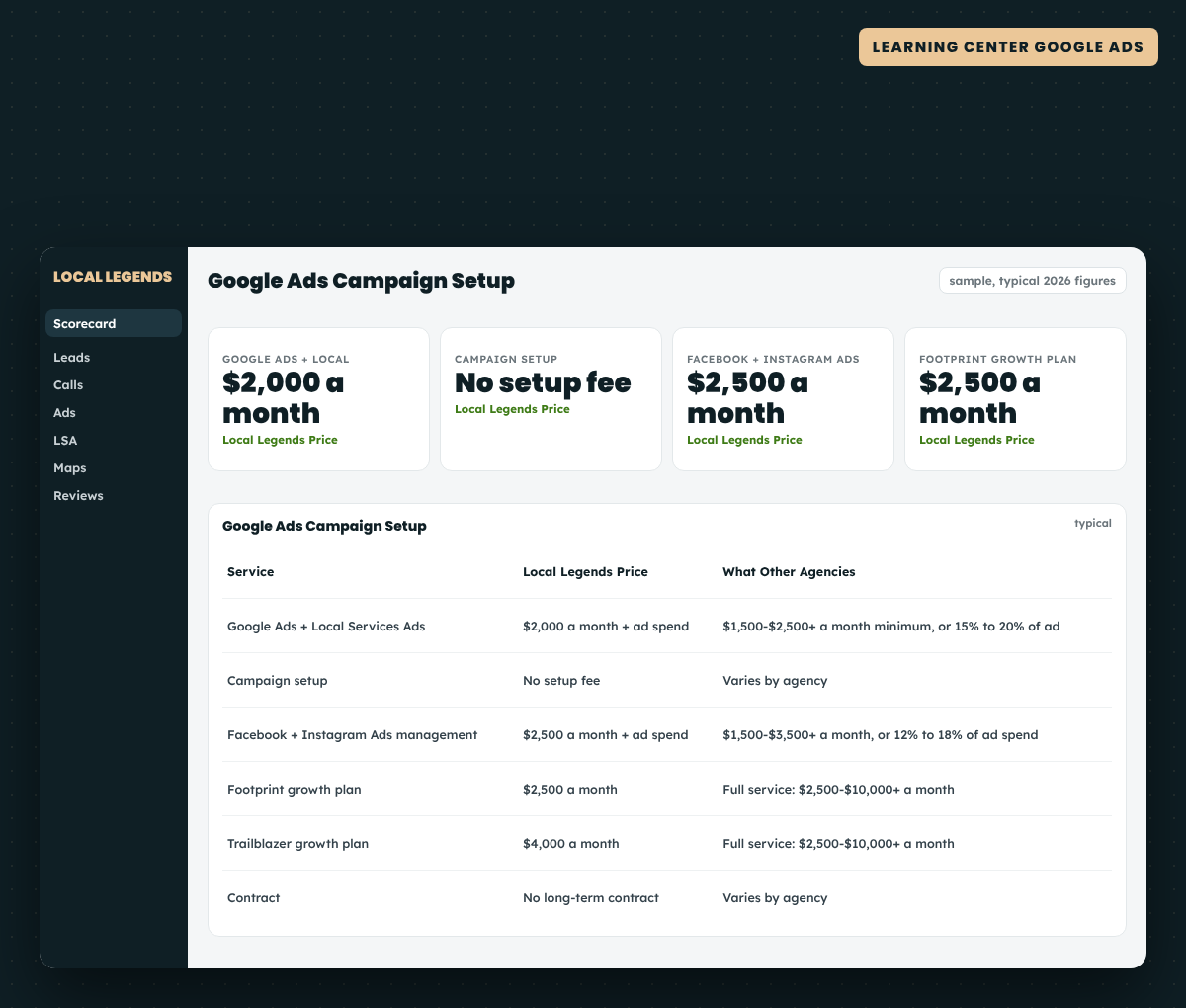
Having Google Ads campaigns set up and managed typically costs a contractor $1,500-$2,500+ a month or 15% to 20% of ad spend at other agencies, plus the ad spend itself, based on 2026 published agency pricing. Local Legends charges a flat fee with no setup charge.
| Service | Local Legends Price | What Other Agencies Typically Charge |
|---|---|---|
| Google Ads + Local Services Ads management, campaign landing pages and monthly GBP optimization included | $2,000 a month + ad spend | $1,500-$2,500+ a month minimum, or 15% to 20% of ad spend |
| Campaign setup | No setup fee | Varies by agency |
| Facebook + Instagram Ads management | $2,500 a month + ad spend | $1,500-$3,500+ a month, or 12% to 18% of ad spend |
| Footprint growth plan (Google Ads + LSA, pages, GBP posts, monthly scorecard) | $2,500 a month | Full service: $2,500-$10,000+ a month |
| Trailblazer growth plan (adds Bing and Facebook ads, backlinks, weekly scorecard) | $4,000 a month | Full service: $2,500-$10,000+ a month |
| Contract | No long-term contract | Varies by agency |
Every plan is listed on the Local Legends pricing page, and the full service is described on the Google Ads management page.
Not sure which campaigns your account should be running? Book a free growth audit online for a campaign-by-campaign review of types, structure, tracking and cost per booked job.
Local Legends Marketing Reviews From Contractor CEOs What Trade Owners Say
Roofing and restoration CEOs have shared on the record what it is like to work with Local Legends Marketing founder Levi Ostlund, a former concrete and landscaping business owner who lost more than $30,000 to marketers who did not deliver and later served as CMO of Amstill Roofing. [SOURCE: Local Legends founder bio, Levi Ostlund]
Years of roofing campaigns: Brad Beldon, CEO of a roofing company, wrote that Levi's creativity, quick responses and command of the marketing strategy made a major difference for his company. [SOURCE: Local Legends written testimonial, Brad Beldon, CEO, Roofing Company]
Levi has been absolutely outstanding to work with over the years... His creativity, responsiveness, and deep understanding of our marketing strategy have made a huge impact." Brad Beldon, CEO, Roofing Company. Read on Local Legends
Kyle Scott and Jim Dodson, both roofing company CEOs, and Race Allen, CEO of Precision Restoration of Texas, have also recorded video testimonials.
Frequently Asked Questions About Google Ads Campaign Types Quick Answers on Campaigns
How Many Google Ads Campaign Types Are There?
Google's campaign type page lists Search, Performance Max, Display, Video, App and Shopping, and its help center also covers Demand Gen and Smart campaigns. Pay-per-lead local campaigns are a Performance Max goal.
What Is the Best Google Ads Campaign Type for Lead Generation?
For most contractors, Search campaigns and pay-per-lead local campaigns produce the most direct leads, because both reach people actively looking for a service.
Are Smart Campaigns Good for a Small Plumbing Company?
Smart campaigns are simple but limited. Google generates keywords from themes and manages bidding, and each campaign supports one landing page, so most plumbers outgrow them quickly.
Is Performance Max Good for Contractors?
Performance Max can add leads for contractors with strong conversion tracking, but without real lead data it can spend on low-quality traffic across Display and YouTube.
Do Shopping or App Campaigns Make Sense for Home Service Companies?
Rarely. Shopping campaigns are built for retailers with product feeds, and App campaigns promote mobile apps, so neither fits a typical service business.
What Is Demand Gen in Google Ads?
Demand Gen is a visual campaign type that runs on YouTube, including Shorts, Discover, Gmail, Maps and the Google Display Network, built to create interest with people not yet searching.
How Often Should a Google Ads Campaign Be Optimized?
Weekly for search terms, budgets and call quality, with bigger structure and landing page changes reviewed monthly against cost per booked job.
Can I Change Campaign Types Later?
Yes, by launching a new campaign of the type you want and pausing the old one, which keeps the old campaign's history in the account for comparison.
Reviewed by Levi Ostlund, Founder, Local Legends Marketing

Build Google Ads Campaigns That Book Jobs for Your Home Service Company Start With a Free Growth Audit
Local Legends Marketing sets up and manages Google Ads campaigns and Local Services Ads for contractors at a flat $2,000 a month, with campaign landing pages included, accounts in your name and every campaign judged by booked and sold jobs.
- Call:(936) 900-1248
- Home office: 481 Stephen F Austin Dr, Conroe, TX 77302
- Next step: book a free growth audit for a review of your campaign types and setup