


Set Up a Facebook Company Page

How to Set Up a Facebook Company Page for a Home Service Business: A Step-by-Step Guide for Roofers, HVAC Companies, Plumbers and Remodelers
Facebook Business Page Setup From Local Legends Marketing
Updated November 2026 · Reviewed by Levi Ostlund, Founder
Breadcrumb: Home > Learning Center [LINK: /learning-center/] > How to Set Up a Facebook Company Page
To set up a Facebook company page, log in to a personal Facebook account, open Pages, choose Create, enter the business name and up to three categories, then add contact details, photos and a call button. For a contractor, the page is free and takes under an hour to build well.
- Name it exactly like your Google Business Profile: same business name, phone and address.
- Pick contractor categories: such as Roofing Contractor, HVAC Contractor or Plumber.
- Add a Call Now button: most homeowners want to talk, not message.
- Post real job photos: before and after shots from your own crews.
- Turn on recommendations: so customers can review the business.
Free Growth Audit
Your Reviews, Radius and Response Rate vs the competitors beating you.
About Local Legends Marketing
A home service marketing agency headquartered in Conroe, Texas, with 8+ years of marketing experience, running Google Ads, Local Services Ads, local SEO, AI SEO, connected TV and review systems for contractors nationwide.
How Do You Set Up a Facebook Company Page for a Contracting Business? Eight Steps From Login to the First Post
A contracting business sets up its Facebook company page from a personal profile, because Facebook requires a real person to create and manage every page. The steps below follow the current Meta flow, with what a roofer, HVAC company or plumber should enter at each step.
Step 1: Log In to Your Personal Facebook Account
Use the owner's own profile or a trusted manager's on a computer or the Facebook app. The personal profile stays private; it only acts as the key to the page.
Step 2: Open Pages and Choose Create
Open the menu, select Pages, then Create new Page. Meta for Business has the same starting point.
Step 3: Enter the Business Name and Categories
Type the legal or trade name exactly as it appears on the Google Business Profile and trucks. Choose up to three categories, such as Roofing Contractor, Gutter Service and Siding Contractor.
Step 4: Write the Bio
State the trade, the main services and the towns you serve in one or two sentences, for example "Licensed HVAC repair and installation for Mesa, Gilbert and Chandler homeowners."
Step 5: Add Contact Details and Hours
Enter the phone number, website, email, service area and hours. A service-area business can hide the street address and list towns instead.
Step 6: Upload a Profile Photo and Cover Photo
Use the logo for the profile photo and a real crew, truck or finished job for the cover photo. Real photos build more trust than stock images.
Step 7: Choose the Action Button
Pick Call Now for emergency trades, or Book Now or Send Message for planned projects. Link it to the number or booking page you track.
Step 8: Set a Username, Then Publish the First Posts
Claim a custom username so the page URL is clean, then post three or four real jobs before inviting anyone to follow.
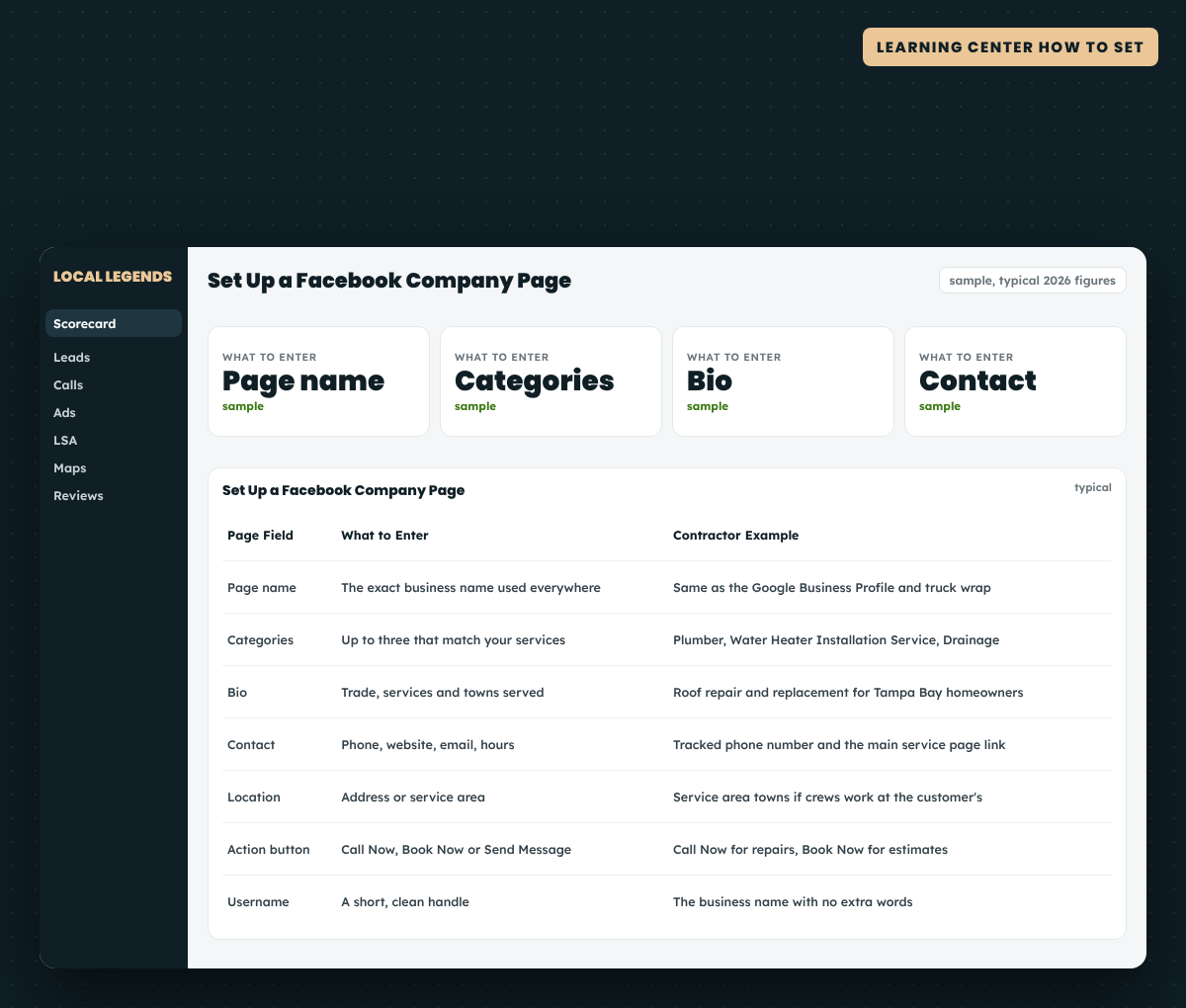
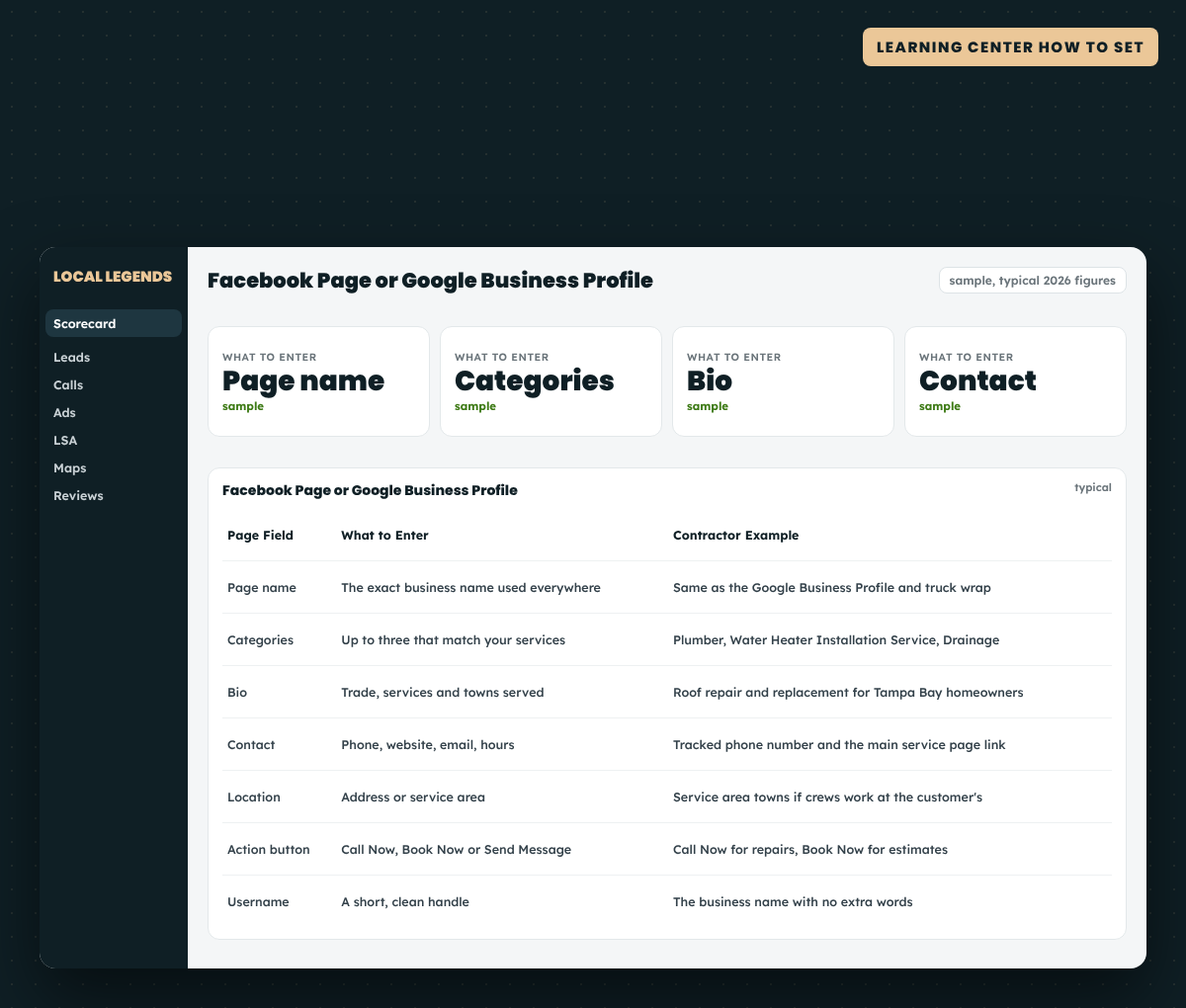
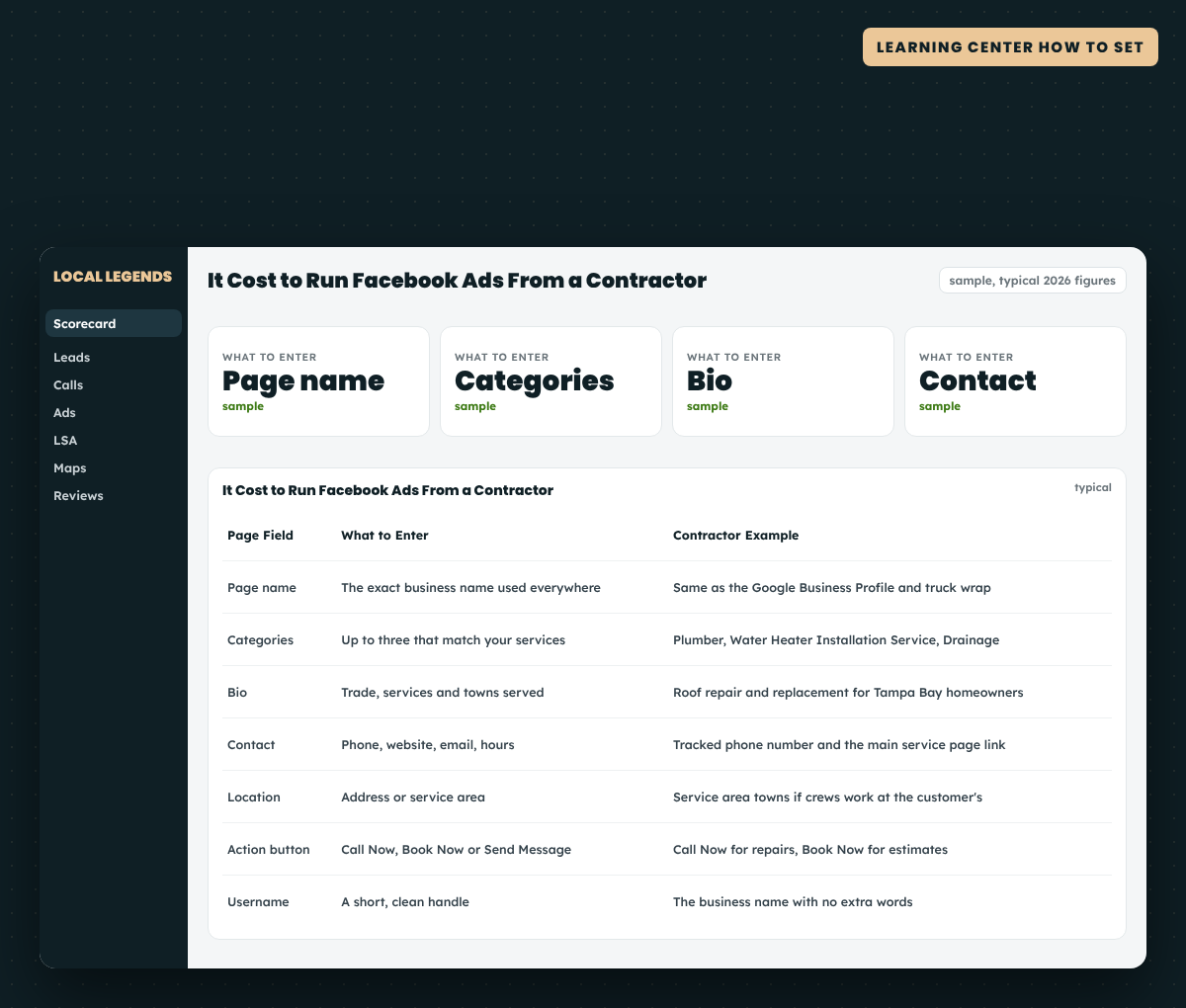
| Page Field | What to Enter | Contractor Example |
|---|---|---|
| Page name | The exact business name used everywhere | Same as the Google Business Profile and truck wrap |
| Categories | Up to three that match your services | Plumber, Water Heater Installation Service, Drainage Service |
| Bio | Trade, services and towns served | "Roof repair and replacement for Tampa Bay homeowners" |
| Contact | Phone, website, email, hours | Tracked phone number and the main service page link |
| Location | Address or service area | Service area towns if crews work at the customer's home |
| Action button | Call Now, Book Now or Send Message | Call Now for repairs, Book Now for estimates |
| Username | A short, clean handle | The business name with no extra words |
Should a Contractor Use a Personal Profile or a Facebook Business Page?
A contractor should run the business on a Facebook business page and use a personal profile only to log in and manage it. The Google AI Overview noted in November 2026 that Meta's terms direct commercial activity to a page, not a personal profile.
- Ads: only a business page can run structured Facebook and Instagram ads.
- Meta Business Suite: connects to the page for scheduling, inbox and insights.
- Team access: a page lets you give office staff, estimators or an agency their own roles.
- Business details: hours, services, call buttons and recommendations live on the page.
- Personal limits: a profile tops out at 5,000 friends and can lose tools when used for business.
I Just Started a Painting Company. What Should My Facebook Page Include Before I Post?
A new painting company's Facebook page should include a clear logo, a bio naming services and towns, working contact details, a call button and a list of specific services before the first post goes up. The Google AI Overview gave that checklist in November 2026.
- Logo and cover photo: a sharp logo and a real finished room or exterior.
- Services listed one by one: interior walls, exteriors, trim, cabinets, decks.
- Before and after photos: shown side by side, with short prep or spraying clips.
- Crew introduction: who will be in the home and how prep and cleanup work.
- Permission first: ask homeowners before posting their house or street.
How to Post on Facebook and Instagram at the Same Time Link the Accounts Once, Then Publish to Both
Contractors post on Facebook and Instagram at the same time by linking the Facebook page and the Instagram business account, then publishing from Meta Business Suite or with cross-posting turned on. Linking takes a few minutes and saves hours every month.
How Do I Post on Facebook and Instagram at the Same Time for My HVAC Business?
An HVAC business can post to both platforms at once in Meta Business Suite by selecting the Facebook page and the Instagram account in the same post composer. The Google AI Overview described that flow in November 2026.
- Connect both accounts: link the Instagram business account to the Facebook page in Meta Business Suite.
- Create the post: choose Create Post and tick both Facebook and Instagram.
- Upload media: add the photo or video, write one caption and adjust each preview if needed.
- Publish or schedule: post now or schedule the week's posts in one sitting.
- Check each version: hashtags and links behave differently on each platform.
How Do I Share a Post From Facebook to Instagram for My Plumbing Company?
A plumbing company shares from Facebook to Instagram either by turning on the Instagram option while creating each post or by setting automatic sharing in Accounts Center. The Google AI Overview noted in November 2026 that text-only posts cannot go to Instagram.
- Open the Facebook app and start a new post on the page.
- Add a photo or video, then write the caption.
- Turn on the Instagram sharing option on the post screen.
- Tap Post to publish to both.
- For automatic sharing, open Accounts Center, choose Connected experiences, then Sharing across profiles.
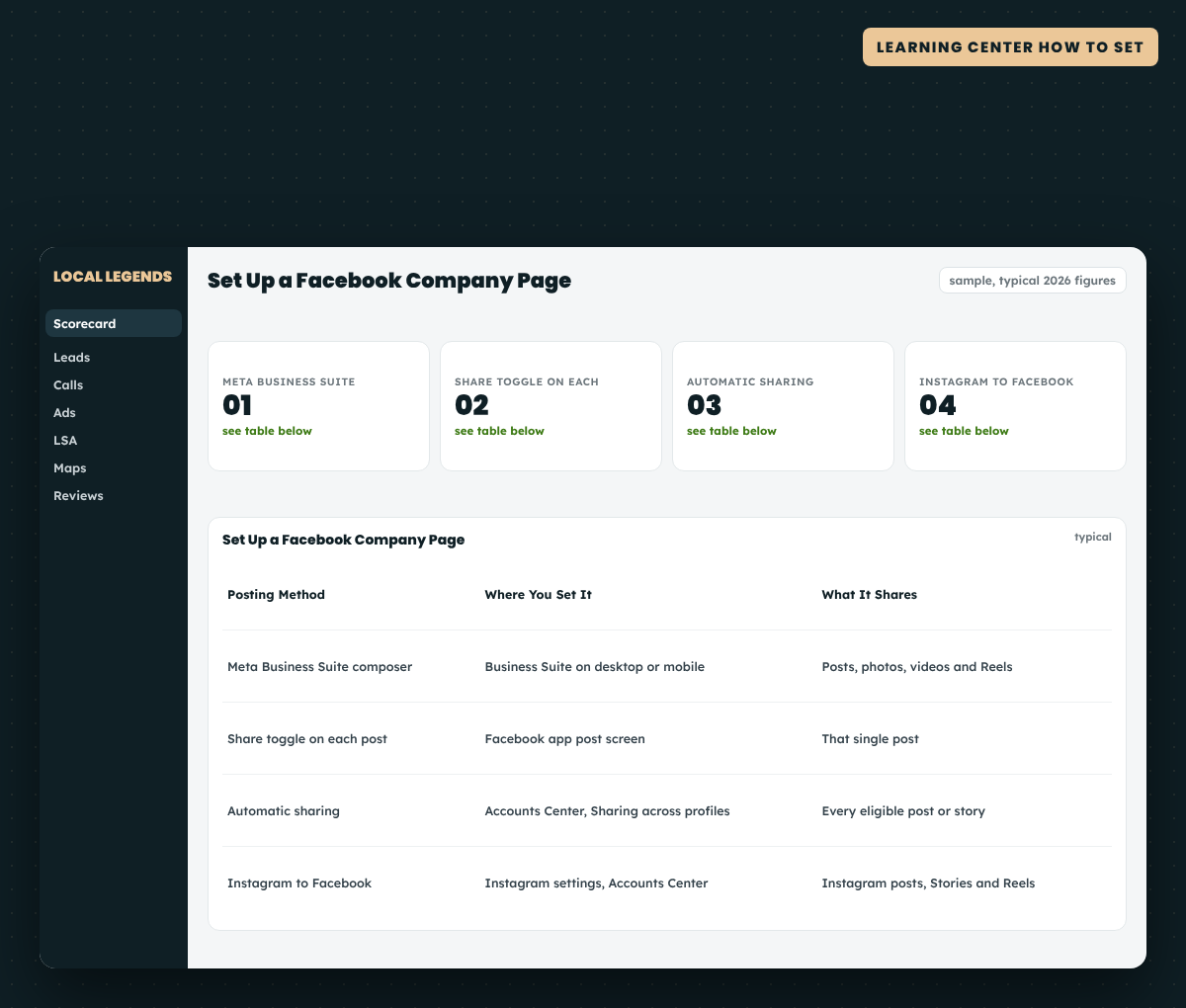
| Posting Method | Where You Set It | What It Shares | Things to Know |
|---|---|---|---|
| Meta Business Suite composer | Business Suite on desktop or mobile | Posts, photos, videos and Reels | Best for scheduling a full week at once |
| Share toggle on each post | Facebook app post screen | That single post | Post must include a photo or video |
| Automatic sharing | Accounts Center, Sharing across profiles | Every eligible post or story | Easy to forget it is on |
| Instagram to Facebook | Instagram settings, Accounts Center | Instagram posts, Stories and Reels | Same accounts must be linked |
How to Use Facebook for a Business That Sells Home Services Posts Build Trust and Ads Bring the Leads
A home service business uses Facebook best by posting real work several times a week to build trust and running local ads to bring in leads. Organic posts show homeowners the company is active; ads put the offer in front of people who do not follow the page yet.
How Local Legends handles social posting: the Footprint plan includes 2 Google Business Profile posts and 2 social posts a week, and Sasquatch and Legend raise that to 3 of each, built from the contractor's own job photos. [SOURCE: Local Legends plan inclusions, BRIEF.md Nov 2026]
What Should a Contractor Post on a Facebook Business Page Each Week?
A contractor should post about 3 to 4 times a week on Facebook, mixing finished projects, crew updates, customer reviews and quick tips. The Google AI Overview gave that rhythm in November 2026 and said real job-site updates build more trust than polished graphics.
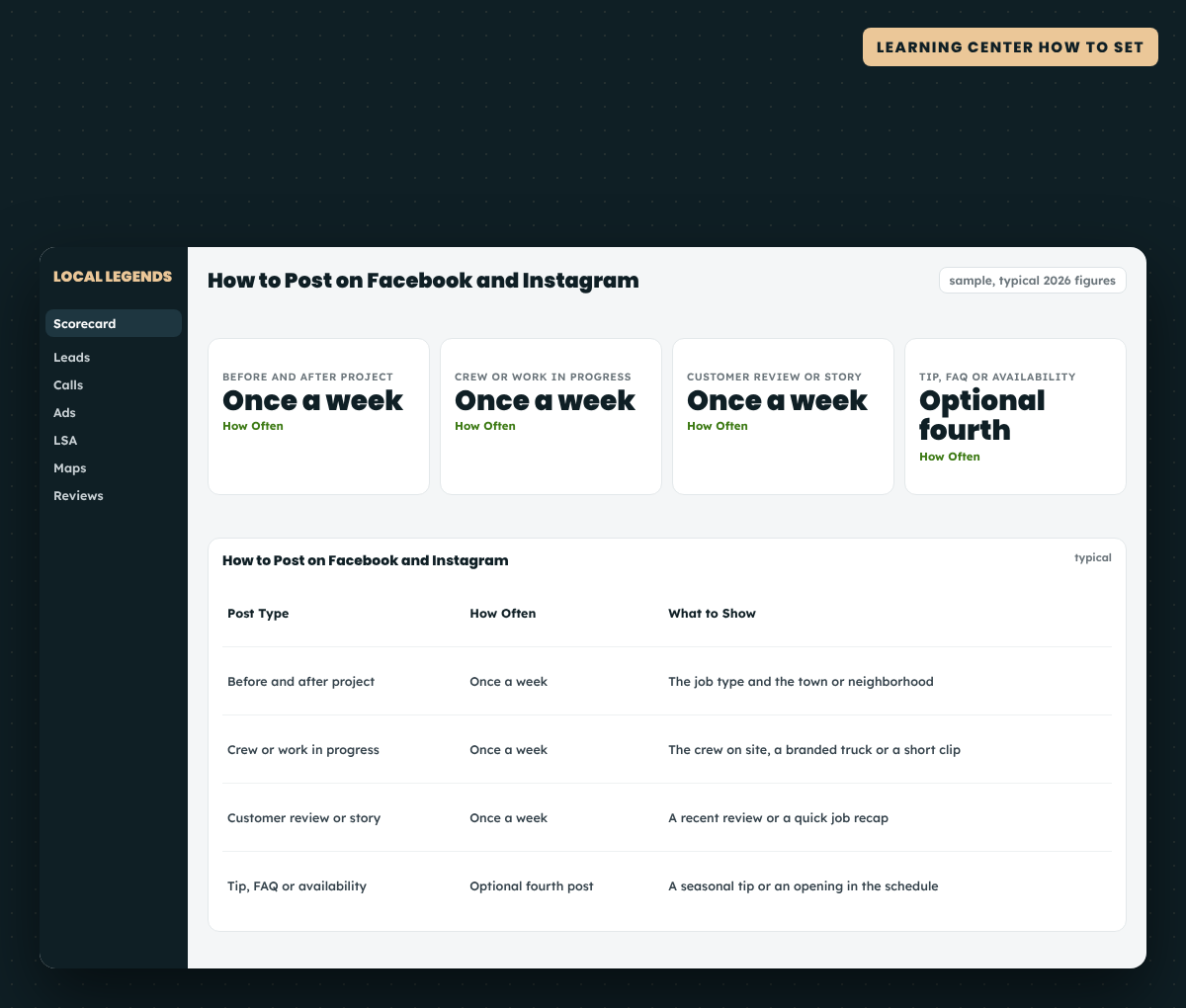
| Post Type | How Often | What to Show | Why It Works |
|---|---|---|---|
| Before and after project | Once a week | The job type and the town or neighborhood | Local homeowners recognize the street and the work |
| Crew or work in progress | Once a week | The crew on site, a branded truck or a short clip | Shows the company is active and in demand |
| Customer review or story | Once a week | A recent review or a quick job recap | Social proof answers whether results are reliable |
| Tip, FAQ or availability | Optional fourth post | A seasonal tip or an opening in the schedule | Answers questions homeowners ask before hiring |
Why Doesn't Anyone See My Contractor Facebook Posts?
Organic reach on Facebook business pages is low because feeds are crowded, paid posts get priority and posts with little early engagement get limited distribution. The Google AI Overview explained those causes in November 2026.
- Use short video and Reels: these formats are often favored over static images.
- Ask simple questions: quick comment prompts beat generic sales lines.
- Reply to comments fast: each reply adds engagement to the post.
- Vary formats: mix photos, short clips and reviews instead of repeating one style.
- Boost or advertise the best posts: paid reach is the reliable way to reach homeowners who do not follow you.
Should My HVAC Company Post Financing Offers and Seasonal Specials on Its Facebook Page?
An HVAC company should post financing offers and seasonal specials on Facebook, because people scrolling are usually planning work, not facing a breakdown. The Google AI Overview said in November 2026 that monthly payment examples help homeowners consider a replacement.
- Time offers to the weather: furnace checks before cold weather, AC tune-ups before summer.
- State the details plainly: who qualifies and when the offer ends.
- Balance offers with value: mix specials with install photos and maintenance tips.
- Check the ad rules before boosting: Meta applies extra requirements to financing ads.
How Do You Ask for Facebook Reviews From Contractor Customers? Turn On Recommendations, Then Ask Right After the Job
A contractor gets Facebook reviews by turning on recommendations, copying the page's review link and asking customers right after a job goes well. The Google AI Overview recommended asking at that moment in November 2026, not during a problem or an upsell.
- Turn recommendations on: check that the Reviews tab is enabled and visible on the page.
- Copy the direct link: open the Reviews tab and copy the URL from the browser.
- Ask when they praise you: a compliment on the job is the natural moment.
- Send it personally: a short text, email or Messenger note with their first name.
- Never pay for reviews: and never ask only happy customers through a filter.
How a Customer Leaves a Facebook Review on a Business Page
The Google AI Overview listed these steps in November 2026. Sending them with the link makes the request easy.
- Sign in to Facebook and open the business page.
- Click Reviews, or look under More if the tab is hidden.
- Choose Yes when asked whether you recommend the business.
- Write at least 25 characters, and add photos if you like.
- Set the audience to Public, then click Post.
Why a Customer Cannot Find the Review Option
The page may have recommendations turned off, or the page category may not support reviews. Facebook also limits each person to one review per page.
Google Reviews Still Come First for Most Trades
Facebook reviews help when homeowners look you up on social media, but Google reviews drive Map Pack rankings, so most contractors ask for Google first and Facebook second.
What Local Legends uses for review requests: every growth plan includes the LSA Ranker review texter, which sends customers a review request by text after the job. [SOURCE: Local Legends plan inclusions, BRIEF.md Nov 2026] See how it works on our review management page.
Facebook Page or Google Business Profile: Which Matters More for a Contractor? Google Catches the Search, Facebook Builds the Story
For most contractors, the Google Business Profile matters more than the Facebook page, because it shows up when homeowners search to hire right now. The Google AI Overview said in November 2026 to set up and verify the Google profile first, then use Facebook for visibility and proof.
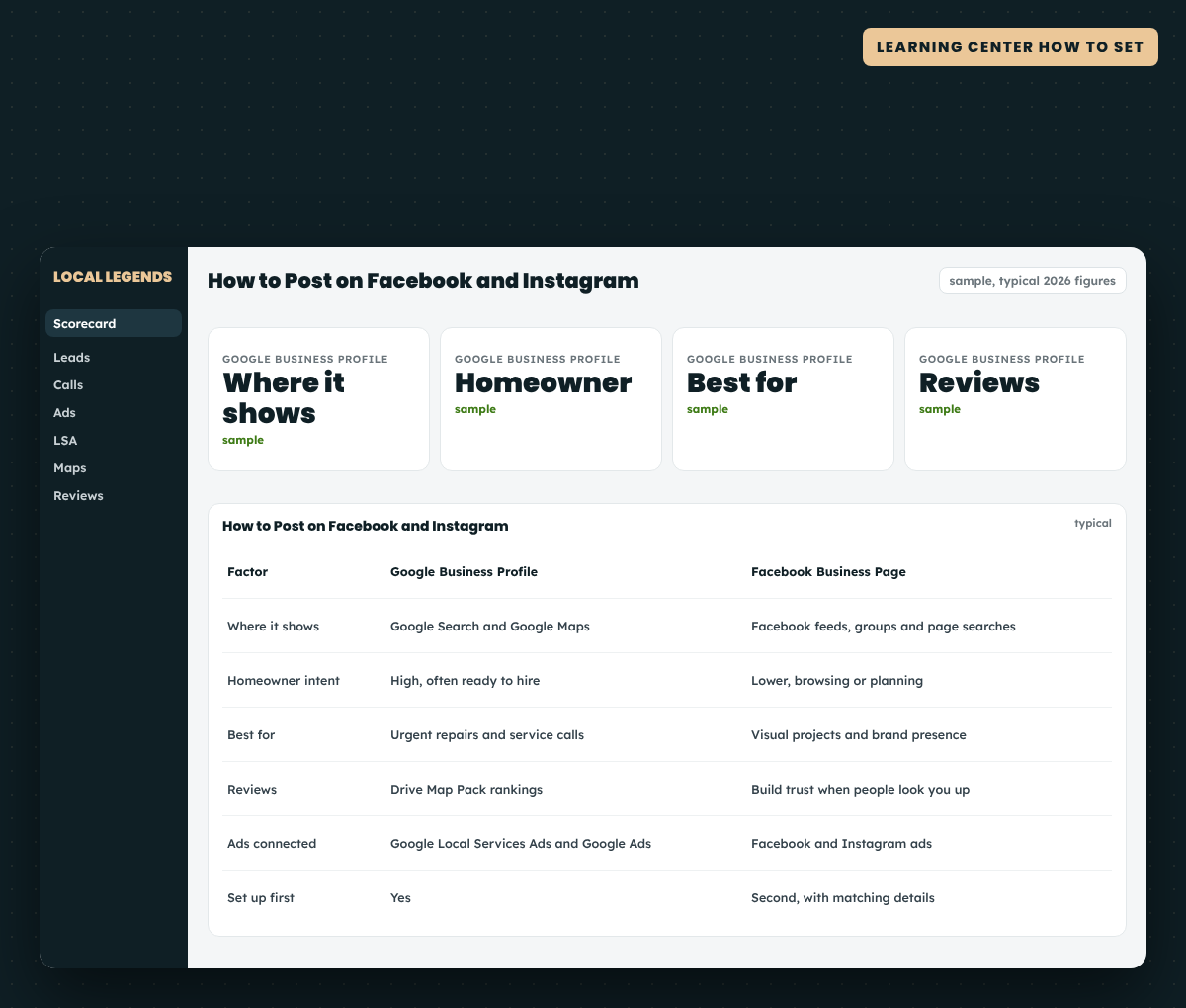
| Factor | Google Business Profile | Facebook Business Page |
|---|---|---|
| Where it shows | Google Search and Google Maps | Facebook feeds, groups and page searches |
| Homeowner intent | High, often ready to hire | Lower, browsing or planning |
| Best for | Urgent repairs and service calls | Visual projects and brand presence |
| Reviews | Drive Map Pack rankings | Build trust when people look you up |
| Ads connected | Google Local Services Ads and Google Ads | Facebook and Instagram ads |
| Set up first | Yes | Second, with matching details |
How Much Does It Cost to Run Facebook Ads From a Contractor Page? The Page Is Free, the Ads Are Not
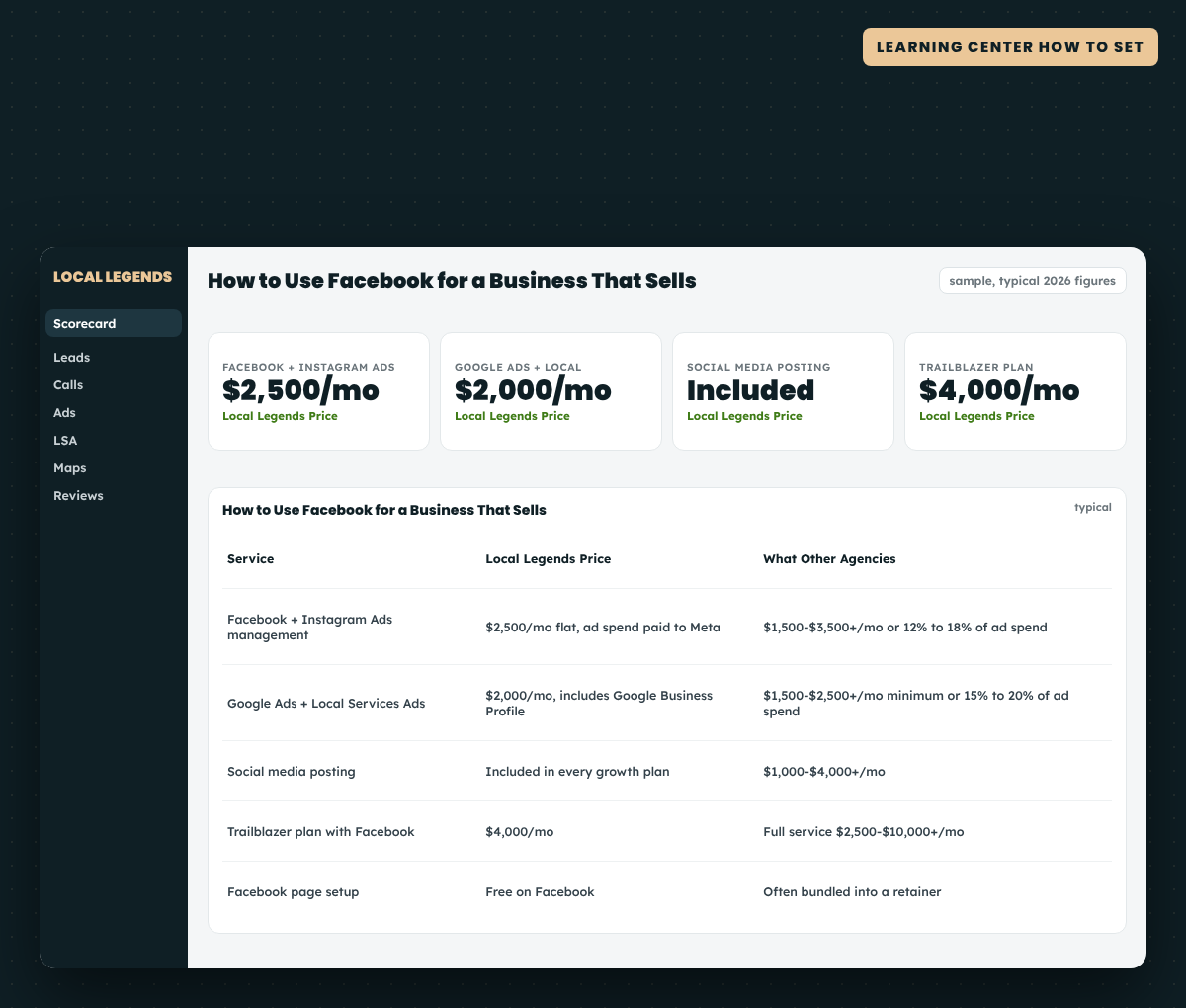
Running Facebook ads from a contractor page typically costs $1,500-$3,000+ a month in ad spend, with typical cost per lead of $35-$120+ depending on the trade, offer and local competition. The Google AI Overview reported those typical figures in November 2026, plus agency fees of a typical $600-$1,500+ a month.
| Service | Local Legends Price | What Other Agencies Typically Charge |
|---|---|---|
| Facebook + Instagram Ads management | $2,500/mo flat, ad spend paid to Meta | $1,500-$3,500+/mo or 12% to 18% of ad spend |
| Google Ads + Local Services Ads management | $2,000/mo, includes Google Business Profile optimization | $1,500-$2,500+/mo minimum or 15% to 20% of ad spend |
| Social media posting | Included in every growth plan | $1,000-$4,000+/mo |
| Trailblazer plan with Facebook and Instagram ads | $4,000/mo | Full service $2,500-$10,000+/mo |
| Facebook page setup | Free on Facebook | Often bundled into a retainer |
There are no setup fees and no long-term contracts, and the contractor owns the Facebook page, ad account and pixel data. See every plan on the Local Legends pricing page.
What Is the Best Way to Use Facebook to Get Leads for a Home Service Business?
The best way to get leads for a home service business on Facebook is a Leads campaign in Meta Ads Manager, built around one service at a time and aimed at the towns you actually serve. The Google AI Overview described that setup in November 2026.
- Choose the Leads objective: so Meta optimizes for quote requests and calls.
- One service per ad set: roofing, bathroom remodels or water heaters, not everything at once.
- Start with a test budget: many contractors begin around a typical $20-$70+ a day.
- Target your real service radius: and exclude areas the crews do not cover.
- Use your own photos and short videos: before and after shots beat stock images.
- Call the lead back fast: Facebook leads cool quickly.
Read more on our Facebook ads page.
Protecting a Contractor Facebook Page From Hacks and Lockouts Ownership, Admin Roles and Account Security
A contractor protects its Facebook company page by keeping at least two trusted admins, turning on two-factor authentication and owning the page and ad account in the company's own Meta business portfolio. Losing access during a busy season stops both posts and ads.
Why Local Legends insists clients own every account: founder Levi Ostlund lost $30,000+ to marketers before starting the agency, including one who simply disappeared. Today every client owns the website, domain, Google Business Profile, ad accounts and call data. [SOURCE: Levi Ostlund founder story and ownership policy, BRIEF.md Nov 2026]
My Contractor Facebook Page Got Hacked. How Do I Get It Back?
A contractor whose Facebook page was hacked should secure the email account first, recover the personal profile, then use Facebook's page recovery form or Meta Business Support. The Google AI Overview gave that order in November 2026.
- Secure your email: reset its password and remove unknown recovery options.
- Recover the personal profile: use Facebook's hacked account tool on a familiar device.
- Lock it down: change the password, turn on two-factor authentication and remove unknown sessions.
- Report the page: submit the page recovery form if you lost admin access.
- Ask another admin: a second trusted admin can often restore access faster.
Is Meta Verified for Business Worth It for a Small Contractor?
Meta Verified for Business is usually not worth it for a small contractor unless Facebook and Instagram are a main source of leads or the business has an impersonation problem. The Google AI Overview said in November 2026 that the badge is not an algorithm boost.
- Worth considering: when you run Meta ads and rely on the page for estimates and messages.
- Worth considering: when fake accounts copy your name or photos.
- Usually not needed: when you post occasionally and most work comes from referrals.
- Better first spend: real job photos, reviews and well-targeted ads.
Local Legends Marketing Reviews From Contractor CEOs Owners Who Hired Levi Ostlund
Roofing and restoration owners have gone on record about working with Local Legends Marketing and founder Levi Ostlund on ads, social media and tracking. Video testimonials are on the Local Legends reviews page [LINK: /about-us/reviews/].
Levi has been absolutely outstanding to work with over the years... His creativity, responsiveness, and deep understanding of our marketing strategy have made a huge impact." Brad Beldon, CEO, Roofing Company. Read on Local Legends
- Kyle Scott, CEO, Roofing Company (video testimonial)
- Jim Dodson, CEO, Roofing Company (video testimonial)
- Race Allen, CEO, Precision Restoration of Texas (video testimonial)
- Brad Beldon, CEO, Roofing Company (written testimonial)
Frequently Asked Questions About Setting Up a Facebook Company Page Facebook Business Page Questions From Contractors
Can I Create a Facebook Page for My Company?
Yes. Any business can create a free Facebook page from a personal account, and contractors can list services, service areas and a call button on it.
Is There a Difference Between a Regular Facebook Page and a Business Page?
A Facebook page is the business presence, while a personal profile is for a person. People often say "business page" to mean a page; the page is what connects to ads and Meta Business Suite.
How Much Does It Cost to Set Up a Facebook Business Page?
Setting up a Facebook business page is free. Costs start only when the company boosts posts or runs ads.
Does a Facebook Business Page Have to Be Connected to a Personal Account?
Yes, a real person's account creates and manages the page, but the personal profile's name and posts are not shown on the page.
Can I Create a Facebook Business Page on Mobile?
Yes. The Facebook app offers the same Pages menu and Create option as the desktop site.
How Do I Add an Office Manager or Agency to My Facebook Page?
Add them through page access in settings or through Meta Business Suite, giving each person only the access they need. Keep ownership in your own business portfolio.
Should My Facebook Page Name Match My Google Business Profile?
Yes. Matching the name, phone and address across Facebook and Google keeps your business details consistent for homeowners and search engines.
How Often Should a Contractor Post on Facebook?
About 3 to 4 times a week is a common target, but steady real job posts matter more than volume.
Reviewed by Levi Ostlund, Founder, Local Legends Marketing

Turn Your Facebook Company Page Into a Lead Source Start With a Free Growth Audit
A well-built Facebook company page is the starting line; booked jobs come from the ads, reviews and follow-up behind it. Local Legends Marketing reviews your page, Google Business Profile, tracking and funnel, then recommends the next step for your trade. Learn about our social media management service.
- Flat monthly fees, with no setup fees and no long-term contracts.
- You own every account, including the Facebook page and ad account.
- A CEO scorecard that follows each lead to the booked and sold job.
Call (936) 900-1248 or book a free growth audit online.