


A Plain Answer for Roofers, HVAC Companies

Can You Remove Facebook Reviews? What a Contractor Can Delete, What Stays Up and Why Google Reviews Do More for SEO
A Plain Answer for Roofers, HVAC Companies and Plumbers
Updated November 2026 · Reviewed by Levi Ostlund, Founder
Can you remove Facebook reviews from your business page? Not the ones customers leave: a contractor can delete a review it wrote itself, report one that breaks Facebook's rules or turn the whole reviews section off, but it cannot erase a fair complaint.
The bigger point for home service owners is search. Google says more reviews and positive ratings can help local ranking, so steady Google reviews usually matter more than any single Facebook post.
- Your own review on another page: you can delete it.
- A customer's review on your page: you cannot delete it; you can reply to it.
- A review that breaks the rules: you can report it and wait for Facebook's decision.
- Every review at once: you can turn reviews off, which hides the good ones too.
- For SEO: Google reviews feed the Map Pack; Facebook reviews do not appear there.
Free Growth Audit
Your Reviews, Radius and Response Rate vs the competitors beating you.
About Local Legends Marketing
A home service marketing agency headquartered in Conroe, Texas, with 8+ years of marketing experience, running Google Ads, Local Services Ads, local SEO, AI SEO, connected TV and review systems for contractors nationwide.
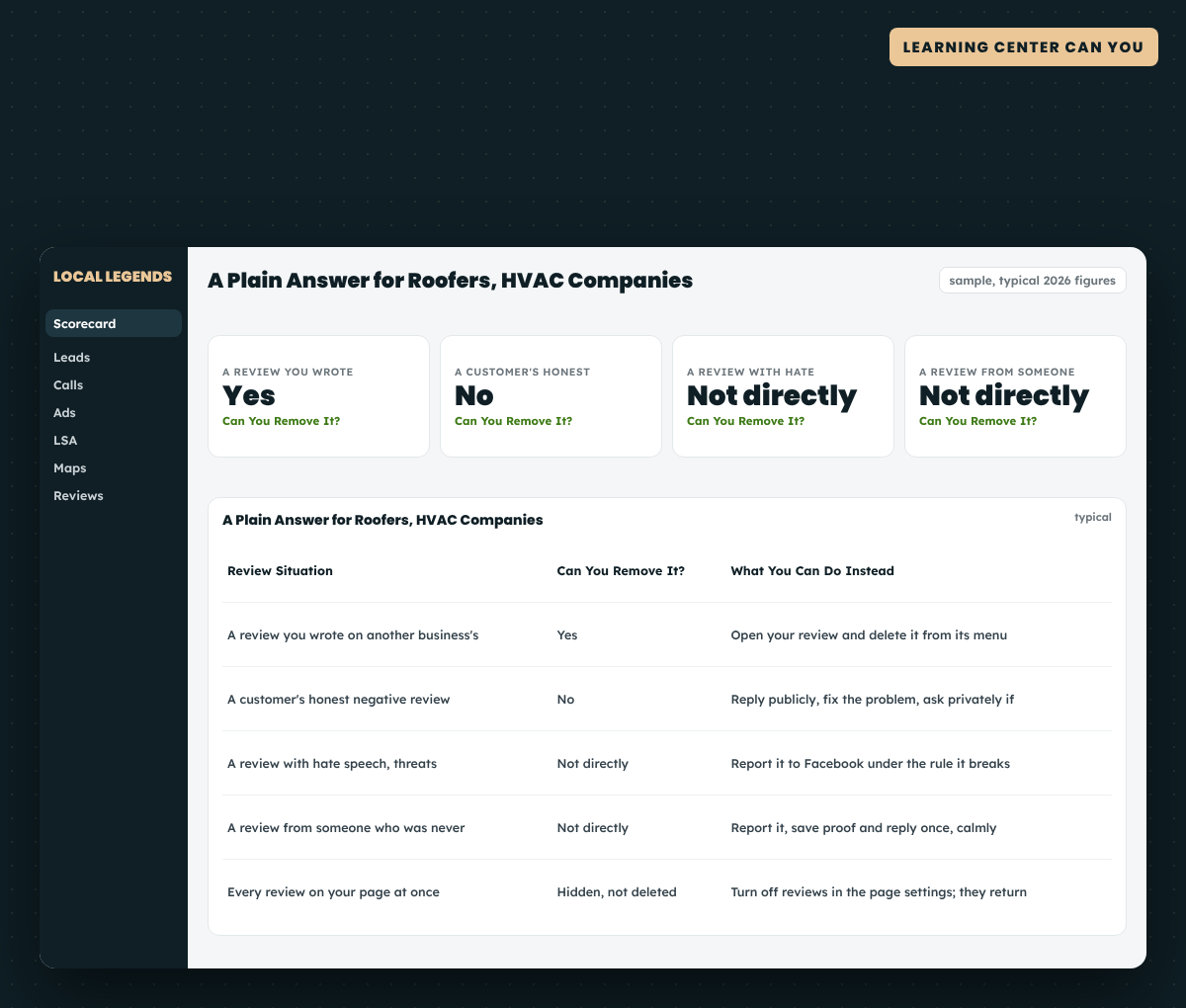
Can I Delete Facebook Reviews Left on My Business Page? Who Wrote It Decides What You Can Do
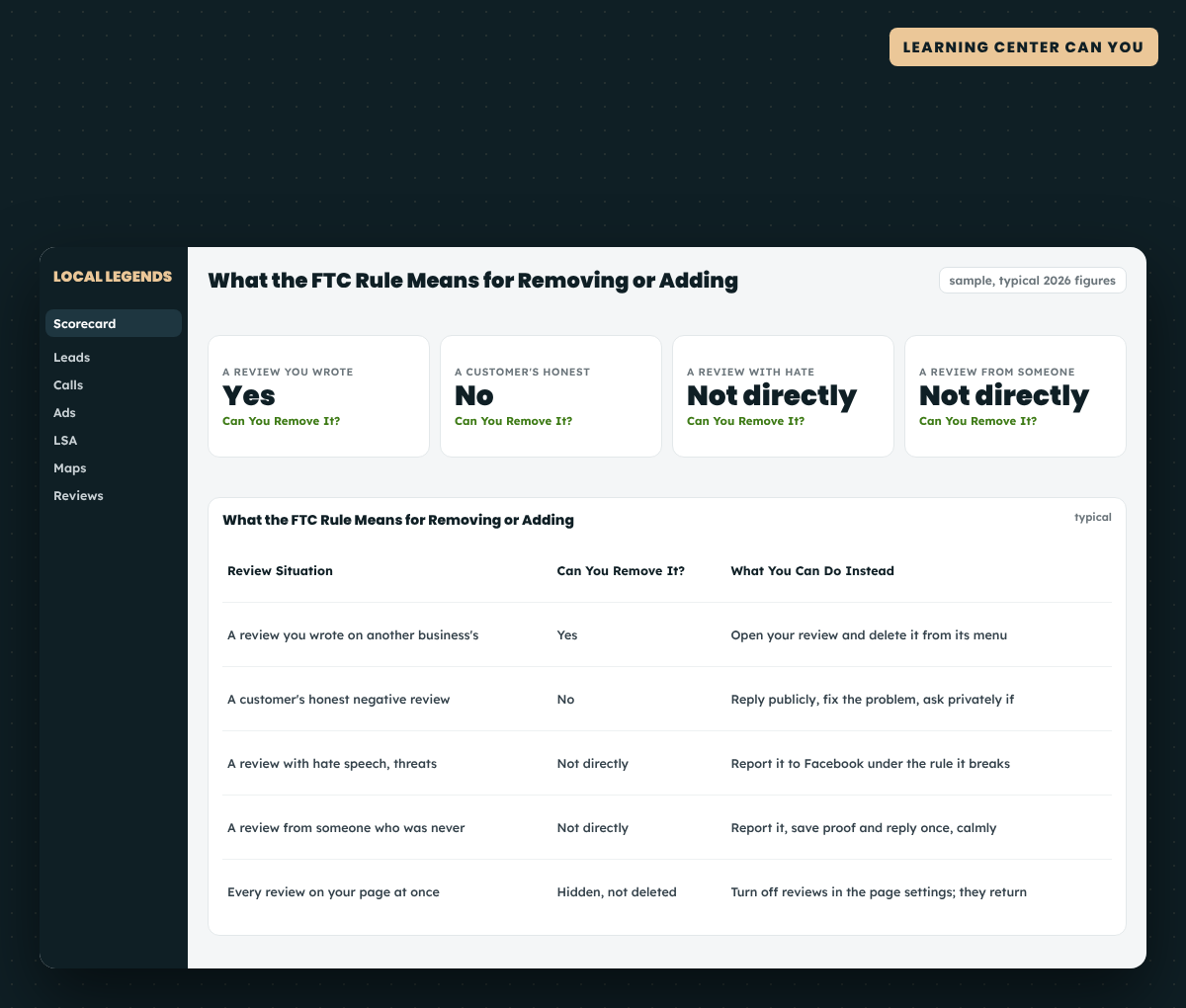
A Facebook business page owner cannot delete reviews that customers or other people leave, because Facebook treats those posts, called recommendations, as the reviewer's content. What the owner can do depends on who wrote the review and whether it breaks a rule.
| Review Situation | Can You Remove It? | What You Can Do Instead |
|---|---|---|
| A review you wrote on another business's page | Yes | Open your review and delete it from its menu |
| A customer's honest negative review on your page | No | Reply publicly, fix the problem, ask privately if they will update it |
| A review with hate speech, threats or spam | Not directly | Report it to Facebook under the rule it breaks |
| A review from someone who was never a customer | Not directly | Report it, save proof and reply once, calmly |
| Every review on your page at once | Hidden, not deleted | Turn off reviews in the page settings; they return if you turn reviews back on |
[SOURCE: Facebook help center behavior as captured in Google result snippets for the sibling page research (w28, Nov 27 2026); facebook.com help pages could not be fetched directly in this run]
Can I Delete a Facebook Review That a Competitor Left on My Roofing Page?
A roofing company cannot delete a competitor's review itself, but it can report the review to Facebook when the post is spam, false identity or another rule violation, and it can reply so homeowners see the company's side.
- Save screenshots of the review, the reviewer's profile and the date before reporting.
- Check your job records for the name, address or phone number.
- Report it from the review's menu(find support or report) and pick the reason that fits, such as spam or fraud, then explain in the report details that the reviewer runs a competing business.
- Reply once: say you have no record of the job and invite the person to call the office.
- Keep earning real reviews so one post carries less weight.
For the full click-by-click process, see our guide on how to delete Facebook reviews[LINK: /learning-center/how-to-delete-facebook-reviews/].
Facebook Review Removal Compared With Google Review Removal Neither Platform Lets You Delete
Neither Facebook nor Google lets a business delete customer reviews directly, but Google gives business owners a clearer path: a report, a status tracker and a one-time appeal through its Reviews Management Tool.
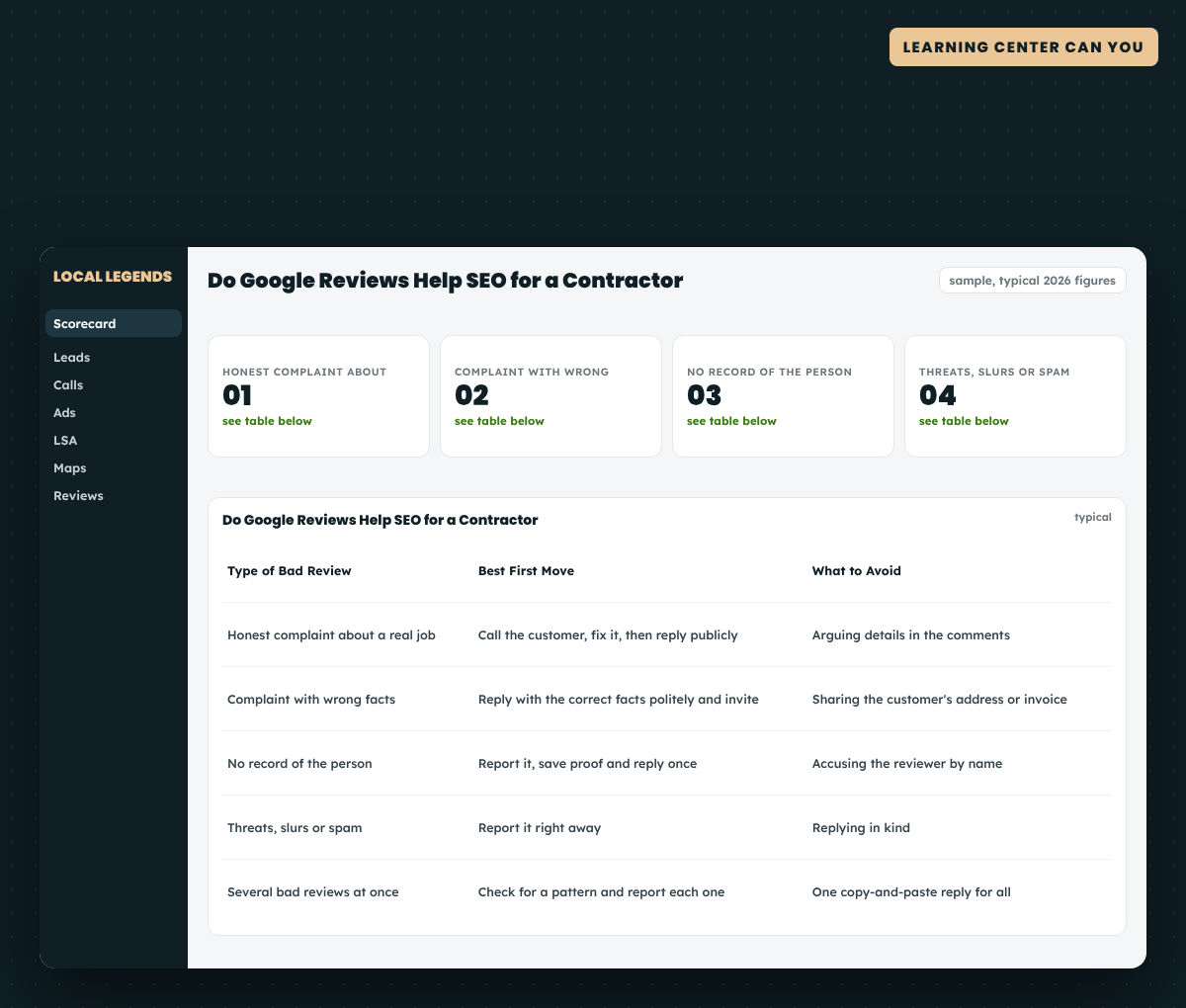
| Question | Facebook Business Page | Google Business Profile |
|---|---|---|
| Can the business delete a customer review? | No | No |
| Can the business report a review? | Yes, from the review's menu | Yes, from the profile or the Reviews Management Tool |
| Is there a status tracker? | Limited | Yes: decision pending, no violation found or escalated |
| Can the business appeal a decision? | Facebook may offer another look | One-time appeal for reviews found not to violate policy, up to 10 at a time |
| Can reviews be turned off? | Yes, for the whole page | No |
| What does a review look like? | Recommend or don't recommend, with written text | 1 to 5 stars, with text optional |
| Do the reviews feed the Google Map Pack? | No | Yes |
[SOURCE: Google Business Profile Help, "Report inappropriate reviews on your Business Profile" (support.google.com/business/answer/4596773), fetched Nov 27 2026]
How Long Does Google Take to Decide on a Reported Review?
Google says review evaluation typically takes several days, and the owner can follow each report in the Reviews Management Tool instead of guessing.
- Decision pending: Google has not evaluated the review yet.
- No policy violation: the review stays, and you can file one appeal.
- Escalated: the appeal is under review and the final decision arrives by email.
- Do not report a review only because you disagree with it; Google asks owners not to.
- Stuck on decision pending for weeks: contact Google Business Profile support with the business details and the review in question.
Google's prohibited content list includes conflicts of interest, such as reviews from competitors or former employees, which is the category to choose for a rival's review on Google.
Why Contractors Should Care About the Difference
A bad Facebook post hurts trust with people who visit the page. A bad Google review sits beside your Map Pack listing, where homeowners compare roofers or plumbers before they call, so it deserves the faster, more careful response.
Do Google Reviews Help SEO for a Contractor? Google Says Reviews Feed Local Ranking
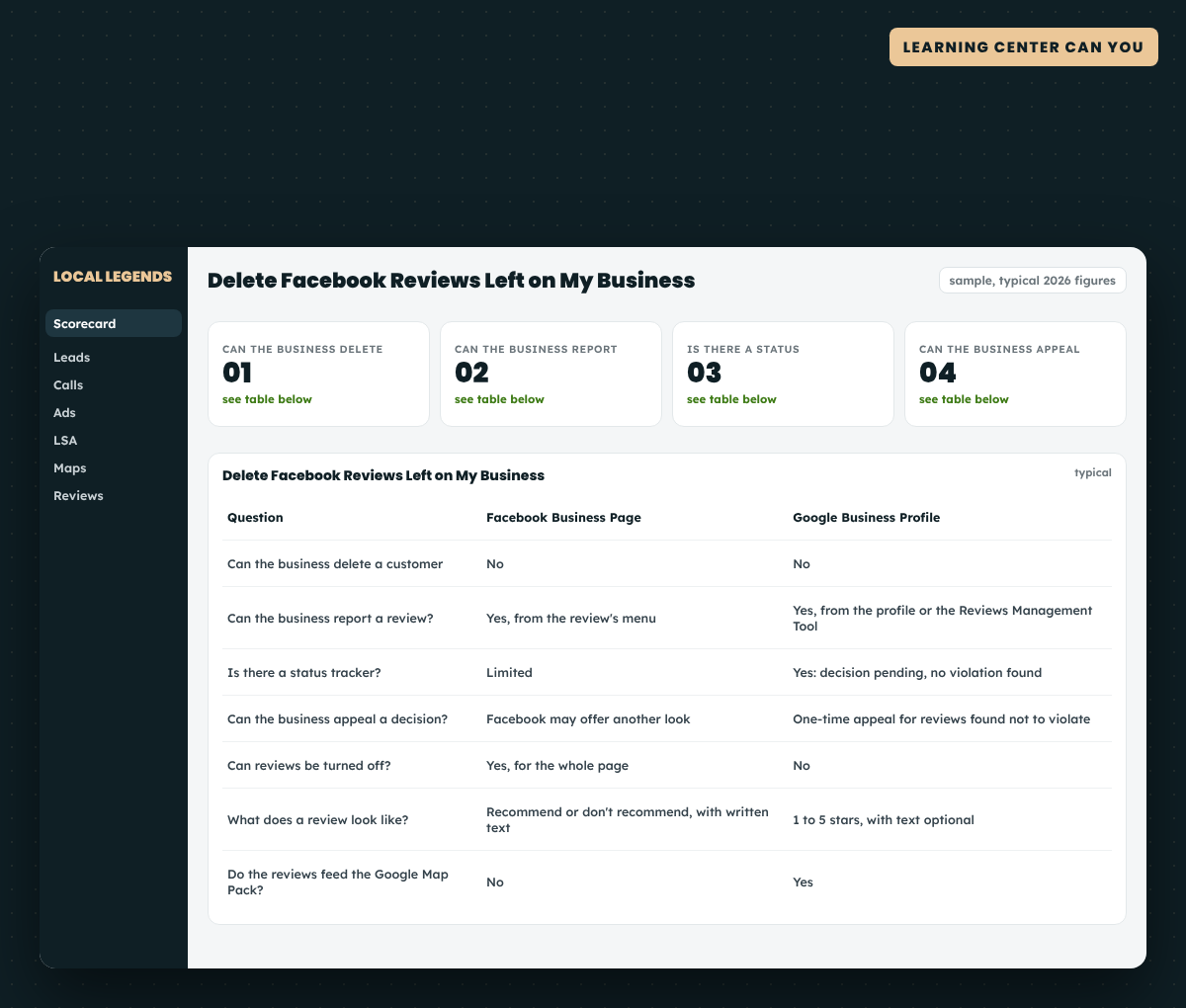
Yes, Google reviews help local SEO for a contractor. Google's own help page on local ranking states, "More reviews and positive ratings can help your business's local ranking." Reviews sit inside prominence, one of the three factors Google names.
| Google Local Ranking Factor | What Google Means | Where Reviews Fit for a Contractor |
|---|---|---|
| Relevance | How well the Business Profile matches the search | Review text that names the service, such as "water heater replaced," adds matching detail |
| Distance | How far the business is from the searcher | Reviews do not change distance |
| Prominence | How well known the business is | Review count and rating count toward it, along with links from other websites |
[SOURCE: Google Business Profile Help, "Tips to improve your local ranking on Google" (support.google.com/business/answer/7091), fetched Nov 27 2026]
Do Facebook Reviews Help a Contractor Rank Higher on Google?
Facebook reviews are not named among the signals in Google's local ranking help, so they do not lift a contractor in the Map Pack the way Google reviews do. They still matter for trust when homeowners check the company on Facebook.
- Google reviews: count toward prominence in Google's own guidance.
- Facebook reviews: shape what homeowners see on your page and in local groups.
- Both: tell AI tools and shoppers how real customers describe the work.
- Priority for most trades: ask for the Google review first, Facebook second.
Do Replies to Reviews Help SEO for an HVAC Company?
Google says replying to reviews shows customers that you value their feedback, and helpful replies help a business stand out, so an HVAC company should answer every review even though Google does not call replies a ranking factor.
- Reply to praise and complaints with a short, specific note.
- Name the service and town naturally, such as "glad the new heat pump in Plano is running quiet."
- Keep private details out of every public reply.
- Reply within a day or two so the profile looks active.
- Reply to the good reviews too, so the page does not look like it only answers complaints.
What Good Review Text Gives Google and AI Tools
Detailed reviews that mention the job, the equipment and the neighborhood give search engines and AI assistants facts to match against your website. Ask customers to say what was done, not only that it went well.
When you ask, try: "Would you mind sharing what we fixed and what town you are in?" Mentions of the technician's name, arrival, communication and cleanup add trust details as well.
What a Contractor Should Do With a Bad Facebook Review Instead of Removing It Match the Move to the Review
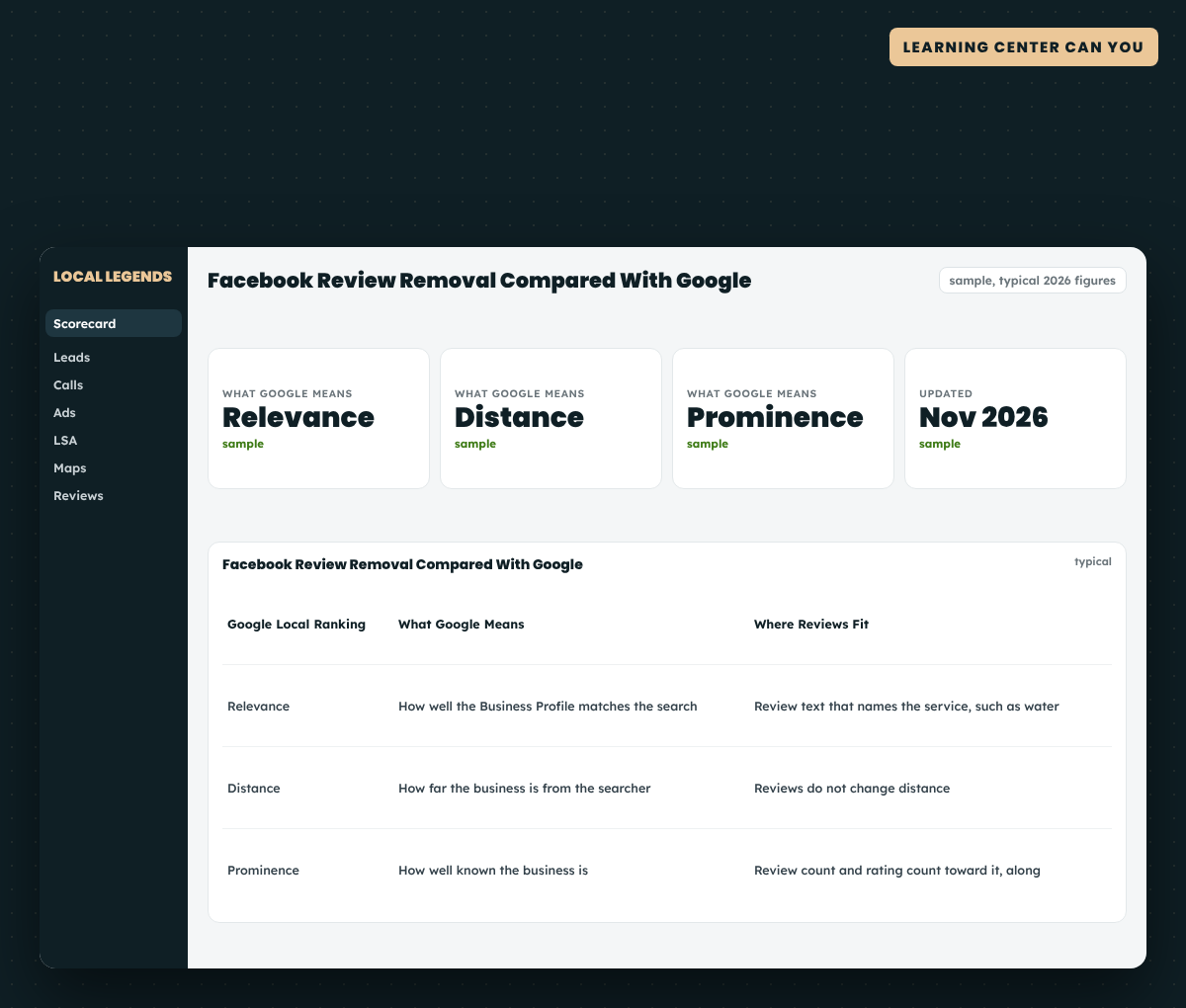
The right response to a bad Facebook review depends on whether it is honest, false or abusive, and in most cases a calm public reply plus a fix does more than any attempt at removal.
| Type of Bad Review | Best First Move | What to Avoid |
|---|---|---|
| Honest complaint about a real job | Call the customer, fix it, then reply publicly | Arguing details in the comments |
| Complaint with wrong facts | Reply with the correct facts politely and invite a call | Sharing the customer's address or invoice |
| No record of the person | Report it, save proof and reply once | Accusing the reviewer by name |
| Threats, slurs or spam | Report it right away | Replying in kind |
| Several bad reviews at once | Check for a pattern and report each one | One copy-and-paste reply for all |
Should a Roofing Company Turn Off Facebook Reviews to Hide One Bad Review?
Turning off Facebook reviews to hide one bad review usually costs a roofing company more than it saves, because the switch hides every positive review along with the negative one, and homeowners notice a page with no reviews.
- Turn off only when the page faces a flood of abuse you cannot keep up with.
- Otherwise, reply and let your record of good reviews speak.
- Remember the reviews return if you turn the section back on later.
- Point homeowners to Google where your strongest reviews live.
- Where the switch lives: Settings and privacy, then Settings, then Page and tagging, then the option that lets others view and leave reviews on your Page.
- Use it as a short circuit breaker during a wave of spam reviews, then turn reviews back on.
A Four-Step Reply Any Contractor Can Use
- Thank the person for the feedback, even when it stings.
- State one fact plainly, such as the date of the visit or what was done.
- Offer a direct line to the office manager or owner.
- Keep it under four sentences and never post private details.
Before replying, check the job notes with the crew. Sign with your name and title, skip phrases like "sorry you feel that way" and keep prices, change orders and warranty disputes out of public replies.
What the FTC Rule Means for Removing or Adding Reviews Some Shortcuts Are Now Federal Violations
The Federal Trade Commission's final rule on reviews and testimonials, announced in August 2024, bans several tactics contractors are sometimes pitched, including fake reviews and pressure campaigns meant to remove honest ones.
- No fake reviews: including AI-generated reviews that claim to come from real customers.
- No buying sentiment: incentives tied to a positive or negative review are banned.
- No undisclosed insider reviews: managers and staff must disclose their connection.
- No review suppression by threats: groundless legal threats or intimidation to remove reviews are banned.
- No fake social proof: buying or selling fake followers or views is banned.
- No conditioned incentives: the rule bars incentives tied to a review's sentiment, so never make a refund or discount depend on changing or deleting a review.
- No hiding negatives on your own site: a business cannot present the reviews on its website as all or most of the reviews after suppressing low ratings or negative ones.
- No gag clauses: the Consumer Review Fairness Act makes it illegal to use contract terms that restrict or penalize honest reviews.
[SOURCE: FTC press release, "Federal Trade Commission Announces Final Rule Banning Fake Reviews and Testimonials," August 2024 (ftc.gov), fetched Nov 27 2026; FTC "Consumer Review Fairness Act: What Businesses Need to Know" (ftc.gov), fetched Nov 27 2026]
Can I Pay a Company to Remove Bad Facebook Reviews for My Plumbing Business?
A plumbing business can pay for help reporting reviews that break the rules, but no company can make Facebook delete an honest review, so a promise to remove reviews on demand is a reason to ask exactly how it would happen.
- Legitimate help: organizing evidence, filing reports and writing replies.
- Not legitimate: threats, fake counter-reviews or paying reviewers to delete posts.
- Ask for the method in writing before you pay anything.
- Ask how they are paid: some firms charge only after a policy-violating review comes down; get that in writing too.
- Be careful with unsolicited offers: a stranger offering to remove a sudden wave of bad reviews for a fee may be behind the reviews.
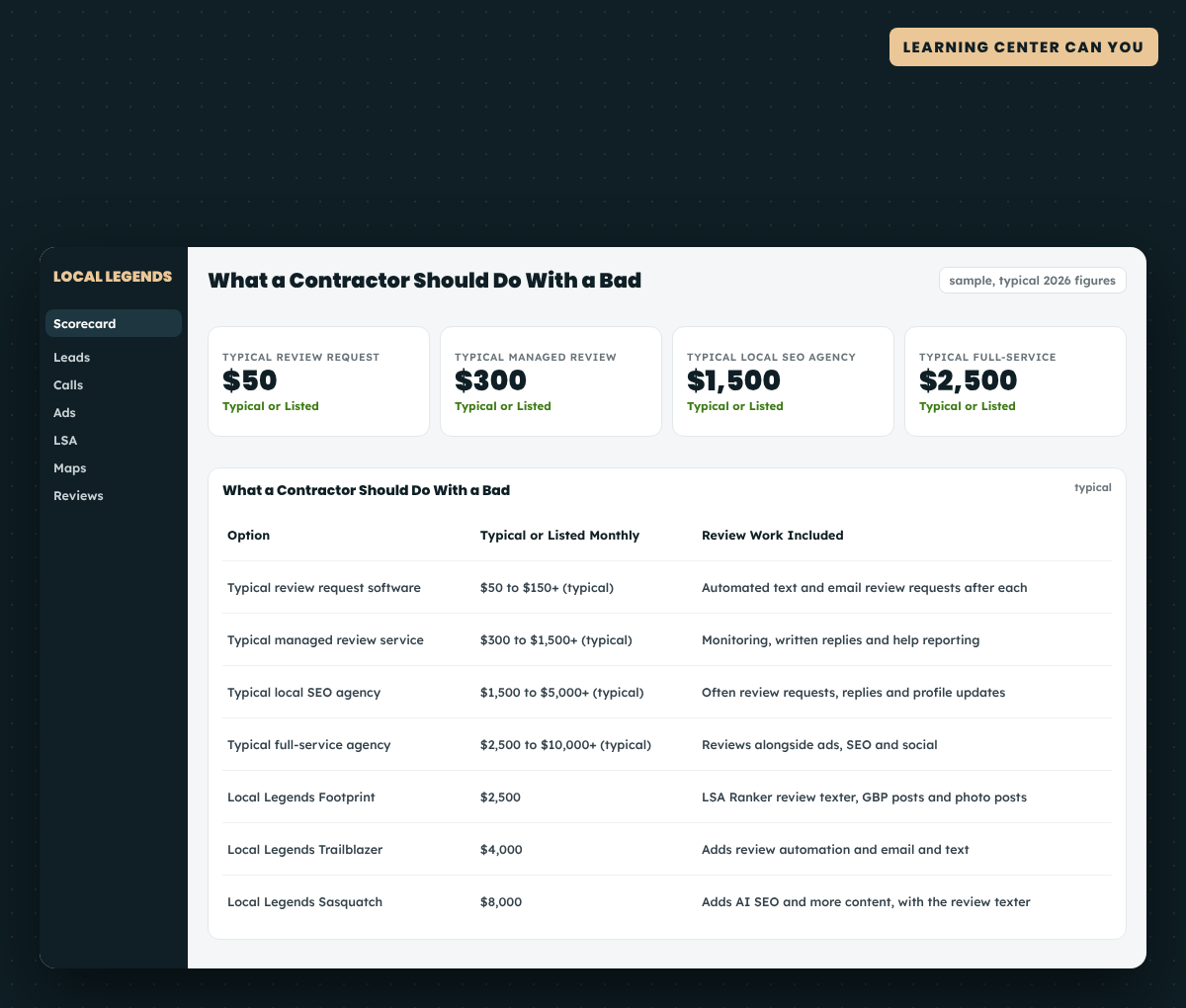
How Much Does Review Management Cost for a Contractor? Typical Agency Fees Next to Local Legends Prices
Review management for a contractor is sold three ways: review request software, a managed review service or a bundle inside local SEO or a full marketing plan. Software and managed services typically cost far less than the bundles, which also cover pages, ads and profile work.
| Option | Typical or Listed Monthly Price | Review Work Included |
|---|---|---|
| Typical review request software | $50 to $150+ (typical) | Automated text and email review requests after each job, reminders and website widgets |
| Typical managed review service | $300 to $1,500+ (typical) | Monitoring, written replies and help reporting reviews that break the rules |
| Typical local SEO agency | $1,500 to $5,000+ (typical) | Often review requests, replies and profile updates |
| Typical full-service agency | $2,500 to $10,000+ (typical) | Reviews alongside ads, SEO and social |
| Local Legends Footprint | $2,500 | LSA Ranker review texter, GBP posts and photo posts, monthly scorecard |
| Local Legends Trailblazer | $4,000 | Adds review automation and email and text follow-ups, weekly scorecard |
| Local Legends Sasquatch | $8,000 | Adds AI SEO and more content, with the review texter included |
[SOURCE: BRIEF.md Local Legends pricing and typical other-agency ranges (2026 published agency pricing), confirmed by Levi Ostlund, Nov 8 2026; software and managed-service ranges from Google AI Mode answers and published 2026 vendor pricing, Nov 27 2026]
What Changes the Price
- Number of locations and profiles being managed.
- Text volume: sending many review request texts each month can move software into a higher tier.
- Who writes the replies: templates or a person.
- Automation: requests that fire from your CRM when a job closes.
- Other channels bundled in: ads, pages and social posting.
Every plan has no setup fees and no long-term contracts. See Local Legends pricing[LINK: /pricing/] and how review management for contractors[LINK: /services/review-management/] works with Google Business Profile management[LINK: /services/google-business-profile-management/].
Contractor CEO Reviews of Local Legends Marketing What Owners Say About Us
Contractor owners who have worked with Local Legends Marketing[LINK: /] speak to the same things this guide recommends: responsiveness and a clear strategy, and their words are shared here exactly as given.
A roofing CEO on years of working together: Brad Beldon credited Levi's creativity, responsiveness and understanding of his marketing strategy with a large effect on his company. [SOURCE: Local Legends written testimonial, Brad Beldon, CEO, Roofing Company]
Levi has been absolutely outstanding to work with over the years... His creativity, responsiveness, and deep understanding of our marketing strategy have made a huge impact." Brad Beldon, CEO, Roofing Company. Read on Local Legends
Video Testimonials From Contractor CEOs
Three contractor CEOs recorded video testimonials for Local Legends, and any agency you consider should be able to show similar on-record proof.
- Roofing: Kyle Scott, CEO, Roofing Company, and Jim Dodson, CEO, Roofing Company.
- Restoration: Race Allen, CEO, Precision Restoration of Texas.
Frequently Asked Questions About Removing Facebook Reviews More Answers for Contractors
Can You Delete a Facebook Review From the Mobile App?
Yes, for a review you wrote yourself. Open the review on the business page, tap its menu and choose the delete option.
Does Facebook Tell the Reviewer That I Reported Them?
Reports are handled by Facebook, not shared by the business, so keep your public reply polite either way.
Can I Hide Only the Negative Facebook Reviews?
No. Facebook offers one switch for the whole reviews section, so a page cannot keep the praise visible while tucking away a single complaint.
Can a Customer Edit a Facebook Review After the Problem Is Fixed?
Yes, the reviewer can edit or delete their own review, and a polite private request after the fix is fair to make once.
Do Google Reviews Help SEO More Than Yelp or Facebook Reviews?
For the Google Map Pack, yes, because Google's local ranking help names review count and ratings on the Business Profile itself.
Should a Contractor Copy Facebook Reviews Onto Google?
No. Reviews cannot be moved between platforms; ask happy customers to leave a fresh Google review in their own words.
How Many Google Reviews Should a Contractor Aim For?
Google sets no minimum. Compare your count, rating and recent review pace with the top three companies in your Map Pack.
Can I Sue Over a False Facebook Review?
Possibly, if it states false facts that harm the business, but talk to an attorney first; opinions and honest complaints are usually protected.
Reviewed by Levi Ostlund, Founder, Local Legends Marketing

Turn Your Reviews Into More Booked Jobs Book a Free Growth Audit
Send us your Facebook page and Google Business Profile, and Local Legends Marketing[LINK: /] will show where your reviews stand against the top local competitors and how a steady review texter can change that.
- Call:(936) 900-1248
- Home office: 481 Stephen F Austin Dr, Conroe, TX 77302
- Next step: book a free growth audit; growth plans with the review texter start at $2,500 a month