


Local Legends Marketing Home Service Websites,

Home Service Web Design That Routes Emergency Calls, Planned Projects and Recurring Customers to the Right Page, the Right Booking Tool and the Right Truck
Local Legends Marketing Home Service Websites, Paid Once and Registered to You
Updated November 2026 · Reviewed by Levi Ostlund, Founder
Breadcrumb: Home > Industries [LINK: /industries/] > Home Services [LINK: /industries/home-services/] > Website Design
Home service web design is the planning and building of a website that turns searches for repairs, replacements and recurring visits into calls, online bookings and estimate requests, and Local Legends Marketing builds those sites for HVAC, plumbing, electrical, roofing, garage door and cleaning companies.
- Three buyer paths: urgent repair, planned project and recurring service, each with its own page style.
- Booking that feeds dispatch: online booking widgets from ServiceTitan or Housecall Pro placed where they help.
- Trade and town pages: one page per service, and town pages only where 5+ real local facts exist.
- Owned outright: the domain, files, copy, photos and call records stay in the company's name.
- Agency-reported proof: 25,000+ appointments generated and $30M+ in revenue influenced.
Free Growth Audit
Your Reviews, Radius and Response Rate vs the competitors beating you.
About Local Legends Marketing
A home service marketing agency headquartered in Conroe, Texas, with 8+ years of marketing experience, running Google Ads, Local Services Ads, local SEO, AI SEO, connected TV and review systems for contractors nationwide.
Home Services Website Design Built Around How Each Customer Buys Urgent, Planned and Recurring Work Need Different Pages
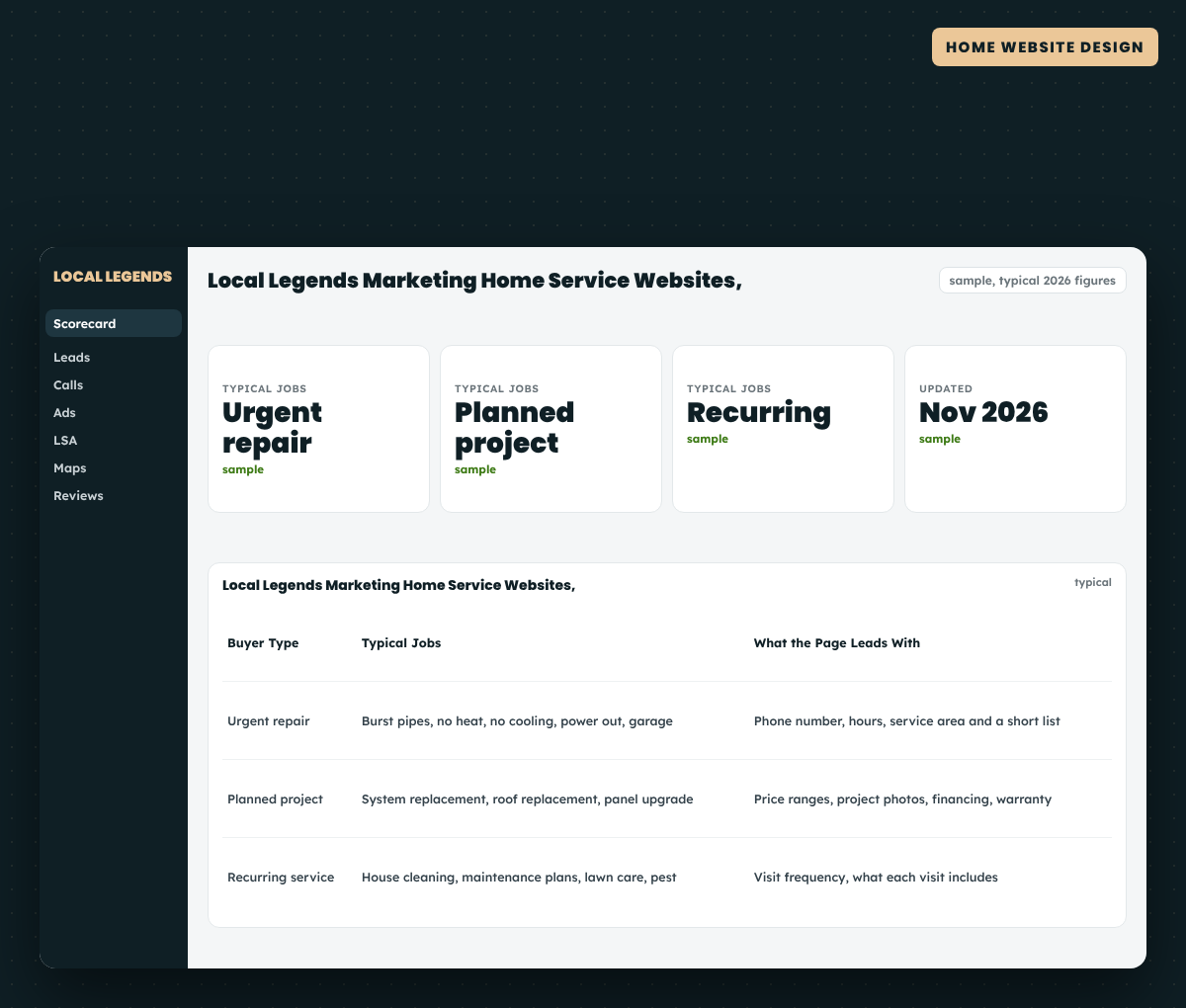
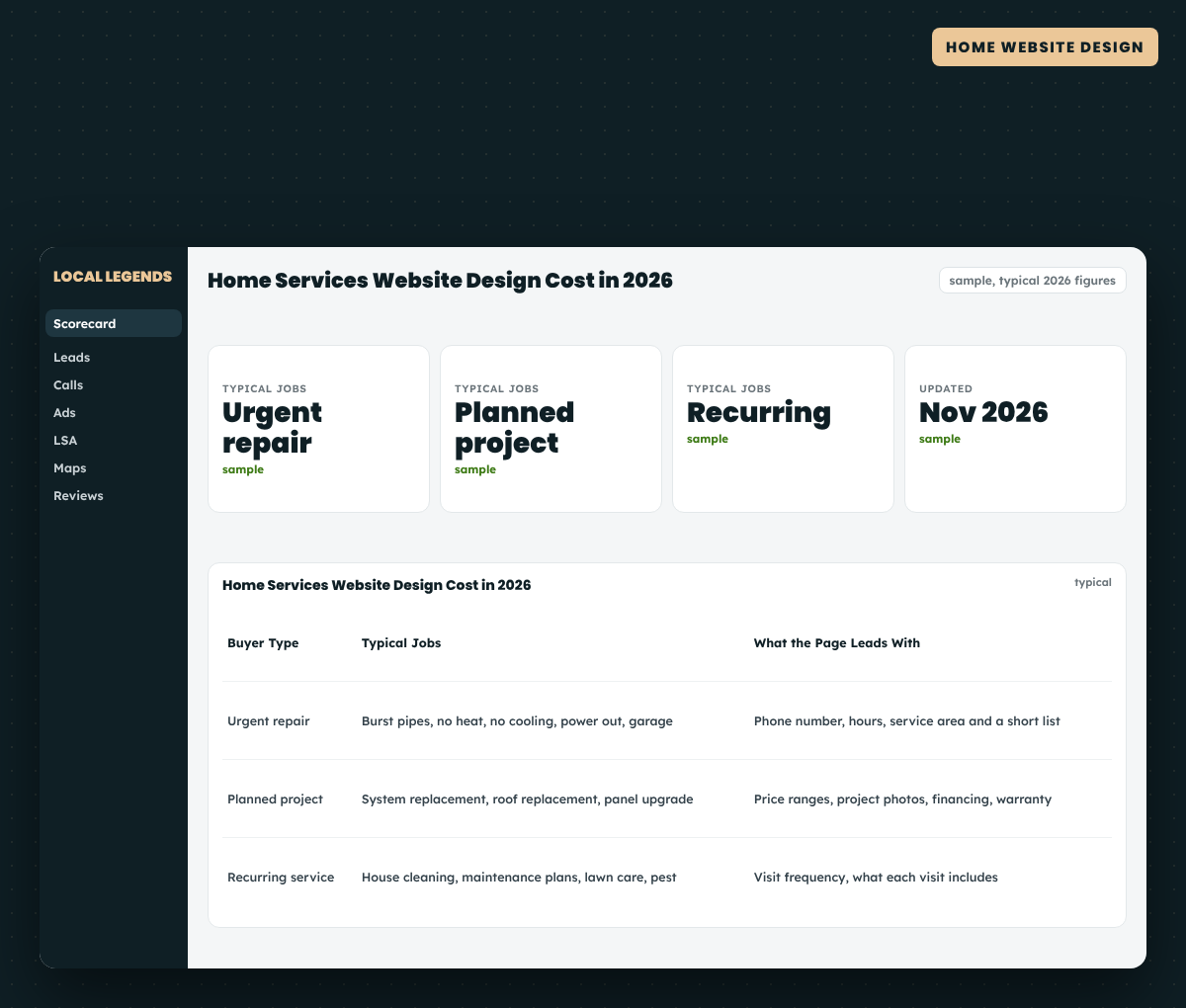
Home services website design works best when each service page is shaped by how its customer buys, because a homeowner with water on the floor wants a phone number, while a homeowner pricing a new roof wants photos, ranges and time to compare.
| Buyer Type | Typical Jobs | What the Page Leads With | Main Action |
|---|---|---|---|
| Urgent repair | Burst pipes, no heat, no cooling, power out, garage door stuck | Phone number, hours, service area and a short list of what the tech can fix | Tap to call |
| Planned project | System replacement, roof replacement, panel upgrade, remodel | Price ranges, project photos, financing, warranty and reviews | Estimate form or call |
| Recurring service | House cleaning, maintenance plans, lawn care, pest service | Visit frequency, what each visit includes and starting prices | Online booking or quote |
Why One Template for Every Service Loses Calls
A site that gives the drain cleaning page and the water heater replacement page the same layout serves neither buyer well. Urgent pages need to be short and phone-first; project pages need room for proof and pricing.
How the Home Page Splits the Traffic
The home page should offer each buyer a clear first click: an urgent service button, a "get an estimate" path and, where it fits, a "book a visit" path. Everything else on the home page supports those three choices.
What Should the First Screen of a Home Service Website Show on a Phone?
The first phone screen of a home service website should show what you do, where you work, how to reach you and one reason to trust you, with nothing that pushes the call button out of view.
- A plain headline: the services and the area, such as heating, cooling and plumbing in your county.
- A call button that stays pinned to the screen while the visitor scrolls.
- A second action: book online or request an estimate, for visitors who will not call.
- One proof point: the star rating and review count from your Google Business Profile.
- No pop-up covering the call button on mobile, and no oversized cookie banner either.
- No auto-playing slider or long welcome paragraph pushing the buttons below the fold.
Should a Plumbing and HVAC Company Have One Website or Separate Websites for Each Trade? Most Multi-Trade Companies Rank Better on One Strong Domain
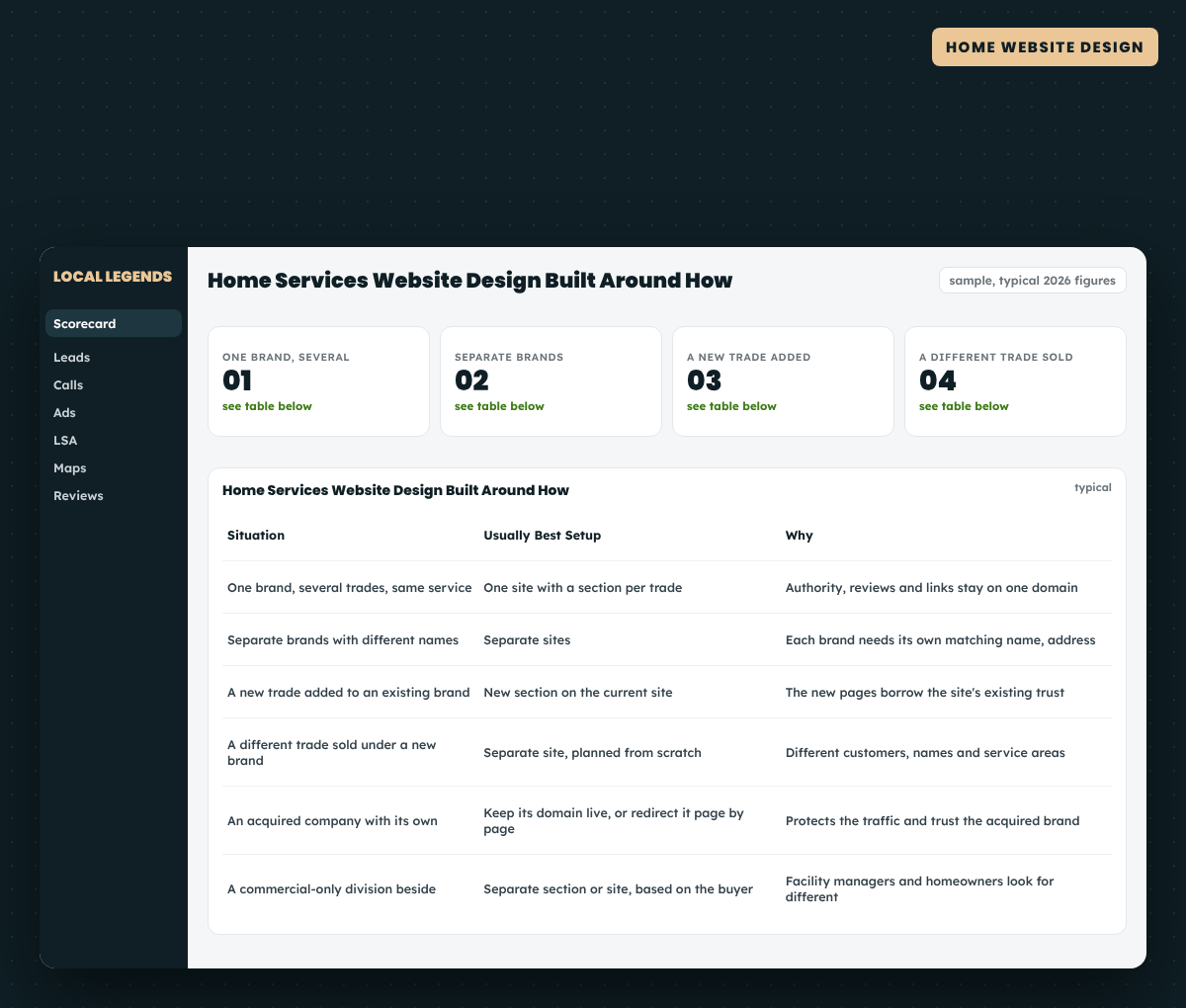
Most home service companies that offer several trades under one brand do better with one website and a section for each trade, because one domain builds reviews, links and history faster than two or three thin sites that compete with each other.
| Situation | Usually Best Setup | Why |
|---|---|---|
| One brand, several trades, same service area | One site with a section per trade | Authority, reviews and links stay on one domain |
| Separate brands with different names and phone numbers | Separate sites | Each brand needs its own matching name, address and phone |
| A new trade added to an existing brand | New section on the current site | The new pages borrow the site's existing trust |
| A different trade sold under a new brand in a new region | Separate site, planned from scratch | Different customers, names and service areas |
| An acquired company with its own rankings and reviews | Keep its domain live, or redirect it page by page | Protects the traffic and trust the acquired brand earned |
| A commercial-only division beside residential work | Separate section or site, based on the buyer | Facility managers and homeowners look for different proof |
How to Organize a Multi-Trade Site
Give each trade a hub page in its own folder, such as /plumbing/ and /heating-cooling/, with that trade's service pages beneath it. Visitors and search engines then see which jobs belong to which trade, and the header and logo should name every trade the company offers.
When Separate Sites Make Sense
Separate sites fit companies that run truly separate brands, each with its own Google Business Profile, phone number and trucks. Splitting one brand across several sites usually divides its strength.
We Are Adding Electrical to Our Plumbing Company. How Should the Website Change?
A plumbing company adding electrical should add an electrical section to its current website, with its own hub page, service pages and license details, instead of launching a new domain from zero.
- Give electrical its own menu item and update the home page headline so it names both trades.
- Add an electrical hub page linked from the main menu and the home page.
- Build one page per electrical job: panel upgrades, EV chargers, generators and lighting.
- Show the electrical license on those pages, separate from the plumbing license.
- Update the Google Business Profile with the new services and categories that apply.
- Add electrical photos and reviews as soon as the first jobs are done.
- Feature jobs that cross both trades, such as tankless water heaters, sump pump battery backups and standby generators.
- Add electrical to the booking and quote forms so dispatch routes each request to the right tech.
- Check the domain name: a plumbing-only domain may call for a broader name with 301 redirects.
- Track electrical calls separately so you can see whether the new trade pays.
Should a Home Service Website Have Online Booking Connected to ServiceTitan or Housecall Pro? Book the Simple Jobs Online and Keep the Phone for the Rest
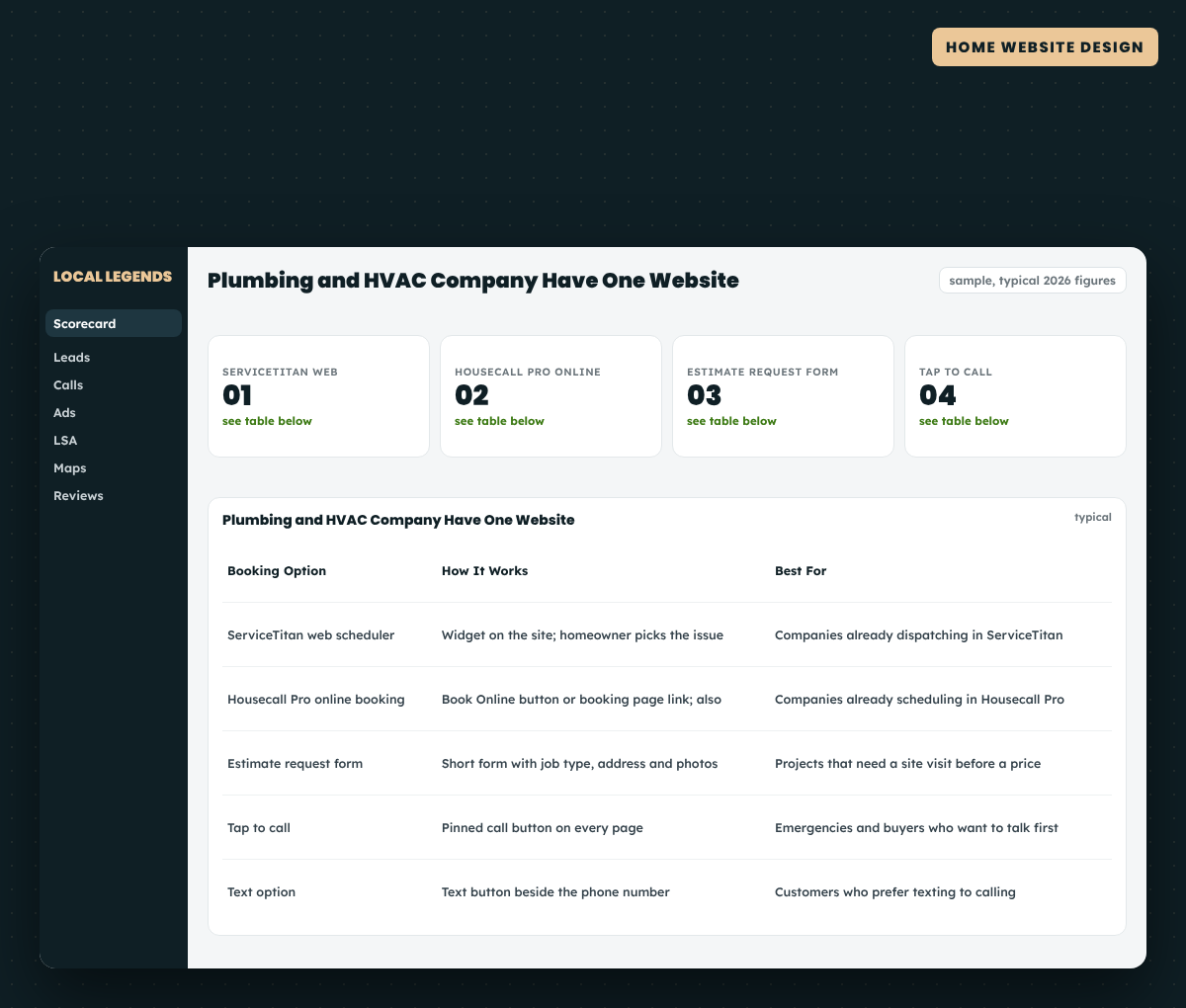
A home service website should offer online booking for simple, well-defined jobs when the booking tool writes straight into the dispatch software, and keep the phone front and center for emergencies and complex projects.
Both major field service platforms offer booking that lives on the company's website. ServiceTitan's web scheduler is a widget the company's web developers install, opened from a button such as "Schedule an Appointment," and listed as a beta feature.
Housecall Pro's online booking can be reached from Google, a website button or a direct link.
[SOURCE: help.servicetitan.com, Set Web Scheduler for Homeowners; help.housecallpro.com, Getting Started With Online Booking; both checked Nov 27 2026]
| Booking Option | How It Works on the Website | Best For |
|---|---|---|
| ServiceTitan web scheduler | Widget on the site; homeowner picks the issue, address and time window | Companies already dispatching in ServiceTitan |
| Housecall Pro online booking | "Book Online" button or booking page link; also reachable from Google | Companies already scheduling in Housecall Pro |
| Estimate request form | Short form with job type, address and photos | Projects that need a site visit before a price |
| Tap to call | Pinned call button on every page | Emergencies and buyers who want to talk first |
| Text option | Text button beside the phone number | Customers who prefer texting to calling |
Which Jobs Fit Online Booking
Tune-ups, inspections, drain cleanings, standard cleanings and estimate appointments fit well. Gas leaks, active water leaks and anything unsafe belong on the phone, and the site should say so plainly.
Keeping Junk Bookings Out
Limit the services a customer can book online, require a service address inside your area and ask one or two qualifying questions. The office should still confirm every online booking.
Why the Booking Tool Should Write Into Dispatch
A booking tool that reads live technician availability captures after-hours requests without double-booking a crew. A generic calendar link or contact form only starts a round of phone tag. Larger dispatch systems need ZIP codes, job types and capacity rules mapped before launch.
How Should a House Cleaning or Recurring Service Website Handle Quotes for Regular Visits?
A house cleaning or recurring service website should show what a standard visit includes, how often visits can run and a starting price, then let the customer request a quote or book a first visit online.
- List what is included in a standard, deep and move-out clean or in each maintenance visit.
- Price the first visit separately: a first deep clean usually costs more than the recurring rate.
- Show frequency options: weekly, biweekly and monthly, with the starting rate for each where you can.
- Ask for home size and rooms in the quote form so the price can be confirmed fast.
- Add checkboxes for extras such as pets, inside the oven or heavy buildup, and call online prices estimates confirmed at the first visit.
- Show your policies for keys, pets and cancellations on the booking page.
- Collect reviews from regular customers, since recurring buyers want proof of consistency.
Which Pages Does a Home Service Website Need for Each Service and Town? Service Pages First, Town Pages Where They Are Earned
A home service website needs one page for every core service it wants calls for, one hub page per trade and town pages only for the places the crews really work, each carrying content written for that service or place.
Core Pages Every Home Service Site Needs
- Home page with the three buyer paths.
- Trade hub pages for each trade the company offers.
- Service pages for each job the company wants more of.
- Reviews page with real customer reviews and the review count.
- About page with the team, licenses, insurance and years in business.
- Financing and offers page where financing is available.
- Service area page listing every county and town covered, in plain text.
- Contact page with the same name, address and phone as the Google Business Profile.
How Google Business Profile Service Areas Shape Town Pages
Google lets a service-area business list up to 20 service areas by city or postal code, says the total area should not run much past about two hours of driving from the business, and asks companies that do not serve customers at their address to remove it from the profile.
[SOURCE: support.google.com/business/answer/9157481, checked Nov 27 2026]
The website's service area page and town pages should match the profile's areas, so the site and the listing tell the same story about where the company works.
When a Town Page Is Worth Writing
A town page is worth writing when the company can describe real work there: the home types, the jobs it sees most, local rules, reviews from that town and job photos. Local Legends writes town pages only for towns with 5+ real local facts.
Smaller towns without that material belong in the plain-text areas list on the service area page and in the profile's service areas, not on thin pages that swap one town name for another.
Should My Home Service Website Show License, Insurance and Background-Check Details?
A home service website should show license numbers, insurance status and any background-check policy the company truly follows, because homeowners are letting a stranger into the house and want proof before they book.
- License numbers for each trade with the issuing agency, worded the way the license reads, in the footer and on the trade pages. Some states require the number in advertising, so check your licensing board.
- Insurance: state the coverage types, such as general liability and workers' compensation, and offer a certificate of insurance on request instead of posting the policy.
- Background checks only if every technician really passes one.
- Bonds listed separately from insurance, if the company is bonded.
- Warranties in plain words, keeping manufacturer warranties apart from your own workmanship guarantee.
- Team photos and names of the people who show up.
Is the Free Website From My Field Service Software Good Enough for a Home Service Company? Good Enough to Start, Rarely Enough to Grow
The website that comes with field service software can be good enough for a brand-new home service company, but it usually limits page count, layout and search control, so companies that want steady search calls tend to outgrow it.
- It fits when: you need a site this week and most work comes from referrals.
- It limits you when: you need separate pages for each service, trade and town.
- Check the domain: make sure the site runs on a domain registered to you, not a subdomain branded with the software's name.
- Check the exit: ask whether you can move the pages and content if you leave the software.
- Keep the booking tool: a built site can still use the software's booking widget.
What Should a Home Service Website Show About Prices, Financing and Coupons?
A home service website should show price ranges or starting prices for common jobs, financing for large projects and coupons for smaller jobs, because visitors stay longer when they can see they are in the right price range.
- Starting prices or diagnostic fees for tune-ups, drain cleanings, inspections and standard cleanings.
- Ranges for replacements and projects, with what is included, what moves the price and the month the range was set.
- Financing on big-ticket pages and its own short page, worded the way the lender allows, noting that approval depends on the lender.
- Coupons with clear terms and end dates.
- No "call for price" walls on pages where you can safely give a range.
How Much Does Home Services Website Design Cost in 2026? Typical Builds, Subscriptions and Local Legends Prices
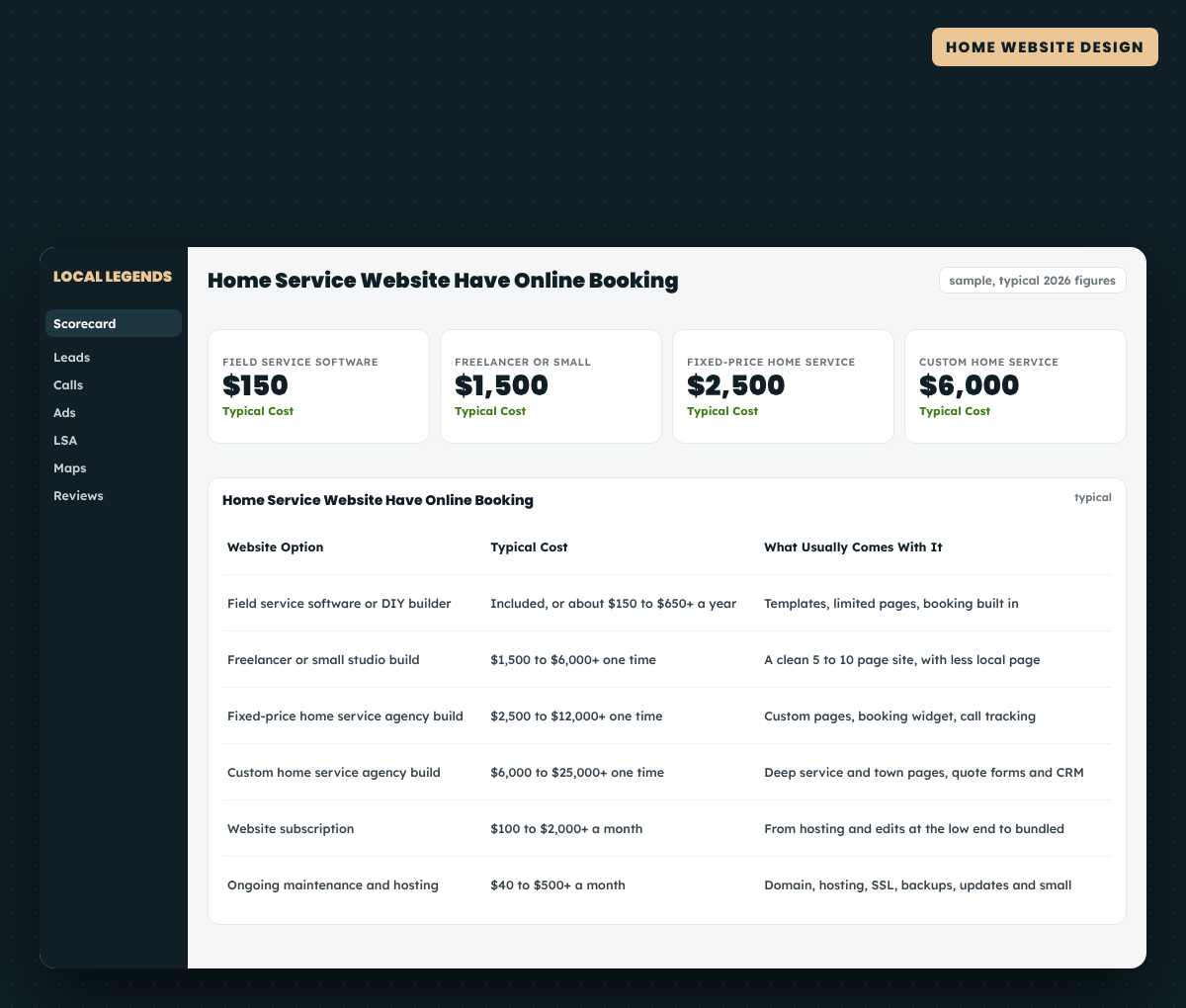
Home services website design typically costs $2,000 to $8,000+ for a professional build and $6,000 to $25,000+ for a custom agency build, based on published 2026 pricing guides and Google AI Mode answers reviewed in November 2026, while agency websites overall typically run $2,500 to $50,000+.
| Website Option (Typical 2026 Ranges) | Typical Cost | What Usually Comes With It |
|---|---|---|
| Field service software or DIY builder site | Included, or about $150 to $650+ a year | Templates, limited pages, booking built in |
| Freelancer or small studio build | $1,500 to $6,000+ one time | A clean 5 to 10 page site, with less local page depth |
| Fixed-price home service agency build | $2,500 to $12,000+ one time | Custom pages, booking widget, call tracking on higher tiers |
| Custom home service agency build | $6,000 to $25,000+ one time | Deep service and town pages, quote forms and CRM connections |
| Website subscription (site leased monthly) | $100 to $2,000+ a month | From hosting and edits at the low end to bundled marketing at the top |
| Ongoing maintenance and hosting | $40 to $500+ a month | Domain, hosting, SSL, backups, updates and small changes |
[SOURCE: published home service web design pricing pages saved in research/sources/hs-wd/; Google AI Mode cost and subscription answers citing 2026 web design pricing guides, captured Nov 27 2026; BRIEF.md typical agency range]
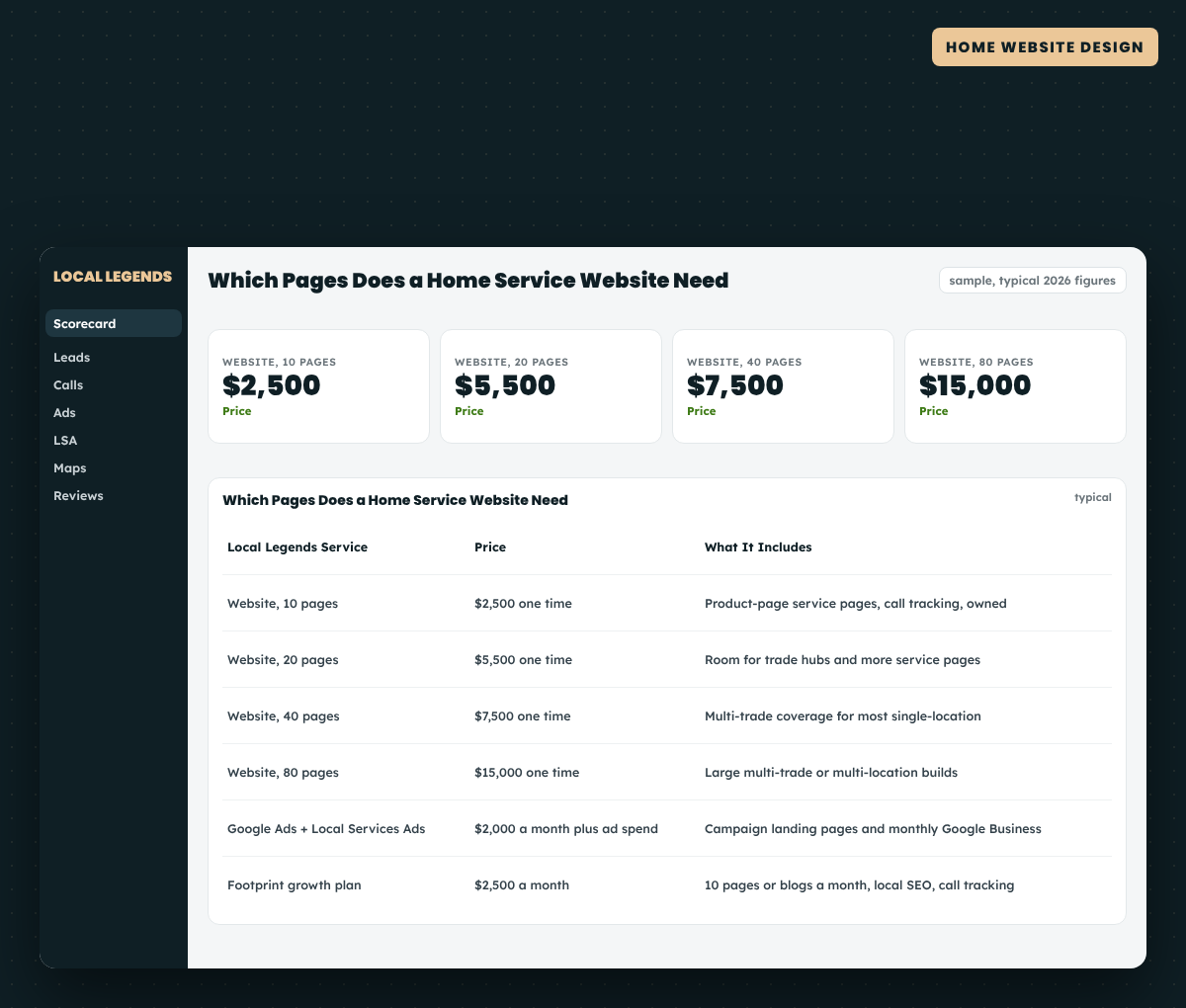
Local Legends Home Service Website Prices
| Local Legends Service | Price | What It Includes |
|---|---|---|
| Website, 10 pages | $2,500 one time | Product-page service pages, call tracking, owned by you |
| Website, 20 pages | $5,500 one time | Room for trade hubs and more service pages |
| Website, 40 pages | $7,500 one time | Multi-trade coverage for most single-location companies |
| Website, 80 pages | $15,000 one time | Large multi-trade or multi-location builds |
| Google Ads + Local Services Ads | $2,000 a month plus ad spend | Campaign landing pages and monthly Google Business Profile optimization |
| Footprint growth plan | $2,500 a month | 10 pages or blogs a month, local SEO, call tracking, monthly scorecard |
No plan carries a setup fee or a long-term contract. Every plan and add-on is on the Local Legends pricing page.
Is a $1,000 a Month Website Subscription a Good Deal for a Home Service Business?
A $1,000 a month website subscription adds up to $12,000 in the first year, so it is only a good deal if the marketing bundled with it produces booked jobs and the company keeps the site and domain if it cancels.
- Do the math: compare 12 or 24 months of payments with a one-time build.
- Read the cancellation terms: some subscription sites end when payments stop.
- Ask what the monthly fee covers: hosting, edits, SEO or ads management, and how many new pages, posts or profile updates arrive each month.
- Ask whether ad spend is billed on top of the monthly fee.
- Compare with site-care-only plans, which typically run about $150 to $400+ a month.
- Confirm domain ownership: the domain should be registered to your company either way.
- Ask for call reports: a subscription should show booked calls, not page views.
Who Is the Best Home Service Web Design Company? Proof of Booked Jobs Beats a Portfolio
The best home service web design company is the one that builds pages for each service and buyer type, connects the site to your phone and dispatch software and leaves the company holding every login, rather than the one with the prettiest portfolio.
- Trade experience: ask to see service pages they wrote for home service companies.
- Buyer paths: ask how the site will handle emergencies, projects and recurring visits.
- Booking and CRM: ask how leads reach ServiceTitan, Housecall Pro, Jobber, JobNimbus, AccuLynx, Buildertrend or GoHighLevel.
- Call tracking: ask whether calls will be tracked by page and source.
- Ownership: ask whose name the domain, hosting and content will be in.
- Pricing and terms: ask for the full price and contract length in writing.
How Local Legends Answers Those Questions
Local Legends builds only for contractors, writes every page from research, connects CallRail call tracking to the CRM, publishes one-time prices from $2,500 and leaves the site, domain, copy, photos and call data with the client, with no setup fees and no long-term contracts.
How Do I Make Sure I Own My Home Service Website When an Agency Builds It?
A home service company keeps ownership by putting the domain, hosting access, content and analytics in its own name before the build begins, and by getting that in writing.
- Register the domain yourself, or have it registered to the company with the owner's email.
- Get the content, code and design assigned to you in writing once the invoice is paid, with no buyout fee to leave.
- Keep admin access to the website and hosting, or a full export on request.
- Own Google Analytics, Search Console and the Google Business Profile as primary owner.
- Ask who keeps the tracking numbers if you leave, and whether they can be ported to your own account.
- Confirm photo licenses, so stock or agency photos can stay on the site after the contract ends.
- Get a full backup and admin logins at launch.
Our Home Service Website Went Down on a Saturday and the Phones Stopped. What Do We Do First? Restore One Working Page, Then Find the Cause
A home service company whose website goes down on a weekend should restore a single working contact page first, then find and fix the cause once calls are flowing again.
- Forward the main line to a cell phone if the office phones are down too, since internet phones often fail with the office connection.
- Confirm the problem: check the site on a phone using cellular data, off your office network.
- Check the domain and hosting: an expired domain or a failed hosting payment is a common cause, and the host's status page shows wider outages.
- Put up one contact page with the phone, a short form and the service area.
- Check the Google Business Profile: the phone number and hours still bring calls.
- Pause ads that send clicks to the broken site.
- Write down every login once the crisis is over, and keep it in the company's name.
How to Keep It From Happening Again
Set the domain to auto-renew on a company card, keep backups on a schedule and use uptime monitoring that alerts the office. A short list of who to call when the site breaks saves hours on a weekend.
Will a New Website Help My Home Service Company Show Up in ChatGPT and Google AI Answers?
A new website helps a home service company appear in AI answers when its pages answer customer questions clearly and its business details match across the web, but the website is only one of the signals those tools use.
- Answer real questions on service pages: prices, timing, what is included and service area.
- Keep one name, address and phone on the site, Google, Bing Places, Apple Business Connect and Yelp.
- Collect reviews that name the job, such as water heater replacement or deep cleaning.
- Let AI crawlers read the site: check that robots.txt does not block them.
- Add structured data that states the business type, hours, service areas and contact details.
- Keep the services list matched between the site and every profile, so no listing shows a service you dropped.
- Ask the tools directly each month which companies they recommend for your services and towns.
Home Service Websites That Load Fast and Work for Everyone Speed and Accessibility Are Part of the Build
A home service website should meet Google's Core Web Vitals targets and be built to be accessible, because most service searches happen on phones and every visitor needs to be able to call or book.
Google's good thresholds are a Largest Contentful Paint of 2.5 seconds or less, an Interaction to Next Paint of 200 milliseconds or less and a Cumulative Layout Shift of 0.1 or less. [SOURCE: web.dev Web Vitals, checked Nov 27 2026]
The Department of Justice's March 18, 2022 guidance says the ADA applies to the web offerings of businesses open to the public and cites WCAG as helpful guidance. [SOURCE: ada.gov web guidance, checked Nov 27 2026]
- Compress every photo before upload and size hero images for phones.
- Limit scripts: chat tools, sliders and old tracking tags slow the page.
- Use readable contrast and labeled forms for screen readers.
- Make the call and booking buttons reachable by keyboard.
- Caption videos of the team and the work.
How Local Legends Builds a Home Service Website Audit, Map, Write, Launch and Track
Every Local Legends home service website follows five steps, from a growth audit of the current site to a scorecard that ties each call to a booked job.
Step 1: Growth Audit
Tracking, local SEO, Local Services Ads and the website funnel are reviewed first, with Google Maps rank grids across the towns the company serves.
Step 2: Map the Buyer Paths
Each trade and service is sorted into urgent, planned or recurring, which decides its page style and main action.
Step 3: Research and Write
Every page is written from what homeowners search and ask for that service, with real job photos and reviews placed where they prove a point.
Step 4: Build, Connect and Launch
Pages go live in the product-page layout with booking widgets, tracked numbers and 301 redirects from any old URLs.
Step 5: Track and Grow
Calls and forms run through call tracking and CRM integration, and new pages are added as the company grows. The national build approach is on the contractor website design page.
Websites After Launch: Rankings, Profiles and Ads
A new site is the base for the rest of the marketing. Local SEO for contractors adds pages and citations over time, and Google Business Profile management keeps the listing matched to the site.
Local Services Ads began moving into Google Ads as Performance Max campaigns that still charge per lead in August 2026, and they sync business details from the profile. [SOURCE: support.google.com/google-ads/answer/17213585, checked Nov 27 2026]
The wider plan for every trade is on the home service marketing page, and the regions served are listed under Local Legends service areas.
Home Service Web Design Reviews From Contractor CEOs Contractor CEOs on the Record
Contractor CEOs have spoken on record about the marketing Levi Ostlund and the Local Legends team ran for their companies.
A multi-year roofing relationship: Brad Beldon, CEO of a roofing company, wrote about years of work with Levi and how his marketing strategy affected the business. [SOURCE: Local Legends written testimonial, Brad Beldon, CEO, Roofing Company]
Levi has been absolutely outstanding to work with over the years... His creativity, responsiveness, and deep understanding of our marketing strategy have made a huge impact." Brad Beldon, CEO, Roofing Company. Read on Local Legends
- Kyle Scott, CEO, Roofing Company (video testimonial)
- Jim Dodson, CEO, Roofing Company (video testimonial)
- Race Allen, CEO, Precision Restoration of Texas (video testimonial)
- Brad Beldon, CEO, Roofing Company (written testimonial)
A Founder Who Learned What a Bad Website Costs
Levi Ostlund sold driveway jobs door to door at 10, poured concrete with his dad and ran a landscaping company in high school. He lost $30,000+ to marketers, including one whose good-looking site never ranked, and later became CMO of Amstill Roofing. [SOURCE: BRIEF.md founder facts]
Frequently Asked Questions About Home Service Web Design Short Answers for Home Service Owners
How Many Pages Should a Home Service Website Have?
Most single-location home service companies need 20 to 40 pages: a home page, trade hubs, one page per core service, proof pages and a few earned town pages.
What Platform Is Best for a Home Service Website?
The best platform is one you own, that loads fast and that accepts your booking and tracking tools. Ownership and speed matter more than the brand of the builder.
Do Home Service Websites Need a Blog?
A blog helps when each post answers a real customer question, such as what a furnace tune-up includes. Posts written only to add words rarely bring calls.
Can Local Legends Connect the Website to Our CRM?
Yes. Call tracking connects to ServiceTitan, Housecall Pro, JobNimbus, AccuLynx, Jobber, Buildertrend and GoHighLevel so each call matches the job it became.
Will a Redesign Hurt Our Google Rankings?
Not when every old page that ranked gets a 301 redirect to its new page and the content that earned the ranking is kept.
Do You Write the Content?
Yes. Local Legends writes every service and town page from research, with labeled headers and the questions homeowners ask.
How Long Does a Home Service Website Take?
The timeline depends on page count and how quickly photos and logins arrive, and it is set during the growth audit.
What Happens to the Site If We Stop Working Together?
It stays with you. The domain, site, copy, photos and call data are in the company's name, and there is no long-term contract.
Reviewed by Levi Ostlund, Founder, Local Legends Marketing

Plan Your Home Service Web Design Around Booked Jobs Book a Free Growth Audit
Local Legends Marketing plans, writes and builds home service websites that send every buyer to the right page and every lead to the right truck, with prices published up front and the site registered to you.
- Call:(936) 900-1248
- Home office: 481 Stephen F Austin Dr, Conroe, TX 77302
- Next step: a free growth audit of your current site; new websites from $2,500 one time