


A Contractor's Guide to Pay-Per-Lead Ads

What Is Google LSA? Google Local Services Ads, the Google Verified Badge, Lead Charges and the 2026 Move Into Google Ads Explained for Home Service Contractors
A Contractor's Guide to Pay-Per-Lead Ads on Google
Updated November 2026 · Reviewed by Levi Ostlund, Founder
Breadcrumb: Home > Learning Center [LINK: /learning-center/] > What Is Google LSA?
What is Google LSA? Google LSA is short for Google Local Services Ads, a pay-per-lead ad that puts a screened local service business at the top of Google with its rating, hours and a call or message button. The contractor pays when a homeowner calls, messages or books, not when someone clicks.
- What you pay for: valid calls, messages and booking requests, not clicks.
- What you need first: a verified Google Business Profile and Google's background, license and insurance checks.
- What decides your spot: responsiveness, reviews, profile quality, relevance and your bid.
- What changed in 2026: LSA is moving inside Google Ads, and manual lead disputes end once an account migrates.
- Agency-reported proof: 25,000+ appointments generated and $30M+ in revenue influenced for home service companies.
Free Growth Audit
Your Reviews, Radius and Response Rate vs the competitors beating you.
About Local Legends Marketing
A home service marketing agency headquartered in Conroe, Texas, with 8+ years of marketing experience, running Google Ads, Local Services Ads, local SEO, AI SEO, connected TV and review systems for contractors nationwide.
What Is LSA in Marketing, and How Does It Work for a Small Home Service Business? Pay Per Lead, Not Per Click
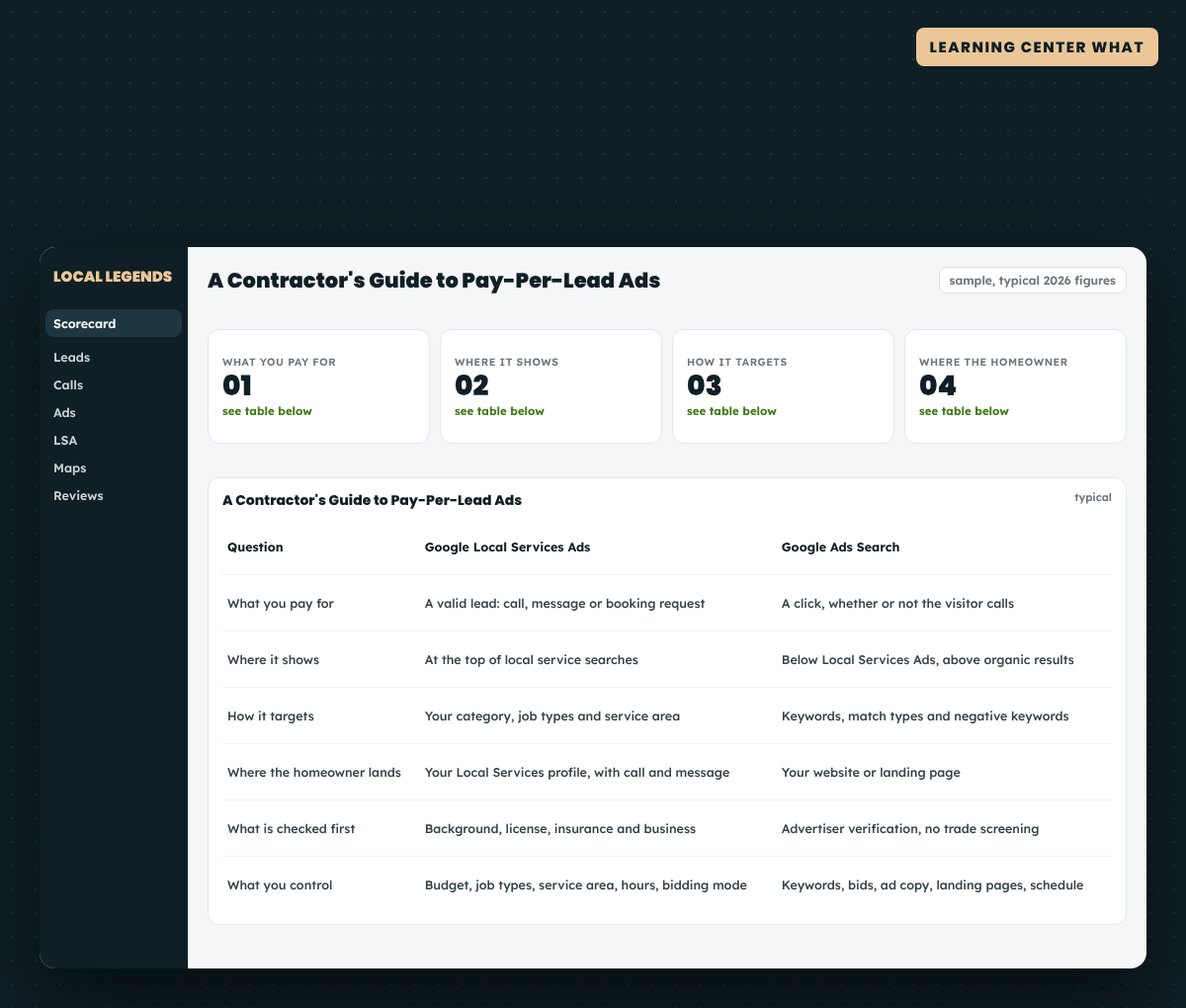
In marketing, LSA means Google Local Services Ads, an ad format built only for local service businesses that bills by the lead. A small plumbing, HVAC or roofing company sets a budget, chooses its job types and service area, and Google matches it to nearby searches without any keyword list to manage.
Google AI Mode described LSA in November 2026 as profile-driven: the ad draws on your business category, service area, hours and reviews rather than on keywords you bid on. That makes the setup simpler than search ads and the profile far more important.
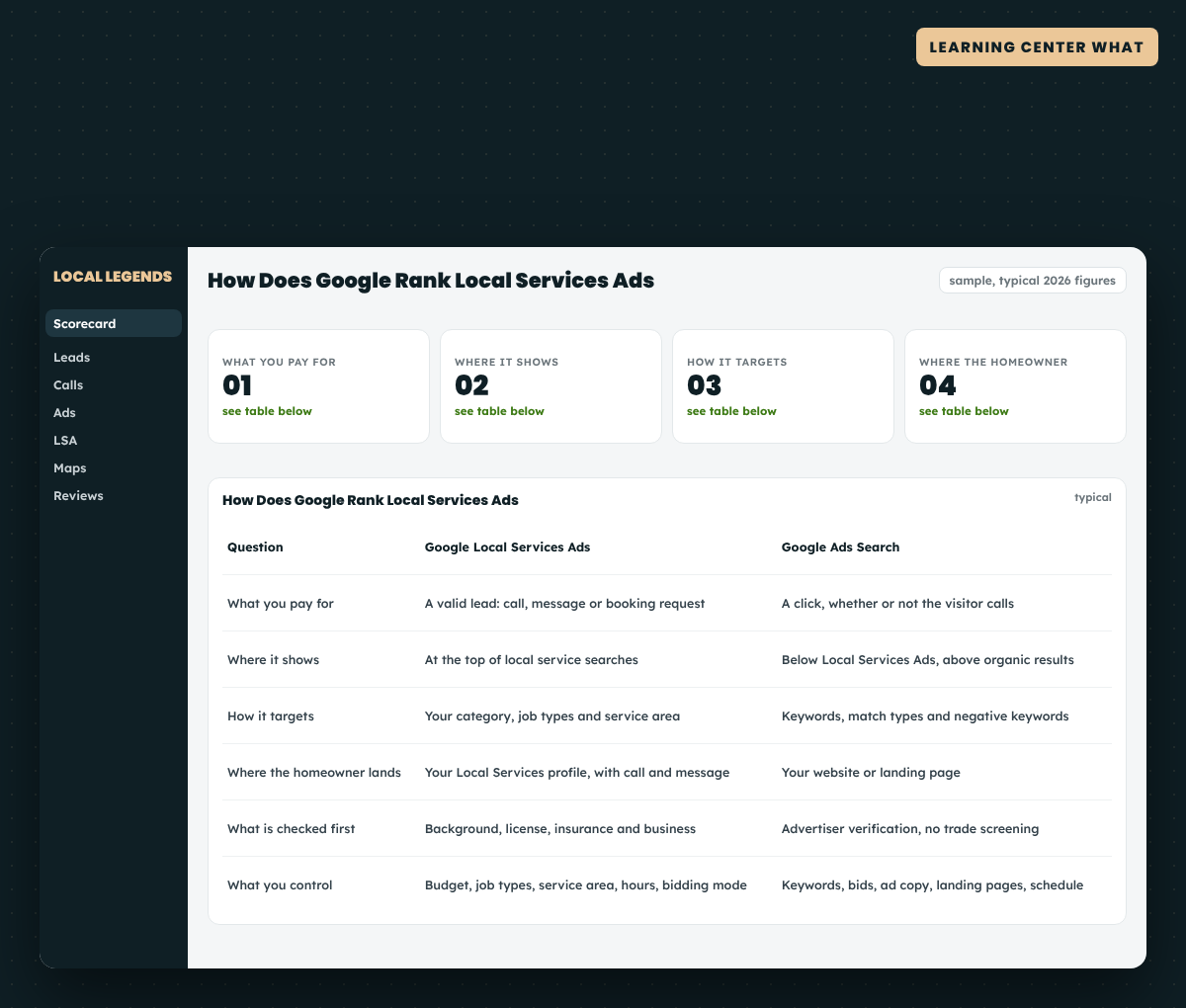
| Question | Google Local Services Ads | Google Ads Search Campaigns |
|---|---|---|
| What you pay for | A valid lead: call, message or booking request | A click, whether or not the visitor calls |
| Where it shows | At the top of local service searches | Below Local Services Ads, above organic results |
| How it targets | Your category, job types and service area | Keywords, match types and negative keywords |
| Where the homeowner lands | Your Local Services profile, with call and message buttons | Your website or landing page |
| What is checked first | Background, license, insurance and business registration | Advertiser verification, no trade screening |
| What you control | Budget, job types, service area, hours, bidding mode | Keywords, bids, ad copy, landing pages, schedule |
What a Homeowner Sees on the Listing
The listing shows your business name, the Google Verified badge, your star rating and review count, your hours and a button to call or message. Reviews on the listing come from your Google Business Profile, not from a separate LSA account, according to Google.
How Google Decides Who Gets the Lead
Google weighs your bid together with how likely you are to produce a lead and how strong your profile is. Unlike a click auction, a cheaper but slower competitor can still lose to a faster one with better reviews.
What Is the Difference Between Google Local Services Ads and Google Ads, and Should My Contracting Company Run Both?
Google Local Services Ads charge per lead and sit at the very top of the page, while Google Ads charge per click and sit just below them. Google AI Mode recommended running both in November 2026 when a contractor has the budget and crew capacity, because each one catches a different kind of searcher.
- Start with LSA alone if the budget is small, the reviews are strong and the phones are answered right away.
- Start with Google Ads alone if your trade has no LSA category or you sell a niche, high-ticket service that needs a landing page to explain it.
- Run both when you want the top two spots on the page, with LSA catching "near me" searches and Google Ads aimed at the specific, profitable jobs.
- Judge both the same way: cost per booked job, not cost per lead or cost per click.
Our Google Ads management page explains how the search side is built alongside LSA.
What Is Google Guaranteed, and What Replaced It? One Badge Now: Google Verified
Google Guaranteed was the trust badge, with a money-back guarantee behind it, that screened home service businesses carried on their Local Services Ads. Google announced on August 20, 2025 that, starting that October, it would fold Google Guaranteed, Google Screened and License Verified by Google into one Google Verified badge.
The money-back guarantee ended with it. Google's help pages say homeowners could still request reimbursement for services booked through Local Services Ads before December 7, 2025, within 30 days of the service being completed. Bookings after that date carry no Google guarantee.
- What stayed the same: the screening, the pay-per-lead billing and the placement at the top of Google.
- What changed: one badge name for every category, and no consumer reimbursement program.
- What existing advertisers had to do: nothing; Google says verified accounts received the new badge automatically.
- What new advertisers do: complete Google's screening and verification process to earn the badge.
- What it means for your ranking: Google says LSA ranking was not affected by the badge change.
If your website, truck wraps or ads still say "Google Guaranteed," update the wording to "Google Verified" so homeowners are not promised a refund program that no longer exists.
Is My Business Eligible for Google Local Services Ads, and Which Home Service Categories Are Included? A Category, a Verified Profile and Google's Checks
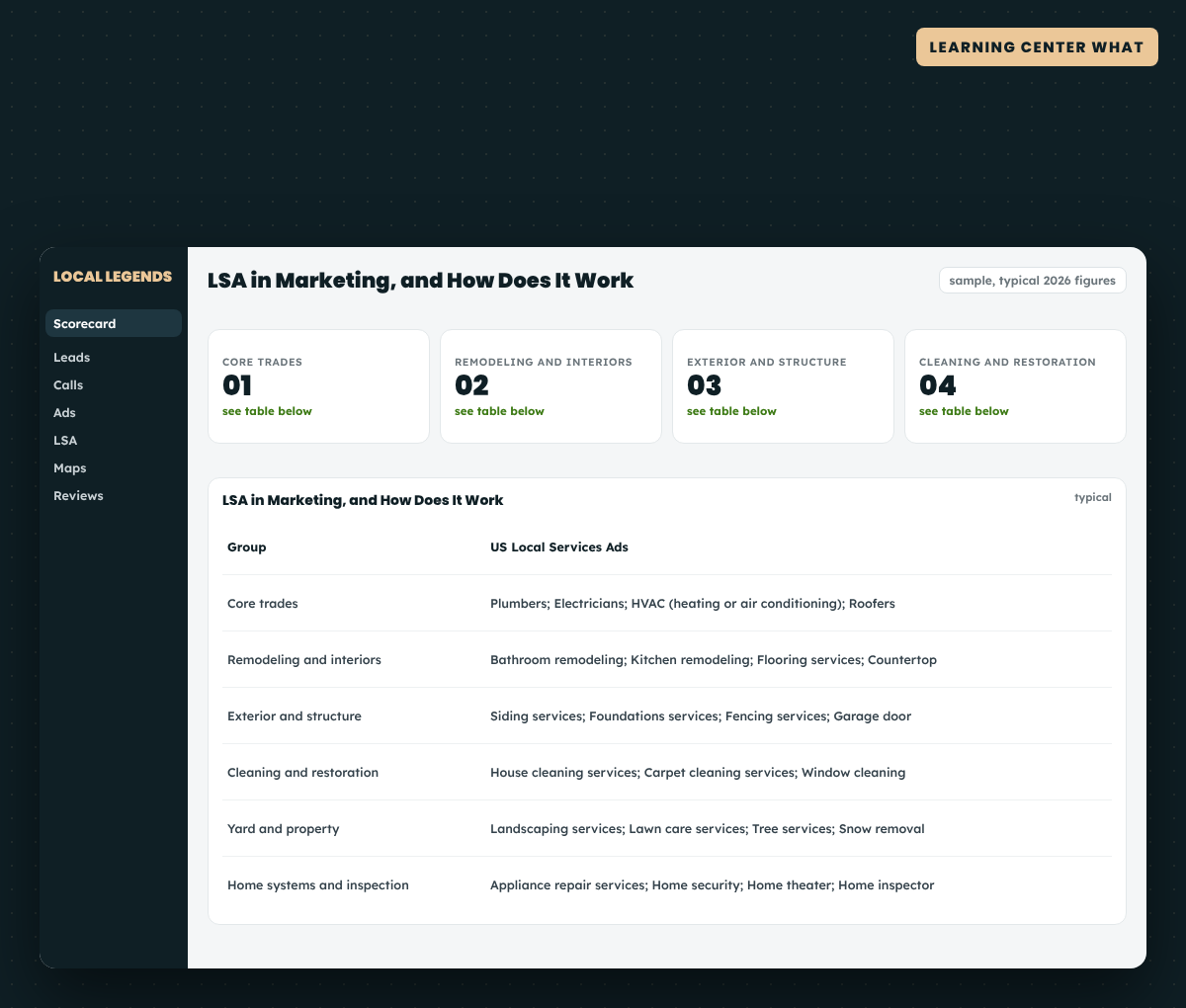
A home service business is eligible for Google Local Services Ads when it offers one of Google's listed categories in an active market, has a verified Google Business Profile and passes Google's screening. Google publishes the US category list on its Local Services help pages.
| Group | US Local Services Ads Categories Listed by Google |
|---|---|
| Core trades | Plumbers; Electricians; HVAC (heating or air conditioning); Roofers; General contractor; Handyman; Carpenters |
| Remodeling and interiors | Bathroom remodeling; Kitchen remodeling; Flooring services; Countertop services; Painter; Window repair services |
| Exterior and structure | Siding services; Foundations services; Fencing services; Garage door services; Solar energy contractor; Pool contractor |
| Cleaning and restoration | House cleaning services; Carpet cleaning services; Window cleaning services; Pool cleaner; Water damage services; Junk removal services |
| Yard and property | Landscaping services; Lawn care services; Tree services; Snow removal; Pest control services; Sewage system |
| Home systems and inspection | Appliance repair services; Home security; Home theater; Home inspector; Locksmiths; Home insulation (California and Florida only) |
If your trade is missing from that list, such as concrete or asphalt paving, Local Services Ads is not an option for that work, and Google Ads, local SEO and the Map Pack carry the load instead.
How Does the Google Local Services Ads Background Check and License Verification Work for Contractors?
Google screens Local Services advertisers with background checks, business registration, insurance and license checks before the ads can run, and Google says businesses are not charged for the background checks. For US plumbers, HVAC companies, roofers, electricians and house cleaners, the checks Google lists are:
- Background checks: a business check and an owner check, and every business owner completes a criminal background check.
- Service professionals: in applicable categories, employees, contractors and temporary workers who perform the core service are checked; office and clerical staff generally are not.
- Urgent categories: plumbers, HVAC companies and electricians get an additional level of screening.
- Business registration: a D-U-N-S number whose name and address match your profile, or a Secretary of State registration, an IRS EIN or a Department of Revenue registration.
- Insurance: proof of general liability coverage.
- Licenses: state-level business and owner licenses where local law requires them.
- Advanced Verification: some categories add a review of public data and video interviews conducted by Google.
A failed background check means a 30-day wait before reapplying, and a second denial means 180 days, so it pays to get every document and name right the first time.
How Do I Set Up a Google LSA Account for My Contracting Business, and How Long Does Approval Take?
A contractor sets up a Google LSA account on Google's Local Services page, not inside Google Ads, because Google says new pay-per-lead campaigns cannot yet be created directly in Google Ads. Google says screening takes 3 to 4 weeks on average after documents are submitted.
- Verify your Google Business Profile and confirm you have owner or manager access.
- Match every name and address across the profile, licenses, insurance certificate and registration.
- Check eligibility by entering your category and service area on the Local Services page.
- Choose job types and hours that match the work you want and the times you answer.
- Upload licenses and insurance and complete business registration.
- Send background check invitations to owners and any service professionals who need them.
- Set a weekly budget and billing, then watch for screening updates by email.
How Much Does Google LSA Cost per Lead for a Plumber, Roofer or HVAC Company? Google Sets the Lead Price, You Set the Budget
Google LSA cost has no fixed price list: Google says lead prices vary by job type, location, lead type and bidding mode, and message leads are typically priced lower than phone leads. The contractor controls the budget and the job types, and Google sets what each lead costs within them.
AI answers we checked in November 2026 quoted per-lead ranges for plumbing, HVAC and roofing that came from agency benchmarks, and the ranges did not agree with one another. We do not publish them here. Your own account's cost per booked job is the only number that tells you whether LSA pays.
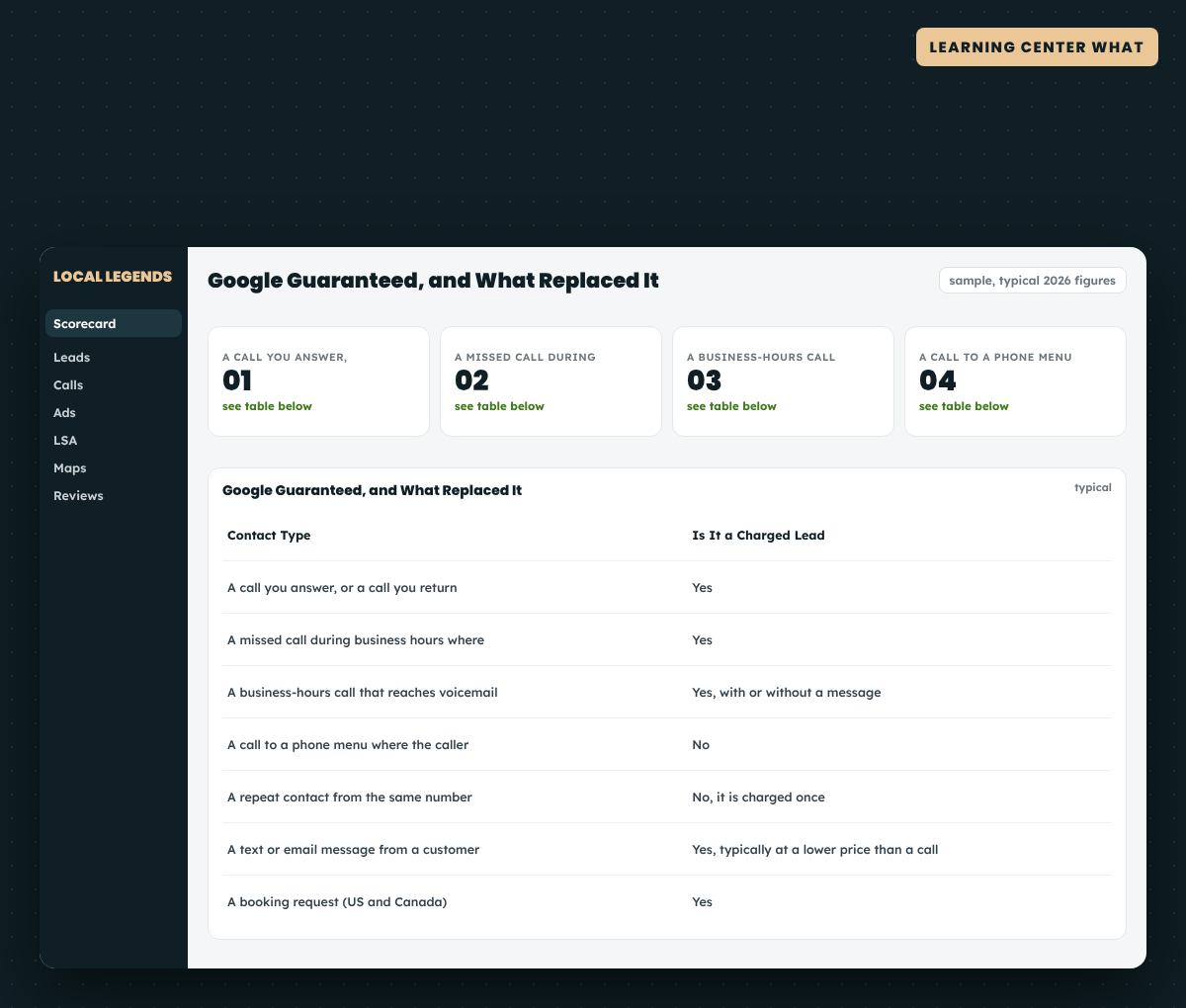
| Contact Type | Is It a Charged Lead, According to Google? |
|---|---|
| A call you answer, or a call you return and speak with the customer | Yes |
| A missed call during business hours where the caller stays on more than 20 seconds | Yes |
| A business-hours call that reaches voicemail or a greeting and lasts more than 20 seconds | Yes, with or without a message |
| A call to a phone menu where the caller hangs up before pressing a key | No |
| A repeat contact from the same number or email within 15 days | No, it is charged once |
| A text or email message from a customer | Yes, typically at a lower price than a call |
| A booking request (US and Canada) | Yes |
| A lead Google later judges invalid, duplicate or low quality | Google may apply an automatic credit after reviewing charged leads over about 30 days |
Do I Get Charged for Missed Calls, Spam Calls or Wrong Job Types in Google Local Services Ads?
Yes, a missed call can be charged: Google bills a business-hours call that rings or reaches voicemail for more than 20 seconds, even if no one answered. For spam and invalid contacts, Google reassesses charged leads over about 30 days and may credit them automatically.
- Answer inside 20 seconds: route LSA calls to whoever can pick up fastest, including an answering service.
- Shorten business-hours greetings: a long voicemail intro counts against you once 20 seconds pass.
- Set hours you truly staff: your business hours decide when missed calls count.
- Keep job types accurate: turn off work you do not do so the ad matches the right searches.
- Rate every lead: Google's feedback survey is how you flag poor-quality contacts.
- Expect no manual disputes after migration: Google says manual lead disputes are no longer supported once an account moves into Google Ads.
How Do I Set a Budget for Google Local Services Ads, and Can I Slow It Down When My Crews Are Booked Out?
A Google Local Services Ads budget is set as an average weekly budget, and Google treats it as a target, not a hard weekly cap. Google's budget page gives the monthly maximum as the average weekly budget times 30.4, divided by 7. Once that monthly maximum is reached, the ad stops for the rest of the month.
- Pick a bidding mode: Maximize leads, Target cost per lead or Max per lead; Google recommends Maximize leads.
- Fund at least 10 leads a week: Google's bidding page recommends that minimum for best results.
- Slow down by job type: turning off small repairs while keeping installs on is gentler than a full stop.
- Use the ad schedule: limit the hours the ad runs when the board is full.
- Know what migration changes: Google converts the weekly budget into a daily average and retires manual bidding.
What Local Legends Charges to Manage LSA, Compared With Typical Agencies
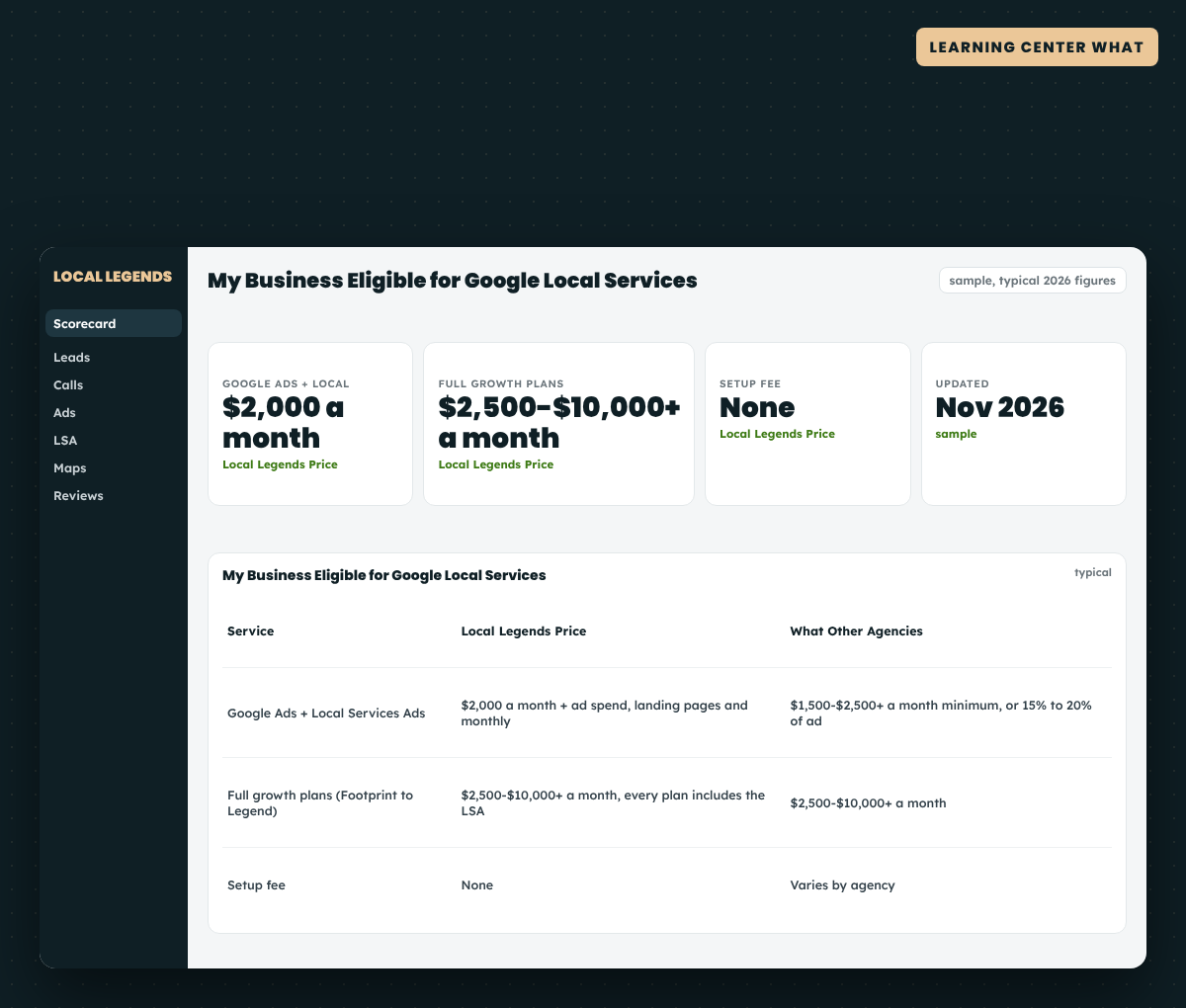
| Service | Local Legends Price | What Other Agencies Typically Charge |
|---|---|---|
| Google Ads + Local Services Ads management | $2,000 a month + ad spend, landing pages and monthly Google Business Profile optimization included | $1,500-$2,500+ a month minimum, or 15% to 20% of ad spend |
| Full growth plans (Footprint to Legend) | $2,500-$10,000+ a month, every plan includes the LSA Ranker review texter | $2,500-$10,000+ a month |
| Setup fee | None | Varies by agency |
Other-agency figures are typical ranges from 2026 published agency pricing, not quotes. Lead costs are paid by you straight to Google. See every plan on the Local Legends pricing page.
How Does Google Rank Local Services Ads for Home Service Contractors? Responsiveness, Reviews and Profile Quality
Google ranks Local Services Ads on three things it publishes: your bid, how likely you are to generate a lead and the quality of your profile. A higher bid alone does not guarantee the top spot, and Google says higher-quality profiles may rank higher and pay lower costs per lead.
How Do I Rank Higher in Google Local Services Ads as a Home Service Contractor?
A home service contractor ranks higher in Local Services Ads by answering fast, earning steady reviews and completing the profile Google scores. Google AI Mode gave the same order in November 2026, and Google's own ranking page lists each lever.
- Responsiveness: Google says missed calls may hurt your responsiveness score, so answer live.
- Rating and review count: both appear in Google's profile quality factors.
- Average response time: reply to message leads in minutes, not hours.
- Photos: Google names high-quality images as a profile quality factor.
- Verification checks completed: finished screening counts toward profile quality.
- Booking and message options: turning them on gives homeowners more ways to reach you.
- Relevance and search context: job types, service area and hours decide which searches you can match.
Local Legends runs this work through LSA Ranker, which includes the LSA Ranker review texter that sends every finished customer a review request by text. [SOURCE: Local Legends services, BRIEF.md]
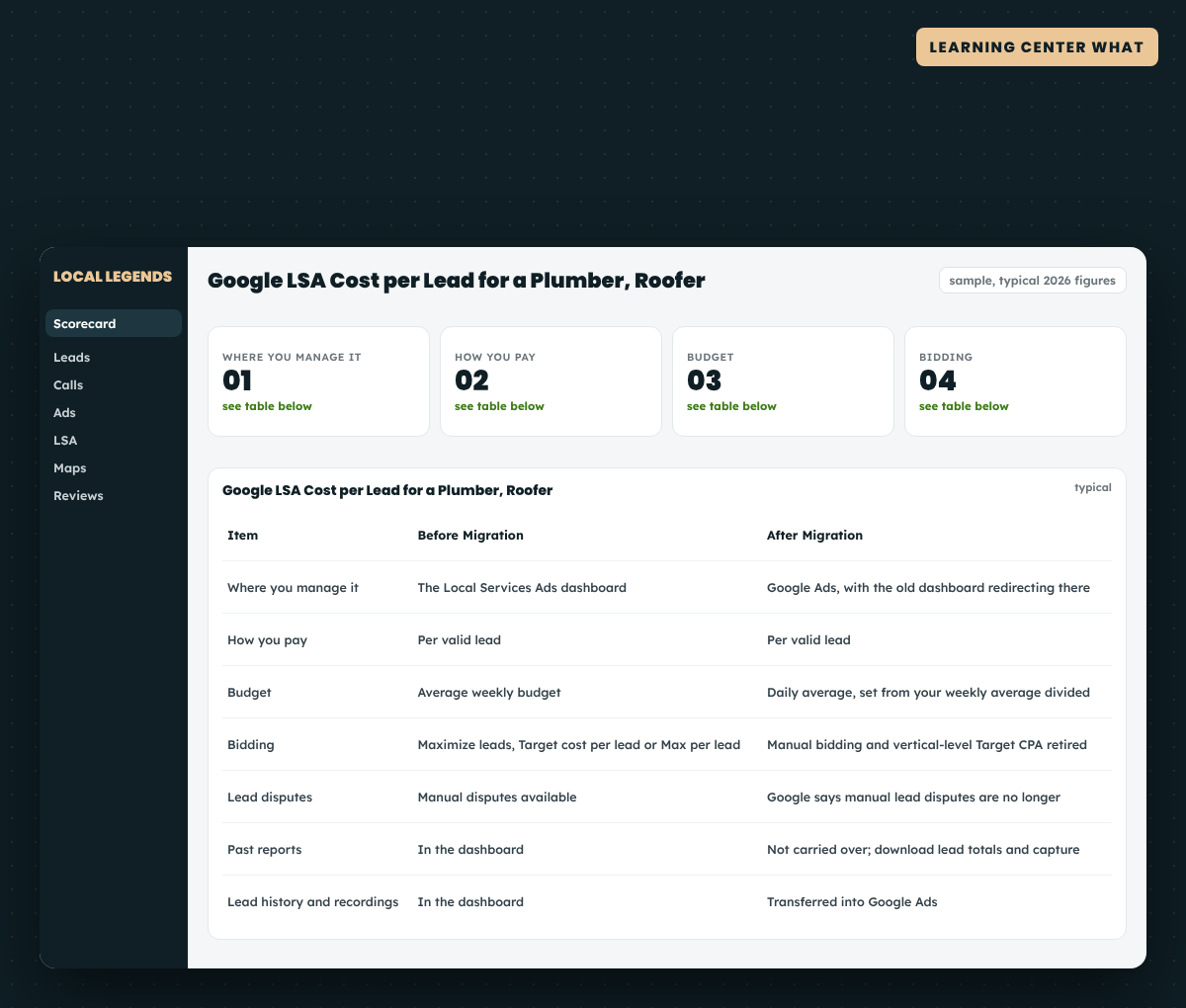
Google LSA Account Changes: The 2026 Move Into Google Ads Same Pay-Per-Lead Ads, a New Home
Google LSA accounts are moving into Google Ads, where they run as a specialized Performance Max campaign type built for pay-per-lead goals. The first phase began in August 2026 for select US advertisers in nine trades: roofing, HVAC, plumbing, electrical, pest control, moving, lawn care, house cleaning and appliance repair.
Service-area businesses without storefronts follow in late 2026, and remaining categories and non-US accounts follow in 2027, according to Google Ads Help. Local Services Ads are not a separate product going away; they are becoming a campaign inside Google Ads that still charges per lead.
| Item | Before Migration | After Migration |
|---|---|---|
| Where you manage it | The Local Services Ads dashboard | Google Ads, with the old dashboard redirecting there |
| How you pay | Per valid lead | Per valid lead |
| Budget | Average weekly budget | Daily average, set from your weekly average divided by 7 |
| Bidding | Maximize leads, Target cost per lead or Max per lead | Manual bidding and vertical-level Target CPA retired |
| Lead disputes | Manual disputes available | Google says manual lead disputes are no longer supported |
| Past reports | In the dashboard | Not carried over; download lead totals and capture reports first |
| Lead history and recordings | In the dashboard | Transferred into Google Ads |
| Business name, address, hours | Edited in LSA | Synced one way from your Google Business Profile |
| Google Verified badge | On the profile | Transfers automatically if verification is complete |
Google Is Moving Local Services Ads Into Google Ads. What Do I Need to Do Before My LSA Account Migrates?
Before an LSA account migrates, save the reporting history, confirm who can log in to Google Ads and clean up the Google Business Profile. Google says account administrators get an email 14 days before the migration date, a dashboard banner and a reminder 7 days later.
- Download your history: spend and charged leads by calls, messages and bookings, plus screenshots of impressions and clicks.
- Watch the admin inbox: the 14-day and 7-day emails go to the account administrator.
- Check Google Ads access: owner, office staff and agency should each have the right permission level.
- Fix the profile now: name, address and hours will sync from the Google Business Profile, and big name or address changes trigger a 24 to 48 hour review.
- Write down current settings: budgets, bidding mode, job types and service areas, so you can check them after the move.
- Replace BBB callouts: Google says they are no longer supported after migration.
Google LSA Account Problems and How Contractors Fix Them Diagnose Before Touching the Budget
Most Google LSA account problems fall into three groups: the account is not eligible to show, the settings filter it out, or the profile loses the ranking to competitors. Looking at impressions first tells you which group you are in.
My Google Local Services Ads Stopped Getting Calls This Week. What Should I Check First?
When Local Services Ads go quiet suddenly, check the account status, the screening documents and the impression count before changing the budget. Google AI Mode put those checks first in November 2026.
- Account status: confirm the profile or migrated campaign is active and has no warning banner.
- Expiring documents: an insurance certificate or license that lapsed can stop the ads.
- The Google Business Profile: a suspended, edited or disconnected profile affects the ad that pulls from it.
- Migration: see whether your account moved into Google Ads this week.
- Billing: an expired card or declined payment halts delivery.
- Impressions: zero impressions point to a status or budget block; impressions without calls point to ranking or phone problems.
Why Am I Not Getting Leads From Google Local Services Ads Even Though My Account Is Approved?
An approved Google LSA account with no leads is usually blocked by a hidden task, narrowed by its own settings, or outranked by stronger profiles. Google AI Mode listed those three causes in November 2026.
- Open tasks in the linked Google Ads account: pending advertiser verification can hold back delivery.
- Job types and service area: each one is a filter, and a search must match both to show your ad.
- A low budget or bid limit: a Max per lead cap below what competitors pay can keep you out.
- Few reviews or a low rating: both count in profile quality.
- Narrow hours: the ad only runs when your schedule says you are open.
My Google Local Services Ads Account Was Suspended. How Do I Get It Back?
A suspended Google LSA account comes back by finding the policy that was flagged, fixing it and then contacting Google, not by opening a new account. Google warns that new accounts an advertiser tries to create, and related accounts, may also be suspended.
- Read the notice: Google says suspensions follow violations of Local Services policies, the provider terms or Google Ads policies.
- Check the Policy Manager: it shows the account status and next steps.
- Fix the cause: update expired documents and make the name, address and phone match across the profile, website and LSA.
- Contact Google: use the Contact us form with a short, factual list of what you corrected.
- Keep your records: a suspended account can still view its reports, so save them.
Should You Manage Your Own Google LSA Account or Let an Agency Manage It? Own the Account Either Way
Every contractor should own its Google LSA account, whether the owner manages it or an agency does. The screening, billing and lead history are tied to your business, and an account set up under someone else's login can mean starting verification over.
Should I Let a Marketing Agency Manage My Google LSA Account, and Who Should Own the Account?
A contractor should keep primary ownership of the LSA and Google Ads accounts and give an agency manager access only, according to Google AI Mode in November 2026. An agency can tune settings and budgets, but it cannot answer your phones for you.
- Create the account yourself with a company email and a payment method you control.
- Invite the agency as a manager, never as the owner.
- Keep your call recordings and lead history in your account, so they stay with you.
- Ask how the agency reports: booked jobs and cost per booked job, not only lead counts.
- Ask what changes after migration: who watches the Google Ads campaign and the budget each week.
- Make sure your team can answer: responsiveness is still yours to own.
How Local Legends Handles Google LSA Accounts
Local Legends Marketing[LINK: /] keeps the website, domain, Google Business Profile, ad accounts and call data in the client's name, and is added as an owner on the profile while the client stays the primary owner.
Every account gets a weekly project review meeting. [SOURCE: Local Legends engagement terms, BRIEF.md]
Calls are tracked with CallRail and connected to CRMs including ServiceTitan, Housecall Pro, JobNimbus, Jobber and GoHighLevel, so a CEO scorecard shows calls, booked jobs, sold jobs and cost per booked job.
There are no setup fees and no long-term contracts. Learn more on our Google Local Services Ads management page.
Local Legends Marketing Reviews From Contractor CEOs Owners Who Hired the Team
Four home service CEOs have given Local Legends testimonials: three lead roofing companies and one leads a restoration company. Three are on video and one is written. [SOURCE: Local Legends testimonials, BRIEF.md]
Levi has been absolutely outstanding to work with over the years... His creativity, responsiveness, and deep understanding of our marketing strategy have made a huge impact." Brad Beldon, CEO, Roofing Company. Read on Local Legends
- Kyle Scott, CEO, Roofing Company (video testimonial)
- Jim Dodson, CEO, Roofing Company (video testimonial)
- Race Allen, CEO, Precision Restoration of Texas (video testimonial)
- Brad Beldon, CEO, Roofing Company (written testimonial)
Founder Levi Ostlund sold driveway jobs door to door at age 10, poured concrete with his dad, ran a landscaping company in high school and later served as CMO of Amstill Roofing, after losing more than $30,000 to marketers who did not deliver. [SOURCE: Local Legends founder bio, Levi Ostlund]
Frequently Asked Questions About Google LSA Short Answers for Contractors
Is Google LSA Going Away?
No, Google LSA is not going away. It is moving into Google Ads as a Performance Max campaign type with pay-per-lead goals, keeping per-lead billing and the top placement.
Is Google Guaranteed Still a Thing?
No, Google Guaranteed was replaced by the Google Verified badge starting in October 2025, and the money-back guarantee ended for bookings made on or after December 7, 2025.
Is Google Verified Free?
Google says businesses are not charged for the background checks, and there is no badge fee. You pay for the leads your ad produces.
Where Do Local Services Ads Reviews Come From?
Local Services Ads reviews come from your Google Business Profile, according to Google, and they follow the Google Maps content policies. Google gives LSA advertisers a review link to share with customers.
Can I Create a New Pay-Per-Lead Campaign Inside Google Ads?
Not yet: Google says new pay-per-lead campaigns cannot be created directly in Google Ads at this time, so new advertisers still start on the Local Services page.
What Happens If a Background Check Fails?
Google requires a 30-day wait before reapplying after a failed background check, and a 180-day wait after a second denial.
Do Message Leads Cost Less Than Phone Calls?
Usually, yes: Google says message leads are typically priced lower than phone leads, though the price depends on how likely the customer is to book.
Does Local Legends Charge a Percentage of My LSA Spend?
No, Local Legends charges a flat $2,000 a month to manage Google Ads and Local Services Ads together, and lead costs are paid by you directly to Google.
Reviewed by Levi Ostlund, Founder, Local Legends Marketing

Get Your Google LSA Account Working for Booked Jobs Start With a Free Growth Audit
A free growth audit from Local Legends Marketing reviews your Local Services Ads status, screening documents, job types, call handling and Google Business Profile, along with Google Maps rank grids across your service area, before any budget changes.
- Call:(936) 900-1248
- Home office: 481 Stephen F Austin Dr, Conroe, TX 77302
- First step: a free growth audit, with Google Ads and Local Services Ads management at $2,000 a month and no setup fee