


Set Up a Google Business Profile
How to Set Up a Google Business Profile for a Contracting Business: Name, Category, Service Area, Verification and Call Settings for Roofers, HVAC Companies and Plumbers
A Contractor's Setup Guide From Local Legends Marketing
Updated November 2026 · Reviewed by Levi Ostlund, Founder
Breadcrumb: Home > Learning Center [LINK: /learning-center/] > How to Set Up a Google Business Profile
To set up a Google Business Profile, sign in with a Google account, add or claim the business through Google Maps or Search, enter the real business name and most specific category, choose a service area instead of a public address if you work at customers' homes, then complete the verification method Google offers. Google lets you add or claim the profile at no charge.
- Cost to create: free, according to Google's own help center.
- Service areas: up to 20, staying within about two hours of driving from your base.
- Profiles allowed: one per business, with services listed on that profile rather than split into extra listings.
- Verification review: up to 5 business days for most methods.
- Ownership: the business owner should always hold the primary owner role.
Free Growth Audit
Your Reviews, Radius and Response Rate vs the competitors beating you.
About Local Legends Marketing
A home service marketing agency headquartered in Conroe, Texas, with 8+ years of marketing experience, running Google Ads, Local Services Ads, local SEO, AI SEO, connected TV and review systems for contractors nationwide.
How Do I Set Up a Google Business Profile for My Roofing Company Step by Step? Seven Steps for a Service-Area Contractor
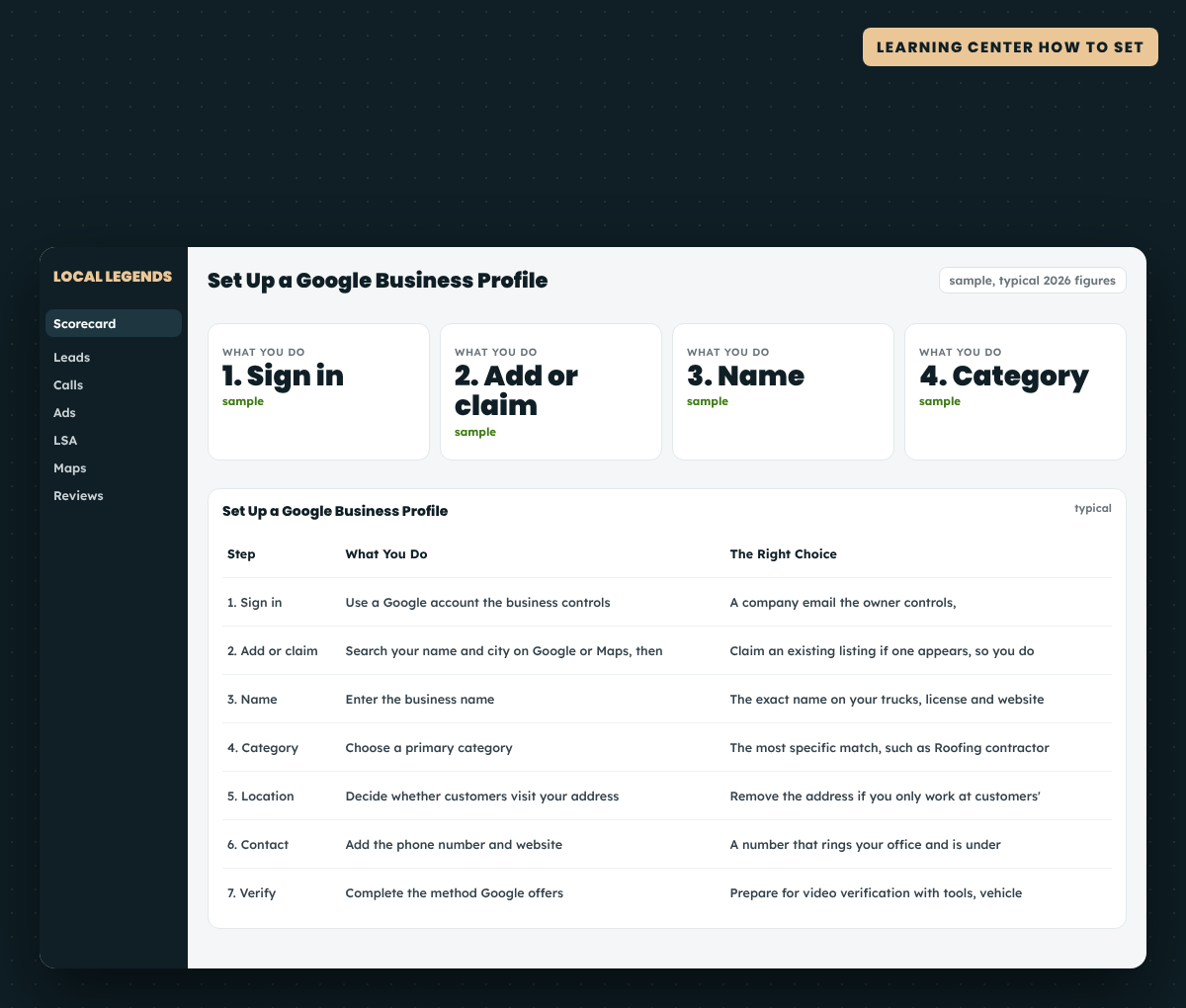
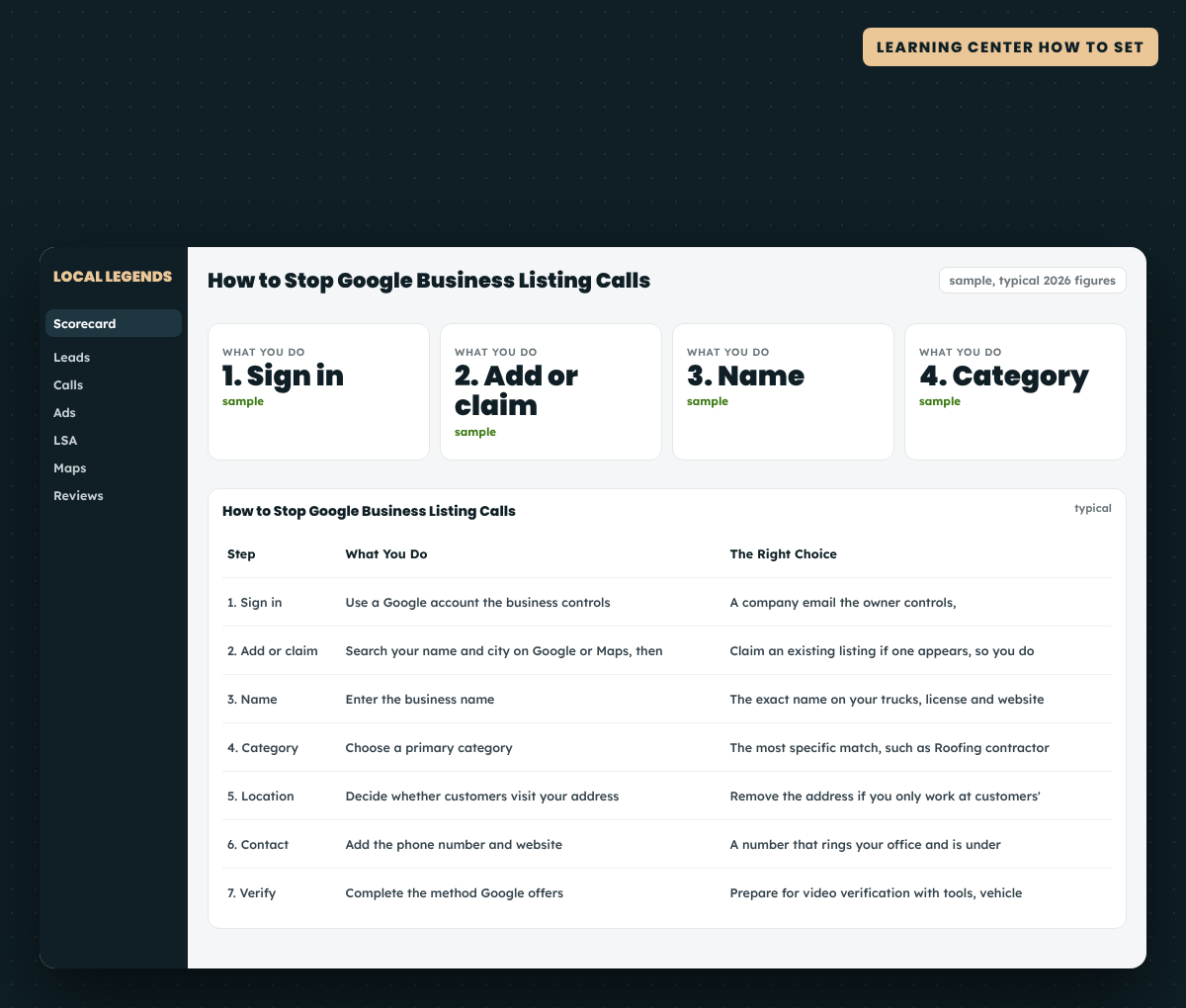
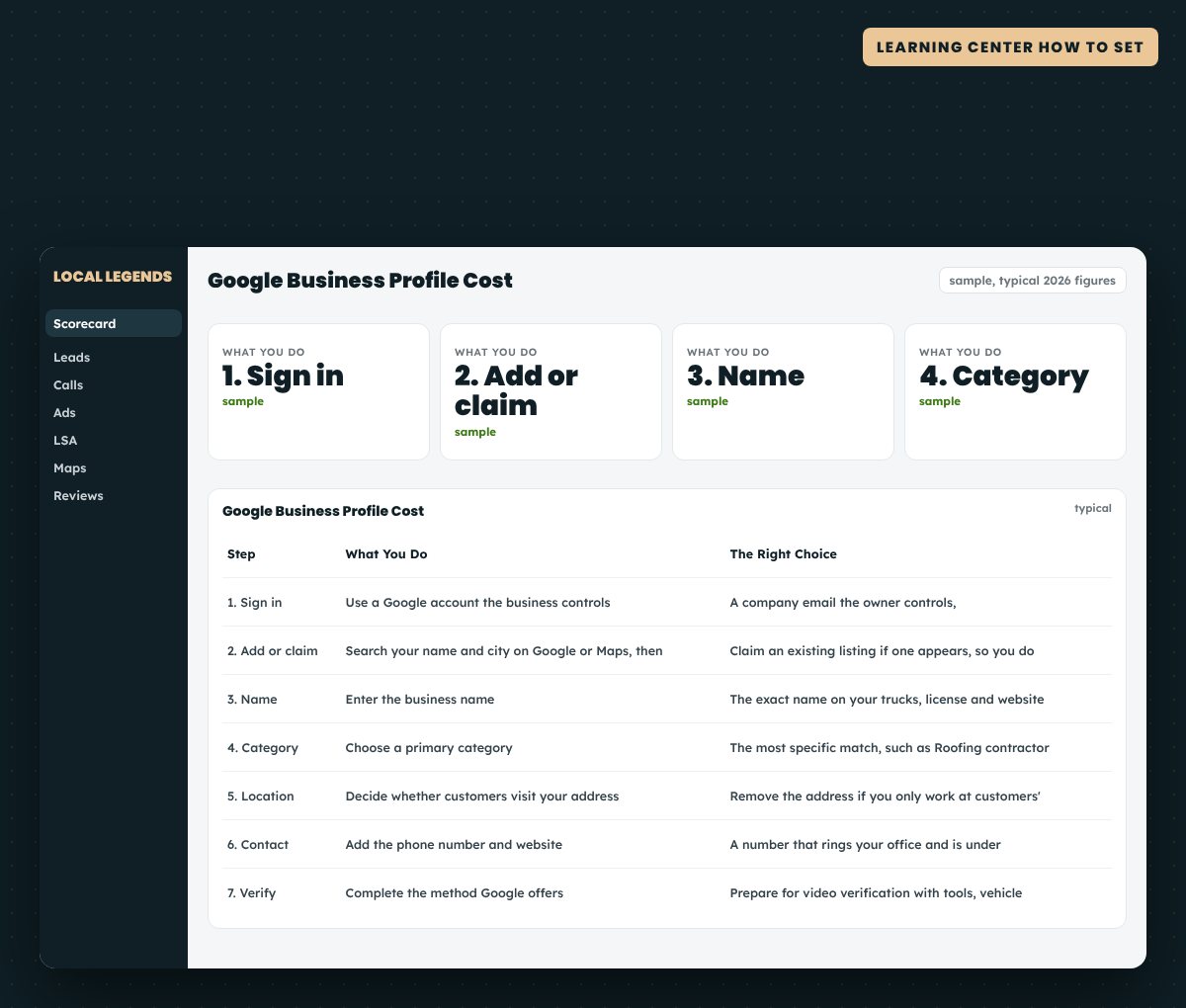
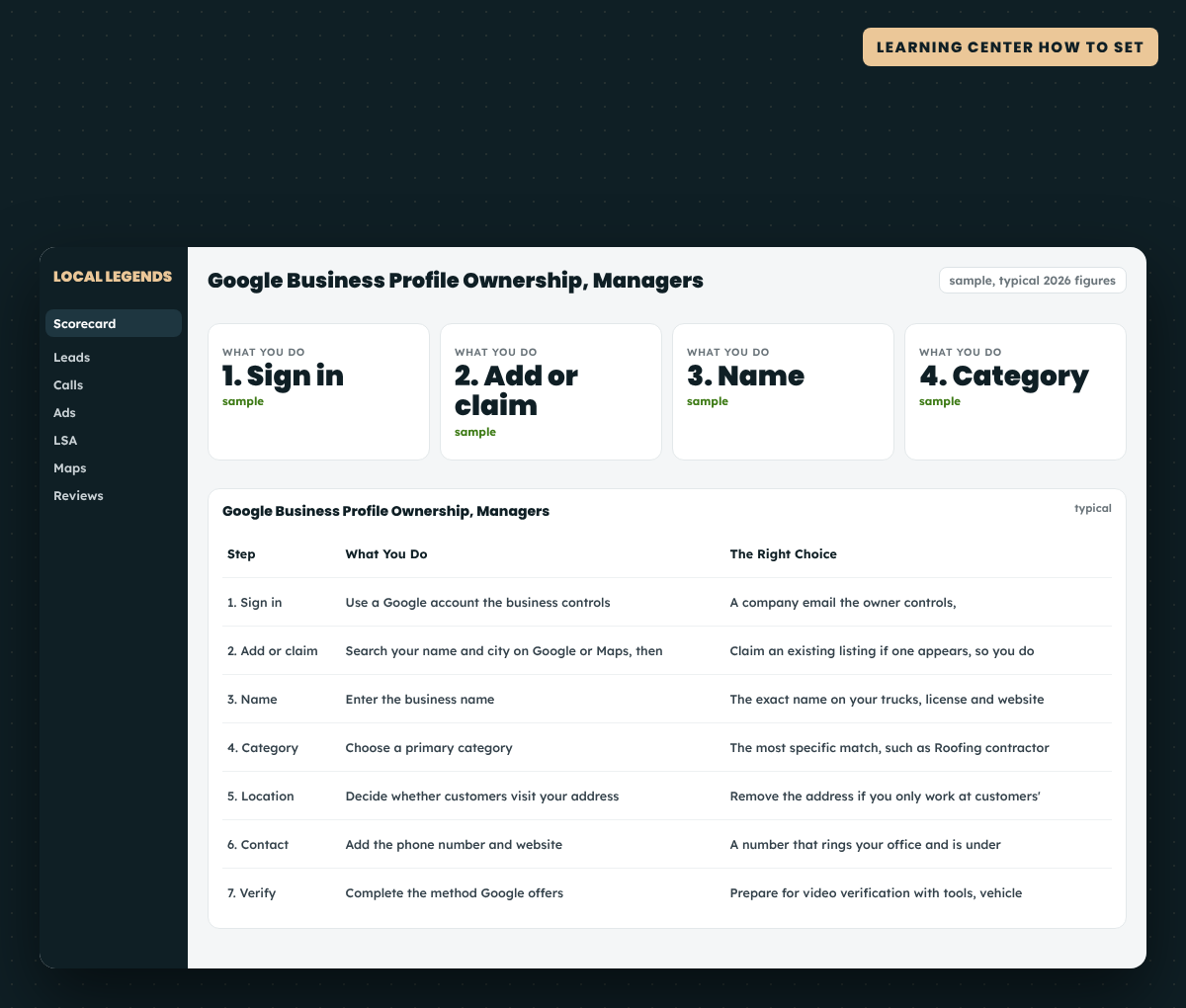
A roofing company sets up its Google Business Profile by creating or claiming the listing, entering accurate business details, defining a service area and verifying, in that order. The table below gives each step with the choice a contractor should make.
| Step | What You Do | The Right Choice for a Contractor |
|---|---|---|
| 1. Sign in | Use a Google account the business controls | A company email the owner controls, not an employee's personal Gmail |
| 2. Add or claim | Search your name and city on Google or Maps, then choose "Own this business?" or "Claim this business," or add a new place in the Maps app | Claim an existing listing if one appears, so you do not create a duplicate |
| 3. Name | Enter the business name | The exact name on your trucks, license and website, with no keywords or city added |
| 4. Category | Choose a primary category | The most specific match, such as Roofing contractor, HVAC contractor or Plumber |
| 5. Location | Decide whether customers visit your address | Remove the address if you only work at customers' homes, then add service areas |
| 6. Contact | Add the phone number and website | A number that rings your office and is under your direct control |
| 7. Verify | Complete the method Google offers | Prepare for video verification with tools, vehicle and documents ready |
Step 1: Use an Account the Company Controls
Create the profile from a Google account tied to a company email the owner can always reach. A profile created under a former office manager's or agency's personal login can leave the owner locked out later.
Step 2: Search Before You Add
Search your business name and city on Google and Google Maps first. Customers or data providers often create a listing before the owner does, and claiming it keeps any existing reviews attached to your business.
Steps 3 and 4: Name and Primary Category
Enter the name exactly as it appears in the real world. Then choose one primary category that describes the core of your work, and add only a few secondary categories for services you truly perform.
Steps 5 and 6: Address, Service Area and Phone
Remove the street address if customers never come to you, add the cities or ZIP codes you serve and enter a phone number that reaches your office. Google's rules require the number to connect to your business and stay under your control.
Step 7: Verify
Google decides which verification methods appear for your business. Read the options before you start, since a video verification goes better when the tools, vehicle and documents are ready before you press record.
Should a Roofing Contractor Who Works From Home Hide the Address on Google?
Yes, a roofing contractor who works from home and meets customers at their properties should remove the address from the profile and list a service area instead, which is what Google's guidelines call for when customers are served at their locations rather than yours.
- Remove the address under Location if no customer visits your home office.
- Add service areas by city or ZIP code, up to 20 of them.
- Keep the overall area within about two hours of driving from your base.
- Never use a P.O. box or a virtual office, since Google does not accept either.
- Expect changes to service areas to take up to 48 hours to appear.
- Show the address only if the office is staffed and can receive customers during its stated hours.
What Is the Best Google Business Profile Category for an HVAC Company?
For most HVAC companies the best primary category is HVAC contractor, or Air conditioning contractor when cooling is clearly the core of the business, because Google asks for the most specific category that describes the main work.
- Choose one primary category for the service that brings the most revenue.
- Add a few secondary categories, such as Furnace repair service or Air conditioning repair service, only if you perform that work.
- Avoid categories for work you subcontract or have stopped offering.
- List individual services, like duct cleaning or heat pump installation, in the Services section.
- Keep the primary category steady through the seasons instead of switching it for summer and winter.
- Pick Heating contractor for a heating-only shop, or Mechanical contractor when large commercial systems are the core work.
- Review categories once a year, since Google adds and renames them.
Can I Put Keywords Like "Roofing" and My City in My Google Business Profile Name?
No, Google's guidelines do not allow keywords, locations or taglines added to the business name. Only use them if they are part of your legal, real-world name on signs, trucks and documents.
- Use the name printed on your license, vehicles and invoices.
- Put services in categories and the Services section instead of the name.
- Put towns in the service area list instead of the name.
- Expect a suspension risk if the name does not match your real branding, since competitors can suggest edits or report the listing.
- Register a DBA and change your signs, website and documents first if you truly want those words in the name.
- Work services and towns into the description and posts in plain sentences.
How Does Google Business Profile Verification Work for a Plumber With No Storefront? Methods Google Offers and What Each One Needs
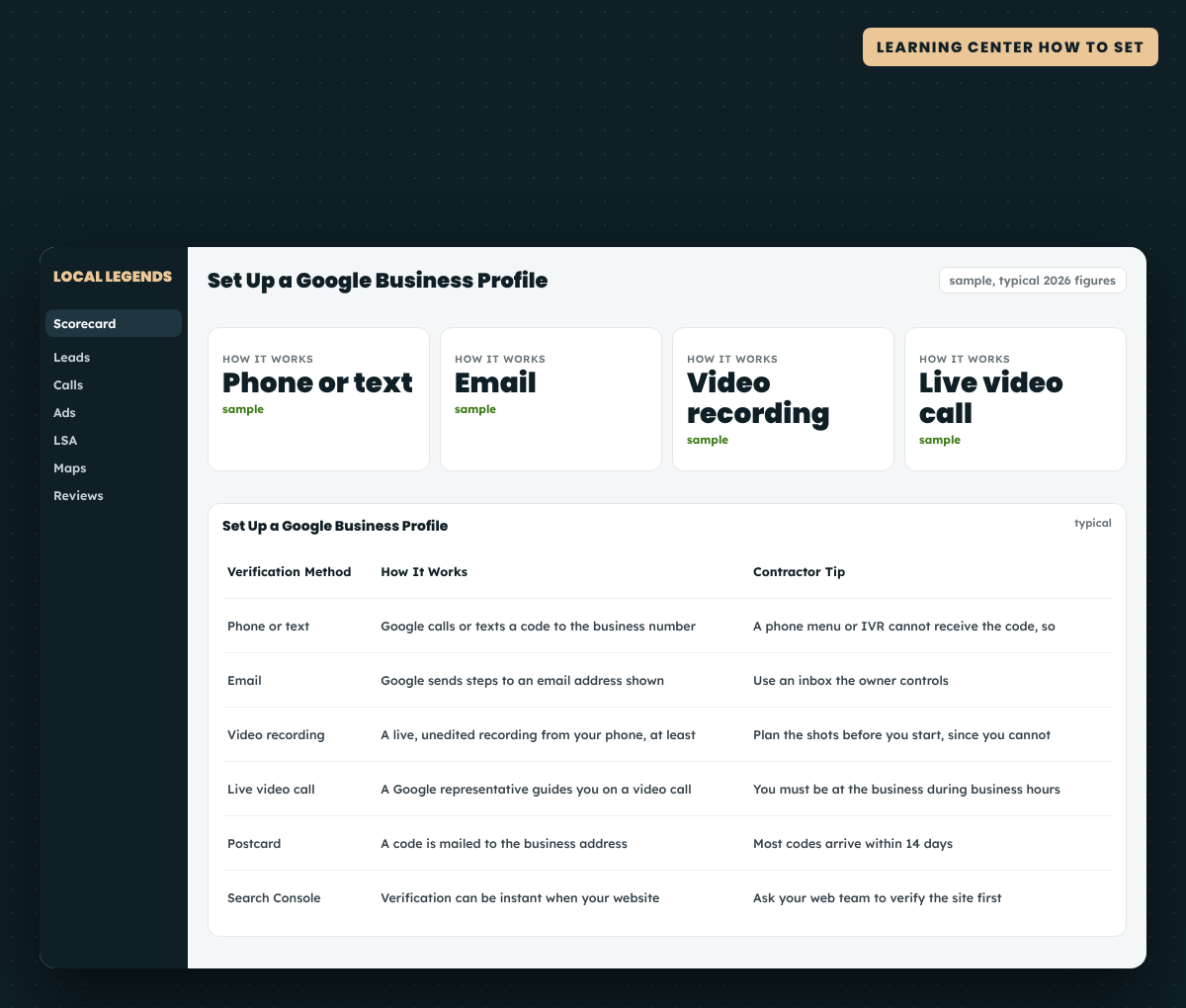
A plumber with no storefront verifies a Google Business Profile with whichever method Google offers for that listing, most often a short recorded video that proves location, equipment and management. Google reviews most submissions within 5 business days.
| Verification Method | How It Works | Contractor Tip |
|---|---|---|
| Phone or text | Google calls or texts a code to the business number | A phone menu or IVR cannot receive the code, so answer on a direct line |
| Google sends steps to an email address shown on screen | Use an inbox the owner controls | |
| Video recording | A live, unedited recording from your phone, at least 30 seconds long | Plan the shots before you start, since you cannot pause or edit |
| Live video call | A Google representative guides you on a video call | You must be at the business during business hours |
| Postcard | A code is mailed to the business address | Most codes arrive within 14 days |
| Search Console | Verification can be instant when your website is already verified in Search Console | Ask your web team to verify the site first |
What to Show in a Contractor Video Verification
Google asks a service-area business to prove three things in one continuous recording: where the business is based, that the business exists and that you manage it.
Show Where the Business Is Based
Film a street sign, building number or landmark near the address on the profile. A contractor who works from home can film landmarks in the immediate neighborhood.
Show That the Business Exists
Show professional tools, equipment, business cards or branded apparel. A plumber might pan across a stocked truck, a pipe threader and a branded shirt.
Show That You Manage the Business
Show yourself doing the work or using business-only assets, such as unlocking a branded van, or show a permit, invoice or utility bill with the same business name.
What Not to Film
Keep bank, tax and ID numbers out of the frame, along with other people's faces and private information. Skip printed paper signs taped to a truck or door, and record inside the Business Profile prompt on your phone rather than uploading a saved file.
My Google Business Profile Video Verification Failed. What Should I Do?
When a Google Business Profile video verification fails, Google sends the reasons, and the fix is a new recording that repeats everything from the first video plus the missing items. Missing location shots or missing proof of management are frequent reasons listed.
- Read the reasons Google lists under Review issues before recording again.
- Separate an upload error from a rejection: a shorter, lower-resolution video on strong Wi-Fi often clears an upload that keeps failing.
- Do not create a second profile to start over, since that adds a duplicate.
- Start the new video at a clear street sign or landmark near the listed address.
- Show the business name on a vehicle, shirt, permit or invoice.
- Record in one take, with no cuts, for at least 30 seconds.
- Confirm the profile name matches the name on your documents exactly.
- If no verification options remain, contact Google Business Profile support from the help center with photos of your vehicle, tools and business documents.
How to Stop Google Business Listing Calls Real Calls Versus Fake Ones
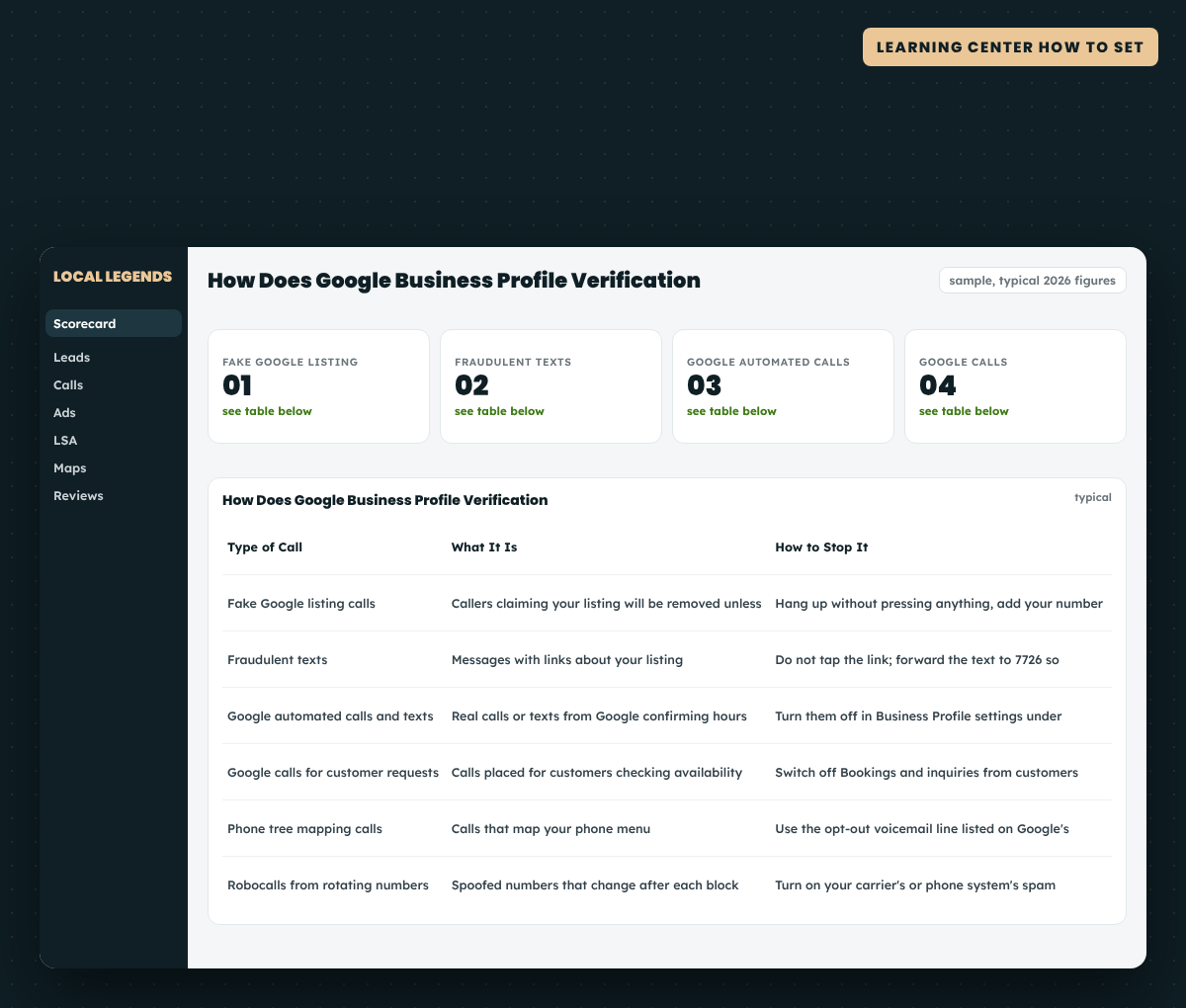
To stop Google business listing calls, hang up on any caller who threatens your listing or asks for payment, register the number on the National Do Not Call Registry and turn off Google's own automated calls in your profile settings. Google says it never asks for payment information over the phone.
| Type of Call | What It Is | How to Stop It |
|---|---|---|
| Fake "Google listing" calls | Callers claiming your listing will be removed unless you pay or press a button | Hang up without pressing anything, add your number to the Do Not Call Registry and report to the FTC or FCC |
| Fraudulent texts | Messages with links about your listing or verification | Do not tap the link; forward the text to 7726 so your carrier can block similar messages |
| Google automated calls and texts | Real calls or texts from Google confirming hours or services | Turn them off in Business Profile settings under Advanced settings |
| Google calls for customer requests | Calls placed for customers checking availability or booking | Switch off "Bookings and inquiries from customers" in the same settings |
| Phone tree mapping calls | Calls that map your phone menu | Use the opt-out voicemail line listed on Google's help page |
| Robocalls from rotating numbers | Spoofed numbers that change after each block | Turn on your carrier's or phone system's spam filtering, since blocking one number at a time rarely works |
How Do I Turn Off Google's Automated Calls to My Contracting Business?
A verified contracting business turns off Google's automated calls in Business Profile settings, under Advanced settings and the section named "Google automated calls and text messages." Each type can be switched off separately.
- Go to business.google.com and open your profile.
- Select More, then Business Profile settings, then Advanced settings.
- Under "Google automated calls and text messages," switch off the items you do not want.
- Reply STOP to any automated text from Google, or say "Please stop calling my business" if a real automated check-in reaches you.
- Expect an occasional manual call from Google to confirm details even after opting out.
What Should My Office Staff Say When a Caller Claims to Be From Google?
Office staff should end the call politely and never share login details, card numbers or verification codes, since real Google calls never ask for payment and a genuine problem always shows up inside your own profile dashboard.
- Do not press any number the recording asks you to press.
- Do not read out a verification code sent to your phone.
- Check the profile yourself at business.google.com if the caller mentions a problem.
- Log the number and time so the owner can report repeat callers.
How Much Does a Google Business Profile Cost? Free Listing, Paid Upkeep
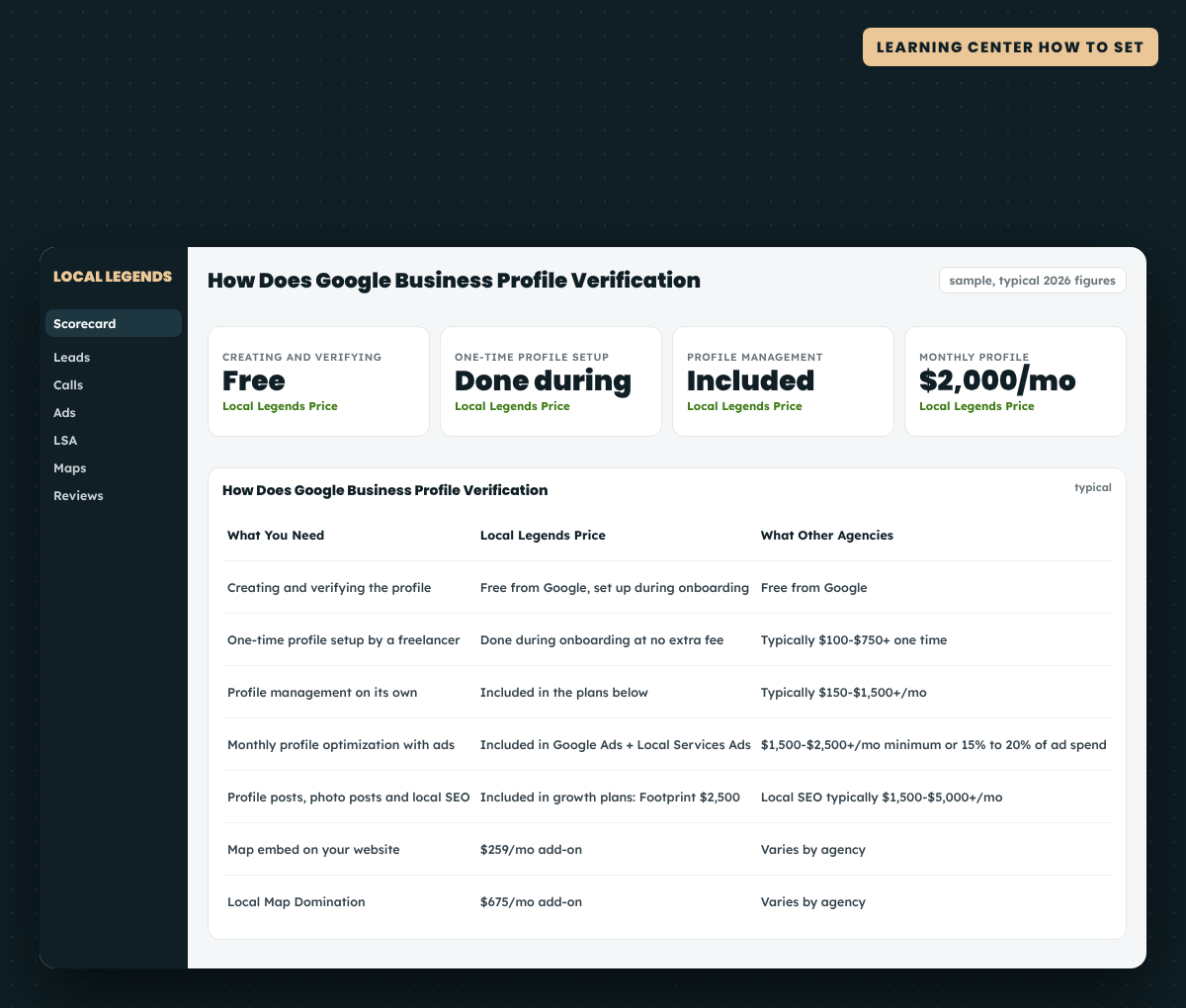
A Google Business Profile costs nothing to create or claim, because Google lets businesses add or claim profiles at no charge. What contractors pay for is the ongoing work: photos, posts, reviews, categories, service areas and the ads that run alongside the profile.
| What You Need | Local Legends Price | What Other Agencies Typically Charge |
|---|---|---|
| Creating and verifying the profile | Free from Google, set up during onboarding | Free from Google |
| One-time profile setup by a freelancer or agency | Done during onboarding at no extra fee | Typically $100-$750+ one time |
| Profile management on its own | Included in the plans below | Typically $150-$1,500+/mo |
| Monthly profile optimization with ads | Included in Google Ads + Local Services Ads management at $2,000/mo | $1,500-$2,500+/mo minimum or 15% to 20% of ad spend for ads management |
| Profile posts, photo posts and local SEO | Included in growth plans: Footprint $2,500, Trailblazer $4,000, Sasquatch $8,000, Legend $10,000+ per month | Local SEO typically $1,500-$5,000+/mo |
| Map embed on your website | $259/mo add-on | Varies by agency |
| Local Map Domination | $675/mo add-on | Varies by agency |
Every plan and add-on is listed on the Local Legends pricing[LINK: /pricing/] page. No plan has setup fees or long-term contracts.
[SOURCE: Levi Ostlund pricing decision, Nov 8 2026, and confirmed claims, Nov 10 2026; typical setup and management ranges from Google AI Mode answers citing agency pricing posts, captured Nov 27 2026]
Is It Worth Paying Someone to Set Up and Manage a Contractor's Google Business Profile?
Paying for help is usually worth it when the profile has failed verification, been suspended or simply sits untouched for months, since setup is quick but steady posting, photo updates and review requests are where most contractors fall behind.
- Do it yourself if you have time to post weekly and answer every review.
- Get help if verification keeps failing or the listing is suspended.
- Keep yourself as the primary owner no matter who manages the profile.
- Ask what is posted each week and how calls and direction requests from the profile are tracked.
- Ask how the agency handles the business name and address, since keyword names and mailbox addresses invite suspensions.
- Plan to film any verification video yourself, since it has to come from the business.
- Pick help that ties profile activity to booked jobs, not views alone.
Our Google Business Profile management[LINK: /services/google-business-profile-management/] adds Local Legends as an owner on your profile while you remain the primary owner, and we teach owners how to handle reinstatements, video verifications and suggested edits themselves.
Google Business Profile Ownership, Managers and Duplicate Listings Keep Control of the Listing You Built
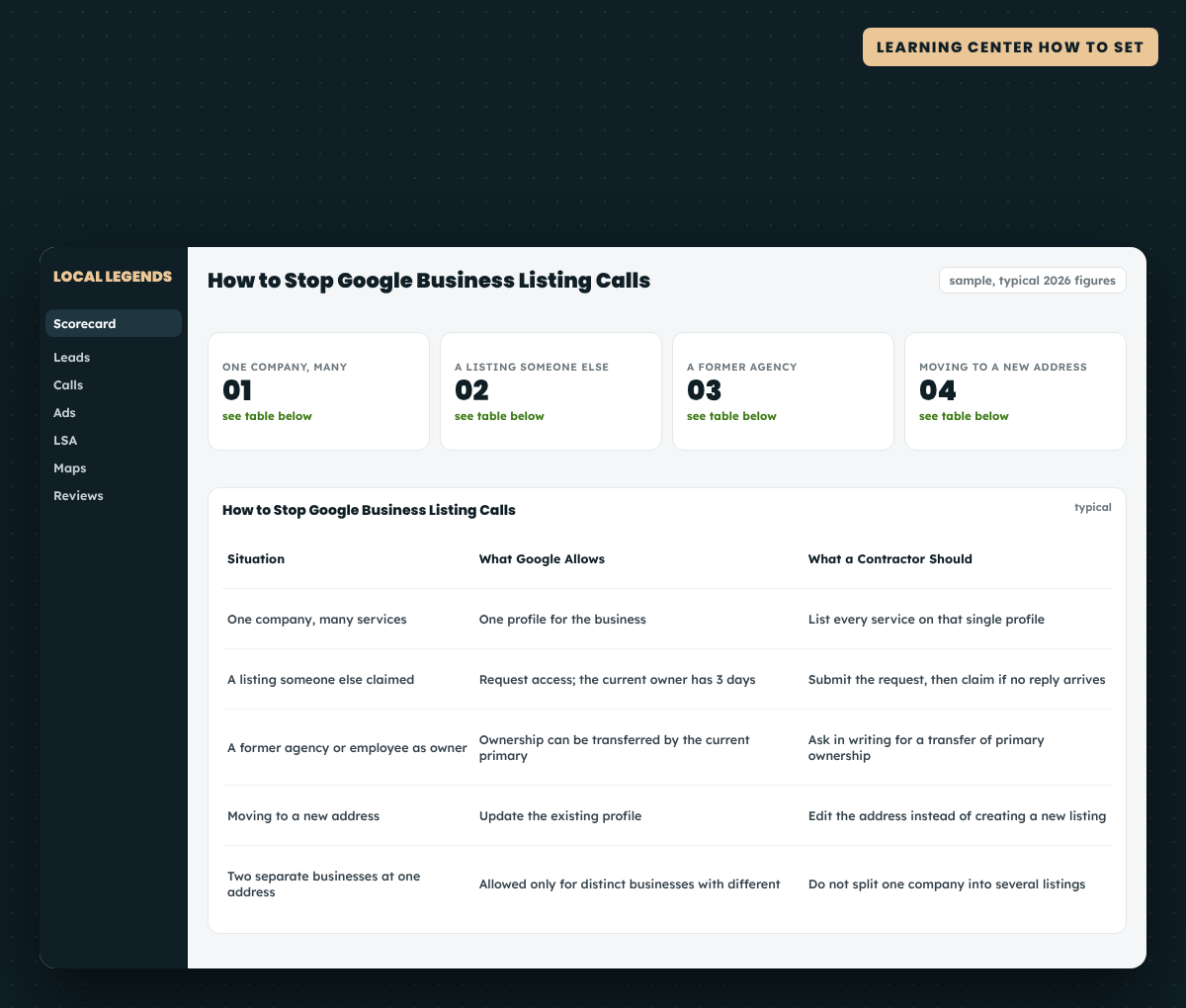
Google allows one Business Profile per business, and the owner of the business should hold the primary owner role on it, with managers and agencies added under it. Ownership problems are easier to prevent than to fix.
| Situation | What Google Allows | What a Contractor Should Do |
|---|---|---|
| One company, many services | One profile for the business | List every service on that single profile |
| A listing someone else claimed | Request access; the current owner has 3 days to respond | Submit the request, then claim if no reply arrives |
| A former agency or employee as owner | Ownership can be transferred by the current primary owner | Ask in writing for a transfer of primary ownership |
| Moving to a new address | Update the existing profile | Edit the address instead of creating a new listing |
| Two separate businesses at one address | Allowed only for distinct businesses with different names and signage | Do not split one company into several listings |
A Former Agency or Employee Owns My Google Business Profile. How Do I Get It Back?
A contractor gets a Google Business Profile back by asking the current owner to transfer primary ownership, or by submitting an access request through Google if the owner will not respond. Google gives the current owner 3 days to answer before you may be able to claim it.
- Ask the former agency or employee in writing to make you the primary owner.
- If they cooperate, they add you as an owner under People and access; Google makes a new owner wait 7 days before primary ownership can move to them.
- If they do not respond, go to business.google.com/add and search for your business.
- Select Request Access and complete the form.
- Wait 3 days, then follow the claim or verify option in Google's email if no reply arrives.
- If the request is denied or no claim option appears, contact Google Business Profile support with your business registration and a utility bill in the company name.
- Once you have access, remove anyone who no longer works with the business.
Can a Contractor Have Multiple Google Business Profiles for Different Cities?
A contractor can have more than one Google Business Profile only when each one represents a real location that meets Google's eligibility rules, because Google allows one profile per business at a location and treats extra listings as duplicates.
- A single shop that serves many towns keeps one profile with a service area.
- A second staffed office in another city may qualify for its own profile when its own crew works from it, it has its own local number and location page and its service area does not overlap the first.
- Never open a virtual office or mailbox to get a listing in a new city.
- Reach new towns with city pages on your website and ads by ZIP code instead.
What to Do After You Set Up a Google Business Profile The First 30 Days Decide How Fast Calls Start
After you set up a Google Business Profile, fill every remaining field, add real job photos, ask recent customers for reviews and connect the profile to your other Google accounts. A verified but empty profile rarely earns calls.
Fill the Remaining Fields
Add hours, services, a description written in plain language, your website and booking or quote link. Seasonal trades can update hours as the season changes.
Connect It to Ads and Tracking
Our Google Local Services Ads[LINK: /services/google-local-services-ads/] work begins with the profile: Local Services Ads require a public, verified profile, and as LSA moves into Google Ads, name, address and hours sync one way from it.
Keep the name, address and phone identical in both places, down to punctuation, and never create a new profile during ad setup if the existing one does not appear. [SOURCE: Google Ads Help, LSA transition to Performance Max with pay-per-lead goals, fetched Nov 27 2026]
What Should a New HVAC Company Post on Its Google Business Profile After Setup?
A new HVAC company should post real job photos and short updates about the services it wants to sell most, since early posts and photos show homeowners an active, local business.
- Before and after photos of installs, with a short caption naming the service and town.
- Seasonal reminders, such as AC tune-ups in spring and furnace checks in fall.
- An introduction post in week one naming the towns you serve and your main services.
- Team and truck photos that match the names on your trucks.
- Short troubleshooting tips, such as what to check before calling about a furnace that will not start.
- Offers or financing details only if they are current.
- A Call now or Book button on every post.
- One or two posts a week, kept up every week.
How Does a New Remodeling Company Get Its First Google Reviews?
A new remodeling company gets its first Google reviews by asking every satisfied customer right after the walkthrough, with a direct review link sent by text, since the request works best while the finished kitchen or bath is fresh.
- Copy the review link from your profile and save it in your phone and CRM.
- Ask in person at the final walkthrough, then send the link or a QR code the same day, with one polite reminder a few days later.
- Ask past clients from work you did before forming the new company.
- Ask customers to mention the project and their town in the review.
- Reply to every review, positive or negative, in a professional tone.
- Never buy reviews or offer payment, discounts, gift cards or free work for them, since Google prohibits it.
Every Local Legends growth plan includes the LSA Ranker review texter, which sends review requests after each job. Our local SEO[LINK: /services/local-seo/] work then builds on those reviews with city pages and citations.
Local Legends Marketing Reviews From Contractor CEOs and the Founder Behind This Guide Why Owning Your Listing Matters
Levi Ostlund started out selling driveway jobs door to door at 10, then poured concrete with his father and ran a landscaping company in high school. Two marketers later cost him more than $30,000, which is why Local Legends insists that the contractor owns every account, including the Google Business Profile. [SOURCE: client-confirmed founder story, BRIEF.md, Nov 2026]
Levi has been absolutely outstanding to work with over the years... His creativity, responsiveness, and deep understanding of our marketing strategy have made a huge impact." Brad Beldon, CEO, Roofing Company. See it on locallegends.marketing
Long-term roofing client: Brad Beldon wrote the testimonial above, published on the Local Legends home page with video testimonials from Kyle Scott, CEO, Roofing Company; Jim Dodson, CEO, Roofing Company; and Race Allen, CEO, Precision Restoration of Texas. [SOURCE: written testimonial, locallegends.marketing home page, Nov 2026]
Frequently Asked Questions About Setting Up a Google Business Profile Short Answers for Contractors
Can I Set Up a Google Business Profile Without a Website?
Yes, a website is optional when you set up the profile, though adding one later gives homeowners a place to see your work and helps verification when the site is verified in Search Console.
How Long Until My New Profile Shows Up on Google Maps?
A new profile usually appears after verification is approved, which Google says takes up to 5 business days for most methods. Edits after that, like service area changes, can take up to 48 hours.
Can I Set Up a Google Business Profile on My Phone?
Yes, you can add a business in the Google Maps app by tapping Contribute, then Add place, then "Is this your business?" Video verification is also recorded on a phone.
How Do I Add My Office Manager Without Giving Up Ownership?
Add the office manager as a manager under People and access, and keep the owner's account as the primary owner. Remove access the day someone leaves the company.
Should a 24/7 Emergency Plumber List 24-Hour Hours?
List 24-hour hours only if someone really answers and dispatches around the clock, since Google asks for regular customer-facing hours and homeowners expect a response when the profile says open.
Do I Need an LLC to Set Up a Google Business Profile?
No, Google's guidelines do not list an LLC as a requirement. Eligibility depends on serving customers in person at your location or theirs, and registration papers or a utility bill in the business name help when verification asks for proof.
Can I Use a P.O. Box or Shared Office Address?
No, Google does not accept P.O. boxes, remote mailboxes or virtual offices. Service-area contractors should hide their real address and list service areas instead.
Does Local Legends Own My Profile If You Manage It?
No. You stay the primary owner, and Local Legends Marketing is added as an owner so the team can manage the profile. If you leave, you keep the profile and its reviews.
Reviewed by Levi Ostlund, Founder, Local Legends Marketing

Get Your Google Business Profile Set Up the Right Way Book a Free Growth Audit
Book a free growth audit and the Local Legends team will check your profile name, category, service areas, verification status and who holds ownership, then show you where your listing appears on a Google Maps rank grid across your service area. [SOURCE: Levi Ostlund confirmation, audits include Google Maps rank grids, Nov 10 2026]
Call (936) 900-1248 or book online. Local Legends Marketing[LINK: /] works with roofers, HVAC companies, plumbers, electricians, remodelers, painters and cleaners nationwide.