


Complete Business Facebook Setup Include
Business Facebook Setup for Contractors: How to Set Up a Business Portfolio, Page, Ad Account, Instagram and Lead Tracking So Your Company Owns Every Asset
The 2026 Meta Setup Checklist for Home Service Companies
Updated November 2026 · Reviewed by Levi Ostlund, Founder
Business Facebook setup for a contractor means building five connected pieces in your company's name: a Meta business portfolio, a Facebook Page, an ad account with payment, a linked Instagram account and website and lead tracking that sends every inquiry to the office.
Setting them up in the right order keeps ownership with the company instead of one employee or an outside marketer. Setup inside Meta is free. At Local Legends Marketing, Facebook and Instagram ads management is a flat $2,500 a month, with ad spend paid straight to Meta.
- Portfolio first: the business portfolio is the container that owns your Page, ad accounts and tracking.
- Two admins: a second trusted admin and two-factor authentication protect against lockouts.
- Ads Manager for leads: campaigns built in Ads Manager track calls, forms and bookings better than a boosted post.
- Tracking before spend: the Meta Pixel, Conversions API and a lead form to CRM connection come before the first ad.
- Partners, not passwords: agencies get partner access to specific assets and never your login.
Free Growth Audit
Your Reviews, Radius and Response Rate vs the competitors beating you.
About Local Legends Marketing
A home service marketing agency headquartered in Conroe, Texas, with 8+ years of marketing experience, running Google Ads, Local Services Ads, local SEO, AI SEO, connected TV and review systems for contractors nationwide.
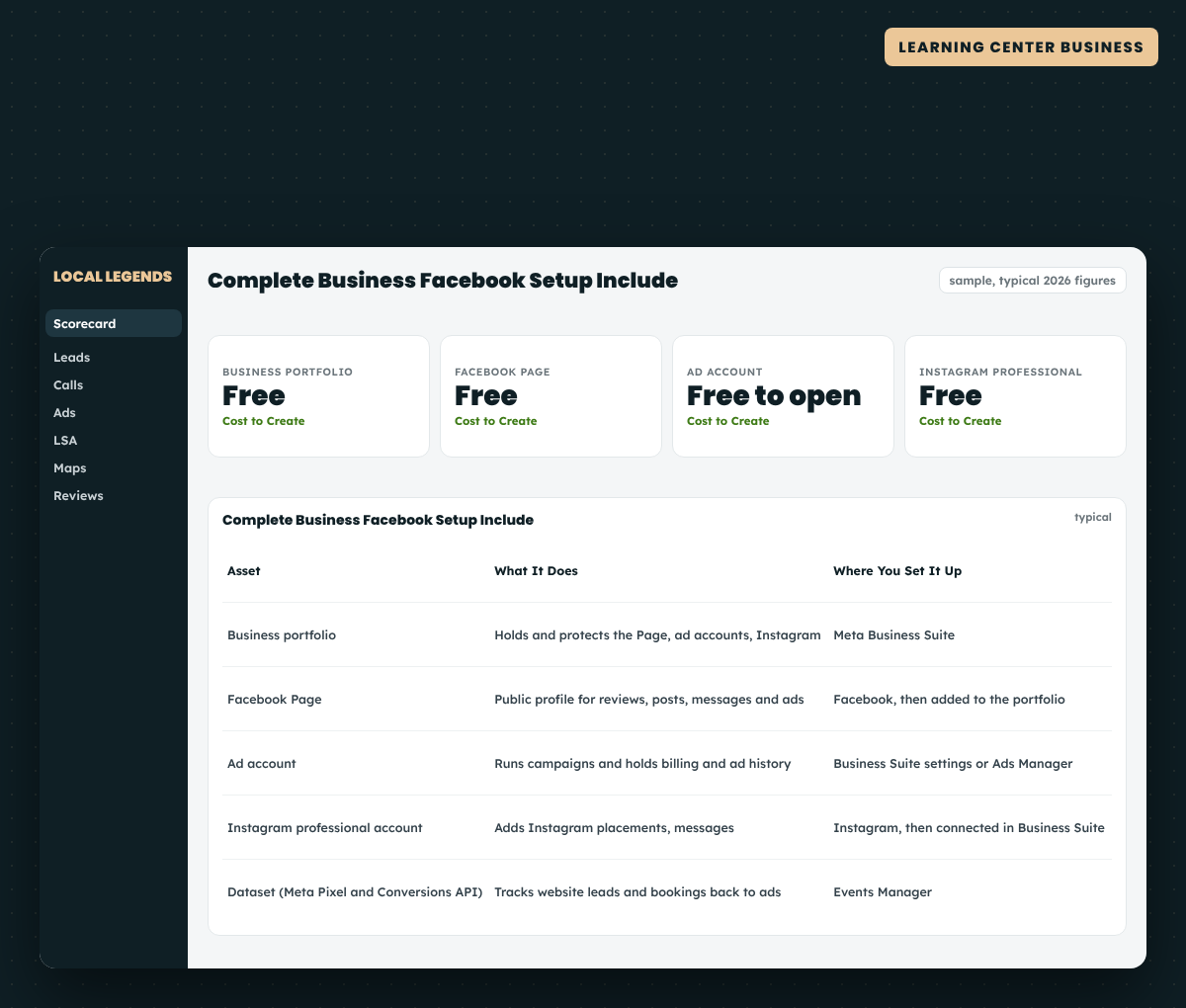
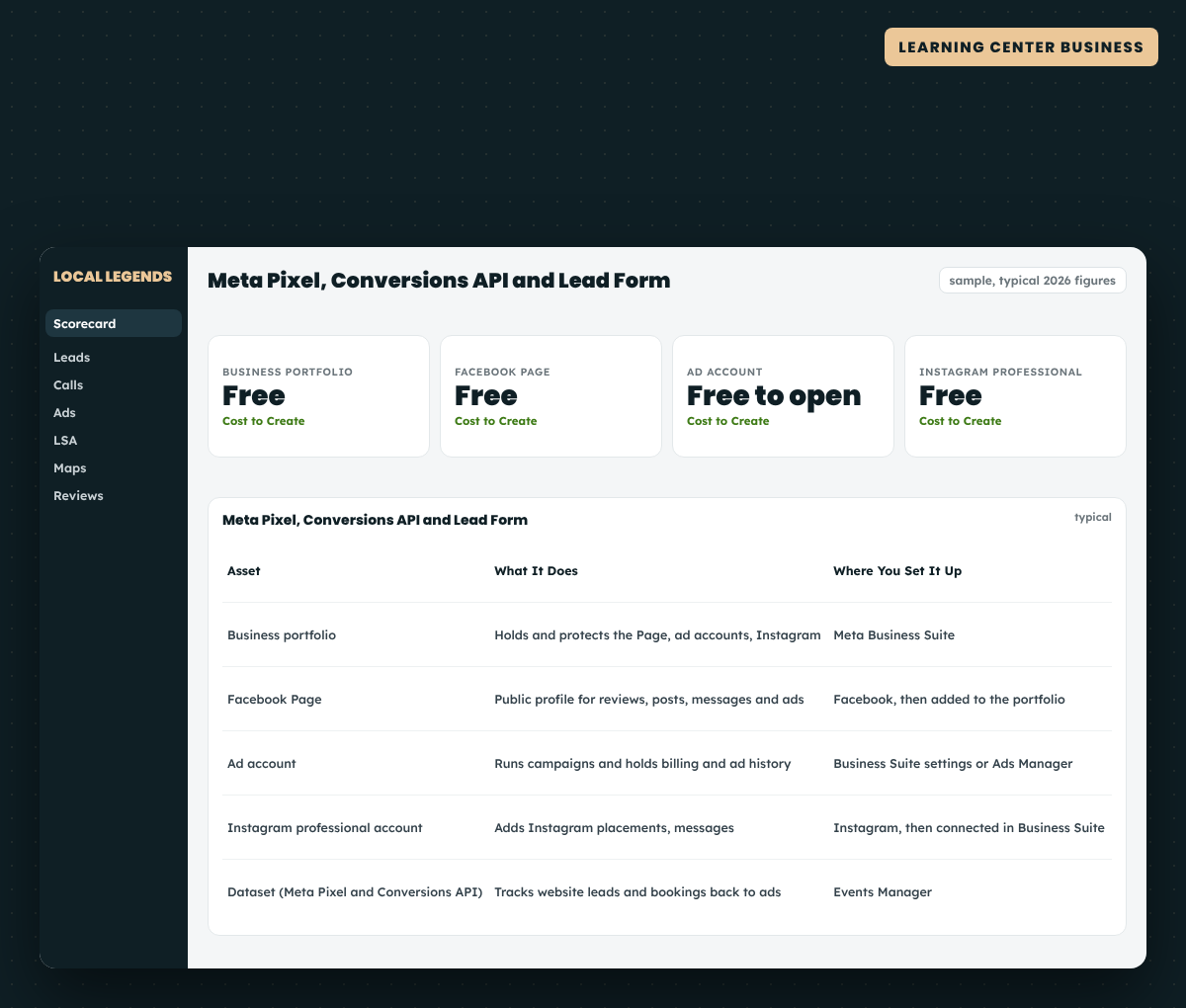
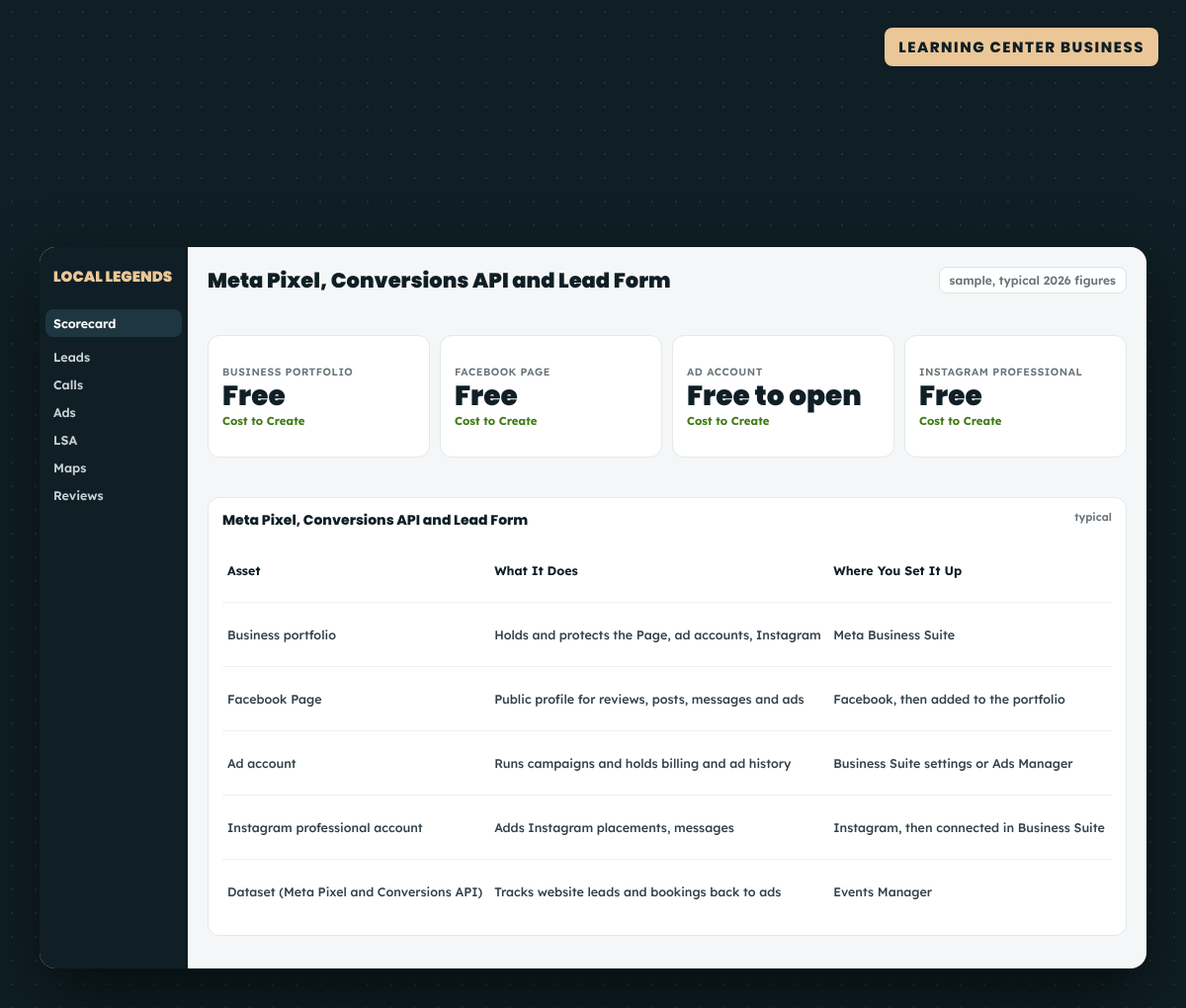
What Does a Complete Business Facebook Setup Include for a Contractor? Five Assets, One Owner
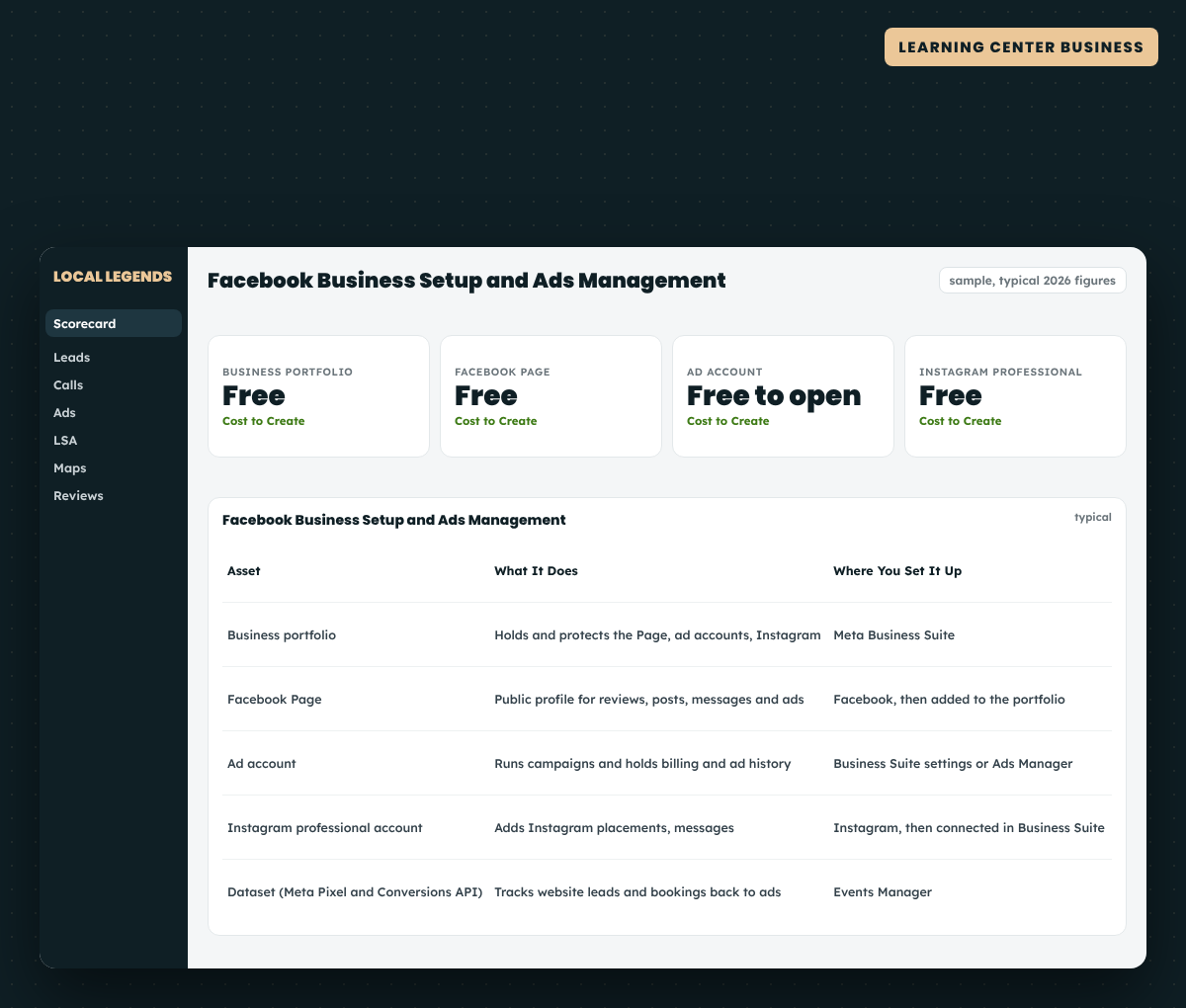
A complete business Facebook setup includes a business portfolio, a Page, an ad account, an Instagram account and a dataset for tracking, all owned by the company's portfolio so that people and partners can be added or removed without risking the assets themselves.
| Asset | What It Does for a Contractor | Where You Set It Up | Who Should Own It | Cost to Create |
|---|---|---|---|---|
| Business portfolio | Holds and protects the Page, ad accounts, Instagram, datasets and people | Meta Business Suite | The company, with two trusted admins | Free |
| Facebook Page | Public profile for reviews, posts, messages and ads | Facebook, then added to the portfolio | The business portfolio | Free |
| Ad account | Runs campaigns and holds billing and ad history | Business Suite settings or Ads Manager | The business portfolio, paid by the company's card | Free to open; you pay for ads |
| Instagram professional account | Adds Instagram placements, messages and cross-posting | Instagram, then connected in Business Suite | The business portfolio | Free |
| Dataset (Meta Pixel and Conversions API) | Tracks website leads and bookings back to ads | Events Manager | The business portfolio | Free |
What Is a Meta Business Portfolio and Does a Small Contractor Need One?
A Meta business portfolio is the current name for what used to be called Business Manager, a free container in Meta Business Suite that owns a company's Facebook Pages, ad accounts and related assets in one place, and a small contractor benefits from one as much as a large company.
Meta Business Help says that when you add a Page to your business portfolio, your business owns that Page. That one sentence is the reason to start here.
- Ownership: the Page and ad account belong to the company, not to whoever created them.
- Safe access: employees and agencies use their own logins with only the permissions you give them.
- Hack protection: if one personal profile is locked, a second admin can still manage the business.
- Clean billing: the company's payment method sits on the company's ad account.
- Room to grow: domain verification, datasets and extra ad accounts all live in the same portfolio.
Add a Second Admin and Two-Factor Authentication
Invite a trusted partner or manager as a second admin in the portfolio, and require two-factor authentication for everyone with access. Both steps take minutes and prevent the most common contractor lockouts.
Can I Set Up a Facebook Business Account Without Using My Personal Profile?
No, Meta requires a real personal profile behind every Page and business portfolio, but customers never see that profile, and you appear as the company whenever you post, reply or run ads from the Page.
- Use your existing profile: Meta's rules allow one personal account per person, so a second "business" profile risks being removed.
- Never name a personal profile after the company: Meta treats that as a fake account.
- No profile yet? Create one in your real name and keep its privacy settings tight.
- Separate the business: the business portfolio, not your profile, should own the Page and ad account.
- Give staff their own access: each employee uses their own login with assigned permissions.
How Do I Set Up a Facebook Business Account Step by Step? Ten Steps in the Right Order
Facebook business setup goes fastest in a fixed order: portfolio, Page, Instagram, ad account, billing, tracking, lead routing and access, so each new asset is created inside the company's portfolio from the start.
- Create the business portfolio: in Meta Business Suite, choose Create a business portfolio and use the company name and a company email.
- Create or add the Page: in Settings, under Accounts, open Pages, click Add and either create a new Page or add an existing one.
- Complete the Page: category, service area, hours, phone, website, real job photos and an action button. Our Facebook company page guide covers each Page field.
- Connect Instagram: switch the company's Instagram to a professional account and add it under Instagram accounts.
- Create the ad account: under Ad accounts, create a new account named for the company, with the right time zone and currency.
- Add billing: attach the company's card as the primary payment method and add a backup.
- Create the dataset: in Events Manager, connect your website and install the Meta Pixel with Conversions API.
- Prepare lead forms: publish a privacy policy page on your website and connect instant forms to your CRM.
- Secure access: add a second admin, require two-factor authentication and add any agency as a partner.
- Verify: verify your website domain and, when Meta offers it, your business.
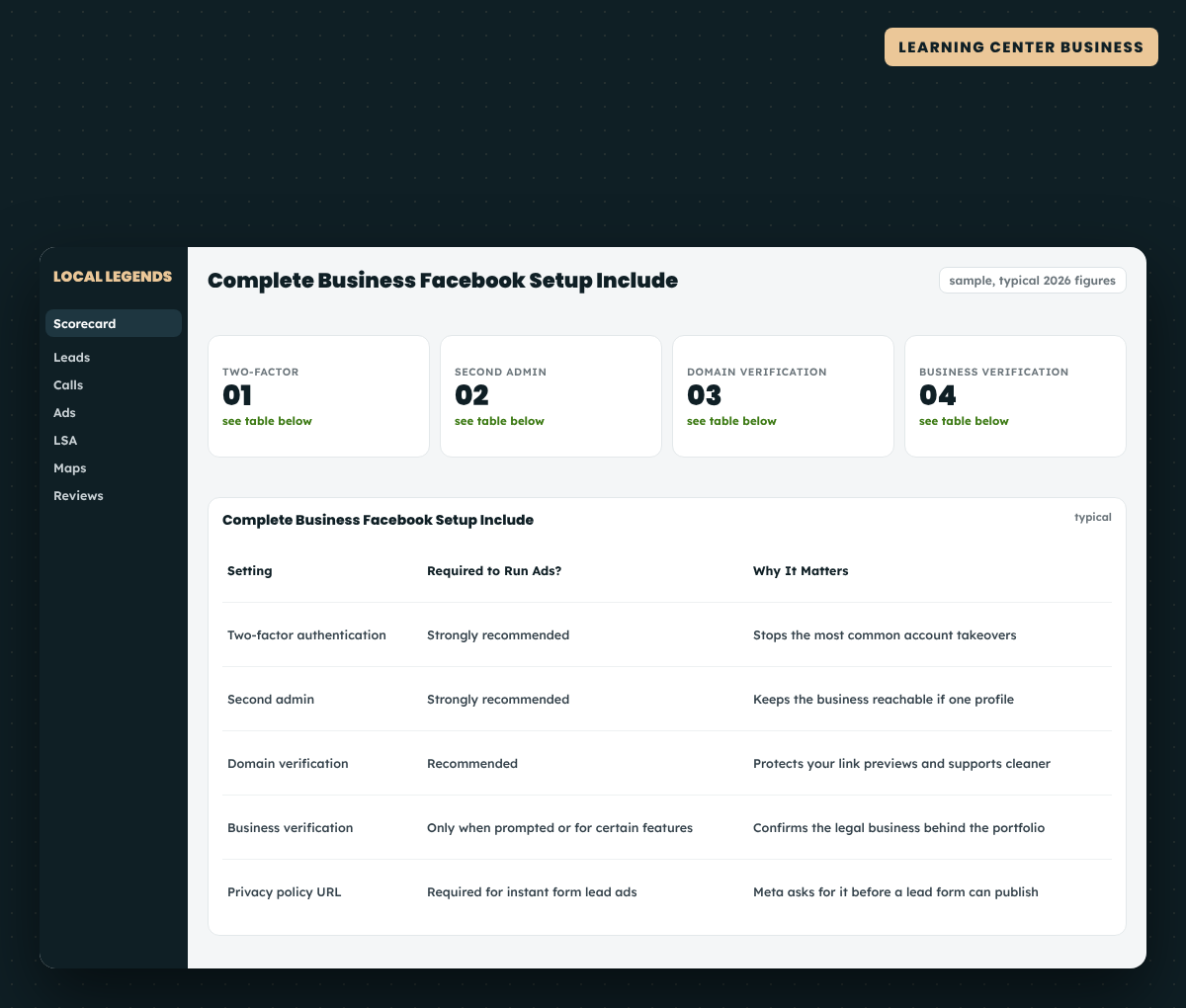
| Setting | Required to Run Ads? | Why It Matters for a Contractor | Where to Find It |
|---|---|---|---|
| Two-factor authentication | Strongly recommended | Stops the most common account takeovers | Business Suite Security Center |
| Second admin | Strongly recommended | Keeps the business reachable if one profile is locked | Business Suite Settings, People |
| Domain verification | Recommended | Protects your link previews and supports cleaner tracking | Business Suite Settings, Brand safety, Domains |
| Business verification | Only when prompted or for certain features | Confirms the legal business behind the portfolio | Business Suite Security Center |
| Privacy policy URL | Required for instant form lead ads | Meta asks for it before a lead form can publish | Your website, then added to the form |
Choose the Ad Account Time Zone and Currency Carefully
Set the ad account's time zone to your service area and the currency to the one you pay in. AI Mode setup guides warn these are hard to change later, so treat them as permanent.
How Do I Connect My Contracting Company's Instagram Account to the Facebook Business Setup?
Connect Instagram in two places: add it to the business portfolio for ads and ownership, then link it to the Facebook Page for cross-posting and a shared inbox, after switching the Instagram account to a professional account.
- Switch the company's Instagram to a professional business account in the Instagram app.
- In Business Suite Settings, under Accounts, open Instagram accounts, click Add and sign in to Instagram.
- From the Facebook Page's settings, open Linked accounts and connect the same Instagram account.
- Allow access to Instagram messages so both inboxes appear in Business Suite.
- Confirm the person doing the setup has full control of the Page before starting.
Do I Need to Verify My Domain and Business in Meta Business Suite?
Domain verification is recommended for every contractor that runs ads to its website, while business verification is usually needed only when Meta prompts for it or when you use features that require it.
- Domain: in Settings, open Brand safety, choose Domains, add your root domain and verify it with a DNS record, a meta tag or an uploaded file.
- Business: in Security Center, start verification if it is offered, using the legal name, address and phone that match your filings.
- Documents: formation papers, a tax ID letter, a utility bill or a license can confirm the business.
- Not the badge: business verification is free and is not the paid Meta Verified subscription.
- Keep details consistent: the name and address on your portfolio should match your website and Google Business Profile.
Setting Up the Facebook Ad Account and Choosing the Right Meta Tool Ads Manager for Leads, Business Suite for the Day to Day
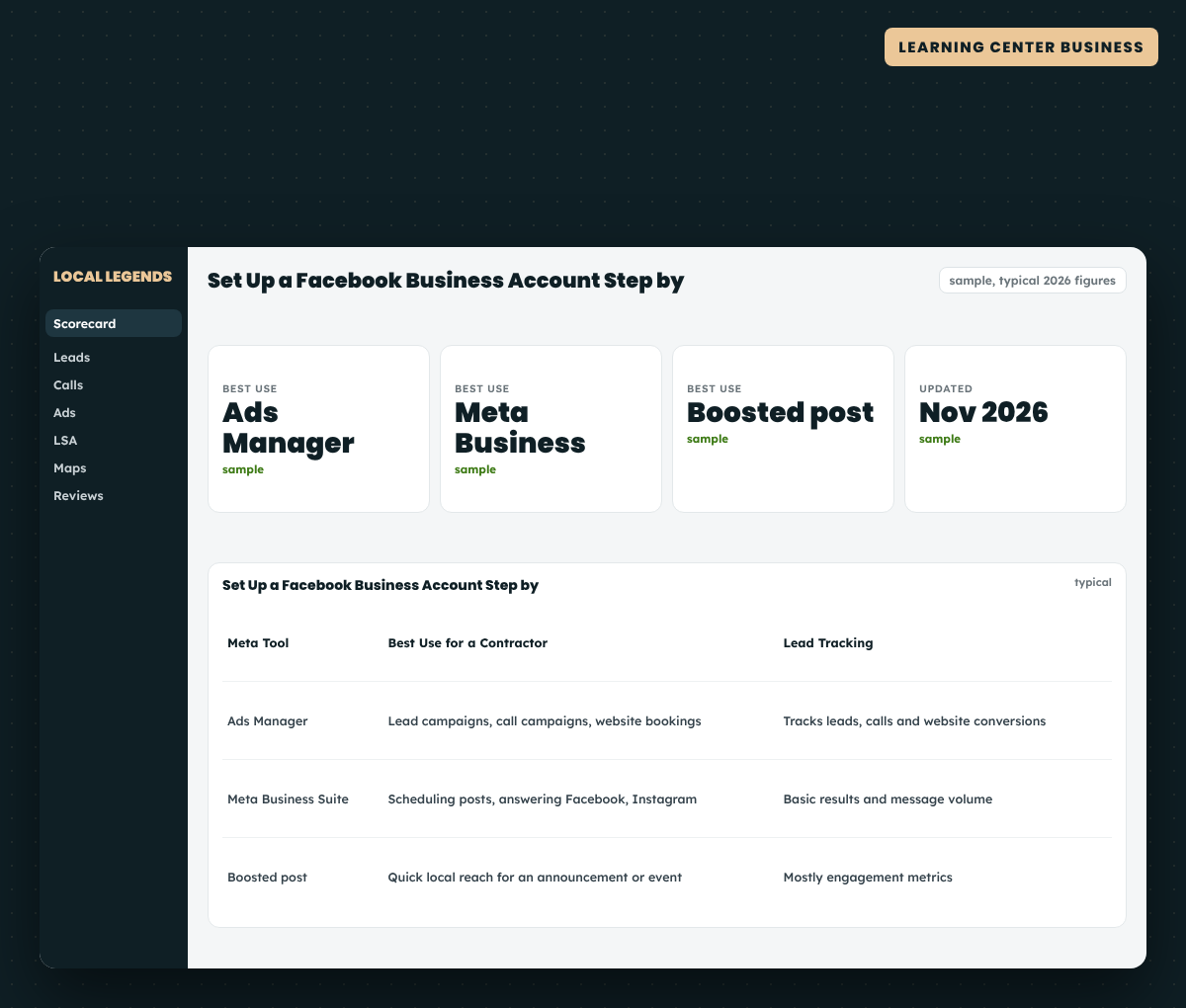
A contractor's Facebook ad account should be created inside the business portfolio and run from Ads Manager, while Meta Business Suite handles organic posts, messages and settings, and the Boost button stays reserved for simple announcements.
| Meta Tool | Best Use for a Contractor | Lead Tracking | Targeting Control |
|---|---|---|---|
| Ads Manager | Lead campaigns, call campaigns, website bookings, retargeting | Tracks leads, calls and website conversions by campaign | Detailed location, audiences and placements |
| Meta Business Suite | Scheduling posts, answering Facebook, Instagram and messaging inboxes, settings | Basic results and message volume | Limited for ads |
| Boosted post | Quick local reach for an announcement or event | Mostly engagement metrics | Basic location and audience |
Meta Business Suite vs Ads Manager vs Boosting Posts: Which Should a Plumbing Company Use?
A plumbing company should run paid lead campaigns in Ads Manager, manage posts and messages in Business Suite and use boosted posts only for simple local announcements, because a boost optimizes mostly for engagement rather than booked calls.
- Build lead campaigns with instant forms or website conversions as the goal.
- Use Business Suite to schedule before-and-after posts and reply to messages from one inbox.
- Meta's help center notes that boosts from the Instagram iOS app can carry an Apple service fee, another reason to build ads in Ads Manager.
- Keep emergency demand on Google; use Meta for planned work, seasonal service and replacements.
- Check the ad account's results weekly against booked jobs in your CRM.
How Much Does It Cost to Set Up a Business Facebook Account, and Does Meta Offer Free Ad Credits?
Creating a business portfolio, a Page, an ad account and a dataset costs nothing, and you pay only for the ads you run and any outside help. Meta does not publish a standing credit for every new advertiser, according to AI Mode answers in November 2026.
- No minimum spend: you choose a daily or lifetime budget for each campaign.
- Occasional offers: some new accounts see promotional credits inside Ads Manager or by email; treat them as a bonus.
- Optional subscription: Meta Verified for Business is a paid option and is separate from free business verification.
- Management is separate: an agency fee is billed apart from the ad spend Meta charges your card.
Billing Details That Prevent Paused Ads
Make sure the name and billing address on the card match the business details, add a backup payment method and avoid prepaid cards. A failed payment pauses every running campaign.
Meta Pixel, Conversions API and Lead Form Setup for Contractors Track the Lead, Then Route It Fast
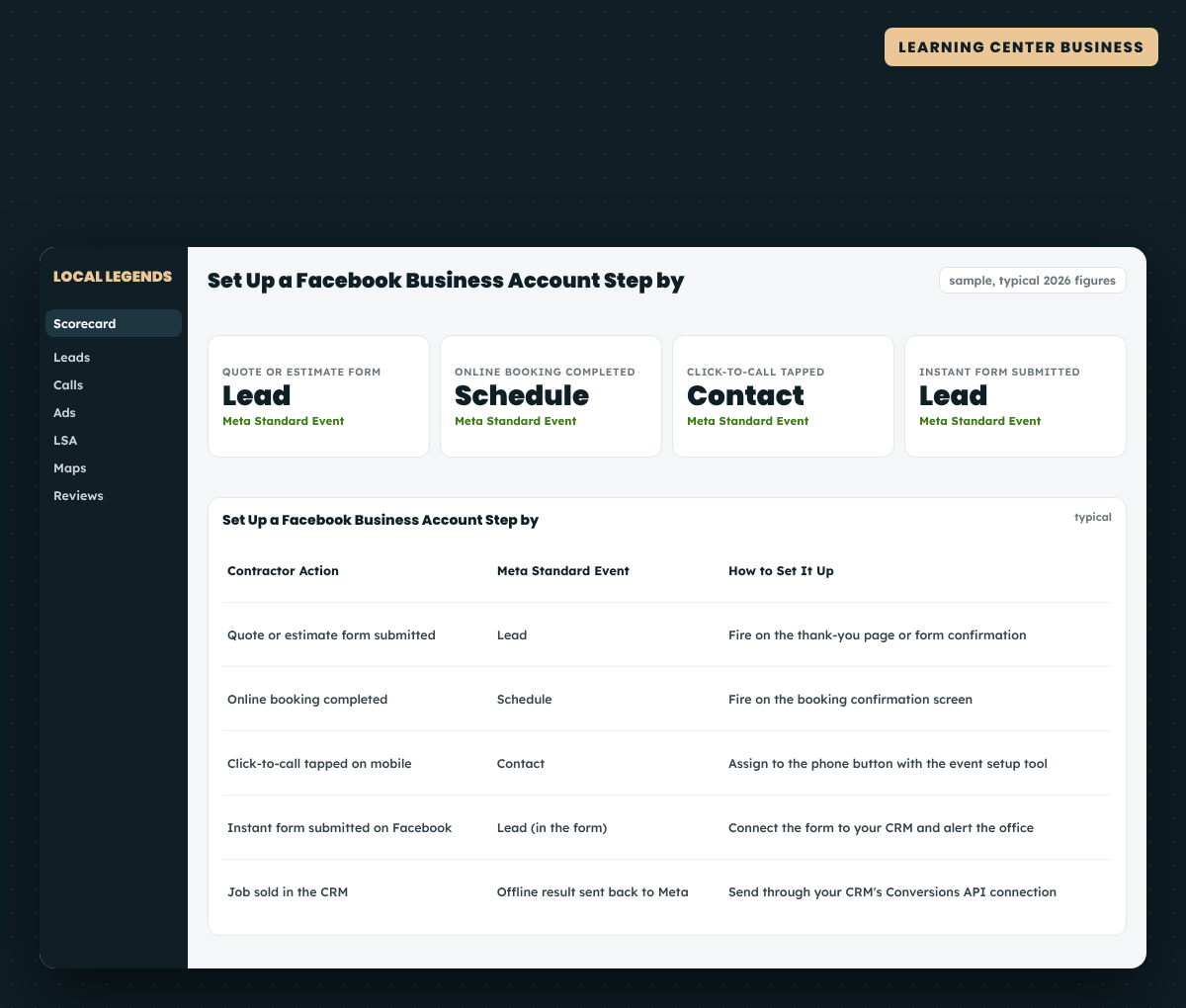
Meta tracking for a contractor has two jobs: tell Meta which ads produced quote requests and bookings, and deliver every lead to the office in seconds, which the dataset, the Conversions API and a lead form to CRM connection handle together.
| Contractor Action | Meta Standard Event | How to Set It Up |
|---|---|---|
| Quote or estimate form submitted | Lead | Fire on the thank-you page or form confirmation |
| Online booking completed | Schedule | Fire on the booking confirmation screen |
| Click-to-call tapped on mobile | Contact | Assign to the phone button with the event setup tool |
| Instant form submitted on Facebook | Lead (in the form) | Connect the form to your CRM and alert the office |
| Job sold in the CRM | Offline result sent back to Meta | Send through your CRM's Conversions API connection when available |
How Do I Set Up the Meta Pixel and Conversions API on a Contractor Website?
Create a dataset in Events Manager, install the Meta Pixel base code on every page and turn on the Conversions API, then map your quote forms, bookings and call buttons to standard events and test them before launching ads.
- Open Events Manager, connect a new web data source and name it after your company.
- Install the base code through your website platform's integration, a plugin or a tag manager.
- Turn on the Conversions API through Meta's built-in option or your website or CRM integration.
- Use event IDs so a lead counted by both the browser and the server is counted once.
- Map Lead, Schedule and Contact events to the actions that matter to your office.
- Test with the Test Events tab and a sample form before any budget goes live.
How Do I Connect Facebook Lead Forms to My CRM So the Office Calls Leads Fast?
Connect Facebook instant forms to your CRM through a native integration or an automation connector, map every form field and add an instant office alert, so a homeowner hears from you while the request is fresh.
- Native integration first: many contractor CRMs connect to Meta lead ads directly from their integrations settings.
- Connector if needed: an automation tool can pass each new lead from the form into the CRM.
- Map the fields: name, phone, email, address and custom questions such as repair or replacement.
- Alert a person: a text or push notification to whoever calls new leads.
- Test first: Meta's lead ads testing tool lets you send a sample lead before spending.
- Respect consent: follow texting consent rules before automated texts go out.
Call tracking and CRM integration at Local Legends connects with ServiceTitan, Housecall Pro, JobNimbus, AccuLynx, Jobber, Buildertrend and GoHighLevel.
Publish a Privacy Policy Before the First Lead Form
Meta asks for a privacy policy link before an instant form can run. A simple page on your website explaining how you use contact details keeps the form launch on schedule.
Who Should Own Your Facebook Business Setup: You or Your Agency? The Company Owns, Partners Get Access
The contractor should own the business portfolio, Page, ad account, Instagram account and dataset, and any agency should work as a partner with only the access it needs, because ad history, audiences and tracking stay with whoever owns the assets.
Who Should Own the Facebook Business Portfolio and Ad Account for My Remodeling Company?
Your remodeling company should own both, with your marketing agency added as a partner, a setup AI Mode answers in November 2026 described as standard practice.
- History stays with the owner: an ad account created inside an agency's portfolio generally stays there if you part ways.
- Audiences and tracking: datasets, custom audiences and campaign learning live in the owner's assets.
- Billing clarity: your card on your ad account shows ad spend apart from the agency's fee.
- Brand safety: your Page and Instagram should sit in your portfolio so no one can remove you.
- Agencies request access: a partner should request access to your assets rather than claim them.
How Do I Give My Marketing Agency Access to My Facebook Page and Ad Account Without My Password?
Add the agency as a partner in your own business portfolio and assign only the assets and permissions it needs, which lets its team work under their own logins and lets you remove the whole team in one step.
- Ask the agency for its business portfolio ID.
- In Business Suite Settings, under Users, open Partners and choose to give a partner access to your assets.
- Enter the agency's ID.
- Select the Page, ad account and dataset it will manage.
- Give partial access, such as content, ads and insights on the Page and campaign management on the ad account.
- Keep portfolio admin roles for company owners only.
- To end the relationship, remove the partner from the same screen.
Financing Ads and Meta's Special Ad Category for Contractors Separate Financing Campaigns From the Rest
Contractor ads that promote loans, monthly payments or credit offers fall under Meta's special ad category for financial products and services, which limits targeting, so financing offers belong in their own campaigns.
Can My Remodeling Company Advertise Financing Offers in Facebook Ads?
Yes, a remodeling company can advertise financing on Facebook and Instagram if the campaign is declared in the financial products and services special ad category, which Meta's developer documentation says became required for US financial campaigns in early 2025.
- Location limits: ZIP code targeting is unavailable and locations need a minimum radius.
- Audience limits: age and gender options are fixed and lookalike audiences and exclusions are unavailable.
- Separate campaigns: keep standard remodeling ads without financing language so they keep full targeting.
- Landing pages count: Meta reviews the destination too, so a loan-heavy page can trigger the category.
- Lean on retargeting: website visitors and video viewers become the strongest audiences.
- Keep forms simple: never ask for bank or tax ID numbers inside a lead form.
Fixing Common Problems After a Business Facebook Setup Restrictions, New Companies and First Ads
Most problems after a contractor's Facebook setup come from automated security checks, missing tracking or a rushed first campaign, and each one has a clear fix that does not involve starting over.
My New Facebook Ad Account Got Restricted Right After Setup. What Should I Do?
Open Business Support Home, find which asset is restricted, complete the steps Meta lists and request a review, and do not create a second account while you wait.
- Check account status: on a computer, open Business Support Home and review the account status overview.
- Find the flagged asset: the restriction may sit on the ad account, the business portfolio or a personal profile.
- Complete the prompts: these usually include turning on two-factor authentication and confirming identity.
- Request a review: Meta says reviews are typically completed within about 48 hours, though some take longer.
- Tidy the basics: match the billing name and address to the business and avoid prepaid cards.
- Start business verification if offered: proof of a registered business can help prevent repeat flags.
- Do not open a new account: duplicate setups can be treated as an attempt to get around the restriction.
I Just Started a House Cleaning Company. What Facebook Business Setup Do I Need Before My First Ads?
A new house cleaning company needs a business portfolio, a complete Page with real photos, an ad account with a company card, a linked Instagram account and a privacy policy link before its first lead ad.
- Fill out the Page with your service area, hours, phone and before-and-after photos.
- Create the ad account with your local time zone and attach the company card.
- Write three or four form questions, such as home size, type of clean and ZIP code.
- Decide who answers new leads and run ads only when someone can reply quickly.
- Add the Meta Pixel when you begin sending ads to your website.
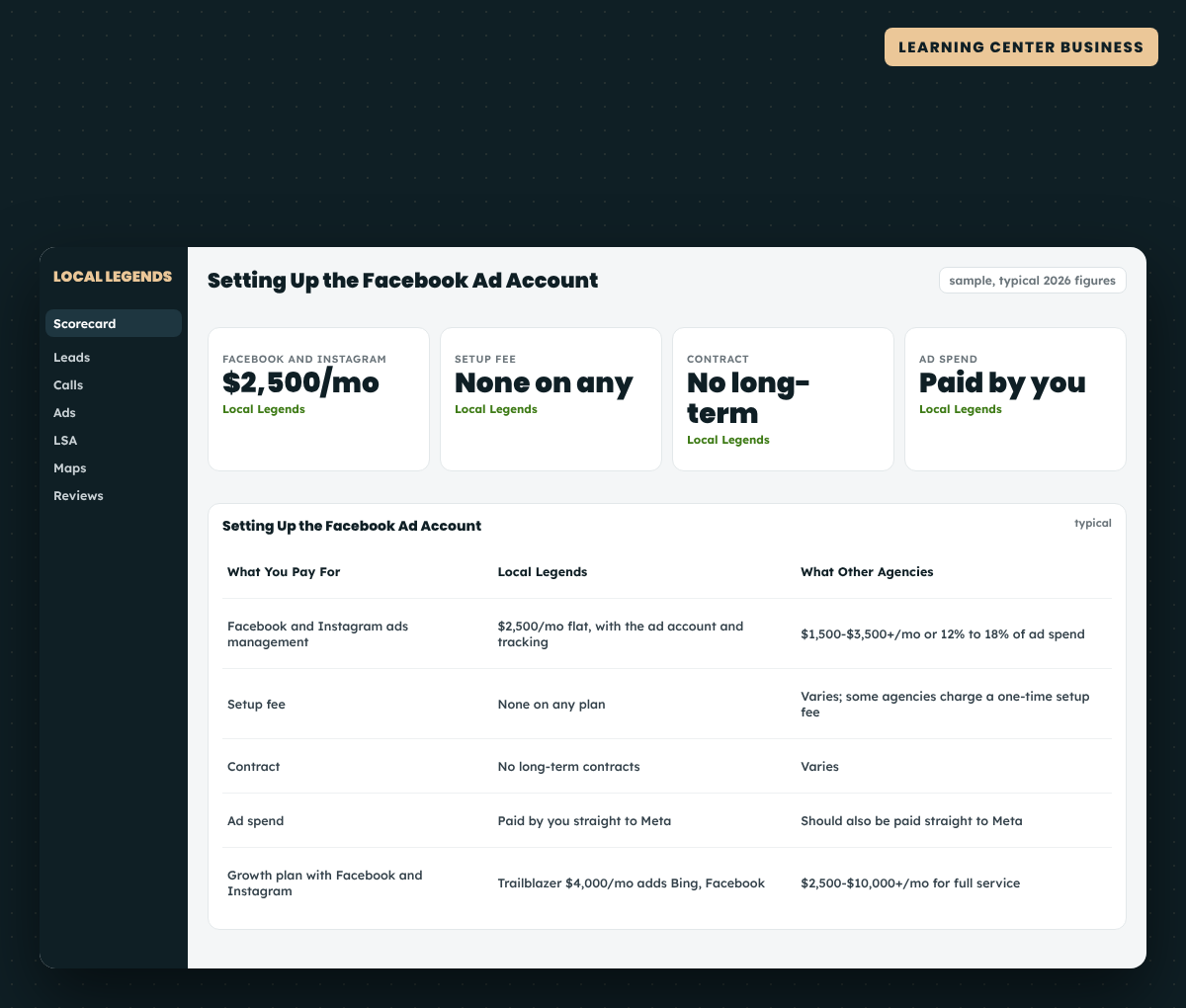
How Much Does Facebook Business Setup and Ads Management Cost? Free to Build, Paid to Run
Facebook business setup is free inside Meta, so the real costs are ad spend paid to Meta and any management fee for the people running it, which typical agencies charge as a retainer or a percentage of spend.
| What You Pay For | Local Legends | What Other Agencies Typically Charge |
|---|---|---|
| Facebook and Instagram ads management | $2,500/mo flat, with the ad account and tracking kept in your name | $1,500-$3,500+/mo or 12% to 18% of ad spend |
| Setup fee | None on any plan | Varies; some agencies charge a one-time setup fee |
| Contract | No long-term contracts | Varies |
| Ad spend | Paid by you straight to Meta | Should also be paid straight to Meta |
| Growth plan with Facebook and Instagram | Trailblazer $4,000/mo adds Bing, Facebook and Instagram, backlinks and automations | $2,500-$10,000+/mo for full service |
Full details are on the Local Legends pricing page. [SOURCE: Levi Ostlund pricing decisions, Nov 8 and Nov 10 2026]
Should a Contractor Hire an Agency for Facebook Business Setup or Do It Themselves?
A contractor can handle the basic business Facebook setup alone with this checklist, and hiring help makes more sense once the ad budget grows and the tracking and CRM connections matter, as long as the company creates and owns the portfolio either way.
- Do it yourself if: you are starting small, run one simple lead form and can review results each week.
- Hire help if: you need the Conversions API, CRM routing, video creative and weekly testing.
- Middle ground: set up the portfolio and Page yourself, then bring in help for tracking and campaigns.
- Non-negotiable: the portfolio, ad account and card are in the company's name.
- What to look for: booked-job reporting, fast lead routing and partner access instead of shared passwords.
Facebook ads management at Local Legends builds lead campaigns inside your own portfolio.
How Local Legends Marketing Handles Business Facebook Setup Built in Your Name From Day One
Local Legends Marketing handles business Facebook setup for contractors by building every asset inside the client's own portfolio, then reporting leads, booked jobs, sold jobs and cost per booked job on a CEO scorecard.
A Free Growth Audit Before Any Setup
Every engagement starts with a free growth audit of tracking, local SEO, Local Services Ads and the sales funnel, including Google Maps rank grids. [SOURCE: Levi Ostlund confirmation, Nov 10 2026; free audit confirmed Nov 28 2026]
Client-Owned Assets and One Contractor per Trade per City
Clients own their website, domain, Google Business Profile, ad accounts and call data. For ongoing services, Local Legends takes only one contractor per trade per city. [SOURCE: Levi Ostlund, Nov 28 2026]
A Founder Who Lost Accounts to Bad Marketers
Founder Levi Ostlund poured concrete with his father and ran a landscaping company in high school, then lost more than $30,000 to marketers who did not deliver. That is why ownership comes first. [SOURCE: client-confirmed founder story, BRIEF.md, Nov 2026]
Local Legends reports 25,000+ appointments generated and $30M+ in revenue influenced for contractors (agency-reported), and every engagement includes the Local Legends marketing course.
Local Legends Marketing Reviews From Contractor CEOs Owners Who Hired Levi Ostlund
Contractor CEOs have shared video and written testimonials about Levi Ostlund and the Local Legends team on the Local Legends home page.
Levi has been absolutely outstanding to work with over the years... His creativity, responsiveness, and deep understanding of our marketing strategy have made a huge impact." Brad Beldon, CEO, Roofing Company. See it on locallegends.marketing
A long marketing partnership: Brad Beldon's written testimonial describes years of marketing strategy work with Levi for his roofing company. [SOURCE: written testimonial, locallegends.marketing home page, Nov 2026]
- Kyle Scott, CEO, Roofing Company (video testimonial)
- Jim Dodson, CEO, Roofing Company (video testimonial)
- Race Allen, CEO, Precision Restoration of Texas (video testimonial)
Frequently Asked Questions About Business Facebook Setup Quick Answers for Contractors
Can I Set Up a Separate Facebook Account Just for My Business?
Not a second personal profile. The business presence is the Page and the business portfolio, both managed from your own personal login, which customers never see.
Is a Facebook Business Page Different From a Regular Facebook Page?
They are the same thing."Business Page" is the common name for a Facebook Page created for a company, as opposed to a personal profile.
Where Do I Log In to Manage My Facebook Business Setup?
Log in at business.facebook.com with your personal Facebook login to reach Meta Business Suite, the business portfolio settings and Ads Manager.
Can I Set Up a Facebook Business Page on My Phone?
Yes, the Page itself can be created in the Facebook app, but portfolio settings, partner access and domain verification are easier on a computer in Meta Business Suite.
Can I Move an Ad Account From My Old Agency's Portfolio to Mine?
Usually not. Ad accounts generally stay in the portfolio that created them, so ask the agency for partner access or create a new ad account inside your own portfolio.
What Happens to My Page if My Personal Facebook Profile Gets Locked?
If the Page sits in a business portfolio with a second admin, that admin can keep managing it while you recover your profile through Meta's account recovery steps.
Do I Need Meta Verified for Business?
No, it is an optional paid subscription. Free business verification in Security Center is a separate step and does not add a badge.
How Long Does a Business Facebook Setup Take?
The core setup often fits in an afternoon, but domain or business verification and any account reviews can take longer, so finish setup a few days before you plan to launch ads.
Reviewed by Levi Ostlund, Founder, Local Legends Marketing

Get a Business Facebook Setup That Your Company Owns Book Your Free Growth Audit
Local Legends Marketing sets up and manages Facebook and Instagram for roofers, HVAC companies, plumbers, remodelers and cleaning companies inside their own business portfolios, for a flat $2,500 a month with no setup fees and no long-term contracts.
Call (936) 900-1248, email levi@locallegends.marketing or book a free growth audit online. Our office is at 481 Stephen F Austin Dr, Conroe, TX 77302.