


A Plain-English Indexing Guide for Home

What Is a Website Index? How Google Indexes a Contractor Website, Why Service Pages Go Missing and How to Get Them Found
A Plain-English Indexing Guide for Home Service Owners
Updated November 2026 · Reviewed by Levi Ostlund, Founder
A website index is the database a search engine builds from the pages it has crawled, and a page that is not in Google's index cannot appear in search results, the Map Pack's website link or AI Overviews. For a contractor, every service and city page has to be indexed before it can bring in a single call.
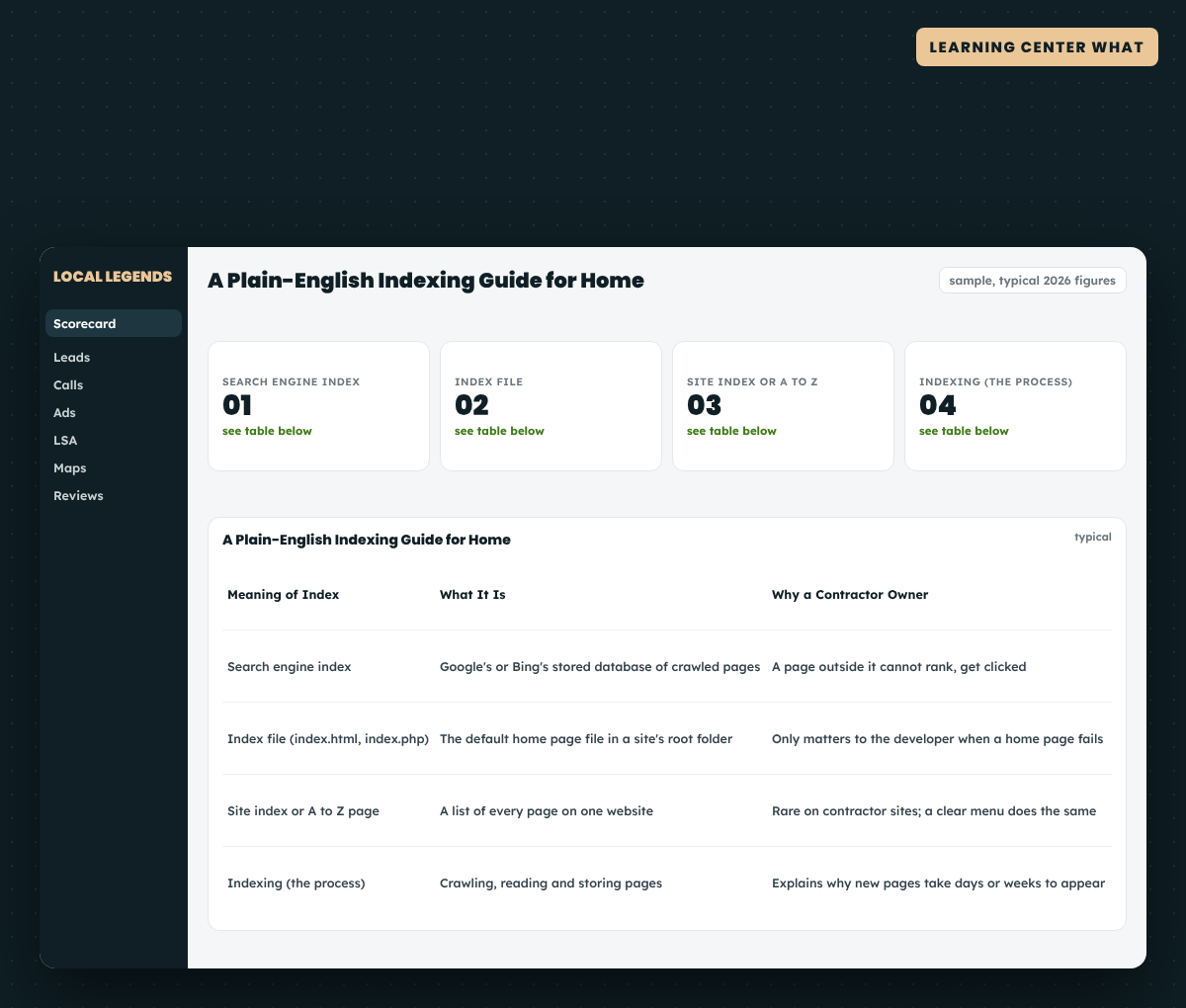
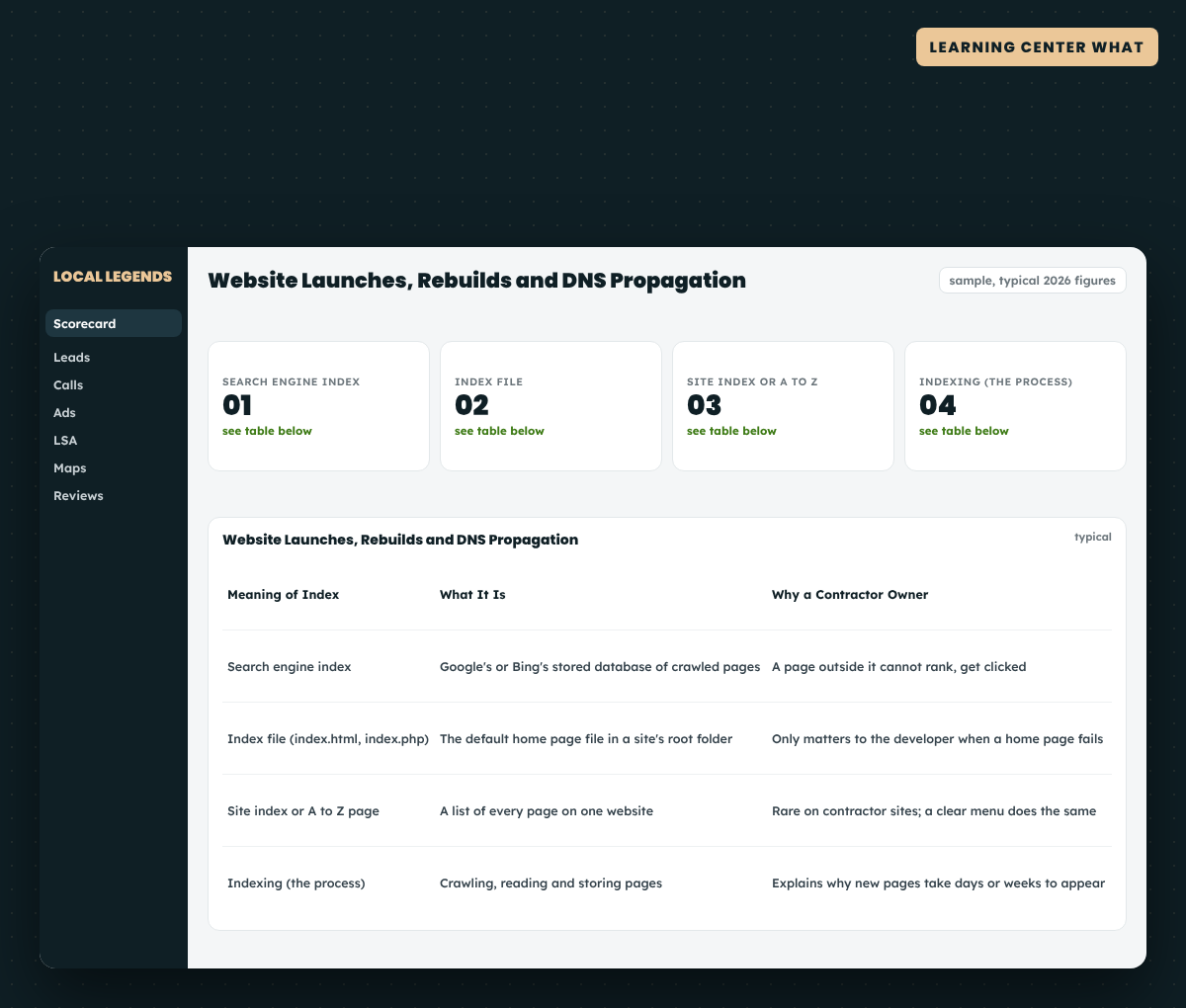
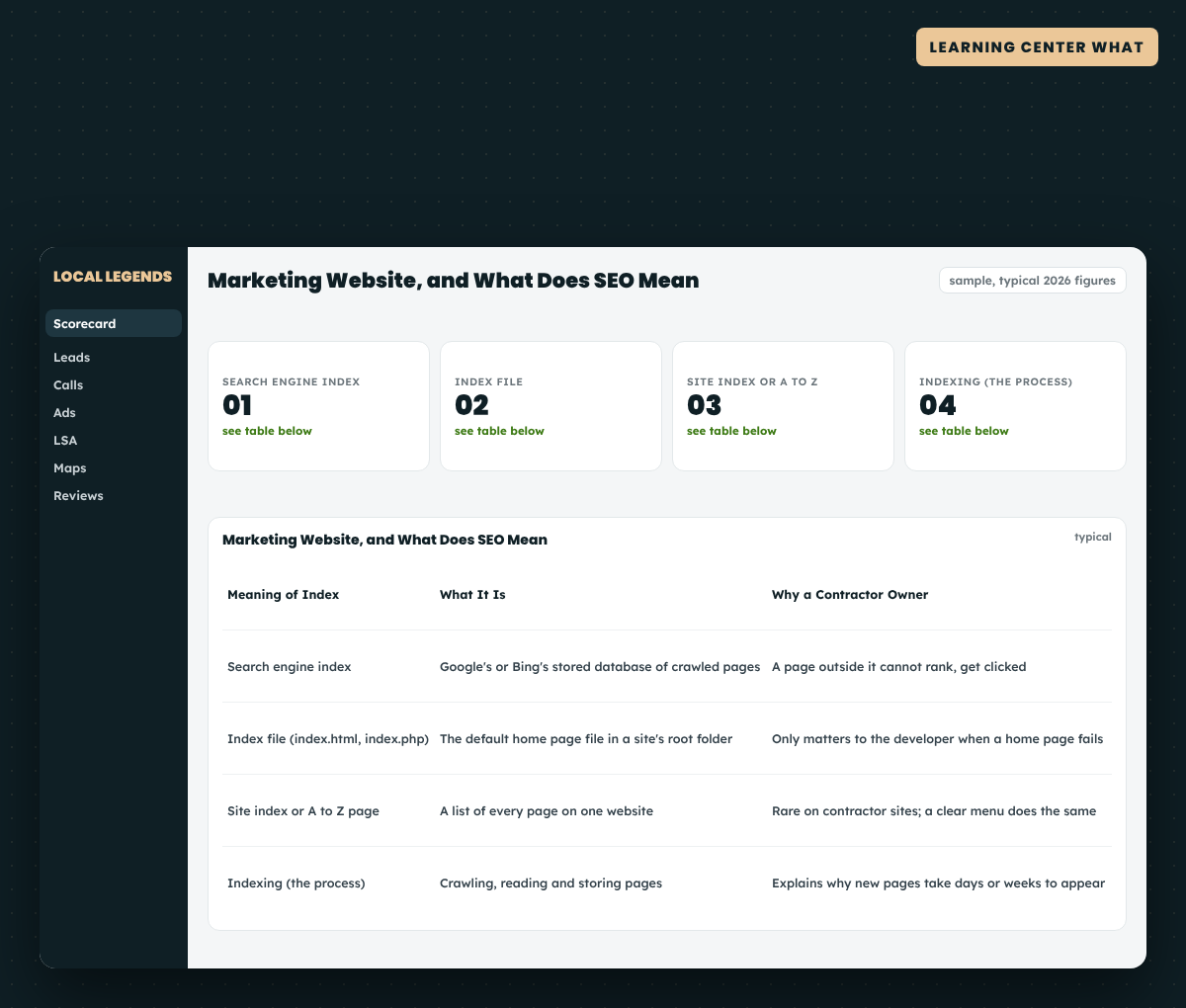
The term has three common meanings, and only one decides whether homeowners find you. Google AI Mode listed them as the search engine index, the default homepage file and an on-site directory page.
- Search engine index: Google's stored copy of the pages it has read and decided to keep.
- Index file: the default file, such as index.html, a server loads when someone types your domain.
- Site index: an A to Z list of pages on a website, like the back of a book.
- What to check first: Search Console's Pages report and the URL Inspection tool.
- What usually blocks it: launch settings left on, weak internal links or pages too similar to each other.
Free Growth Audit
Your Reviews, Radius and Response Rate vs the competitors beating you.
About Local Legends Marketing
A home service marketing agency headquartered in Conroe, Texas, with 8+ years of marketing experience, running Google Ads, Local Services Ads, local SEO, AI SEO, connected TV and review systems for contractors nationwide.
What Is a Website Index? Three Meanings of Index
The website index most contractors need to understand is the search engine index: Google's organized record of the pages it has crawled, read and chosen to store. Google searches that record instead of the live web, which is why results appear in a fraction of a second.
| Meaning of "Index" | What It Is | Why a Contractor Owner Cares |
|---|---|---|
| Search engine index | Google's or Bing's stored database of crawled pages | A page outside it cannot rank, get clicked or be cited by AI |
| Index file (index.html, index.php) | The default home page file in a site's root folder | Only matters to the developer when a home page fails to load |
| Site index or A to Z page | A list of every page on one website | Rare on contractor sites; a clear menu does the same job |
| Indexing (the process) | Crawling, reading and storing pages | Explains why new pages take days or weeks to appear |
[SOURCE: Google Search, "what is a website index" AI Overview and Google AI Mode, captured Nov 29 2026]
Crawling, Indexing and Ranking Are Three Separate Steps
- Crawling: Googlebot finds a page through links, a sitemap or a past visit and downloads it.
- Indexing: Google reads the text, headings, images and links, then decides whether to store the page.
- Ranking: when a homeowner searches, Google picks from indexed pages and orders them by relevance and quality.
A page can be crawled and still not indexed, and indexed without ranking. Each step needs its own fix.
How Do I Check If My Contractor Website and Service Pages Are Indexed on Google? Search Console First, a Site Search Second
The most accurate way to check whether a contractor website is indexed is Google Search Console, which is free and shows the status of every page, according to Google AI Mode. A site: search on Google gives a quick sample but not a complete list.
- Open the Pages report under Indexing in Search Console to see indexed and not indexed counts.
- Paste a service page URL into URL Inspection at the top of Search Console.
- Read the result:"URL is on Google" means indexed; "URL is not on Google" means it is not.
- Run Test Live URL to confirm Google can load and read the page today.
- Click Request Indexing for important pages that show no errors.
- For a quick look, search site:yourdomain.com on Google, with no space after the colon.
Robots.txt and Noindex Block Different Things
A robots.txt rule such as "Disallow: /" stops Google from crawling pages. A noindex tag lets Google crawl a page but tells it not to store the page. Google cannot see a noindex tag on a page robots.txt blocks, so the two should not be combined to remove a page.
Launch Settings to Check on Every New Site
- The platform's "hide from search engines" or "discourage indexing" option, often left on after building.
- A sitewide noindex tag carried over from the staging copy.
- A robots.txt file that blocks the whole site.
- Service pages missing from the menu, which leaves them with no internal links.
Can My Google Business Profile Rank in the Map Pack If My Website Is Not Indexed?
Yes, a Google Business Profile can rank in the Map Pack without an indexed website, but the profile usually ranks in a smaller area and converts fewer callers, according to Google AI Mode. The profile and the website are separate systems that support each other.
- Map rankings lean on the profile: primary category, reviews, review pace, distance and consistent business details.
- The linked page adds relevance: Google reads the website page on the profile to confirm services and service area.
- Homeowners click through: many check photos, licensing and past work before calling.
- Save the exact live URL of the home page or location page in the profile's website field.
[SOURCE: Google AI Mode, "How do I check if my contractor website and service pages are indexed on Google" and "Can my Google Business Profile rank in the map pack if my contractor website is not indexed", captured Nov 29 2026]
Why Is My New Contractor Website Not Showing Up on Google? Not Indexed, Blocked or Buried
A new contractor website that does not show up on Google is usually in one of three situations: it is not indexed yet, a launch setting is blocking it or it is indexed but ranks below established competitors, according to Google AI Mode.
- Search site:yourdomain.com. Zero results means Google has not added the site yet.
- If pages appear, search the service and the town. Missing there means the site is indexed but buried.
- Set up Search Console, submit the sitemap and request indexing for the home page.
- Check for a leftover noindex or robots.txt block from the build.
- Connect the Google Business Profile and match the name, address and phone in the site footer.
- Give each service its own detailed page instead of one general services page.
How Long Does It Take Google to Index a New Website or Service Page?
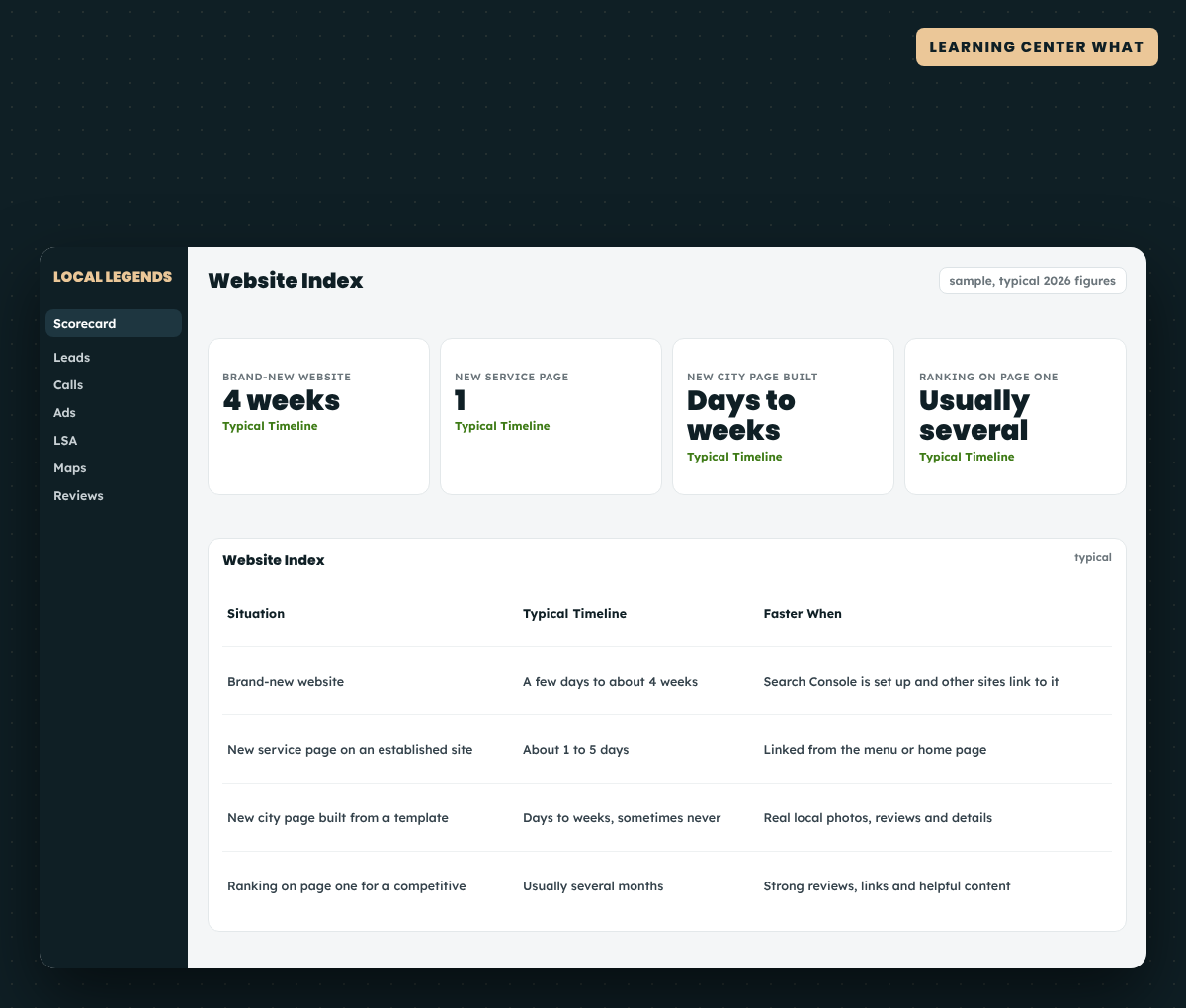
Google typically indexes a brand-new website in a few days to about four weeks and a new page on an established site in about one to five days, according to Google AI Mode, which noted that Google does not promise a schedule.
| Situation | Typical Timeline | Faster When | Slower When |
|---|---|---|---|
| Brand-new website | A few days to about 4 weeks | Search Console is set up and other sites link to it | No links, thin pages or blocking settings |
| New service page on an established site | About 1 to 5 days | Linked from the menu or home page | Buried with no internal links |
| New city page built from a template | Days to weeks, sometimes never | Real local photos, reviews and details | Only the city name changes from page to page |
| Ranking on page one for a competitive term | Usually several months | Strong reviews, links and helpful content | New domain with little authority |
[SOURCE: Google AI Mode, "How long does it take Google to index a new website or a new service page", captured Nov 29 2026]
Search Console Indexing Statuses Contractors See Most Each Status and Its Fix
Search Console's Pages report explains why each URL is or is not in Google's index, and most contractor problems fall under a handful of statuses. Knowing the status tells the owner whether the fix is technical, structural or about the content itself.
What Do "Crawled, Currently Not Indexed" and "Discovered, Currently Not Indexed" Mean for My Service Pages?
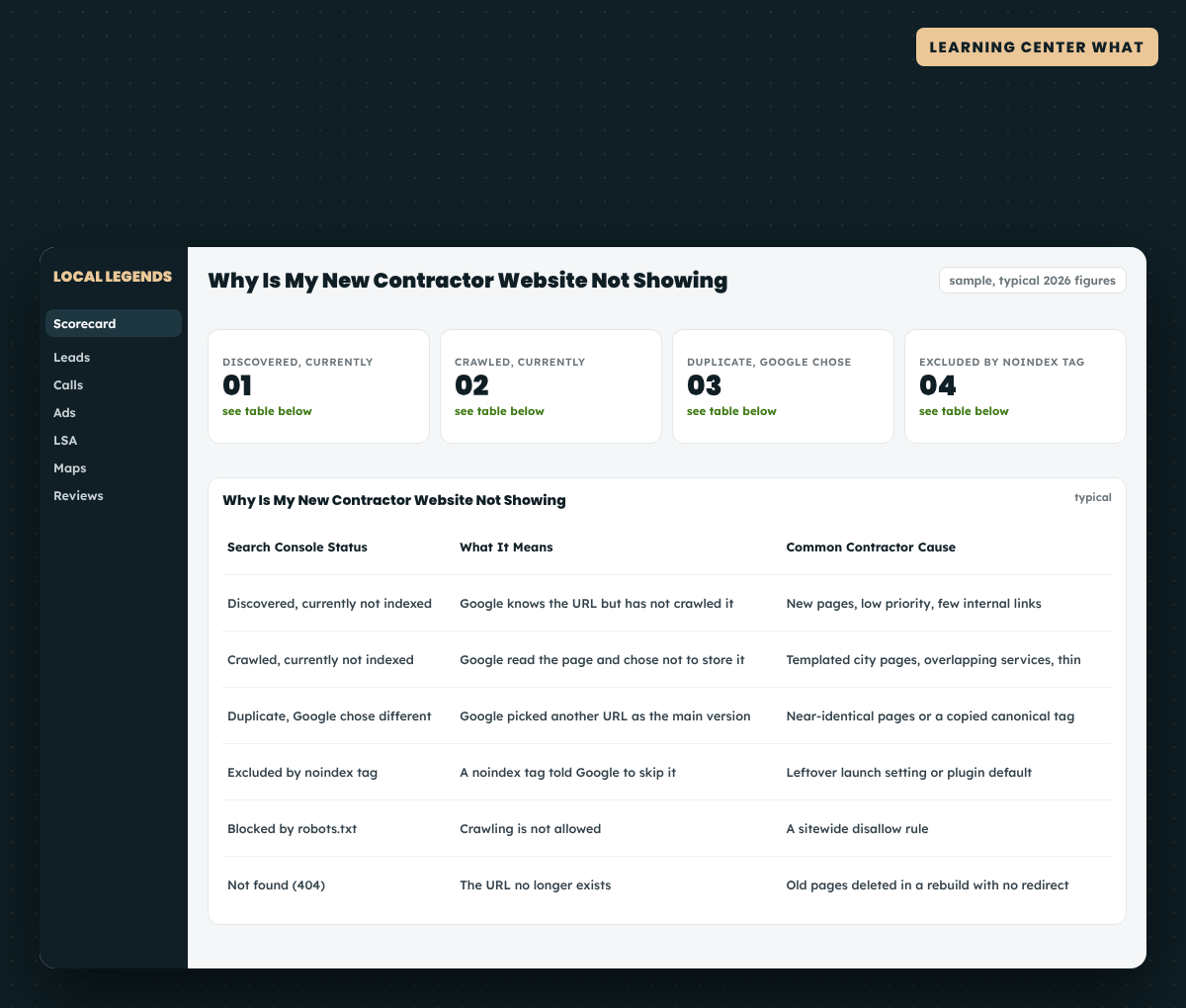
Both statuses mean Google is holding a page back from search results, but at different stages: discovered pages have not been crawled yet, while crawled pages were read and left out, according to Google AI Mode. Neither one is a technical error by itself.
| Search Console Status | What It Means | Common Contractor Cause | Next Step |
|---|---|---|---|
| Discovered, currently not indexed | Google knows the URL but has not crawled it | New pages, low priority, few internal links | Link it from indexed pages, then wait or request indexing |
| Crawled, currently not indexed | Google read the page and chose not to store it | Templated city pages, overlapping services, thin copy | Add unique local proof, then request indexing |
| Duplicate, Google chose different canonical than user | Google picked another URL as the main version | Near-identical pages or a copied canonical tag | Differentiate the page and fix the canonical |
| Excluded by noindex tag | A noindex tag told Google to skip it | Leftover launch setting or plugin default | Remove the tag if the page should rank |
| Blocked by robots.txt | Crawling is not allowed | A sitewide disallow rule | Update robots.txt |
| Not found (404) | The URL no longer exists | Old pages deleted in a rebuild with no redirect | Add a 301 redirect to the matching new page |
[SOURCE: Google AI Mode, "What does Crawled currently not indexed and Discovered currently not indexed mean in Search Console for my service pages", captured Nov 29 2026; status names from Google Search Console Pages report]
Why Would Google Index a Service Page and Then Remove It or Show a Different Page?
Google may index a service page at first and later drop it or show another page because canonical tags are hints, not commands, and other signals can point Google elsewhere, according to Google AI Mode.
- Pages that share most of their text, such as city pages that only swap the town name.
- Thin service pages that Google folds into a stronger hub or the home page.
- Mixed internal signals: menus, sitemaps or links pointing to a slightly different URL version.
- A cloned page that still carries the original page's canonical tag.
- A newer site that has not yet earned enough trust for many similar pages.
- The fix: compare the user-declared and Google-selected canonical in URL Inspection, then rewrite and relink the page.
How Do I Get Google to Index New Service and City Pages Faster? Unique Pages, Strong Links and Clean Signals
Contractors get new service and city pages indexed faster by making each page clearly different, linking it from pages Google already visits and sending clean technical signals, according to Google AI Mode.
- Make every city page earn its place with local job photos, local reviews, neighborhoods served and local permit or weather details. Local Legends writes city pages only for towns with 5 or more real local facts.
- Link new pages from the home page, menu, footer or a service areas hub.
- Cross-link each service page with its matching city pages.
- Give every page a self-referencing canonical instead of one pointing to the main service page.
- Make sure the text loads in the page's HTML, not only after scripts run.
- Request indexing for the most important new pages, keeping in mind Google limits manual requests per day.
- Add the page to the Google Business Profile or relevant directory listings where it fits.
Google's Indexing API is limited to job posting and livestream pages, so it is not a shortcut for service pages.
Does Submitting an XML Sitemap Help a Contractor Website Get Indexed Faster?
Yes, an XML sitemap helps Google discover a contractor's pages faster, especially on a new site with few outside links, but it does not guarantee indexing or improve rankings by itself, according to Google AI Mode.
- Most website builders create a sitemap automatically; the developer confirms its address.
- Submit it in Search Console and Bing Webmaster Tools.
- Keep last-modified dates accurate so updated pages get recrawled.
- Use the sitemap report to see which submitted pages Google accepted.
- Leave noindexed pages out of the sitemap so the signals agree.
[SOURCE: Google AI Mode, "How do I get Google to index my new service and city pages faster" and "Does submitting an XML sitemap help a small business website get indexed faster", captured Nov 29 2026]
Should Every Page on a Contractor Website Be Indexed? Index Pages That Win Jobs
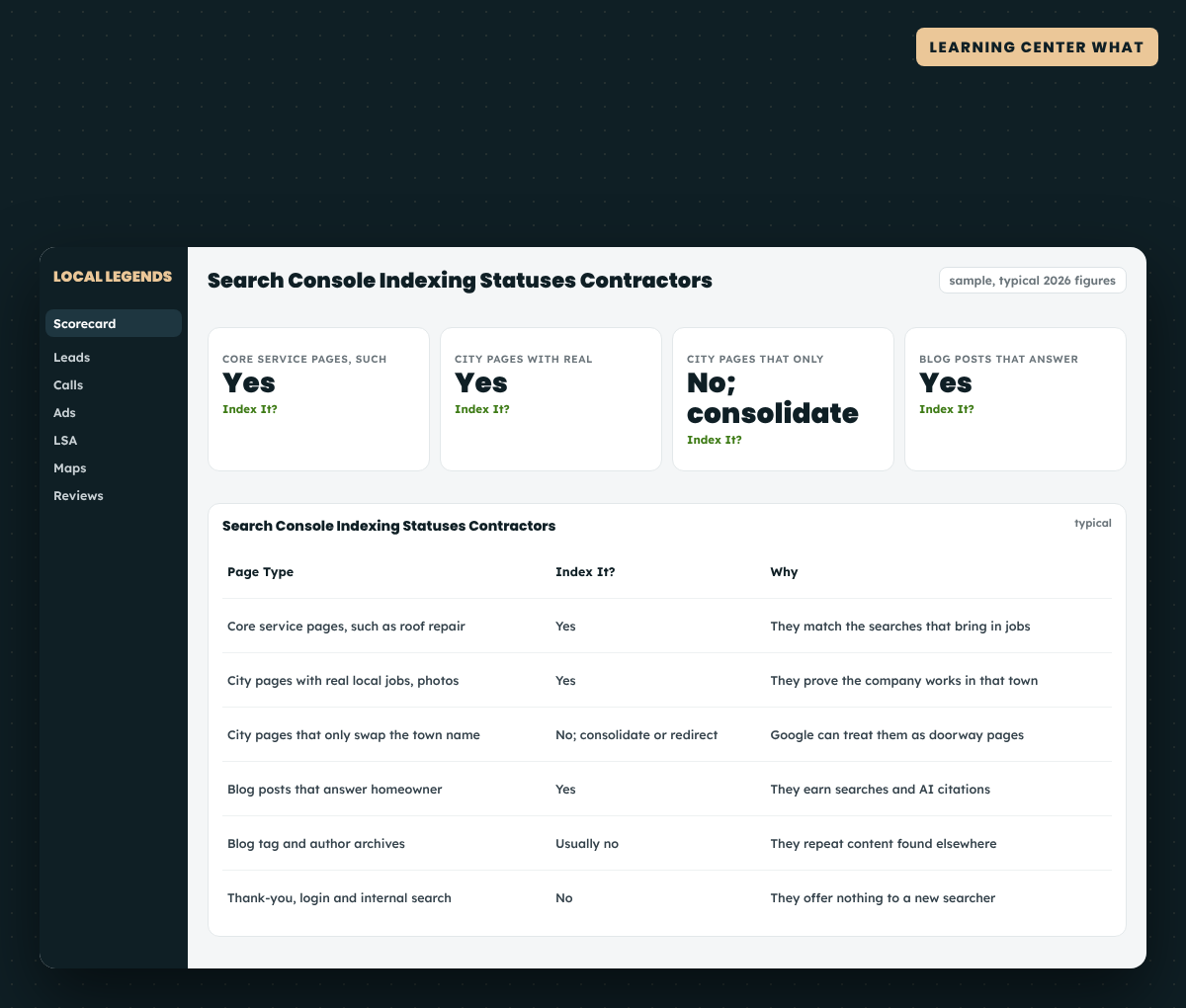
No, not every page on a contractor website should be indexed: core service pages and well-supported city pages should be, while tag archives, thank-you pages and boilerplate city pages usually should not, according to Google AI Mode.
| Page Type | Index It? | Why |
|---|---|---|
| Core service pages, such as roof repair or AC installation | Yes | They match the searches that bring in jobs |
| City pages with real local jobs, photos and reviews | Yes | They prove the company works in that town |
| City pages that only swap the town name | No; consolidate or redirect | Google can treat them as doorway pages |
| Blog posts that answer homeowner questions | Yes | They earn searches and AI citations |
| Blog tag and author archives | Usually no | They repeat content found elsewhere |
| Thank-you, login and internal search pages | No | They offer nothing to a new searcher |
Ten services across fifteen towns would produce 150 pages, and most contractors do not have unique proof for every combination. Fewer, stronger pages tend to index and rank better.
[SOURCE: Google AI Mode, "Should every page on a contractor website be indexed or should some city pages and tag pages be noindexed", captured Nov 29 2026]
Website Launches, Rebuilds and DNS Propagation Keep Pages Indexed
A website launch or rebuild is the moment contractor sites most often lose indexed pages, usually because of missing redirects or settings left on from the build. DNS propagation is a separate, shorter delay that affects who can see the new site.
What Does "Propagating" Mean When a New Website Launches?
Propagating means the waiting period while DNS servers and internet providers update their saved records to point your domain at the new site, according to Google AI Mode. It usually takes minutes to about 48 hours and rarely up to 72 hours.
- Record changes, such as A or CNAME records, often update in a few minutes to a few hours.
- Nameserver changes usually take one to two days to finish everywhere.
- Lower the TTL setting a day or more before the switch so caches refresh faster.
- Visitors may see the old or new site during the window, depending on their provider.
- Propagation is not indexing. Once the domain points to the new site, Google still has to recrawl it.
Protect Email and Lead Notifications During the Switch
Keep the domain's mail records (MX) and any verification records in place when nameservers move. A contractor whose email stops working during a launch can miss quote requests and form notifications without knowing it.
Will Rebuilding or Moving My Contractor Website Make My Pages Drop Out of Google's Index?
A rebuild or platform move does not have to remove pages from Google's index, but pages drop when old URLs break, blocking settings stay on or valuable pages are deleted, according to Google AI Mode. A short ranking dip while Google recrawls is common.
- Map every old URL to its new match and add a permanent 301 redirect for each one that changes.
- Test 5 to 10 old service page URLs on launch day and confirm each lands on the matching new page, not the home page.
- Check yourdomain.com/robots.txt for a sitewide block.
- Keep service and city pages that bring in calls, even if the new menu is shorter.
- Submit the new sitemap and watch the Pages report for the first several weeks.
- Keep the same domain when possible; a domain change needs Search Console's change of address tool.
[SOURCE: Google AI Mode, "What does propagating mean when launching a new website or changing DNS" and "Will rebuilding or moving my contractor website to a new platform make my pages drop out of Google's index", captured Nov 29 2026]
What Is a Marketing Website, and What Does SEO Mean in Web Design? Built to Be Indexed, Found and Called
A marketing website is built to bring in customers who have never heard of the company, and SEO in web design means structuring that site so search engines can crawl, index and understand every service and service area. Both depend on pages Google can read.
What Is a Marketing Website for a Contractor, and How Is It Different From a Brochure Website?
A contractor marketing website is a lead tool that answers homeowner questions and turns local searchers into booked estimates, while a brochure website mainly confirms the business exists for people who already know the name, according to Google AI Mode.
- Goal: a brochure site supports referrals; a marketing site earns new calls from search and ads.
- Structure: a brochure site has a few pages; a marketing site has a page for each service and supported city.
- Message: a brochure site talks about the company; a marketing site answers cost, timeline and trust questions.
- Calls to action: a marketing site keeps click-to-call and quote buttons visible on every page.
- Proof: a marketing site shows real reviews, project galleries and case studies.
- Tracking: a marketing site connects to call tracking so each page's calls are counted.
What Does SEO Mean in Web Design for a Home Service Contractor Website?
In web design, SEO means building a contractor website so Google can read each page, understand what the company does and confirm where it works, according to Google AI Mode. Design decides how the site looks and works; SEO decides whether homeowners find it.
- One page per core service, each with its own title and headings.
- Consistent name, address and phone that match the Google Business Profile.
- Fast mobile pages with tap-to-call buttons.
- Clear titles, headings and image descriptions that crawlers can read.
- Clean internal links so no service page is left orphaned.
- Structured data for the business, its services and FAQs.
Local Legends websites use a product-page layout and are priced one time: $2,500 for 10 pages, $5,500 for 20, $7,500 for 40 and $15,000 for 80. More detail is on the website design page.
Does a Contractor Website Need to Be Indexed to Show Up in ChatGPT and Google AI Overviews? Indexing Comes Before Any AI Citation
Yes, a contractor's website must be indexed and crawlable to be cited or linked in Google AI Overviews and ChatGPT search answers, according to Google AI Mode. Google's own guidance says a page must be indexed and eligible to show a snippet to appear as a supporting link in AI features.
- Google AI Overviews and AI Mode draw on the same index as regular search; no special AI file is required.
- Snippet controls matter: a nosnippet setting can keep a page out of AI features.
- ChatGPT search runs live web searches, so pages should be indexed in Bing and Google and open to OpenAI's search crawler.
- Third-party listings still count: AI tools can name a company from consistent directory listings and reviews.
- Set up Bing Webmaster Tools alongside Search Console.
- Match business details across the Google Business Profile, Bing Places and Apple Business Connect.
[SOURCE: Google AI Mode, "Does my contractor website need to be indexed to show up in ChatGPT answers and Google AI Overviews", captured Nov 29 2026; Google Search Central, AI features and your website]
How Much Does It Cost to Fix Website Indexing Problems for a Contractor? Typical Repair Costs Next to Local Legends Pricing
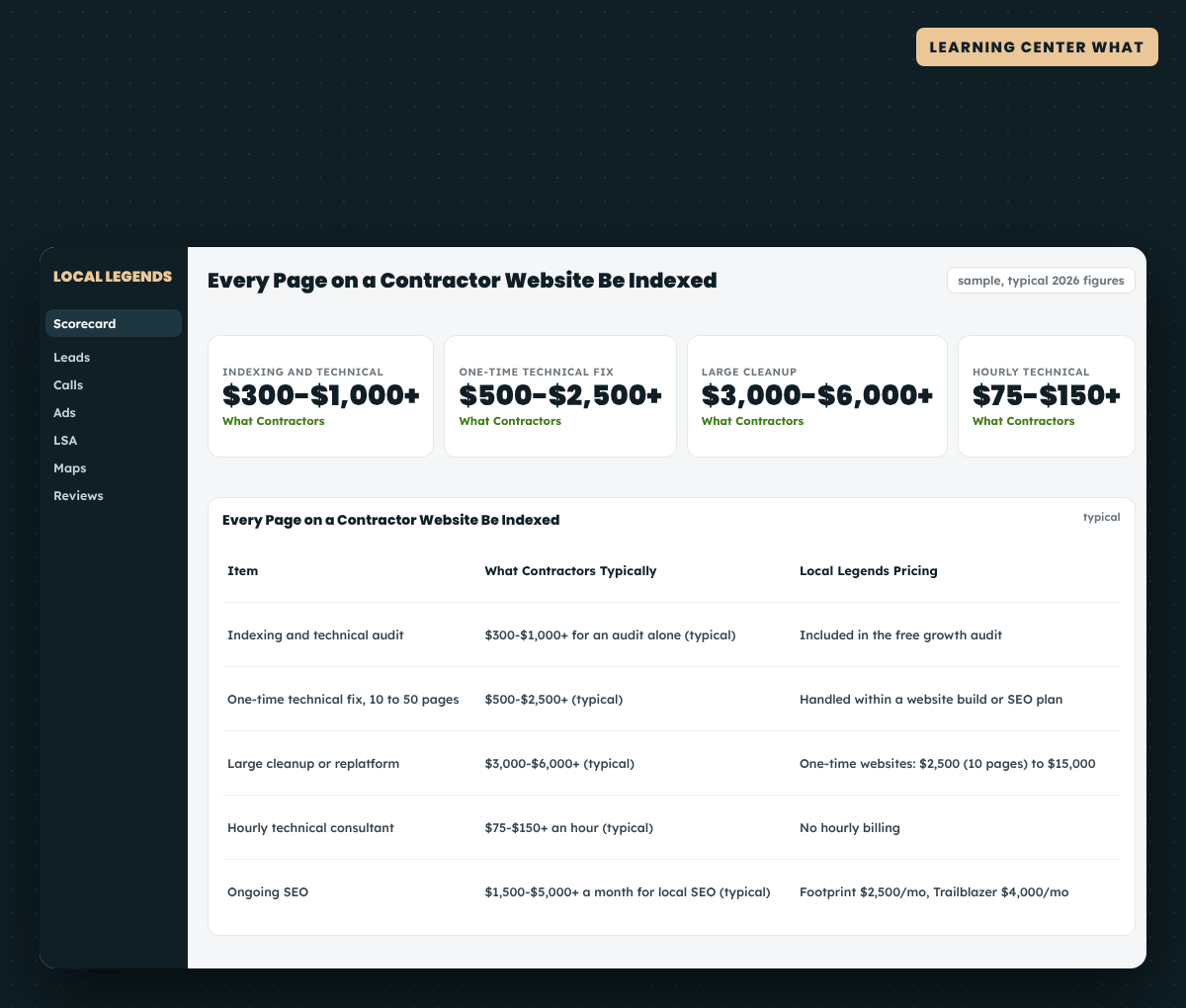
Fixing indexing and technical SEO problems on a small contractor website typically costs $500-$2,500+ as a one-time project, according to Google AI Mode, with larger cleanups and platform moves costing more. Confirm whether a quote covers only the audit or the fixes too.
| Item | What Contractors Typically Pay | Local Legends Pricing |
|---|---|---|
| Indexing and technical audit | $300-$1,000+ for an audit alone (typical) | Included in the free growth audit |
| One-time technical fix, 10 to 50 pages | $500-$2,500+ (typical) | Handled within a website build or SEO plan |
| Large cleanup or replatform | $3,000-$6,000+ (typical) | One-time websites: $2,500 (10 pages) to $15,000 (80 pages) |
| Hourly technical consultant | $75-$150+ an hour (typical) | No hourly billing |
| Ongoing SEO | $1,500-$5,000+ a month for local SEO (typical) | Footprint $2,500/mo, Trailblazer $4,000/mo, Sasquatch $8,000/mo, Legend $10,000+/mo |
Typical ranges are labeled typical and come from Google AI Mode and published 2026 agency pricing. Every plan is listed on the Local Legends pricing page.
[SOURCE: Google AI Mode, "How much does it cost to fix website indexing and technical SEO problems for a small contractor website", captured Nov 29 2026; Local Legends prices from BRIEF.md, Nov 2026]
How Local Legends Marketing Answers Website Indexing Questions Indexing Checked, Then Tracked to Calls
Local Legends Marketing treats indexing as chapter one of a contractor's search results: pages must be indexed before they rank, and rankings only matter when they turn into calls, booked jobs and sold jobs.
Founder Levi Ostlund started Local Legends after paying a marketer for a good-looking website that never ranked, part of the $30,000+ he lost to bad marketing before becoming CMO of a large roofing company. [SOURCE: Local Legends founder story, BRIEF.md, Nov 2026]
- A free growth audit first, covering tracking, local SEO, Local Services Ads and the funnel, with Google Maps rank grids.
- One-time websites in a product-page layout, with no monthly website rental.
- You own the website and domain, plus the Google Business Profile, ad accounts and call data.
- Call tracking tied to the CRM so each page's calls are counted.
- City pages only where there are 5 or more real local facts.
- No setup fees and no long-term contracts.
Ongoing search work is described on the SEO and local SEO pages.
Local Legends Marketing Reviews From Contractor CEOs Owners on Working With Levi
Contractor CEOs have recorded testimonials about working with Local Legends Marketing. The full set is on the Local Legends reviews page.
Levi has been absolutely outstanding to work with over the years... His creativity, responsiveness, and deep understanding of our marketing strategy have made a huge impact." Brad Beldon, CEO, Roofing Company. Read on Local Legends
- Kyle Scott, CEO, Roofing Company (video testimonial)
- Jim Dodson, CEO, Roofing Company (video testimonial)
- Race Allen, CEO, Precision Restoration of Texas (video testimonial)
Frequently Asked Questions About Website Indexes Short Answers for Contractor Owners
How Do I Find the Index of a Website?
Search site:domain.com on Google for a quick sample of indexed pages. For your own site, Search Console's Pages report shows the full indexed and not indexed list.
What Happens If a Website Is Not Indexed?
It cannot appear in Google's search results or be linked in AI Overviews. Homeowners can still reach it by typing the address, but search sends no new visitors.
What Is an Example of an Index?
The index at the back of a book is the classic example: it points to where each topic appears. A search engine index does the same for words and web pages.
Is Site Indexing Good?
Yes, for pages you want homeowners to find. Indexing pages with no search value, such as thank-you pages, adds nothing and can dilute the site.
What Is an index.html File?
It is the default file a web server loads when someone visits a domain without naming a page. It is part of how a site is built, not how Google ranks it.
Does Bing Keep a Separate Index?
Yes, Bing builds its own index, and several AI tools draw on it. Submit the sitemap in Bing Webmaster Tools as well as Search Console.
How Often Does Google Recrawl a Contractor Website?
It varies by site. Sites that update often and earn links tend to be recrawled more often; a quiet site may wait longer between visits.
Can I Remove a Page From Google's Index?
Yes, add a noindex tag or remove the page and return a 404 or 410. Search Console's removals tool hides a URL temporarily while the permanent change takes effect.
Reviewed by Levi Ostlund, Founder, Local Legends Marketing

Get Every Service Page Indexed and Working for Your Company Start With a Free Growth Audit
A free growth audit shows which of your pages Google has indexed, which ones it skipped and why, and how your site compares with the local competitors who rank above you. Local Legends Marketing then fixes the site structure and tracks the results to calls.
- Bring access to Search Console, or we will help you set it up.
- Bring your list of services and towns.
- Leave with a page-by-page index review and a plan to fix it.
Call (936) 900-1248 or book a free growth audit online.