


How a Home Service Business Plans, Launches,

Google Ads Guide for Contractors: A Step-by-Step Playbook for Roofers, HVAC Companies, Plumbers and Remodelers, From the First Campaign to the Weekly Check
How a Home Service Business Plans, Launches, Reads and Grows Google Ads in 2026
Updated November 2026 · Reviewed by Levi Ostlund, Founder
This Google Ads guide shows a contractor how to run Google Ads in seven stages: plan, track, build, write, launch, read and grow. The goal of every stage is the same: more booked jobs from homeowners inside your service area, at a cost per booked job your margins can carry.
Generic guides on page one of Google are written for every kind of business, so they stop at clicks and conversions. A home service company faces expensive searches, urgent callers who skip voicemail, a fixed service area and job seekers typing the same trade words.
- Start narrow: one Search campaign for one high-value service, in the area your crews already cover.
- Track first: calls and forms must be counted before the first dollar is spent.
- Protect the budget: Presence-only location targeting, no Display or Search Partners at launch, a negative keyword list on day one.
- Write for the search: the service and town in the first headline, real trust facts in the rest.
- Send clicks to a matching page: a service landing page, never the home page.
- Check weekly: search terms, call quality, cost per lead and budget pacing.
- Grow on proof: raise the budget only when booked jobs are profitable and the schedule has room.
Free Growth Audit
Your Reviews, Radius and Response Rate vs the competitors beating you.
About Local Legends Marketing
A home service marketing agency headquartered in Conroe, Texas, with 8+ years of marketing experience, running Google Ads, Local Services Ads, local SEO, AI SEO, connected TV and review systems for contractors nationwide.
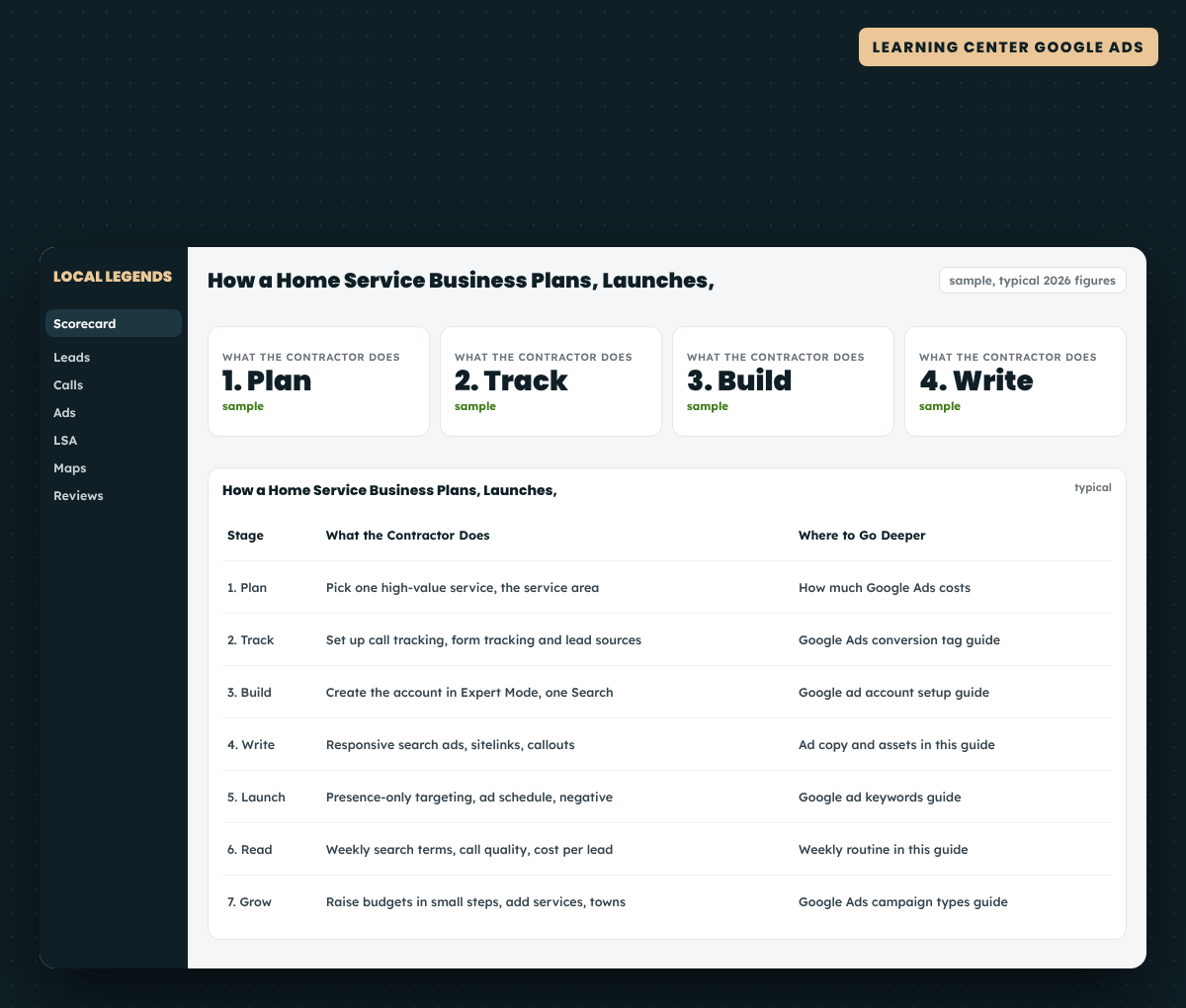
Google Ads Guide Overview for Home Service Companies Seven Stages From Plan to Growth
Google Ads for a home service company works best as a short, ordered checklist, because most wasted spend comes from skipping a step, such as launching before call tracking works or turning on broad keywords before the account has data.
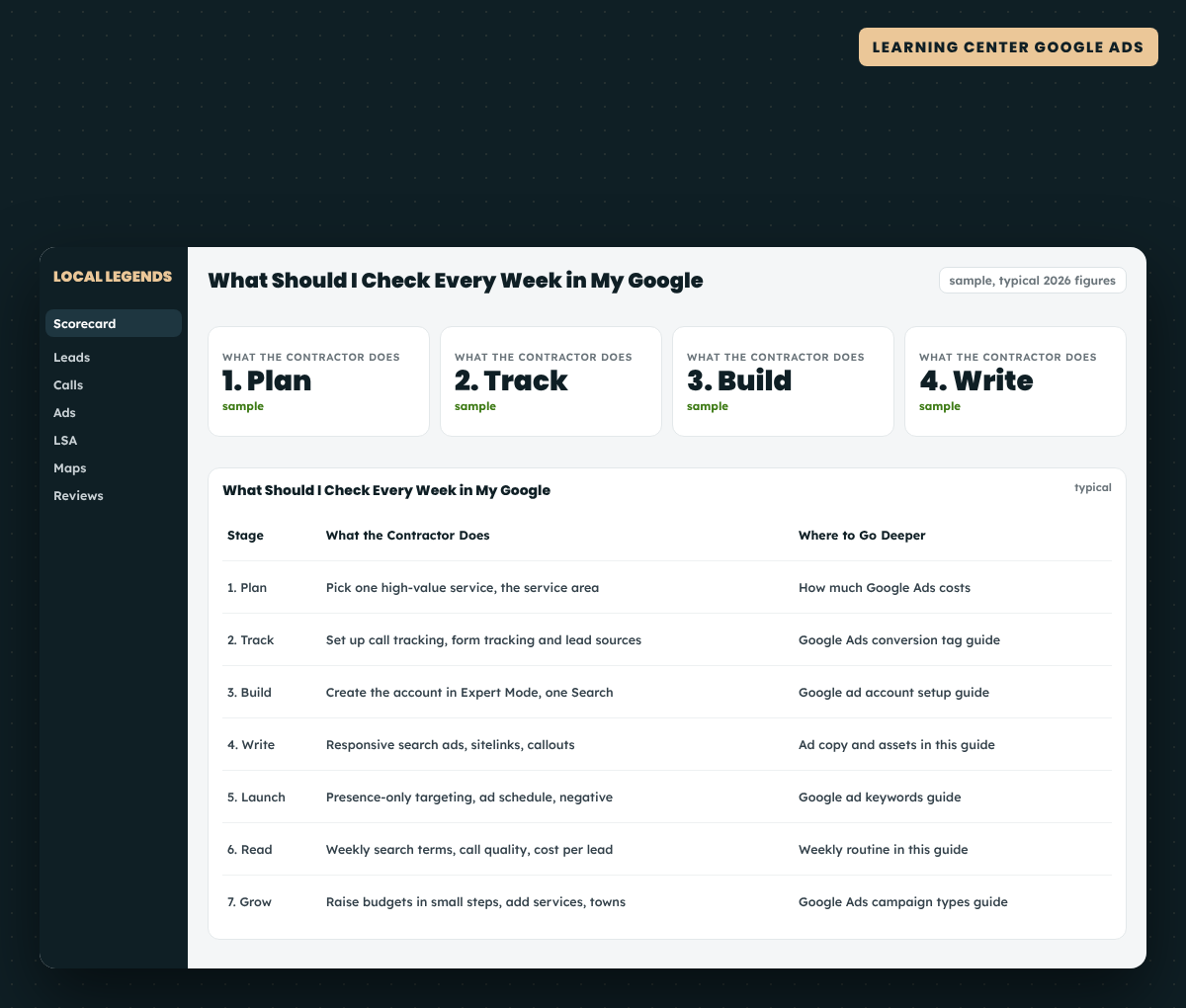
| Stage | What the Contractor Does | Where to Go Deeper |
|---|---|---|
| 1. Plan | Pick one high-value service, the service area and a starting budget | How much Google Ads costs |
| 2. Track | Set up call tracking, form tracking and lead sources in the CRM | Google Ads conversion tag guide |
| 3. Build | Create the account in Expert Mode, one Search campaign, ad groups by service | Google ad account setup guide |
| 4. Write | Responsive search ads, sitelinks, callouts and a call asset | Ad copy and assets in this guide |
| 5. Launch | Presence-only targeting, ad schedule, negative keywords, a matching landing page | Google ad keywords guide |
| 6. Read | Weekly search terms, call quality, cost per lead and budget pacing | Weekly routine in this guide |
| 7. Grow | Raise budgets in small steps, add services, towns and campaign types | Google Ads campaign types guide |
For the deeper steps, see the Google ad account setup guide, the Google Ads conversion tag guide, the Google ad keywords guide and the Google Ads campaign types guide.
[SOURCE: Google Search, "google ads guide" AI Overview and organic results, captured Nov 29 2026; Google AI Mode, "google ads guide for home service contractors like roofers HVAC and plumbers", captured Nov 29 2026]
Do Google Ads Work for Small Contractors in Small Towns?
Yes, Google Ads work for small contractors in small towns when the campaign focuses on high-value jobs and the owner expects fewer leads, according to Google AI Mode. Competition is usually lighter, and one roof, repipe or system replacement can cover months of ad spend.
- Best fit: urgent or high-ticket trades such as roofing, HVAC, plumbing and remodeling.
- Weaker fit: small, routine jobs, where a strong Google Business Profile and referrals often do better.
- Tight targeting: the towns and ZIP codes your crews will actually drive to.
- Exact and phrase match: to keep a small budget on clear hiring searches.
- A test budget: AI Mode suggested about $500-$1,500+ a month in ad spend to test one core service.
- Fast callbacks: small-town homeowners call the top two or three results, so the first answer often wins.
[SOURCE: Google AI Mode, "Do Google Ads work for small contractors in small towns?", captured Nov 29 2026]
How Do I Start Google Ads for My Roofing Company Step by Step? The Contractor Launch Checklist
A roofing company starts Google Ads safely with one Search campaign aimed at hiring searches in its own service area, with automated Smart campaigns avoided and every setting checked by hand, according to Google AI Mode. The same checklist works for HVAC, plumbing, electrical and remodeling.
- Create the account in Expert Mode under your own business email, so you keep ownership and history.
- Set up conversion tracking for calls and forms before any campaign goes live.
- Choose Leads as the goal and Search as the campaign type.
- Uncheck Search Partners and the Display Network for the first campaign.
- Enter your towns, ZIP codes or a radius, then set location options to Presence.
- Set an ad schedule that matches the hours someone answers the phone.
- Build ad groups by service, such as leak repair in one and full replacement in another.
- Use phrase and exact match keywords and add a negative keyword list on day one.
- Write two responsive search ads per ad group and add a call asset.
- Point each ad group at a matching service landing page, not the home page.
[SOURCE: Google AI Mode, "How do I start Google Ads for my roofing company step by step as a beginner?", captured Nov 29 2026]
Settings That Protect a Contractor's Budget
Three default settings cause most early waste for home service accounts. Each one is a quick change during setup.
Change the Location Option to Presence
Google's default can show ads to people who are only interested in your area. Switch it to people in or regularly in your targeted locations, so a homeowner two states away researching your city does not cost you a click.
Turn Off Search Partners and Display at Launch
Search Partners and the Display Network add cheaper but weaker traffic. Leave them off until the core Search campaign is booking jobs at a cost you like.
Start With a Simple Bid Strategy
AI Mode suggested starting new accounts on Maximize Clicks with a bid limit, then moving to conversion-based bidding once real calls and forms are being counted.
How Do I Target the Right Service Area in Google Ads, by Radius or ZIP Code?
Most contractors get the best service area targeting from a radius around the area they serve, with ZIP code exclusions for places they do not want, according to Google AI Mode. A pure ZIP code list works better for a storm path or a few premium neighborhoods.
- Radius: quick to set and even, but it can spill across rivers, highways or areas you do not serve.
- ZIP codes: precise and easy to compare, but more work to build and keep current.
- Exclusions: remove ZIP codes with long drive times or low-fit work.
- Storm work: target the ZIP codes in the hail or wind path instead of a circle.
- Monthly check: open the matched locations report and cut areas that click but never book.
[SOURCE: Google AI Mode, "How do I target the right service area in Google Ads for a roofing company, radius or zip codes?", captured Nov 29 2026]
Where Google Local Services Ads Fit Inside Google Ads in 2026 Pay per Lead, Now in the Same Account
Google Local Services Ads now run inside Google Ads as Performance Max campaigns with pay-per-lead goals, according to Google AI Mode and Google's Ads Help transition page. Contractors still pay for valid leads rather than clicks, and the ads still appear at the top of Search and Maps.
- Same pay-per-lead model: calls, messages and bookings, not clicks.
- Same placements: Google Search and Google Maps, not YouTube or Display.
- No keyword lists: targeting comes from service categories, job types and service areas.
- One dashboard: leads, call recordings and messages now sit in the Google Ads account.
- Daily budgets: budgets now work like the rest of Google Ads.
- Profile sync: the business name, address and hours come from the Google Business Profile.
- Tight job types matter more: choose only the services and areas you want to be paid for.
Google ended manual lead disputes with this move. Local Legends runs weekly lead quality checks instead: every lead is reviewed, junk and out-of-area calls are flagged and targeting and budgets are adjusted. Google may credit some invalid leads automatically, but credits are never guaranteed.
[SOURCE: Google AI Mode, "How do Google Local Services Ads work inside Google Ads for contractors in 2026 now that they moved to Performance Max?", captured Nov 29 2026; Google Ads Help, "Local Services Ads transition to Performance Max campaigns with pay-per-lead goals", as cited by AI Mode]
Should a Contractor Start With Local Services Ads or Search Ads?
Most contractors should run Local Services Ads first for urgent phone leads and add Search campaigns to reach more searches and specific services, according to Google AI Mode. Local Services Ads need less setup; Search campaigns give more control over keywords, copy and landing pages.
- Local Services Ads: pay per lead, verification badge, reviews and fast answering drive ranking.
- Search campaigns: pay per click, full control of keywords, ads, schedules and pages.
- Both together: the most common setup once tracking proves which one books more jobs.
See Google Local Services Ads management for how Local Legends runs the pay-per-lead side.
How Do I Write Google Ads Headlines and Descriptions for a Contractor? Fifteen Headlines, Four Descriptions, One Clear Next Step
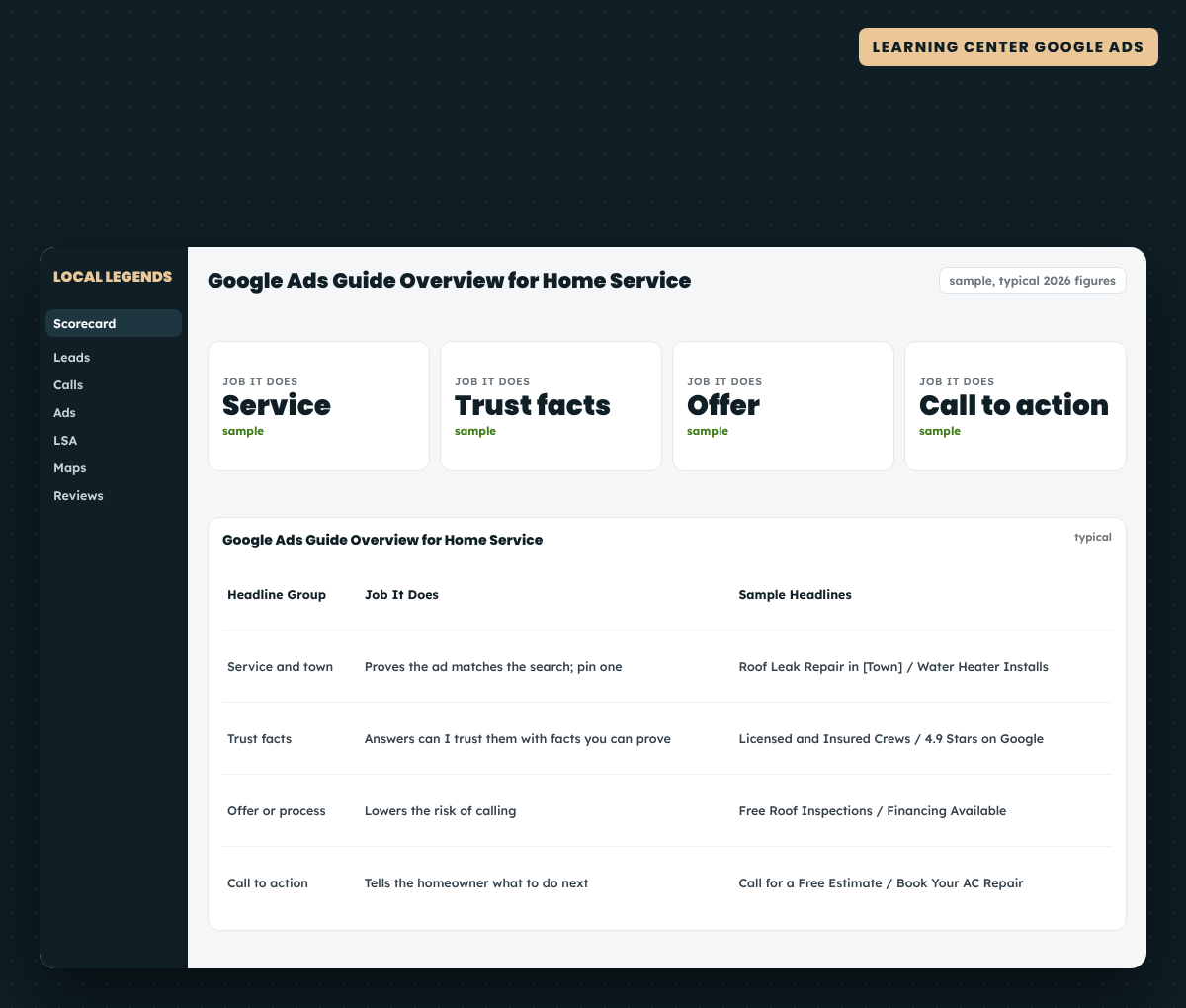
A contractor writes strong Google Ads by putting the service and town in the first headline, backing it with true trust facts and ending with a clear action, using the responsive search ad format. Google Ads Help says each ad holds up to 15 headlines of 30 characters and 4 descriptions of 90 characters.
Google mixes and tests the lines, so each headline has to make sense on its own. Google's help page also recommends at least two responsive search ads per ad group with Good or Excellent ad strength.
| Headline Group | Job It Does | Sample Headlines (30 Characters or Fewer) |
|---|---|---|
| Service and town | Proves the ad matches the search; pin one to position 1 | "Roof Leak Repair in [Town]" / "Water Heater Installs [Town]" |
| Trust facts | Answers "can I trust them" with facts you can prove | "Licensed and Insured Crews" / "4.9 Stars on Google" (if true) |
| Offer or process | Lowers the risk of calling | "Free Roof Inspections" / "Financing Available" (if offered) |
| Call to action | Tells the homeowner what to do next | "Call for a Free Estimate" / "Book Your AC Repair Online" |
[SOURCE: Google Ads Help, "About responsive search ads", captured Nov 29 2026; Google AI Mode, "How do I write Google Ads headlines and descriptions for a plumbing company?", captured Nov 29 2026]
Only Write Claims You Can Back
Many sample ads online promise arrival times, flat rates or satisfaction guarantees. Use a claim only when your company actually offers it and your office can keep it, because the ad, the landing page and the phone call all have to match.
- Use real numbers: your actual rating, review count and years in business.
- Skip slogans:"We fix it right" uses space a license number or financing line could fill.
- Match the page: the first words on the landing page should repeat the main headline.
- Use descriptions to explain: the service area, the process and what happens after the call.
Which Ad Assets Should an HVAC Company Use in Google Ads?
An HVAC company should start with call, location, sitelink and callout assets, then add structured snippets, real photos and seasonal promotions, according to Google AI Mode. Google's assets help page says it picks which assets to show for each search, so relevant ones should all be added.
- Call asset: a tap-to-call number, scheduled to the hours someone answers.
- Location asset: linked from the Google Business Profile to show the address and rating.
- Sitelinks: four to six, split by intent, such as repair pages for emergency campaigns and financing or estimate pages for replacements.
- Callouts: short facts such as licensed and insured, financing or workmanship warranty, if true.
- Structured snippets: a services list such as AC repair, furnace installation and heat pumps.
- Image assets: real photos of your vans, technicians and installs, never stock.
- Promotion assets: real seasonal offers with clear dates.
[SOURCE: Google AI Mode, "Which ad assets like sitelinks, callouts, call and location assets should an HVAC company use in Google Ads?", captured Nov 29 2026; Google Ads Help, "About assets", captured Nov 29 2026]
What Should a Google Ads Landing Page for a Contractor Include? One Service, One Town, One Next Step
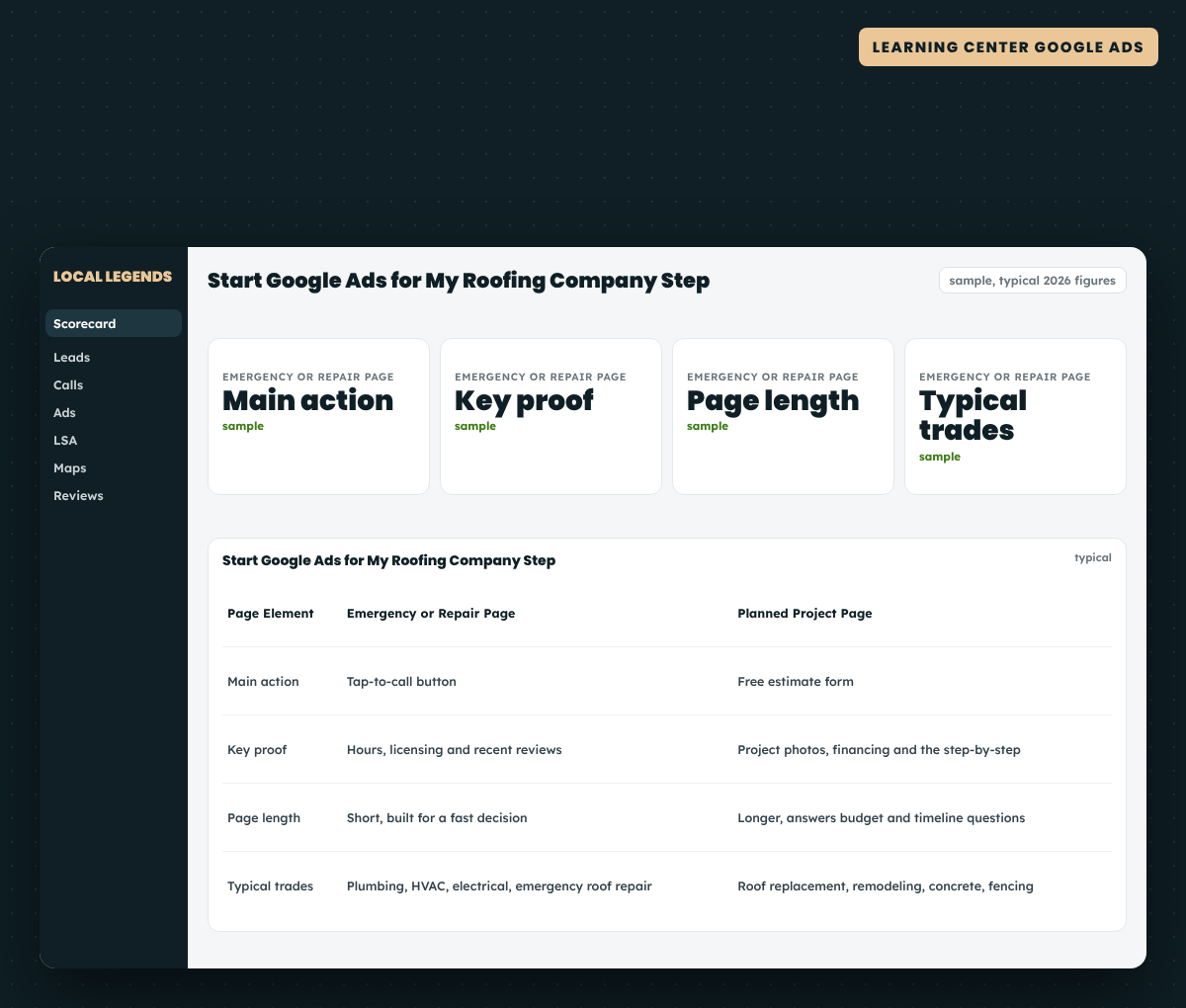
A contractor's Google Ads landing page should cover a single service, repeat the ad's headline, put a tap-to-call button and a short form on the first screen and show local proof, according to Google AI Mode. A home page with ten services makes an urgent caller search for the next step.
- Matching headline: the service and town from the ad.
- One-line subheadline: the main reason to call, such as licensing or free estimates.
- Tap-to-call button: large and fixed at the top on phones.
- Short form: name, phone, ZIP code and service needed.
- No main menu: fewer ways to wander off.
- Real proof: two or three recent reviews, real crew and truck photos, license and insurance details.
- Service area list: the towns you serve, so out-of-area visitors self-select out.
- Fast on mobile: most home service searches happen on phones.
| Page Element | Emergency or Repair Page | Planned Project Page |
|---|---|---|
| Main action | Tap-to-call button | Free estimate form |
| Key proof | Hours, licensing and recent reviews | Project photos, financing and the step-by-step process |
| Page length | Short, built for a fast decision | Longer, answers budget and timeline questions |
| Typical trades | Plumbing, HVAC, electrical, emergency roof repair | Roof replacement, remodeling, concrete, fencing |
[SOURCE: Google AI Mode, "What should a contractor landing page for Google Ads include?", captured Nov 29 2026]
Launching Google Ads and the First 90 Days Calls in Weeks, Steady Costs Later
Contractor Google Ads usually bring first calls within one to two weeks of launch and settle into a predictable cost per booked job around day 90, according to Google AI Mode. The early weeks are for cleaning up searches and confirming that tracking matches the phone log.
How Long Does It Take for Google Ads to Start Working for an HVAC Company?
Google Ads for an HVAC company typically serve within a day or two of approval, produce calls in the first two weeks and reach steady returns in about three months, with weather and competition changing the pace.
- Week 1: ads start serving and Google's bidding enters a learning period.
- Weeks 2 to 4: calls become steady; remove junk searches and confirm tracking.
- Days 30 to 60: adjust bids and copy using a full month of call data.
- Day 90: enough booked and sold jobs to judge return against average ticket.
- Faster: heat waves, cold snaps and storm weeks bring more searches.
- Slower: mild shoulder seasons, crowded metros and missed calls.
[SOURCE: Google AI Mode, "How long does it take for Google Ads to start working for an HVAC company?", captured Nov 29 2026]
Should I Run Google Ads 24/7 or Set an Ad Schedule for My Plumbing Business?
A plumbing business should run emergency ads around the clock only when the office or an answering service takes calls overnight, and schedule planned work ads to business hours, according to Google AI Mode. An emergency caller who reaches voicemail usually calls the next ad.
- Emergency campaign: burst pipes, sewer backups and no-heat calls, 24/7 only with live coverage.
- Planned work campaign: drain cleaning, fixture installs and water heater replacements during staffed hours.
- No overnight coverage: schedule the call asset to hide after hours, or pause emergency ads.
- Middle ground: keep ads running for form leads overnight while the call button shows only when staffed.
[SOURCE: Google AI Mode, "Should I run Google Ads 24/7 or set an ad schedule for my plumbing business?", captured Nov 29 2026]
What Should I Check Every Week in My Google Ads Account as a Contractor? A 15-Minute Weekly Routine
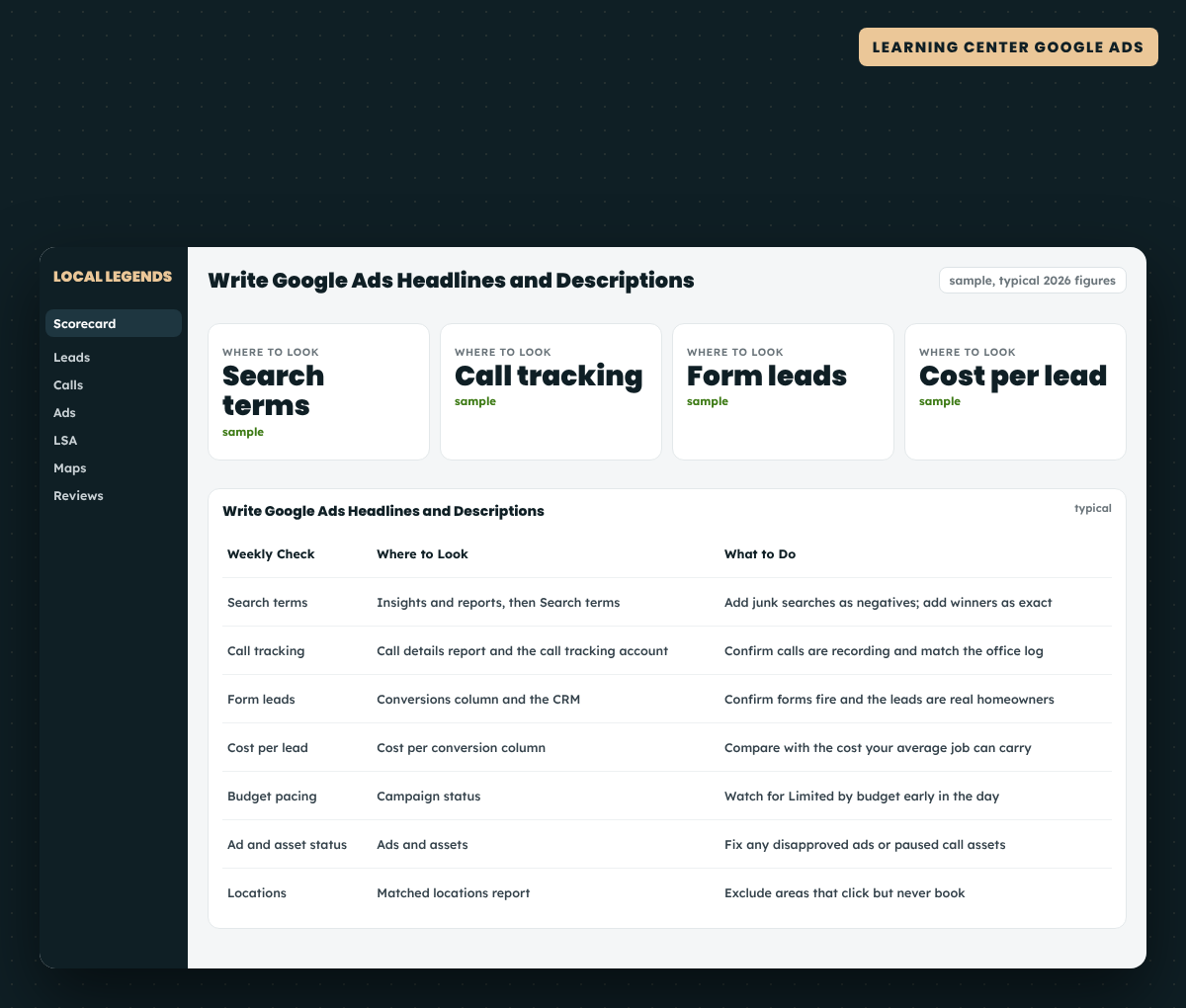
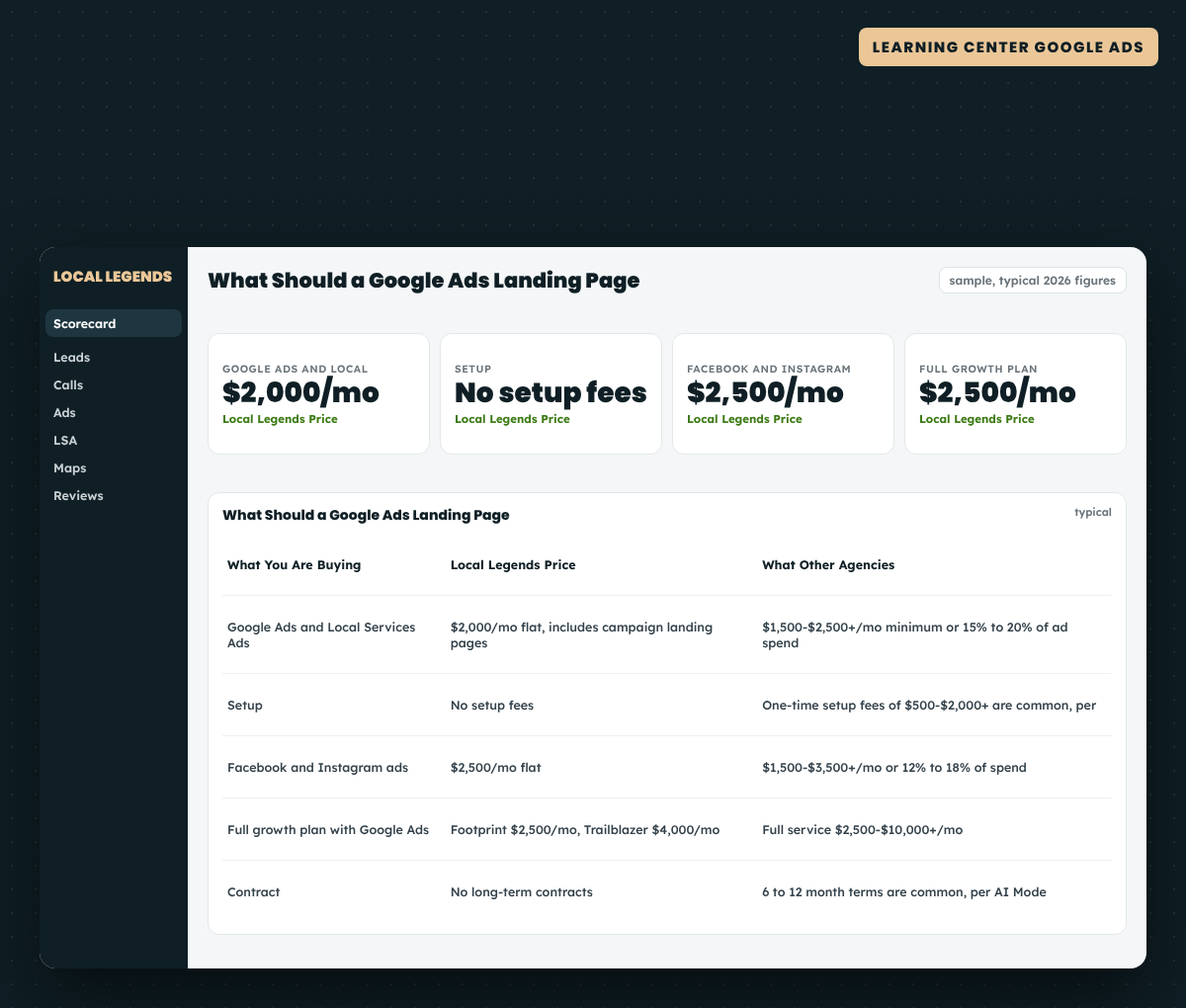
A contractor should spend about 15 minutes a week checking search terms, call and form tracking, cost per lead, budget pacing and ad status, according to Google AI Mode. Small leaks found weekly cost far less than leaks found at the end of the month.
| Weekly Check | Where to Look | What to Do |
|---|---|---|
| Search terms | Insights and reports, then Search terms | Add junk searches as negatives; add winners as exact match |
| Call tracking | Call details report and the call tracking account | Confirm calls are recording and match the office log |
| Form leads | Conversions column and the CRM | Confirm forms fire and the leads are real homeowners |
| Cost per lead | Cost per conversion column | Compare with the cost your average job can carry |
| Budget pacing | Campaign status | Watch for "Limited by budget" early in the day |
| Ad and asset status | Ads and assets | Fix any disapproved ads or paused call assets |
| Locations | Matched locations report | Exclude areas that click but never book |
[SOURCE: Google AI Mode, "What should I check every week in my Google Ads account as a contractor?", captured Nov 29 2026]
How Do I Read the Search Terms Report in Google Ads for My Home Service Business?
The search terms report shows the exact words homeowners typed before clicking your ad, so it tells a contractor what the budget actually paid for, not just which keywords were chosen. Google AI Mode recommended sorting it by cost.
- Open the report: Campaigns, then Insights and reports, then Search terms.
- Pick a long window: the last 30 to 90 days.
- Sort by cost: the most expensive searches rise to the top.
- Add the keyword column: see which of your keywords matched each search.
- Mark the waste: do-it-yourself searches, job seekers, parts shoppers and services you do not offer.
- Add them as negatives: at the campaign or account level.
- Promote the winners: add searches that booked jobs as exact match keywords.
- Watch competitor names: if those clicks never call, add the names as negatives.
Google hides some low-volume searches for privacy, so the visible rows will not add up to total spend.
[SOURCE: Google AI Mode, "How do I read the search terms report in Google Ads for my home service business?", captured Nov 29 2026]
Starter Negative Keywords for Contractors
- Job seekers: jobs, hiring, salary, careers, training, apprentice.
- Do-it-yourself: DIY, how to, tutorial, video.
- Parts shoppers: parts, supplies, wholesale, manual.
- Price-only searches: free, cheap, used.
- Services you do not offer: add each one, such as commercial work if you only do residential.
Which Google Ads Numbers Should a Home Service Business Watch? Booked Jobs First, Clicks Last
The Google Ads numbers that matter most for a home service business are cost per booked job, return on ad spend and cost per qualified lead, according to Google AI Mode. Clicks and impressions are chapter one; booked and sold jobs are the ending.
- Cost per booked job: total ad cost divided by appointments that made the calendar.
- Return on ad spend: sold revenue divided by ad spend; at a 25% margin, a 4 to 1 return only breaks even.
- Lead-to-booking rate: a low rate usually points to phone handling, not the ads.
- Cost per qualified lead: count only real calls and valid forms, not page views or very short calls.
- Impression share lost to budget: shows whether more budget would reach more real searches.
[SOURCE: Google AI Mode, "What Google Ads metrics matter most for a home service business?", captured Nov 29 2026; breakeven example is simple arithmetic]
What Are the Most Common Google Ads Mistakes Contractors Make?
The most common Google Ads mistakes contractors make are loose targeting, counting the wrong conversions and sending every click to the home page, according to Google AI Mode. Each one makes Google spend more on people who will never book.
- Broad, single-word keywords like "roofing" without a negative list.
- The default location option, which reaches people outside the service area.
- Small repairs and big installs in one campaign, which makes budgets impossible to steer.
- Counting page views or very short calls as conversions, which teaches bidding to find the wrong people.
- Automated bidding too early, before the account has steady conversion data.
- Ads running when nobody answers, paying for calls that go to voicemail.
- Accepting every automated recommendation without checking whether it helps booked jobs.
[SOURCE: Google AI Mode, "What are the most common Google Ads mistakes contractors make?" and "What should I check every week in my Google Ads account as a contractor?", captured Nov 29 2026]
Growing a Contractor Google Ads Account Scale on Proven Booked Jobs
A contractor should grow a Google Ads account only after its booked jobs are profitable, its campaigns are limited by budget and its crews have open time, according to Google AI Mode. Raising spend before fixing tracking only multiplies the waste.
When Should a Contractor Increase Their Google Ads Budget?
A contractor should increase the Google Ads budget when campaigns show "Limited by budget", the cost per lead has held steady for about a month and the schedule has room for more work, according to Google AI Mode.
- Limited by budget: the daily budget runs out before the day's real searches do.
- Impression share lost to budget: a meaningful share of eligible searches are being missed.
- Steady costs: at least 30 days of stable cost per lead after the learning period.
- Profit after costs: close rate and average ticket show margin after labor and materials.
- Fast response: the office answers calls and follows up on forms quickly.
- Crew capacity: open slots in the next one to three weeks.
- Raise in steps: AI Mode suggested about 15% to 20% every 7 to 10 days, not doubling overnight.
[SOURCE: Google AI Mode, "When should a contractor increase their Google Ads budget?", captured Nov 29 2026]
Should a Contractor Learn Google Ads or Hire an Agency?
A contractor can learn Google Ads when the budget is small and the owner has time, and usually hires help once ad spend grows and time on job sites is worth more, according to Google AI Mode, which suggested a one-time professional setup as a middle path.
- Do it yourself: small budgets, an owner who wants to learn and time for a weekly check.
- One-time setup, then do it yourself: a professional builds tracking, structure and negatives first.
- Hire an agency: larger budgets, several services or towns and no time to manage weekly.
- Either way: create the account under your own business email and keep admin access.
- Free training: Google offers Google Ads training on its Skillshop site.
How Much Does Google Ads Management Cost for Contractors? Typically $1,500-$2,500+ a Month
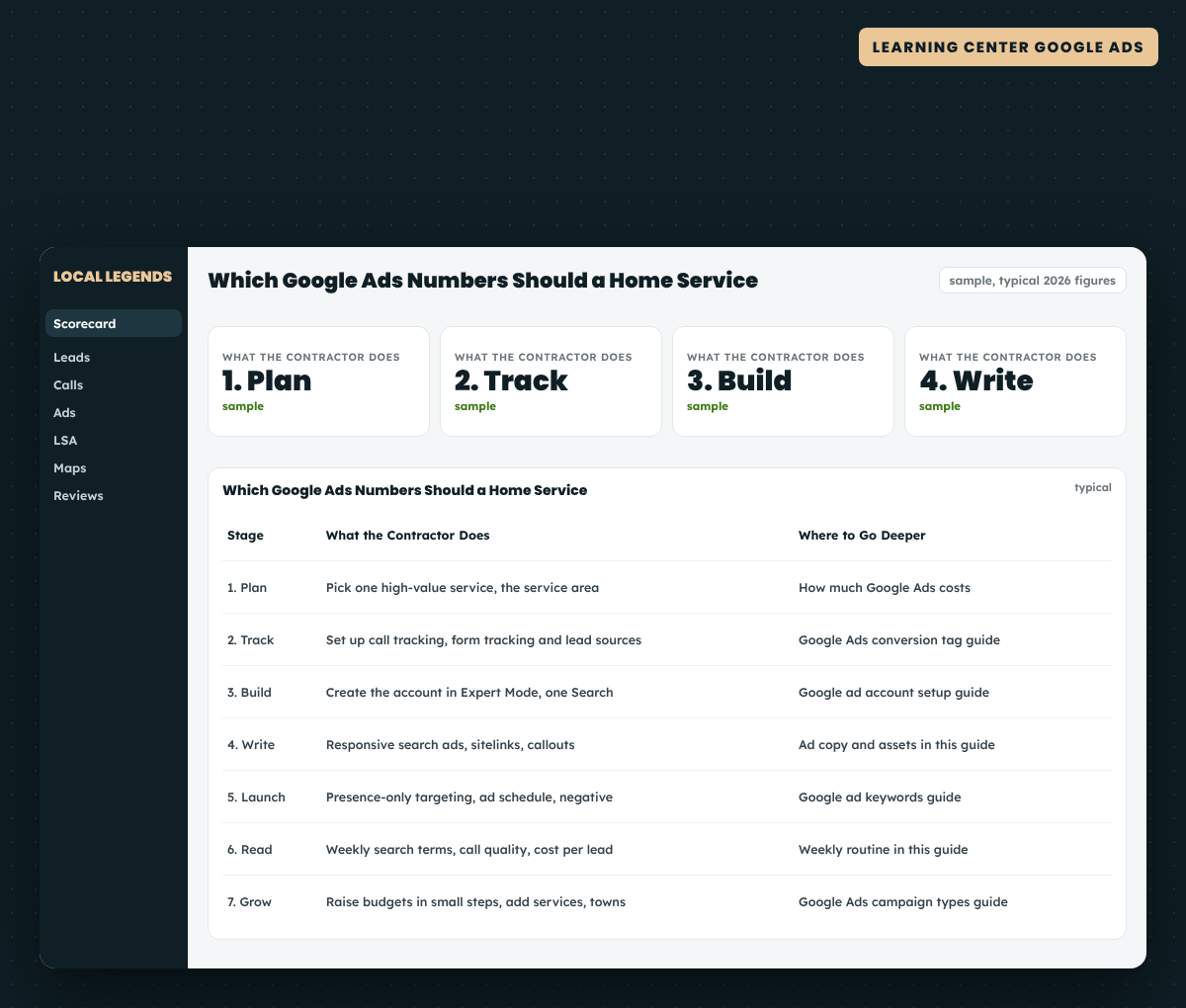
Google Ads management for contractors typically costs $1,500-$2,500+ a month as a minimum fee or 15% to 20% of ad spend, based on 2026 published agency pricing. Ad spend is a separate bill paid to Google.
| What You Are Buying | Local Legends Price | What Other Agencies Typically Charge |
|---|---|---|
| Google Ads and Local Services Ads management | $2,000/mo flat, includes campaign landing pages and monthly Google Business Profile optimization | $1,500-$2,500+/mo minimum or 15% to 20% of ad spend |
| Setup | No setup fees | One-time setup fees of $500-$2,000+ are common, per AI Mode |
| Facebook and Instagram ads | $2,500/mo flat | $1,500-$3,500+/mo or 12% to 18% of spend |
| Full growth plan with Google Ads | Footprint $2,500/mo, Trailblazer $4,000/mo, Sasquatch $8,000/mo, Legend $10,000+/mo | Full service $2,500-$10,000+/mo |
| Contract | No long-term contracts | 6 to 12 month terms are common, per AI Mode |
Ad spend is paid by the contractor straight to Google. Local Legends never charges a percentage of spend. Every plan is listed on the Local Legends pricing page, and the cost of the clicks themselves is covered in the guide on how much Google Ads costs.
[SOURCE: Google AI Mode, "How much does Google Ads management cost for contractors and home service businesses?", captured Nov 29 2026; Local Legends prices from the Nov 2026 price sheet]
What a Management Fee Should Cover
- Call and form tracking: connected to the CRM, so booked jobs can be counted.
- Weekly negative keyword work: from the search terms report.
- New-customer reporting: results from service searches shown separately from searches for your own company name.
- Landing pages: built to match the campaigns.
- Account ownership: the ad account, pages and data stay in your name.
How Local Legends Marketing Runs Google Ads for Contractors One Flat Fee, Your Accounts
Local Legends Marketing runs Google Ads and Local Services Ads for contractors as one program for $2,000 a month flat, tracked from the first click to the sold job. The agency-reported totals are 25,000+ appointments generated and $30M+ in revenue influenced.
- Audit first: a free growth audit of tracking, local SEO, Local Services Ads and the sales funnel, including Google Maps rank grids.
- Landing pages included: the pages each campaign sends clicks to.
- Weekly lead quality checks: every lead reviewed, junk and out-of-area calls flagged, targeting and budgets adjusted.
- Call tracking connected to your CRM: CallRail with ServiceTitan, Housecall Pro, JobNimbus, AccuLynx, Jobber, Buildertrend or GoHighLevel.
- Weekly CEO scorecard: leads, booked jobs, sold jobs and cost per booked job.
- You own everything: website, domain, Google Business Profile, ad accounts and call data.
- One contractor per trade per city: on ongoing services.
- No setup fees and no long-term contracts.
The work is judged by booked jobs in your own account. See Google Ads management for the full service.
Local Legends Marketing Reviews From Roofing and Restoration CEOs Owners on Working With Levi Ostlund
Roofing and restoration CEOs have recorded testimonials about working with Local Legends Marketing and founder Levi Ostlund. The full set is on the Local Legends reviews page.
Levi has been absolutely outstanding to work with over the years... His creativity, responsiveness, and deep understanding of our marketing strategy have made a huge impact." Brad Beldon, CEO, Roofing Company. Read on Local Legends
- Kyle Scott, CEO, Roofing Company (video testimonial)
- Jim Dodson, CEO, Roofing Company (video testimonial)
- Race Allen, CEO, Precision Restoration of Texas (video testimonial)
Frequently Asked Questions About This Google Ads Guide Short Answers for Contractor Owners
Is $20 a Day Enough for Google Ads?
For most contractors, $20 a day, about $600 a month, is a thin budget for Search ads in competitive trades. Google AI Mode suggested $1,500-$3,000+ a month in search ad spend for contractors; small towns and one narrow service can start lower.
Is $500 a Month Enough for Google Ads for a Contractor?
$500 a month can test one high-value service in a small town, but it rarely supports several services or a metro area. Track booked jobs from the first week so the test answers a real question.
Is $5 a Day Enough for Google Ads?
No, not for a home service Search campaign. A budget that small runs out after very few clicks in most trades and gives Google too little data to learn from.
Is There a Google Ads Guide PDF for Contractors?
This page works as one: the seven-stage table, the launch checklist and the weekly routine can be printed and kept by the office computer.
Can I Learn Google Ads for Free?
Yes. Google offers free Google Ads training on Skillshop and a help center for every setting. Neither one covers contractor-specific choices like ad schedules for emergency calls or service area exclusions.
Can I Run Google Ads for Free?
No. Google Ads charges for clicks on Search ads and for valid leads on Local Services Ads. Google sometimes offers promotional credit to new advertisers, with spending conditions.
Should I Accept Google's Automated Recommendations?
Review each one before applying it. Recommendations to add broad keywords or raise budgets can help, but only when tracking proves they add booked jobs.
Does Local Legends Charge a Percentage of Ad Spend?
No. Google Ads and Local Services Ads management is $2,000 a month flat, and the contractor pays Google directly for ad spend.
Reviewed by Levi Ostlund, Founder, Local Legends Marketing

Put This Google Ads Guide to Work in Your Account Book a Free Growth Audit
The fastest way to use this Google Ads guide is to check your own account against it. A free growth audit from Local Legends Marketing reviews your settings, search terms, tracking and landing pages and shows what each booked job is costing you today.
- Bring your Google Ads login details for a screen share: the audit reviews the live account with you.
- Bring your call tracking or CRM report: so leads can be matched to booked jobs.
- Keep every account in your name.
Call (936) 900-1248 or book a free growth audit online.